ota

 Hi,Team,

I am currently using the nrf5415 to develop OTA. My NCS version is v3.0.2.
Now I have two types of devices: Hub and Terminal. Both of these devices use nrf54l15. Our OTA design scheme is:
Hub ota: Enables the mcuboot function, establishes BLE connection with our custom app, and performs firmware update. For the custom app, we will refer to the Nordic's NRF Connect tool. Now I can use the nrf connect tool to update the firmware of the hub.
Terminal OTA: Usually, the Hub and the terminal communicate via BLE power. When performing a firmware update for the terminal, the terminal and the Hub establish a BLE connection. After the Hub enables the mcuboot function, it has mcuboot_primary and mcuboot_secondary. Then I create a.yml file and add mcuboot_third in the Hub. mcuboot_third is used to store the terminal's firmware. Then the Hub reads the terminal's code from the flash and sends it to the terminal via GATT. The terminal also enables the mcuboot function. The terminal receives the firmware via GATT and manually saves mcuboot_secondary and manually updates the firmware status to perform the firmware update.
Now I have a few questions:
Question 1.

 I used the nrf connect firmware to download to the mcuboot_third area in the Hub, but the nrf connect tool reported an error.
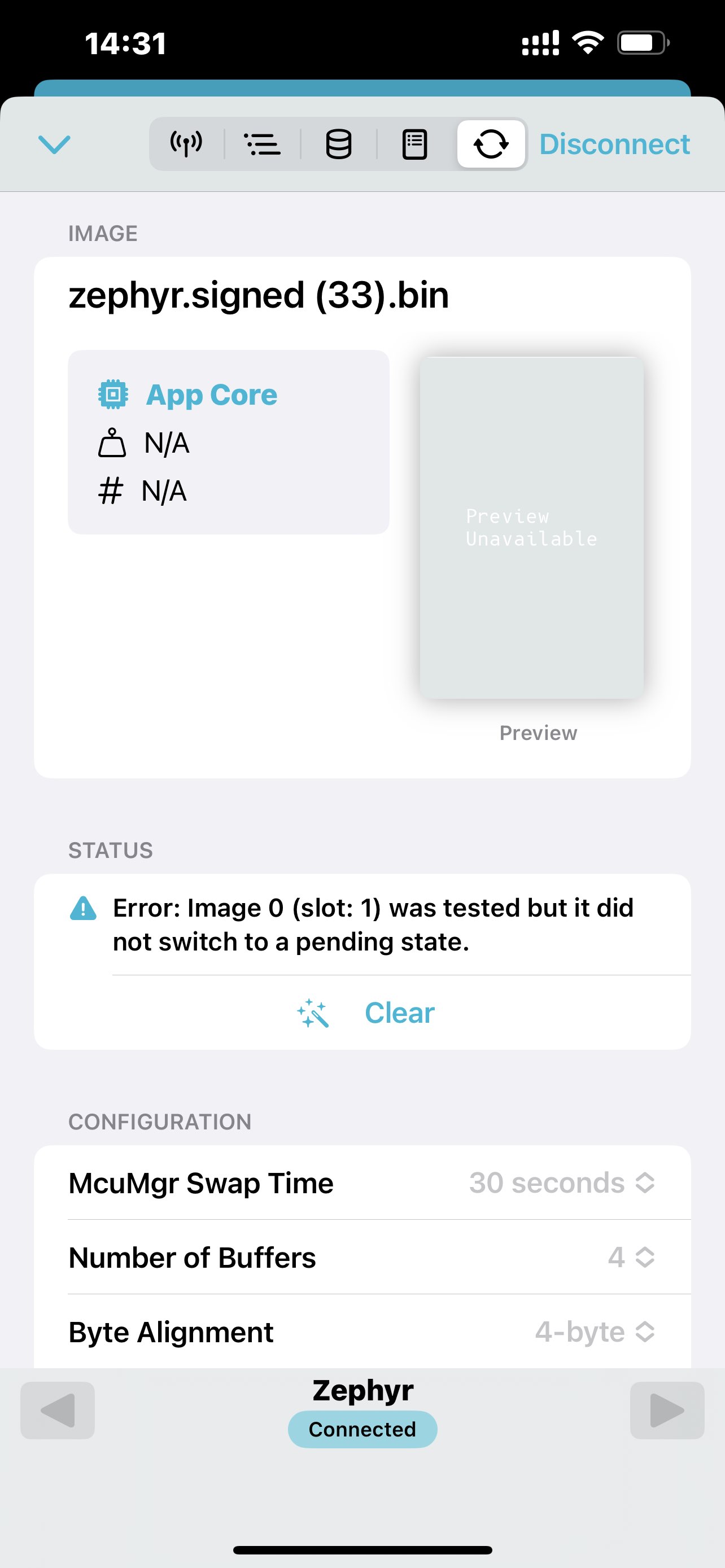
This is a custom.yml file.

app:
  address: 0x14800
  end_address: 0x177000
  region: flash_primary
  size: 0x162800
external_flash:
  address: 0x2C6000
  end_address: 0x7FF000
  region: external_flash
  size: 0x539000
external_flash_update_flag:
  address: 0x7FF000
  end_address: 0x800000
  region: external_flash
  size: 0x1000
littlefs_storage:
  address: 0x177000
  end_address: 0x17d000
  placement:
    before:
    - end
  region: flash_primary
  size: 0x6000
mcuboot:
  address: 0x0
  end_address: 0x14000
  placement:
    align:
      end: 0x1000
    before:
    - mcuboot_primary
  region: flash_primary
  size: 0x14000
mcuboot_pad:
  address: 0x14000
  end_address: 0x14800
  placement:
    before:
    - mcuboot_primary_app
  region: flash_primary
  size: 0x800
mcuboot_primary:
  address: 0x14000
  end_address: 0x177000
  orig_span: &id001
  - app
  - mcuboot_pad
  region: flash_primary
  size: 0x163000
  span: *id001
mcuboot_primary_app:
  address: 0x14800
  end_address: 0x177000
  orig_span: &id002
  - app
  region: flash_primary
  size: 0x162800
  span: *id002
mcuboot_secondary:
  address: 0x0
  device: DT_CHOSEN(nordic_pm_ext_flash)
  end_address: 0x163000
  placement:
    align:
      start: 0x4
  region: external_flash
  share_size:
  - mcuboot_primary
  size: 0x163000
  
mcuboot_third:
  address: 0x163000
  device: DT_CHOSEN(nordic_pm_ext_flash)
  end_address: 0x2C6000
  placement:
    align:
      start: 0x4
  region: external_flash
  share_size:
  - mcuboot_primary
  size: 0x163000  

otp:
  address: 0xffd500
  end_address: 0xffd9fc
  region: otp
  size: 0x4fc
sram_primary:
  address: 0x20000000
  end_address: 0x2002f000
  region: sram_primary
  size: 0x2f000

I made some changes to flash_map_pm.h and zephyr_img_mgmt.c.

flash_map_pm.h:
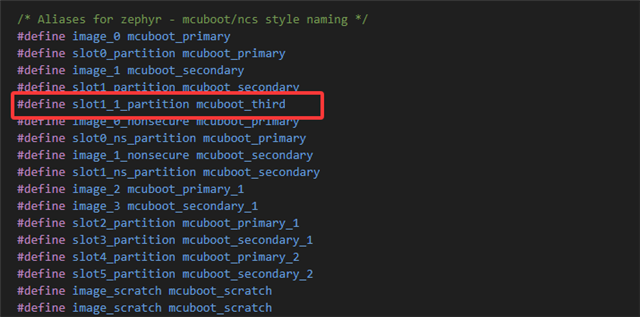
zephyr_img_mgmt.c:

#define SLOT0_PARTITION		slot0_partition
#define SLOT1_PARTITION		slot1_partition
#define SLOT1_1_PARTITION	slot1_1_partition
#define SLOT2_PARTITION		slot2_partition
#define SLOT3_PARTITION		slot3_partition
#define SLOT4_PARTITION		slot4_partition
#define SLOT5_PARTITION		slot5_partition

img_mgmt_flash_area_id(int slot)
{
	uint8_t fa_id;
	const struct flash_area *fap;
	switch (slot) {
	case 0:
		fa_id = FIXED_PARTITION_ID(SLOT0_PARTITION);
		break;

	case 1:
		//fa_id = FIXED_PARTITION_ID(SLOT1_PARTITION);
	uint8_t UpdateFlag[4];
    printk("\n img_mgmt_flash_area_id UpdateFlag data :");
    flash_area_open(9, &fap);
    flash_area_read(fap,0,UpdateFlag,4);
    for(int i=0;i<4;i++)
    {
        printk("%02x ",UpdateFlag[i]);
    }
    flash_area_close(fap);
    printk("\n");

    if(UpdateFlag[0] == 0x55 && UpdateFlag[1] == 0xaa && UpdateFlag[2] == 0x55 && UpdateFlag[3] == 0x11)
    {
		fa_id = FIXED_PARTITION_ID(SLOT1_PARTITION);
        printk("\n update firmware on slot1 \n");
    }
    else{
		fa_id = FIXED_PARTITION_ID(SLOT1_1_PARTITION);
        printk("\n update firmware on slot2 \n");
    }
		break;

#if FIXED_PARTITION_EXISTS(SLOT2_PARTITION)
	case 2:
		fa_id = FIXED_PARTITION_ID(SLOT2_PARTITION);
		break;
#endif

#if FIXED_PARTITION_EXISTS(SLOT3_PARTITION)
	case 3:
		fa_id = FIXED_PARTITION_ID(SLOT3_PARTITION);
		break;
#endif

#if FIXED_PARTITION_EXISTS(SLOT4_PARTITION)
	case 4:
		fa_id = FIXED_PARTITION_ID(SLOT4_PARTITION);
		break;
#endif

#if FIXED_PARTITION_EXISTS(SLOT5_PARTITION)
	case 5:
		fa_id = FIXED_PARTITION_ID(SLOT5_PARTITION);
		break;
#endif

	default:
		fa_id = -1;
		break;
	}

	return fa_id;
}

Question 2:

Is the terminal's OTA solution feasible? Currently, the only way to perform firmware OTA for Aura is through the Hub. If not, how should I update the firmware for the terminal?

Thanks.

Parents
  • Hi

    I think this sample sample where we've evaluated OTA of an external device through LwM2M may be helpful for you: https://docs.nordicsemi.com/bundle/ncs-latest/page/nrf/samples/cellular/lwm2m_client/README.html and https://docs.nordicsemi.com/bundle/ncs-latest/page/nrf/samples/cellular/lwm2m_client/fota_external_mcu.html. The downside is that it doesn't show a use case for BLE OTA, but the application shows somewhat the same procedure that you describe.

    Question 1.

     I used the nrf connect firmware to download to the mcuboot_third area in the Hub, but the nrf connect tool reported an error.

    Does the error affect anything other than affecting the status? Do you intend to go directly from mcuboot_third to the external MCU's MCUboot_primary slot? Or is the path:

    mcuboot_third on hub -> mcuboot_secondary on external device -> mcuboot_primary on external device? 

    Is the terminal's OTA solution feasible? Currently, the only way to perform firmware OTA for Aura is through the Hub. If not, how should I update the firmware for the terminal?

    The solution is feasible yes, but the solution has to be a proprietary solution since what we have that showcases OTA of an external device is only the lwm2m exercise above..

    Kind regards,
    Andreas

  • Hi,

    1. Our custom app software will implement firmware updates by referring to the nrf connect tool. So when the nrf connect tool shows an error, it means that the custom app will also have the same error, which indicates that the firmware download for the device has failed.
    The path is exactly as you described: mcuboot_third on the hub -> mcuboot_secondary on the external device -> mcuboot_primary on the external device. If there are any other simpler methods, they can also be tried.


    2. If the Ota solution for the terminal is feasible, then what should I do? However, you mentioned that this solution must be a proprietary one, which means the development process will be quite complex. Are there any other options? As long as the functions are achieved, it's fine: the terminal receives the firmware from the hub, and the terminal itself verifies and updates the firmware.

    Thanks.

  • Hi,

    Thank you for your reply.
    Your analysis is correct.

    I have created a flag. If the flag is 0x55AA5511, it means to update the hub because the firmware of the hub is defaultly downloaded to mcuboot_secondary. So I can easily implement the firmware update of the hub. If the flag is 0x55AA5522, it means to download the terminal firmware. But the problem is that I don't know how to download the firmware to mcuboot_third.

    Do you know how to solve this problem?

    Reference for the overwrite file is as follows:

    app:
      address: 0x14800
      end_address: 0x177000
      region: flash_primary
      size: 0x162800
    external_flash:
      address: 0x2C6000
      end_address: 0x7FF000
      region: external_flash
      size: 0x539000
    external_flash_update_flag:
      address: 0x7FF000
      end_address: 0x800000
      region: external_flash
      size: 0x1000
    littlefs_storage:
      address: 0x177000
      end_address: 0x17d000
      placement:
        before:
        - end
      region: flash_primary
      size: 0x6000
    mcuboot:
      address: 0x0
      end_address: 0x14000
      placement:
        align:
          end: 0x1000
        before:
        - mcuboot_primary
      region: flash_primary
      size: 0x14000
    mcuboot_pad:
      address: 0x14000
      end_address: 0x14800
      placement:
        before:
        - mcuboot_primary_app
      region: flash_primary
      size: 0x800
    mcuboot_primary:
      address: 0x14000
      end_address: 0x177000
      orig_span: &id001
      - app
      - mcuboot_pad
      region: flash_primary
      size: 0x163000
      span: *id001
    mcuboot_primary_app:
      address: 0x14800
      end_address: 0x177000
      orig_span: &id002
      - app
      region: flash_primary
      size: 0x162800
      span: *id002
    mcuboot_secondary:
      address: 0x0
      device: DT_CHOSEN(nordic_pm_ext_flash)
      end_address: 0x163000
      placement:
        align:
          start: 0x4
      region: external_flash
      share_size:
      - mcuboot_primary
      size: 0x163000
      
    mcuboot_third:
      address: 0x163000
      device: DT_CHOSEN(nordic_pm_ext_flash)
      end_address: 0x2C6000
      placement:
        align:
          start: 0x4
      region: external_flash
      share_size:
      - mcuboot_primary
      size: 0x163000  
    
    otp:
      address: 0xffd500
      end_address: 0xffd9fc
      region: otp
      size: 0x4fc
    sram_primary:
      address: 0x20000000
      end_address: 0x2002f000
      region: sram_primary
      size: 0x2f000

    Thanks.

  • Hi,

    dede said:

    I have created a flag. If the flag is 0x55AA5511, it means to update the hub because the firmware of the hub is defaultly downloaded to mcuboot_secondary. So I can easily implement the firmware update of the hub. If the flag is 0x55AA5522, it means to download the terminal firmware. But the problem is that I don't know how to download the firmware to mcuboot_third.

    Do you know how to solve this problem?

    The short answer is unfortunately no, I don't know this.

    I did some more digging and found this unofficial sample that a colleague of mine made for NCS 2.4.0 https://github.com/hellesvik-nordic/samples_for_nrf_connect_sdk/tree/v2.6.0/bootloader_samples/client_smp/smp_client_ble. The implementation is hacky and you will have to do some patching, but hopefully it might be good enough to show case how to transfer data to a remote device. There's an issue if you attempt to transfer the candidate image in chunks to the remote if you call the transfer within an ISR. This sample shows how to do it in a workqueue.

    It doesn't use sysbuild so this porting needs to be done as well.

    I might have another sysbuild version that showcases how to do this in a thread context, but lets focus on the other one for now..


    Kind regards,
    Andreas

  • Hi,

    Thank you for your reply.
    Because the terminal cannot establish a connection with the app to perform OTA (Over-The-Air Update), it can only communicate with the hub. I have now successfully implemented app splitting, and I have written the terminal's firmware into the mcuboot third area of the hub. So, is there such a custom Ota method? My idea is that the hub sends the firmware data of the mcuboot third version to the aura, the aura stores it in the mcuboot secondary, and then the terminal makes its own judgment based on certain conditions and performs the firmware upgrade. If possible, how can I add the judgment conditions?

    Thanks.

  • Hi,team,

    I haven't solved this problem yet. Who can help me?

    Thanks.

  • Hi,

    I can now write the firmware data to the mcuboot_secondary of the terminal, but I don't know how to implement the firmware update for the terminal.

    Thanks.

Reply Children
Related