How to resetting Matter TotalOperationalHours to 0 on Factory Reset

Dear Nordic Support Team,

Hope this email finds you well. I am currently developing a Matter-enabled device using the Nordic nRF Connect SDK, and I’ve encountered a question regarding the General Diagnostics Cluster (per Matter specification) that I hope you can assist with.

Specifically, I need to reset the value of the TotalOperationalHours attribute (Attribute ID: 0x0003, as defined in the Matter General Diagnostics Cluster) to 0 when the device performs a factory reset. This ensures the operational hour count starts fresh after a factory reset, which is critical for accurate device usage tracking in our product.
I have the following key questions:
In the Nordic nRF Connect SDK, which specific API or function should I call to directly set the TotalOperationalHours attribute value to 0?
  • Hi,

    You can use the ConfigurationMgr().StoreTotalOperationalHours() function to set the TotalOperationalHours attribute, for example:

    ConfigurationMgr().StoreTotalOperationalHours(totalOperationalHours);

    If you want to verify the value, you can read it with ConfigurationMgr().GetTotalOperationalHours(), for example:

    ConfigurationMgr().GetTotalOperationalHours(totalOperationalHours);
    LOG_INF("TotalOperationalHours: %u", totalOperationalHours);

    Best regards,
    Marte

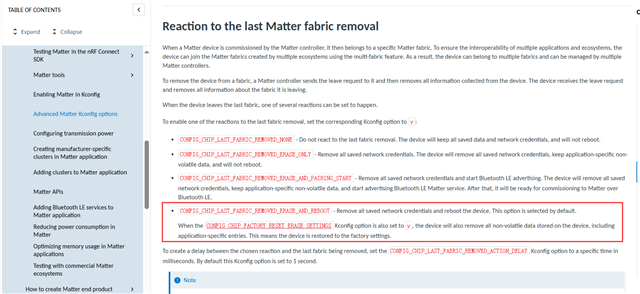
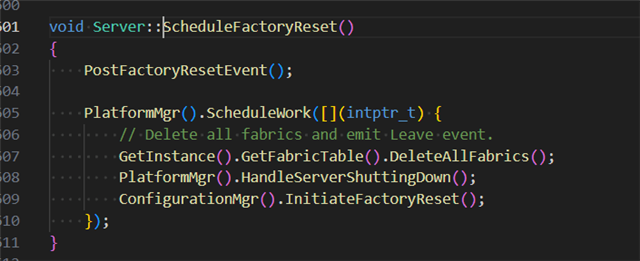
  • When the ScheduleFactoryReset() function is called by default during a factory reset, it should clear the NVM (Non-Volatile Memory) data. However, we are encountering an issue: even after invoking this function, the value of the TotalOperationalHours attribute fails to be cleared. Could you please help explain why this happens?

  • Hi,

    Which version of the nRF Connect SDK are you using? Do you see this in an SDK sample or a custom application? Are you storing the TotalOperationalHours somewhere yourself?

    I cannot reproduce the issue on my side. In my tests, TotalOperationalHours is set to 0 after doing a factory reset, even without manually calling StoreTotalOperationalHours().

    Best regards,
    Marte

  • The SDK version I am using is ncs v3.0.1. Could you please let me know which version you are using?

  • Hi,

    I tested with both v3.0.1 and v3.1.0.

    I did some pretty simple tests where I added functionality that reads and increments the TotalOperationalHours when button 4 is pressed. I added it in ButtonEventHandler() in the light switch sample:

    uint32_t newTotalOperationalHours = 0;
    
    void AppTask::ButtonEventHandler(Nrf::ButtonState state, Nrf::ButtonMask hasChanged)
    {
    	if ((APPLICATION_BUTTON_MASK & state & hasChanged)) {
    		LOG_INF("Button has been pressed, keep in this state for at least 500 ms to change light sensitivity of bound lighting devices.");
    		Instance().StartTimer(Timer::DimmerTrigger, kDimmerTriggeredTimeout);
    	} else if ((APPLICATION_BUTTON_MASK & hasChanged)) {
    		Nrf::PostTask([] { DimmerTriggerEventHandler(); });
    #ifdef CONFIG_CHIP_ICD_UAT_SUPPORT
    	} else if ((UAT_BUTTON_MASK & state & hasChanged)) {
    		LOG_INF("ICD UserActiveMode has been triggered.");
    		Server::GetInstance().GetICDManager().OnNetworkActivity();
    #endif
    	}
    	if ((DK_BTN4_MSK & state & hasChanged)) {
    		uint32_t totalOperationalHours;
    		LOG_INF("Button 4 pressed.");
    		ConfigurationMgr().GetTotalOperationalHours(totalOperationalHours);
    		LOG_INF("TotalOperationalHours: %u", totalOperationalHours);
    		newTotalOperationalHours = totalOperationalHours + 1;
    		LOG_INF("TotalOperationalHours after increment: %u", newTotalOperationalHours);
    		ConfigurationMgr().StoreTotalOperationalHours(newTotalOperationalHours);
    	}
    }

    I tested by pressing button 4 to read and increment TotalOperationalHours. I also verified the value with chip-tool. Then I performed a factory reset by holding button 1. After the device restarted, I checked TotalOperationalHours again, and it was reset to 0.

    Best regards,
    Marte

Related