Hi:
My environment is:
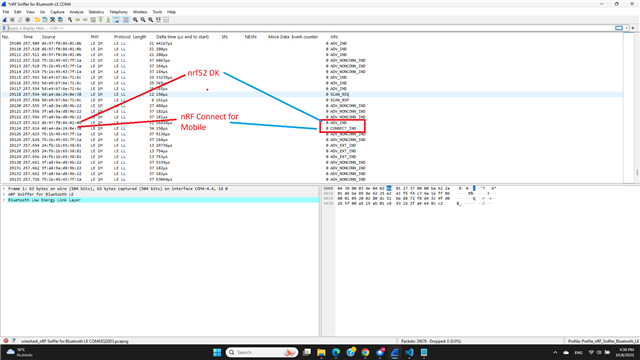
Windows laptop, nRF52 DK (Peripheral), nRF52840 Dongle, Mobile Central (iOS and Android), and Wireshark nRF Sniffer for Bluetooth.
Peripheral sends ADV_IND
Central responds with CONNECT_IND
Wireshark displays the two packets above.
After this, nothing else is displayed.
I tried many times to reconnect by disconnecting the peripheral from the nRF Connect application and initiating the connection again.
Wireshark doesn't display anything related to Peripheral or Central.
I'm not using any filters.
The firmware is working correctly. When nRF Connect Mobile connects to the Peripheral, the VSCode COM Terminal displays:
[00:00:14.671,112] <inf> Lesson3_Exercise2: Connection parameters updated: interval 7.50 ms, latency 0 intervals, timeout 5000 ms
[00:00:14.929,260] <inf> Lesson3_Exercise2: Connection parameters updated: interval 48.75 ms, latency 0 intervals, timeout 5000 ms
[00:00:19.350,433] <inf> Lesson3_Exercise2: Connection parameters updated: interval 1000.00 ms, latency 0 intervals, timeout 4000 ms
But these packets aren't displayed in Wireshark, nor are any other packets.
May you help me?
Thanks in advance.
Luiz