Beware that this post is related to an SDK in maintenance mode
More Info: Consider nRF Connect SDK for new designs

LESSON 6 - EXERCISE 2 - Bluetooth Low Energy Fundamentals

Hi: 

My environment is:
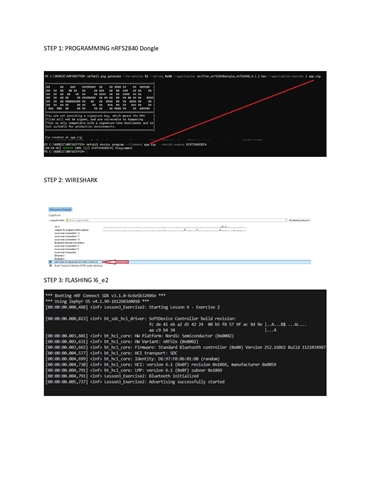
Windows laptop, nRF52 DK (Peripheral), nRF52840 Dongle, Mobile Central (iOS and Android), and Wireshark nRF Sniffer for Bluetooth.

Peripheral sends ADV_IND
Central responds with CONNECT_IND

Wireshark displays the two packets above.

After this, nothing else is displayed.

I tried many times to reconnect by disconnecting the peripheral from the nRF Connect application and initiating the connection again.
Wireshark doesn't display anything related to Peripheral or Central.

I'm not using any filters.

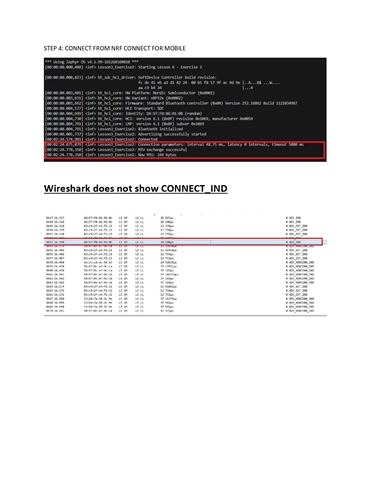
The firmware is working correctly. When nRF Connect Mobile connects to the Peripheral, the VSCode COM Terminal displays:


[00:00:14.671,112] <inf> Lesson3_Exercise2: Connection parameters updated: interval 7.50 ms, latency 0 intervals, timeout 5000 ms
[00:00:14.929,260] <inf> Lesson3_Exercise2: Connection parameters updated: interval 48.75 ms, latency 0 intervals, timeout 5000 ms
[00:00:19.350,433] <inf> Lesson3_Exercise2: Connection parameters updated: interval 1000.00 ms, latency 0 intervals, timeout 4000 ms

But these packets aren't displayed in Wireshark, nor are any other packets.

May you help me?

Thanks in advance.

Luiz

Parents
  • Hello Luiz,

    The packets you are seeing are the advertising channel packets, and the connection channel packets are missing. This appears to be a setup issue rather than a BLE problem. Could you try setting up the sniffer and Wireshark using nRF Util and see if that resolves the issue?

    I suspect that the steps mentioned in the Academy sample might be outdated since we introduced nRF Util. I will check that internally. In the meantime, please follow the steps under section ble sniffer commands and update me with the results.

    Kind regards,
    Abhijith

  • Hello:

    - nrfutil device list


    98793AB063D13B58
    Product nRF Sniffer for Bluetooth LE
    Ports COM4
    Traits serialPorts, usb, nordicUsb

    1050386996
    Product J-Link
    Board version PCA10040
    Ports COM5, vcom: 0
    COM6, vcom: 1
    Traits jlink, devkit, seggerUsb, usb, serialPorts

    Supported devices found: 2

    - Program the HEX file using nrfutil device, replacing <serial-number> and <hex> with the serial number of your device and the HEX file name, respectively:
    The sintaxe is nrfutil device program --serial-number <serial-number> --firmware <hex>

    The HEX file name sniffer_nrf52840dongle_nrf52840_4.1.1.hex and it is installed in same directory of nrfutil.
    The _nrf52840dongle is connected in COM4

    How should I write the command?
    nrfutil device program --serial-number <serial-number> --firmware <hex>

    I remember you that I am using nrf52840dongle (installed in COM4) with Wireshark and that I programmed the nrf52840dongle with nRF Connect for Desktop before sent you the support message.

    I received error in command below

    nrfutil device program --firmware sniffer_nrf52840dongle_nrf52840_4.1.1.hex --serial-number 98793AB063D13B58
    [00:00:00] ------ 0% [98793AB063D13B58] Failed, The operation you tried to run is not available for the selected device. Error: One or more program tasks failed:
    * 98793AB063D13B58: The operation you tried to run is not available for the selected device.

    The operation is either not supported for this type of device or the device has issues and it cannot be recognized (NotFound)

    Regards

    Luiz

Reply
  • Hello:

    - nrfutil device list


    98793AB063D13B58
    Product nRF Sniffer for Bluetooth LE
    Ports COM4
    Traits serialPorts, usb, nordicUsb

    1050386996
    Product J-Link
    Board version PCA10040
    Ports COM5, vcom: 0
    COM6, vcom: 1
    Traits jlink, devkit, seggerUsb, usb, serialPorts

    Supported devices found: 2

    - Program the HEX file using nrfutil device, replacing <serial-number> and <hex> with the serial number of your device and the HEX file name, respectively:
    The sintaxe is nrfutil device program --serial-number <serial-number> --firmware <hex>

    The HEX file name sniffer_nrf52840dongle_nrf52840_4.1.1.hex and it is installed in same directory of nrfutil.
    The _nrf52840dongle is connected in COM4

    How should I write the command?
    nrfutil device program --serial-number <serial-number> --firmware <hex>

    I remember you that I am using nrf52840dongle (installed in COM4) with Wireshark and that I programmed the nrf52840dongle with nRF Connect for Desktop before sent you the support message.

    I received error in command below

    nrfutil device program --firmware sniffer_nrf52840dongle_nrf52840_4.1.1.hex --serial-number 98793AB063D13B58
    [00:00:00] ------ 0% [98793AB063D13B58] Failed, The operation you tried to run is not available for the selected device. Error: One or more program tasks failed:
    * 98793AB063D13B58: The operation you tried to run is not available for the selected device.

    The operation is either not supported for this type of device or the device has issues and it cannot be recognized (NotFound)

    Regards

    Luiz

Children
Related