Beware that this post is related to an SDK in maintenance mode
More Info: Consider nRF Connect SDK for new designs

LESSON 6 - EXERCISE 2 - Bluetooth Low Energy Fundamentals

Hi: 

My environment is:
Windows laptop, nRF52 DK (Peripheral), nRF52840 Dongle, Mobile Central (iOS and Android), and Wireshark nRF Sniffer for Bluetooth.

Peripheral sends ADV_IND
Central responds with CONNECT_IND

Wireshark displays the two packets above.

After this, nothing else is displayed.

I tried many times to reconnect by disconnecting the peripheral from the nRF Connect application and initiating the connection again.
Wireshark doesn't display anything related to Peripheral or Central.

I'm not using any filters.

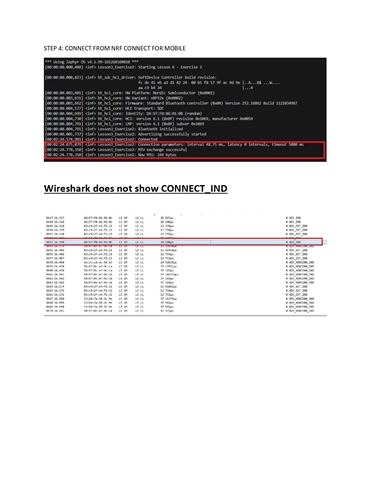
The firmware is working correctly. When nRF Connect Mobile connects to the Peripheral, the VSCode COM Terminal displays:


[00:00:14.671,112] <inf> Lesson3_Exercise2: Connection parameters updated: interval 7.50 ms, latency 0 intervals, timeout 5000 ms
[00:00:14.929,260] <inf> Lesson3_Exercise2: Connection parameters updated: interval 48.75 ms, latency 0 intervals, timeout 5000 ms
[00:00:19.350,433] <inf> Lesson3_Exercise2: Connection parameters updated: interval 1000.00 ms, latency 0 intervals, timeout 4000 ms

But these packets aren't displayed in Wireshark, nor are any other packets.

May you help me?

Thanks in advance.

Luiz

  • Hello:

    It's working with all the options below:

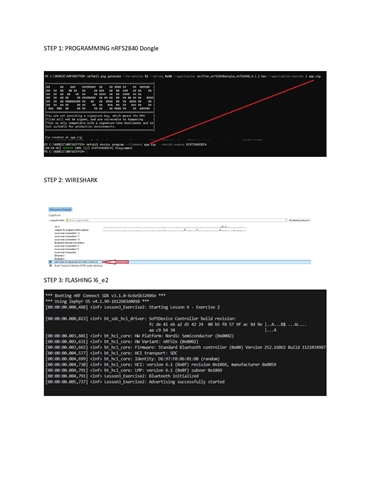
    1 - Uploading firmware via nRF Connect for Desktop

    2 - Uploading firmware via:
    nrfutil pkg generate --hw-version 52 --sd-req 0x00 --application sniffer_nrf52840dongle_nrf52840_4.1.1.hex --application-version 1 app.zip
    nrfutil device program --firmware app.zip --serial-number EC073565DEFA

    3 - Uploading firmware via:
    nrfutil device program --firmware C:\Users\LMIRANDA\.nrfutil\share\nrfutil-ble-sniffer\firmware\sniffer_nrf52840dongle_nrf52840_4.1.1.zip --serial-number EC073565DEFA

    Why didn't I see the packages?

    The problem was that I wasn't using the Interface Toolbar because it didn't appear in Wireshark.
    From what I understand, Wireshark doesn't display the Interface Toolbar by default in Windows.
    The exercise doesn't say that the Interface Toolbar should be selected.
    It shows the interface toolbar.
    Since I didn't see it, I didn't select it.
    I selected the Interface toolbar and the peripheral name in the Device field.
    From then on, I started seeing Empty PDU and Connection Update Parameter packets.

    The nrfutil-ble-sniffer\firmware command didn't work:

    ble-sniffer is installed

    C:\NORDIC\NRFSNIFFER> nrfutil -ble-sniffer\firmware
    error: unexpected argument '-b' found

    Usage: nrfutil.exe [OPTIONS] [COMMAND]

    For more information, try '--help'.

    C:\NORDIC\NRFSNIFFER> nrfutil-ble-sniffer\firmware
    nrfutil-ble-sniffer\firmware : The module 'nrfutil-ble-sniffer' could not be loaded. For more information, run 'Import-Module nrfutil-ble-sniffer'.
    At line:1 char:1
    + nrfutil-ble-sniffer\firmware
    + ~~~~~~~~~~~~~~~~~~~~~~~~~~~~
    + CategoryInfo : ObjectNotFound: (nrfutil-ble-sniffer\firmware:String) [], CommandNotFoundException
    + FullyQualifiedErrorId : CouldNotAutoLoadModule

    I used the command below to find the zip file location.

    nrfutil ble-sniffer bootstrap
    Bootstrapping ble-sniffer...
    Bootstrap succeeded
    Next step
    ---------

    Program a device with the appropriate sniffer firmware. We recommend using `nrfutil-device` for this.

    Find the device you would like to program with the following command:

    nrfutil device list

    Then, you can program this device with the sniffer firmware with the following command:

    nrfutil device program --firmware <fw> --serial-number <serial-number>

    Supported devices
    -----------------
    * nRF52840 Dongle (firmware = C:\Users\LMIRANDA\.nrfutil\share\nrfutil-ble-sniffer\firmware\sniffer_nrf52840dongle_nrf52840_4.1.1.zip)
    * nRF52840 DK (firmware = C:\Users\LMIRANDA\.nrfutil\share\nrfutil-ble-sniffer\firmware\sniffer_nrf52840dk_nrf52840_4.1.1.hex)
    * nRF52833 DK (firmware = C:\Users\LMIRANDA\.nrfutil\share\nrfutil-ble-sniffer\firmware\sniffer_nrf52833dk_nrf52833_4.1.1.hex)
    * nRF52 DK (firmware = C:\Users\LMIRANDA\.nrfutil\share\nrfutil-ble-sniffer\firmware\sniffer_nrf52dk_nrf52832_4.1.1.hex)

    Do you know how to include the Channel Index in the Wireshark column?
    I tried Edit → Preferences → Appearance → Columns, + , Title -> Channel, Type -> Custom and Field: btle.channel
    It didn't accept Field: btle.channel

    Thanks and best regards

    Luiz

  • Hello,

    Glad to hear that it’s working for you. I’m only using nrfutil commands here to sniff the BLE packets using Wireshark, and it’s working for me as well.

    Luiz Miranda said:
    Do you know how to include the Channel Index in the Wireshark column?
    I tried Edit → Preferences → Appearance → Columns, + , Title -> Channel, Type -> Custom and Field: btle.channel
    It didn't accept Field: btle.channel

    To display the Channel Index in Wireshark when using the nRF Sniffer for Bluetooth LE, start a capture and, in the Packet Details pane, expand the section labeled “nRF Sniffer for Bluetooth LE.” Find the Channel Index field, right-click on its value, and choose “Apply as Column.” Wireshark will automatically add the Channel Index to your Packet List using the correct field from the nRF Sniffer plugin (such as nordic_ble.channel) instead of the generic btle.channel field.

    Kind Regards,

    Abhijith

Related