Uart not working in Vscode while working with MBN52832DK

I have been working with MBN52832DK in Vscode . The sample examples i have tested is "Hello world", "bluetooth/peripheral_uart" ,"peripheral lbs".I have been able to connect Bluetooth to my iPhone , i was also able to make the led on and off , blinky code was also working fine . My issue is I cant see printk or printf anywhere not in any terminal. I used Hercules(external serial port terminal) I have connected a TTL to my board  still i am not able to see the output . What am i doing wrong ? i havnt changed a single line of code in the sample example code so u can refer any of the latest sample example codes i have mentioned earlier . I will attach some screenshots below for your reference 
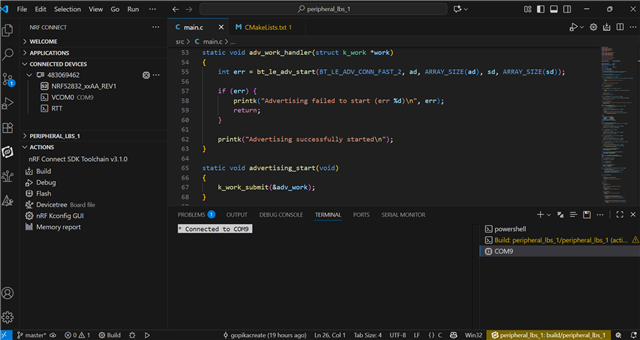
This is the 1 warning message i got while i was running the "peripheral lbs" sample example 

[{
"resource": "/d:/v3.1.0/zephyr/CMakeLists.txt",
"owner": "nrf-connect",
"severity": 4,
"message": "CMake Warning at D:/v3.1.0/zephyr/CMakeLists.txt:2232 (message):",
"source": "cmake",
"startLineNumber": 2232,
"startColumn": 1,
"endLineNumber": 2232,
"endColumn": 2147483647
}]

And also in  "bluetooth/peripheral_uart" i tried sending and receiving data using the nrf Toolbox app in my iPhone nothing is happening . 

  • Hi Gopika

    I have a few questions 

    1. Which voltage does your TTL expect?
    2. What is your build target?
    3. Have you tried attaching a logic analyzer or similar to the pins to check if there is any output? 
    4. Can you post your overlay? 

    Regards

    Runar

  • Hey Runar

    1. It's 5V

    2. Because i am using MBN52832DK the build target i am using is nrf52dk_nrf52832

    3. No i haven't

    4.There is nothing in my overlay . Some default comments that's it .

  • 1. That will not work due tot he following:

    • For I/O pin voltage when VDD ≤ 3.6 V: the maximum is VDD + 0.3 V
    • For I/O pin voltage when VDD > 3.6 V: the maximum is 3.9 V

    2. If you are using a moduel, do you know if the module has an external crystal or not? If not you need to enable the internal RC in your project. In general we recommend that you create a new board target if not using a DK. 

    3. Ok, I suspect the voltage missmach is the issue here

    4. Ok

    Regards

    Runar

  • 1. I didnt get you  , the voltage i am suppling form the mbn board to ttl is around 5v it is taken from a pin VCC_EXT pin of MBN board i have checked the voltage that it recive .

    2. Okay let me look into that , but other than Uart , ble, led blinky code is all working so still i should create a new board target?

    3.What should i actually check for this 

  • Regarding 1

    I think we are talking past each other. I was wondering which voltage level does the TTL expect. Often in my experience they are based upon 5V logic while our boards are 3v3 logic. So they normally do not work without level shifters

    2. If BLE is working I suspect it has a external crystal and you dont need to worry about it. In general it is good practice to create a custom board as mentioned. 

    3. Check the datasheet for the TTL device and check what level it expect. You can also use a scope if you have or a multimeter to see if there is any change in the voltage level on the uart pins

    Regards

    Runar

Related