compilation error for USB Mass Storage sample with nrf7002dk and ncs 3.0.2

Hi,

In order to solve another ticket, I need to make mass storage sample to work with a nrf7002dk and nc3.0.2 but I can't manage to make it work. It was working two years ago when I tried with ncs 2.5.0.

In prj.conf, I added : 

CONFIG_APP_MSC_STORAGE_FLASH_FATFS=y
CONFIG_SPI_NOR_FLASH_LAYOUT_PAGE_SIZE=4096

(I took example from this ticket : USB Mass Storage Sample using nRF7002-dk - Nordic Q&A - Nordic DevZone - Nordic DevZone )

And setup following build configuration 
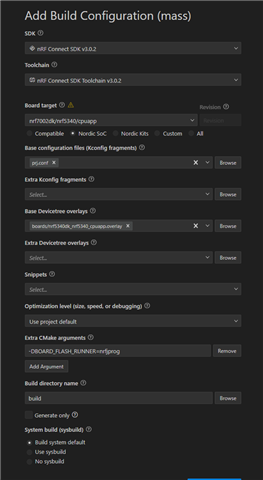
But it doesn't compile : 

In file included from C:/ncs/v3.0.2/zephyr/include/zephyr/storage/flash_map.h:330,
                 from C:/Dev/zephyr_sandbox/mass/src/main.c:21:
C:/Dev/zephyr_sandbox/mass/src/main.c: In function 'setup_flash':
C:/ncs/v3.0.2/nrf/include/flash_map_pm.h:47:22: error: 'PM_storage_partition_ID' undeclared (first use in this function)
   47 | #define PM_ID(label) PM_##label##_ID

Any idea ? 

Thank you for your help

Parents
  • Hi,

    The error comes from the partition manager. You can try to disable the partition manager by creating a file called sysbuild.conf and adding this:

    SB_CONFIG_PARTITION_MANAGER=n

    Best regards,
    Marte

  • Hi, 

    Thank you, now it compiles! But I can't flash. The nRF Connect extension keeps using nrfutils which doesn't work due to protobuf version conflict. If I change the flash runner to nrfjprog via extra cmake argument AND CmakeLists.txt, but it keeps using nrfutils

    It is the first time I try a sample since I started development on that SDK. My main project does use nrfjprog without even having to tell it to do so. Both sample and main project are with ncs3.0.2. 

    Why is this behavior inconsistent (and non-working)? 

    Thank you for your help

  • Hi,

    Did you install the nRF Connect SDK toolchain manually or using nrfutil or VS Code?

    Do you use the nRF Connect SDK for VS Code extension to build and flash?

    If you installed the toolchain using nrfutil or VS Code, then the VS Code extension should use this toolchain, including the python version bundled with the toolchain.

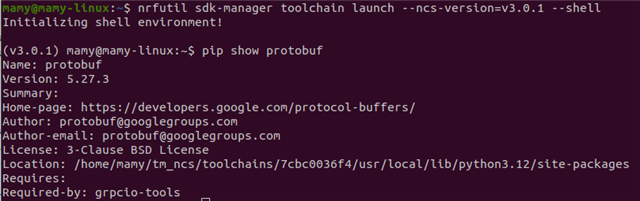
    Can you launch the toolchain with nrfutil and check which protobuf version is used?

    nrfutil sdk-manager toolchain launch --ncs-version=v3.0.2 --shell

    pip show protobuf

    For example, here you can see that v3.0.1 uses protobuf 5.27.3:

    Best regards,
    Marte

  • Hi, thank you for your answer.

    If you installed the toolchain using nrfutil or VS Code, then the VS Code extension should use this toolchain, including the python version bundled with the toolchain.

    I installed all toolchains with VS Code.

    nrfutil sdk-manager toolchain launch --ncs-version=v3.0.2 --shell

    Give "ModuleNotFoundError: No module named 'constants'" even if I install constants with pip. 

    Best regards

  • Hi,

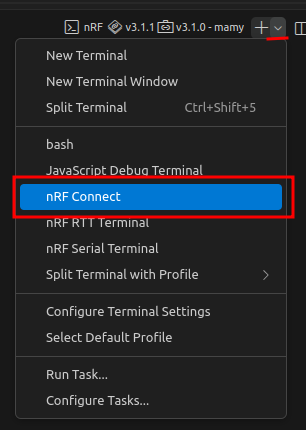
    Do you get errors if you open an nRF Connect terminal in VS Code and flash using the west flash command in this terminal?

    Best regards,
    Marte

  • Hi,

    when opening an nRFConnect terminal and using the flash command as follow : 

    I have the same error : 

    PS C:\Dev\zephyr_sandbox\mass\build\mass> west flash -d c:\Dev\zephyr_sandbox\mass\build --domain mass --dev-id 1050717037
    -- west flash: rebuilding
    [0/3] Performing build step for 'mass'
    ninja: no work to do.
    [3/3] Completed 'mass'
    -- west flash: using runner nrfutil
    -- runners.nrfutil: reset after flashing requested
    -- runners.nrfutil: Flashing file: C:\Dev\zephyr_sandbox\mass\build\mass\zephyr\zephyr.hex
    Traceback (most recent call last):
      File "<frozen runpy>", line 198, in _run_module_as_main
      File "<frozen runpy>", line 88, in _run_code
      File "C:\Users\AppData\Local\Programs\Python\Python312\Scripts\nrfutil.exe\__main__.py", line 4, in <module>
      File "C:\Users\AppData\Local\Programs\Python\Python312\Lib\site-packages\nordicsemi\__main__.py", line 50, in <module>
        from nordicsemi.dfu.bl_dfu_sett import BLDFUSettings
      File "C:\Users\AppData\Local\Programs\Python\Python312\Lib\site-packages\nordicsemi\dfu\bl_dfu_sett.py", line 52, in <module>
        from nordicsemi.dfu.package import Package
      File "C:\Users\AppData\Local\Programs\Python\Python312\Lib\site-packages\nordicsemi\dfu\package.py", line 54, in <module>
        from nordicsemi.dfu.init_packet_pb import *
      File "C:\Users\AppData\Local\Programs\Python\Python312\Lib\site-packages\nordicsemi\dfu\init_packet_pb.py", line 38, in <module>
        from . import dfu_cc_pb2 as pb
      File "C:\Users\AppData\Local\Programs\Python\Python312\Lib\site-packages\nordicsemi\dfu\dfu_cc_pb2.py", line 32, in <module>
        _descriptor.EnumValueDescriptor(
      File "C:\ncs\toolchains\0b393f9e1b\opt\bin\Lib\site-packages\google\protobuf\descriptor.py", line 920, in __new__
        _message.Message._CheckCalledFromGeneratedFile()
    TypeError: Descriptors cannot be created directly.
    If this call came from a _pb2.py file, your generated code is out of date and must be regenerated with protoc >= 3.19.0.
    If you cannot immediately regenerate your protos, some other possible workarounds are:
     1. Downgrade the protobuf package to 3.20.x or lower.
     2. Set PROTOCOL_BUFFERS_PYTHON_IMPLEMENTATION=python (but this will use pure-Python parsing and will be much slower).
    
    More information: https://developers.google.com/protocol-buffers/docs/news/2022-05-06#python-updates
    Traceback (most recent call last):
      File "<frozen runpy>", line 198, in _run_module_as_main
      File "<frozen runpy>", line 88, in _run_code
      File "C:\Users\AppData\Local\Programs\Python\Python312\Scripts\nrfutil.exe\__main__.py", line 4, in <module>
      File "C:\Users\AppData\Local\Programs\Python\Python312\Lib\site-packages\nordicsemi\__main__.py", line 50, in <module>
        from nordicsemi.dfu.bl_dfu_sett import BLDFUSettings
      File "C:\Users\AppData\Local\Programs\Python\Python312\Lib\site-packages\nordicsemi\dfu\bl_dfu_sett.py", line 52, in <module>
        from nordicsemi.dfu.package import Package
      File "C:\Users\AppData\Local\Programs\Python\Python312\Lib\site-packages\nordicsemi\dfu\package.py", line 54, in <module>
        from nordicsemi.dfu.init_packet_pb import *
      File "C:\Users\AppData\Local\Programs\Python\Python312\Lib\site-packages\nordicsemi\dfu\init_packet_pb.py", line 38, in <module>
        from . import dfu_cc_pb2 as pb
      File "C:\Users\AppData\Local\Programs\Python\Python312\Lib\site-packages\nordicsemi\dfu\dfu_cc_pb2.py", line 32, in <module>
        _descriptor.EnumValueDescriptor(
      File "C:\ncs\toolchains\0b393f9e1b\opt\bin\Lib\site-packages\google\protobuf\descriptor.py", line 920, in __new__
        _message.Message._CheckCalledFromGeneratedFile()
    TypeError: Descriptors cannot be created directly.
    If this call came from a _pb2.py file, your generated code is out of date and must be regenerated with protoc >= 3.19.0.
    If you cannot immediately regenerate your protos, some other possible workarounds are:
     1. Downgrade the protobuf package to 3.20.x or lower.
     2. Set PROTOCOL_BUFFERS_PYTHON_IMPLEMENTATION=python (but this will use pure-Python parsing and will be much slower).
    
    More information: https://developers.google.com/protocol-buffers/docs/news/2022-05-06#python-updates
    Traceback (most recent call last):
      File "<frozen runpy>", line 198, in _run_module_as_main
      File "<frozen runpy>", line 88, in _run_code
      File "C:\Users\AppData\Local\Programs\Python\Python312\Scripts\nrfutil.exe\__main__.py", line 4, in <module>
      File "C:\Users\AppData\Local\Programs\Python\Python312\Lib\site-packages\nordicsemi\__main__.py", line 50, in <module>
        from nordicsemi.dfu.bl_dfu_sett import BLDFUSettings
      File "C:\Users\AppData\Local\Programs\Python\Python312\Lib\site-packages\nordicsemi\dfu\bl_dfu_sett.py", line 52, in <module>
        from nordicsemi.dfu.package import Package
      File "C:\Users\AppData\Local\Programs\Python\Python312\Lib\site-packages\nordicsemi\dfu\package.py", line 54, in <module>
        from nordicsemi.dfu.init_packet_pb import *
      File "C:\Users\AppData\Local\Programs\Python\Python312\Lib\site-packages\nordicsemi\dfu\init_packet_pb.py", line 38, in <module>
        from . import dfu_cc_pb2 as pb
      File "C:\Users\AppData\Local\Programs\Python\Python312\Lib\site-packages\nordicsemi\dfu\dfu_cc_pb2.py", line 32, in <module>
        _descriptor.EnumValueDescriptor(
      File "C:\ncs\toolchains\0b393f9e1b\opt\bin\Lib\site-packages\google\protobuf\descriptor.py", line 920, in __new__
        _message.Message._CheckCalledFromGeneratedFile()
    TypeError: Descriptors cannot be created directly.
    If this call came from a _pb2.py file, your generated code is out of date and must be regenerated with protoc >= 3.19.0.
    If you cannot immediately regenerate your protos, some other possible workarounds are:
     1. Downgrade the protobuf package to 3.20.x or lower.
     2. Set PROTOCOL_BUFFERS_PYTHON_IMPLEMENTATION=python (but this will use pure-Python parsing and will be much slower).
    
    More information: https://developers.google.com/protocol-buffers/docs/news/2022-05-06#python-updates
    -- runners.nrfutil: Board with serial number 1050717037 flashed successfully.

    Best regards

  • Hi,

    Can you try uninstalling the nRF Connect SDK and toolchain, and then reinstalling it?

    Best regards,
    Marte

Reply Children
No Data
Related