nRF Connect for Desktop v5.2.0 not recognizing SEGGER J-Link

I have a Power Profiler Kit II and have been using it for a few years without issue. I have been using it through the nrf Connect for Desktop software and the Power Profiler application. I recently updated the nRF Connect for Desktop to v5.2.0 and the Power Profiler to v4.3.1. In addition to this I updated my SEGGER j-link to V8.18. Since doing this the power profiler is unable to find the SEGGER J-Link V8.18 software. I get the following error message: 
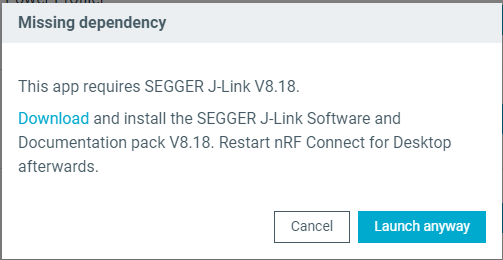
The SEGGER J-link is installed in my C drive under C:\Program Files\SEGGER...

Is there a different location I need to install the SEGGER software so the nrf Connect for Desktop can find it? I have tried uninstalling and reinstalling both softwares multiple times with the same result. Any advice would be greatly appreciated. 

  • I just installed the tooling for the first time on a PC that already had jlink v8.10, and it installed v8.18 during installation. After installation I got a similar screen saying it only found v8.10 (so the  version that was already on it), and that it was not tested with that version so it was up to me to decide to risk it. I did , and in the log window of the power profiler app it said it was actually using v8.18. 

    It seems the SW does not correctly detect the jlink SW it just installed itself, but it does detect it if you install jlink yourself (well, at least on my system), so maybe you can try that as a workaround ? 

    Even more bizar: after closing the app and restarting it again it now does not give me the you only have v8.10 message anymore (even though I did not reinstall anything). 

  • Hi Nathan,

    The location looks correct.. Ensure that you have added the J-Link executable to system path (environment variables). See the requirements: https://docs.nordicsemi.com/bundle/nrf-connect-desktop/page/download_cfd.html 

    In case this does not work, I would suggest that you Uninstall all existing J-Link versions. Then reboot your PC and install only J-Link v8.18. Ensure the installation path is added to your system PATH. Then Start nRF Connect for Desktop and the Power Profiler app.

    Regards,

    Swathy

Related