Partition Manager: pm_static + McuMgr + sysbuild

Using connect SDK 3.0.2 and a NRF-DK52840 my goal is fairly simple: My app should be updatable via BLE using a static partition table.
I followed this tutorial: nRF Connect SDK hands-on, part 6: Adding FOTA over Bluetooth LE

So I added the following to my prj.conf:
CONFIG_NCS_SAMPLE_MCUMGR_BT_OTA_DFU=y

And to sysbuild.conf I added:
SB_CONFIG_PARTITION_MANAGER=y
SB_CONFIG_BOOTLOADER_MCUBOOT=y

Then defined my pm_static.yml as:

mcuboot:
  address: 0x00000000
  size: 0xC600         # 48 KB

mcuboot_pad:
  address: 0xC600
  size: 0x200         # 2 KB

image_0:
  address: 0xC800
  size: 0x40000        # 256 KB (0x40000 - 0x200)

image_1:
  address: 0x4C800
  size: 0x40000        # 256 KB

storage:
  address: 0x8C800
  size: 0x40000         # 256 KB (NVS or misc data)
But when I build my project I get this error:

: zephyr\zephyr_pre0.elf section `text' will not fit in region `FLASH'
c:/ncs/toolchains/0b393f9e1b/opt/zephyr-sdk/arm-zephyr-eabi/bin/../lib/gcc/arm-zephyr-eabi/12.2.0/../../../../arm-zephyr-eabi/bin/ld.bfd.exe: region `FLASH' overflowed by 162072 bytes
collect2.exe: error: ld returned 1 exit status


What did I do wrong?
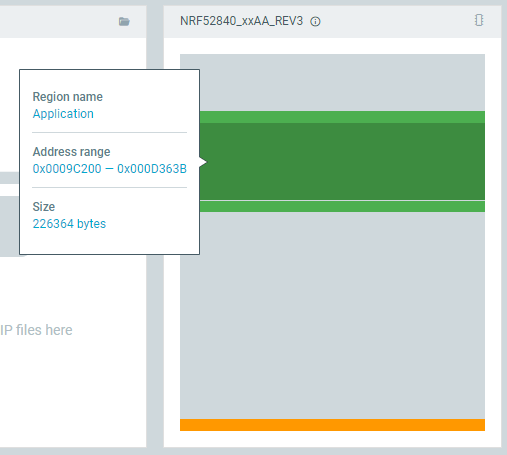
Before adding McuMgr my app was 230520 B in size.

I expected that the bootloader fits into "mcuboot" partition and my app into "image_0". It may look like that it tries to fit my app into "mcuboot"?


Also: what is mcuboot_pad used for? If I just increase the "mcuboot" to 0xC800 and remove mcuboot_pad I get a strange partition config:

Partition 'mcuboot' is not included in the dynamic resolving since it is statically defined.
Partition manager failed: Error when inspecting mcuboot_pad, invalid address 0xcc000, expected 0xcc800,
Failed to partition region flash_primary, size of region: 1048576
Partition Configuration:
image_0:
size: 262144
image_1:
size: 262144
littlefs_storage:
placement:
align:
start: 4096
before:
- nvs_storage
size: 24576
mcuboot:
size: 51200
mcuboot_pad:
placement:
align:
start: 4096
before:
- mcuboot_primary_app
size: 512
mcuboot_secondary:
placement:
after:
- mcuboot_primary
align:
start: 4096
size: 77824
nvs_storage:
placement:
before:
- end
size: 24576
storage:
size: 262144

Parents
  • Hi,

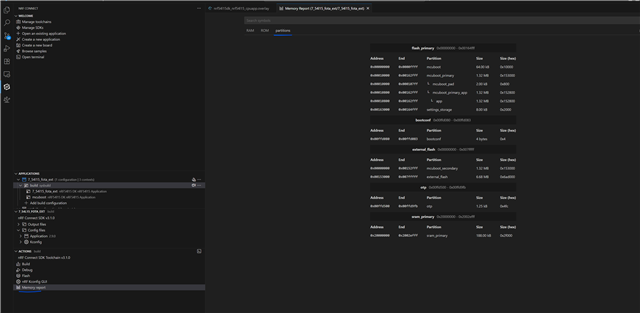
    1. Could you check your partition map with the VS Code tool for memory report? 
    2. Could you first try to remove the static parittioning map and build with dynamic partitioning?

      Typically I recommend that you start your projects/the early phases of development with dynamic partitioning and when your getting closer to nail the final features and layout, then you can use the generated dynamic partitioning map found in the build folder as a foundation for the static map by simply copy/pasting the generated partition layout into a pm_static.yml.

    Kind regards,
    Andreas

  • Thanks.

    Okey using the dynamic partitioning i get the following mess:

    app:
      address: 0xc200
      end_address: 0x80000
      region: flash_primary
      size: 0x73e00
    littlefs_storage:
      address: 0xf4000
      end_address: 0xfa000
      placement:
        align:
          start: 0x1000
        before:
        - nvs_storage
      region: flash_primary
      size: 0x6000
    mcuboot:
      address: 0x0
      end_address: 0xc000
      placement:
        align:
          end: 0x1000
        before:
        - mcuboot_primary
      region: flash_primary
      size: 0xc000
    mcuboot_pad:
      address: 0xc000
      end_address: 0xc200
      placement:
        align:
          start: 0x1000
        before:
        - mcuboot_primary_app
      region: flash_primary
      size: 0x200
    mcuboot_primary:
      address: 0xc000
      end_address: 0x80000
      orig_span: &id001
      - mcuboot_pad
      - app
      region: flash_primary
      sharers: 0x1
      size: 0x74000
      span: *id001
    mcuboot_primary_app:
      address: 0xc200
      end_address: 0x80000
      orig_span: &id002
      - app
      region: flash_primary
      size: 0x73e00
      span: *id002
    mcuboot_secondary:
      address: 0x80000
      end_address: 0xf4000
      placement:
        after:
        - mcuboot_primary
        align:
          start: 0x1000
      region: flash_primary
      share_size:
      - mcuboot_primary
      size: 0x74000
    nvs_storage:
      address: 0xfa000
      end_address: 0x100000
      placement:
        before:
        - end
      region: flash_primary
      size: 0x6000
    sram_primary:
      address: 0x20000000
      end_address: 0x20040000
      region: sram_primary
      size: 0x40000


    The build sizes are:

    'main app'
    Memory region Used Size Region Size %age Used
    FLASH: 241884 B 474624 B 50.96%
    RAM: 209012 B 256 KB 79.73%
    IDT_LIST: 0 GB 32 KB 0.00%

    'mcuboot'
    Memory region Used Size Region Size %age Used
    FLASH: 32652 B 48 KB 66.43%
    RAM: 17728 B 256 KB 6.76%
    IDT_LIST: 0 GB 32 KB 0.00%


    Then using the following pm_static.yml it builds at least without errors:

    mcuboot:
      address: 0x00000
      size: 0xC000
      region: flash_primary
    
    mcuboot_pad:
      address: 0xC000
      size: 0x200
      region: flash_primary
    
    mcuboot_primary:
      address: 0xC200
      size: 0x40000
      region: flash_primary
    
    mcuboot_secondary:
      address: 0x4C200
      size: 0x40000
      region: flash_primary
    
    nvs_storage:
      address: 0x8C200
      size: 0x10000
      region: flash_primary
    

    But my app is not booting, so I looked at the build/partitions.yml and got many additions I don't understand:

    app:
      address: 0x9c200
      end_address: 0xfa000
      region: flash_primary
      size: 0x5de00
    littlefs_storage:
      address: 0xfa000
      end_address: 0x100000
      placement:
        before:
        - end
      region: flash_primary
      size: 0x6000
    mcuboot:
      address: 0x0
      end_address: 0xc000
      region: flash_primary
      size: 0xc000
    mcuboot_pad:
      address: 0xc000
      end_address: 0xc200
      region: flash_primary
      size: 0x200
    mcuboot_primary:
      address: 0xc200
      end_address: 0x4c200
      region: flash_primary
      size: 0x40000
    mcuboot_primary_app:
      address: 0x9c200
      end_address: 0xfa000
      orig_span: &id001
      - app
      region: flash_primary
      size: 0x5de00
      span: *id001
    mcuboot_secondary:
      address: 0x4c200
      end_address: 0x8c200
      region: flash_primary
      size: 0x40000
    nvs_storage:
      address: 0x8c200
      end_address: 0x9c200
      region: flash_primary
      size: 0x10000
    sram_primary:
      address: 0x20000000
      end_address: 0x20040000
      region: sram_primary
      size: 0x40000
    

    Could you please tell me how a minimal partition table looks like without automatic partitioning?
    Why is there now "app" and "mcuboot_primary_app", where my app gets flashed to? 
    I just want to define a simple static partition table for my whole flash. If needed, I happily add required partitions, such as for a metadata or other things.

    Note: I still have SB_CONFIG_PARTITION_MANAGER=y in my sysbuild.conf

  • Hi,

    Leschge said:

    Okey using the dynamic partitioning i get the following mess:

    This looks more like what would've expect from a pm_static.yml

    Leschge said:
    Then using the following pm_static.yml it builds at least without errors:

    That's good, now we know that the fault is due to a mis-partitioning of the existing partitions and not due to your app or any other images being too large.

    Leschge said:
    But my app is not booting,

    Could you enable logging in the bootloader and application and post some device logs? 

    Could you enter a debugging session and see where it hangs? I.e is it because MCUboot can't find the app image or is it because of your application?

    Did your app boot before adding MCUBoot?

    Leschge said:
    e build/partitions.yml and got many additions I don't understand:

    The pm_static.yml that you originally used was lacking some items such as regions, mcuboot_primary and mcuboot_secondary. This is what I'm sure you've referred to as "image 0/1".

    • Mcuboot_primary is where the application runs from and mcuboo_secondary is where the candidate image is held.
    • Settings_storage is what BLE uses to store it's settings
    • nvs_storage is your storage partition
    • 'app' is everything but the mcuboot partition

    Paddings are to make sure that all images starts at the correct addresses.

    Kind regards,
    Andreas

  • --- PLEASE SEE EDIT BELOW --- 

    Thanks again for your time.

    Logs:
    *** Booting MCUboot v2.1.0-dev-ae1ee57f3906 ***
    *** Using nRF Connect SDK v3.0.2-89ba1294ac9b ***
    *** Using Zephyr OS v4.0.99-f791c49f492c ***
    I: Starting bootloader
    I: Primary image: magic=unset, swap_type=0x1, copy_done=0x3, image_ok=0x3
    I: Secondary image: magic=bad, swap_ty copy_done=0x2, image_ok=0x2
    I: Boot source: none
    W: Failed reading image headers; Image=0
    E: Unable to find bootable image

    Reading out the chip reveals, that the app is flashed to:

    app:
      address: 0x9c200
      end_address: 0xfa000
      region: flash_primary
      size: 0x5de00


    ---

    yes, the app boots without using MCUBoot, but with dynamic partitions.

    • Mcuboot_primary is where the application runs from and mcuboo_secondary is where the candidate image is held.
    • Settings_storage is what BLE uses to store it's settings
    • nvs_storage is your storage partition
    • 'app' is everything but the mcuboot partition

    Okey, as I have defined mcuboot_primary and mcuboot_secondary, why does the partition manager add an "app" slot? Can I avoid this? Or better: Can I disable this dynamic partition table entirely to use my own static one?

    Thanks


    --- EDIT: ---


    So after more and more hours I think I got it working together with AI and almost understand it fully.  I hope you can help me to get the final piece.

    This is my current pm_static.yml:

    # ─────────────────────────────────────────────────────────────
    # MCUboot bootloader
    # This is the immutable bootloader that runs at startup.
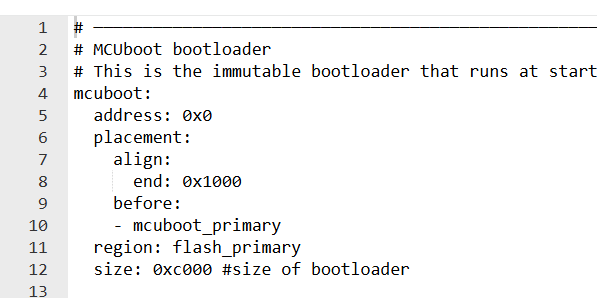
    mcuboot:
      address: 0x0
      placement:
        align:
          end: 0x1000
        before:
        - mcuboot_primary
      region: flash_primary
      size: 0xc000 #size of bootloader
    
    # ─────────────────────────────────────────────────────────────
    # Primary image slot (active)
    # This is the full slot that includes both pad and app.
    mcuboot_primary:
      address: 0xc000
      orig_span: &id001
      - mcuboot_pad
      - app
      region: flash_primary
      sharers: 0x1
      size: 0x40000 # size of primary app + mcuboot pad
      span: *id001 # Includes pad + app
    
    # ─────────────────────────────────────────────────────────────
    # Padding between MCUboot and the application
    # Required by MCUboot to store image metadata (e.g., TLV, header).
    mcuboot_pad:
      address: 0xc000
      placement:
        align:
          start: 0x1000
        before:
        - mcuboot_primary_app
      region: flash_primary
      size: 0x200 # 0x200 is fixed for mcuboot
    
    # ─────────────────────────────────────────────────────────────
    # Application image partition (active slot)
    # This is where your main application binary is stored.
    # It starts just after the mcuboot_pad and spans until 0x80000.
    app:
      address: 0xc200
      region: flash_primary
      size: 0x3FE00 # size of primary app - mcuboot pad
    
    # ─────────────────────────────────────────────────────────────
    # Alias for the app portion of the primary slot
    # Used for linking the application image.
    mcuboot_primary_app:
      address: 0xc200
      orig_span: &id002
      - app
      region: flash_primary
      size: 0x3FE00 # size of primary app - mcuboot pad
      span: *id002
    
    # ─────────────────────────────────────────────────────────────
    # Secondary image slot (inactive)
    # Used during DFU to hold the new image before swap.
    mcuboot_secondary:
      address: 0x4c000
      placement:
        after:
        - mcuboot_primary
        align:
          start: 0x1000
      region: flash_primary
      #share_size:
      #- mcuboot_primary # ensure that primary and secondary app share same size (usually dynamically set)
      size: 0x40000 # size of primary app


    littlefs_storage:
      address: 0x8c000
      size: 0x6E000
      placement:
        align:
          start: 0x1000
        before:
        - nvs_storage
      region: flash_primary
    
    
    nvs_storage:
      address: 0xfa000
      end_address: 0x100000
      placement:
        before:
        - end
      region: flash_primary
      size: 0x6000
    
    
    sram_primary:
      address: 0x20000000
      end_address: 0x20040000
      region: sram_primary
      size: 0x40000
    

    My questions:

    1. What is mcuboot_pad used for and why is it part of partition "app" but not also of partition "mcuboot_secondary" ?
    2. Where does mcuboot hold the active partition in? It is always mcuboot_primary and mcuboot_secondary is just used for swapping or do 
      mcuboot_primary and mcuboot_secondary alternate?


Reply
  • --- PLEASE SEE EDIT BELOW --- 

    Thanks again for your time.

    Logs:
    *** Booting MCUboot v2.1.0-dev-ae1ee57f3906 ***
    *** Using nRF Connect SDK v3.0.2-89ba1294ac9b ***
    *** Using Zephyr OS v4.0.99-f791c49f492c ***
    I: Starting bootloader
    I: Primary image: magic=unset, swap_type=0x1, copy_done=0x3, image_ok=0x3
    I: Secondary image: magic=bad, swap_ty copy_done=0x2, image_ok=0x2
    I: Boot source: none
    W: Failed reading image headers; Image=0
    E: Unable to find bootable image

    Reading out the chip reveals, that the app is flashed to:

    app:
      address: 0x9c200
      end_address: 0xfa000
      region: flash_primary
      size: 0x5de00


    ---

    yes, the app boots without using MCUBoot, but with dynamic partitions.

    • Mcuboot_primary is where the application runs from and mcuboo_secondary is where the candidate image is held.
    • Settings_storage is what BLE uses to store it's settings
    • nvs_storage is your storage partition
    • 'app' is everything but the mcuboot partition

    Okey, as I have defined mcuboot_primary and mcuboot_secondary, why does the partition manager add an "app" slot? Can I avoid this? Or better: Can I disable this dynamic partition table entirely to use my own static one?

    Thanks


    --- EDIT: ---


    So after more and more hours I think I got it working together with AI and almost understand it fully.  I hope you can help me to get the final piece.

    This is my current pm_static.yml:

    # ─────────────────────────────────────────────────────────────
    # MCUboot bootloader
    # This is the immutable bootloader that runs at startup.
    mcuboot:
      address: 0x0
      placement:
        align:
          end: 0x1000
        before:
        - mcuboot_primary
      region: flash_primary
      size: 0xc000 #size of bootloader
    
    # ─────────────────────────────────────────────────────────────
    # Primary image slot (active)
    # This is the full slot that includes both pad and app.
    mcuboot_primary:
      address: 0xc000
      orig_span: &id001
      - mcuboot_pad
      - app
      region: flash_primary
      sharers: 0x1
      size: 0x40000 # size of primary app + mcuboot pad
      span: *id001 # Includes pad + app
    
    # ─────────────────────────────────────────────────────────────
    # Padding between MCUboot and the application
    # Required by MCUboot to store image metadata (e.g., TLV, header).
    mcuboot_pad:
      address: 0xc000
      placement:
        align:
          start: 0x1000
        before:
        - mcuboot_primary_app
      region: flash_primary
      size: 0x200 # 0x200 is fixed for mcuboot
    
    # ─────────────────────────────────────────────────────────────
    # Application image partition (active slot)
    # This is where your main application binary is stored.
    # It starts just after the mcuboot_pad and spans until 0x80000.
    app:
      address: 0xc200
      region: flash_primary
      size: 0x3FE00 # size of primary app - mcuboot pad
    
    # ─────────────────────────────────────────────────────────────
    # Alias for the app portion of the primary slot
    # Used for linking the application image.
    mcuboot_primary_app:
      address: 0xc200
      orig_span: &id002
      - app
      region: flash_primary
      size: 0x3FE00 # size of primary app - mcuboot pad
      span: *id002
    
    # ─────────────────────────────────────────────────────────────
    # Secondary image slot (inactive)
    # Used during DFU to hold the new image before swap.
    mcuboot_secondary:
      address: 0x4c000
      placement:
        after:
        - mcuboot_primary
        align:
          start: 0x1000
      region: flash_primary
      #share_size:
      #- mcuboot_primary # ensure that primary and secondary app share same size (usually dynamically set)
      size: 0x40000 # size of primary app


    littlefs_storage:
      address: 0x8c000
      size: 0x6E000
      placement:
        align:
          start: 0x1000
        before:
        - nvs_storage
      region: flash_primary
    
    
    nvs_storage:
      address: 0xfa000
      end_address: 0x100000
      placement:
        before:
        - end
      region: flash_primary
      size: 0x6000
    
    
    sram_primary:
      address: 0x20000000
      end_address: 0x20040000
      region: sram_primary
      size: 0x40000
    

    My questions:

    1. What is mcuboot_pad used for and why is it part of partition "app" but not also of partition "mcuboot_secondary" ?
    2. Where does mcuboot hold the active partition in? It is always mcuboot_primary and mcuboot_secondary is just used for swapping or do 
      mcuboot_primary and mcuboot_secondary alternate?


Children
  • Hi, 

    Apologies for the wait, thank you for your patience. I see you've been working on initial questions based on the added post scriptum edited section, but I'll go through the questions asked anyways

    Leschge said:
    Okey, as I have defined mcuboot_primary and mcuboot_secondary, why does the partition manager add an "app" slot? Can I avoid this? Or better: Can I disable this dynamic partition table entirely to use my own static one?

    No, you can't add this. Basically what is done is that the app is a container that spans both mcuboot_primary and _secondary as well as paddings. It is not something that "exists" in addition to the previous two partitions. It just contains those mcuboot_primary / _secondary partitions.

    Your application will always run from mcuboot_primary. The mcuboot_secondary is just to hold a candidate image for when you're doing DFU.

    Leschge said:
    • 'app' is everything but the mcuboot partition

    I see that this may have been something that was a bit diffuse. What I meant with "'app' is everything but the mcuboot partition" was referring to the MCUboot bootloader, i.e this: 

    Leschge said:

    So after more and more hours I think I got it working together with AI and almost understand it fully. AHaug I hope you can help me to get the final piece

    Of course! I assume that the comments in the partition map is your notes/the findings that you and 'Kapa' (the AI assistant)

    Leschge said:
    What is mcuboot_pad used for and why is it part of partition "app" but not also of partition "mcuboot_secondary" ?

    mcuboot_pad is a small partition placed in between the primary application slot (mcuboot_primary_app) and the MCUBoot bootloader partiton. Its main purpose is to reserve space for the MCUboot image header and to ensure that the boot image is linked with the correct address offset in flash. This padding is important for alignment requirements, such as aligning on a flash erase sector boundary. These are necessary to ensure that for instance MCUboot knows where to look for the application (where it starts) and where to place the candidate image and swap it with the running image during DFU.

    Leschge said:
    Where does mcuboot hold the active partition in? It is always mcuboot_primary and mcuboot_secondary is just used for swapping or do 
    mcuboot_primary and mcuboot_secondary alternate?

    It is always MCUboot primary unless you build with a configuration that is called "Direct_XIP". But let's stick with "default" mode first.

    In default configuration, you build your application for mcuboot_primary. When you do DFU, you upload the candidate image to the mcuboot_secondary partition and MCUboot swap the two images when you trigger a reset after the candidate image has been approved by the bootloader. After the swap, if the image faults or is not validated for some reason, then the bootloader swaps the image back and reboots from your original image.

    For the Direct_XIP you build a version of your application that is capable of being ran from the secondary partition. In this case it checks the version of the images in the primary and secondary partitions and runs the one with the highest version.

    Let me know if this validates your understanding/answers your questions

    Kind regards,
    Andreas

  • Thanks a lot.

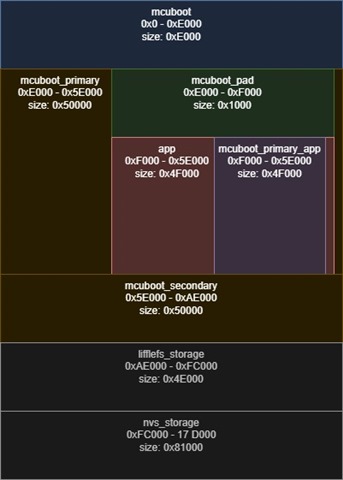
    As the partition.yml is not so easy to read, I converted it into a diagram for others that may struggle to understand it.

    Please keep in mind that this is for the NRF54L15, which requires a larger mcuboot_pad


     such a diagram or example partition.yml would be very useful in the documentation for Partition Manager. Also a section where all default partitions are explained.

  • Hi,

    Thank you for sharing the diagram. Though, there are tools already for this (per the first thing I wrote in this thread heh..) Although it doesn't draw it "pretty":

    AHaug said:
    Could you check your partition map with the VS Code tool for memory report? 

    This tool is also mentioned in the introduction/theory steps of the academy lesson about DFU and bootloaders

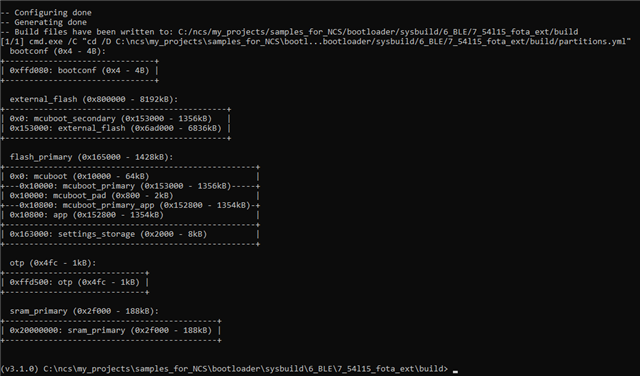
    You can also enter the build folder in cmd and use "ninja partition_manager_report" and get the output as:

    For reference, this is the sample I used (non-official, custom sample that I've created based on our docs and academy course): https://github.com/aHaugl/samples_for_NCS/tree/main/bootloader/sysbuild/6_BLE/7_54l15_fota_ext 

    Kind regards,
    Andreas

Related