OTA/DFU of identical bootloader ZIP package fails to relaunch the new bootloader.

I am running the boot loader with the default name 'DfuTarg' on a Nordic NRF52840 board very similar to the PA10056.
I download this boot loader to the board, connect to it using NRF Connect app on my Pixel phone, and select the DFU icon.
I then select the OTA DFU file that I created of the same boot loader.
The file gets transferred and validation appears to pass but at the end the Segger IDE stops at a hardware breakpoint at vector 0xA60 (hardware fault?).

I expected the boot loader to simply disconnect, reboot and be prepared again for the next DFU but it ended up with a vector exception to 0xA60.
This is a very repeatable process regardless of how many times I try it.
Before each attempt, I completely erase the flash on the board and re-download the first boot loader program that starts on the board.

I think this is my misunderstanding of the system level workflow.
Does the Nordic OTA+DFU ecosystem support a simple boot loader supporting its own update without an application?

Cheers
RVM

Parents
  • Hello,

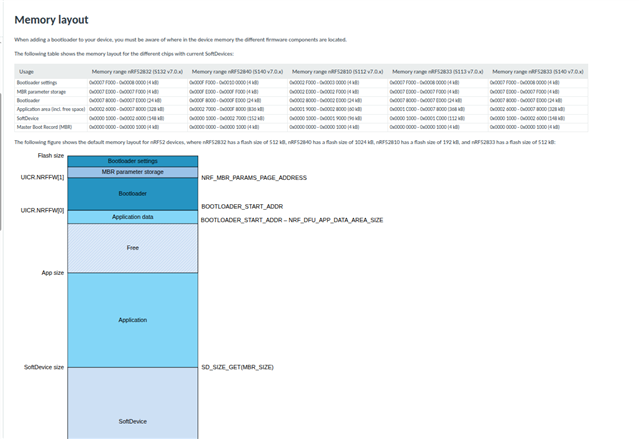
    Yes, this flow is supported and 0xA60 is the address to the HardFault_Handler() in the MBR, so the question is what triggered the fault. A good start to troubleshoot this might be to read out the flash before and after performing a DFU, then compare the two using a diff. If you are uploading the same bootloader binary as the one you programmed initially, you should expect the contents of the bootloader section to remain unchanged.

    (https://docs.nordicsemi.com/bundle/sdk_nrf5_v17.1.0/page/lib_bootloader.html )

    Reading out flash with nrfjprog

    nrfjprog --memrd 0x0 --n 0x100000 > flash_content.txt

    Best regards,

    Vidar

  • Following up on the previous observations, 

    I am now attempting to download a newer boot loader (just the boot loader and NOT the SD+MBR and NOT the Application). 

    I connect to the buttonless DFU app via the Nordic Connect application on my Android phone.
    I then launch the DFU process and set the Boot loader ZIP package file generated via the usual workflow that uses the 'nrfutil pkg generate' command. 

    The phone application successfully reboots the buttonless DFU app into boot loader but does not appear to stay connected long enough to perform any data transter (at least does not appear to be doing so). The remote device continuosly keeps disconnecting and the NRF Connect app on my android phone continuously attempts to connect to the DFU target device.

    I got frustrated and shut down the NRF Connect application on my phone. Ten minutes later, I fire it up and scan the BLE target device and it "SHOWS THE NEW BOOTLOADER IS ACTIVE". 

    This is very strange -- why does the phone app keep attempting to connecting to the BLE device even though the remote has SUCCESSFULLY UPDATED THE BOOTLOADER?

    Cheers

    RVM

  • RVM said:
    The phone application successfully reboots the buttonless DFU app into boot loader but does not appear to stay connected long enough to perform any data transter (at least does not appear to be doing so). The remote device continuosly keeps disconnecting and the NRF Connect app on my android phone continuously attempts to connect to the DFU target device.

    Is there any disconnect reason given in the log from the phone or target device? Also, are you doing buttonless DFU with our without bond sharing  (see https://docs.nordicsemi.com/bundle/sdk_nrf5_v17.1.0/page/service_dfu.html)?

    RVM said:
    Ten minutes later, I fire it up and scan the BLE target device and it "SHOWS THE NEW BOOTLOADER IS ACTIVE". 

    Does it remain stuck in bootloader DFU mode? It's supposed to time out (2 min by default) and boot back into the application. Also, for my understanding, how is it determined that the new bootloader is executing?

    RVM said:
    This is very strange -- why does the phone app keep attempting to connecting to the BLE device even though the remote has SUCCESSFULLY UPDATED THE BOOTLOADER?

    It sounds strange yes, and I'm not sure I understand what is actually happening in the background here.

    Cheers,

    Vidar

  • Our application firmware queries the boot loader for its version (i.e. static access to the location of a static FLASH ROM based symbol in the boot loader) and adjusts a bit field in the BLE advertisement it sends out periodically. 

  • I am trying to get an RTT viewer to connect and display messages from the boot loader and the application, but am not having much luck. I suspect, based on my own understanding of the RTT mechanism, and from snippets of wisdom I have seen around the DevZone and/or the internet in general, that the RTT control blocks are different between the boot loader and application builds and therefore the RTT viewer client gets confused (rightfully so). 

    Can you suggest how I can work around this issue ?

Reply
  • I am trying to get an RTT viewer to connect and display messages from the boot loader and the application, but am not having much luck. I suspect, based on my own understanding of the RTT mechanism, and from snippets of wisdom I have seen around the DevZone and/or the internet in general, that the RTT control blocks are different between the boot loader and application builds and therefore the RTT viewer client gets confused (rightfully so). 

    Can you suggest how I can work around this issue ?

Children
No Data
Related