Hi Muhammad,
These are quite general questions. I recommend going through our Cellular IoT course if you haven’t already. Some LTE event handling is demonstrated in our sample applications, such as the UDP sample. Also note that the modem handles many tasks automatically, so you don’t need to manage everything through event callbacks. For example, the modem will perform periodic cell searches when coverage is lost.
If you can share some logs or modem traces, we can take a closer look at any specific issues.
Best regards,
Benjamin
Hi Benjamin,
I have gone through the Cellular IoT course and also looked into the UDP sample. These are just basic LTE handling, I am talking about the exception where LTE is either very weak or is not available for several hours. I mentioned this already that LTE is trying to reconnect as you said, it is doing it automatically, I did not saved the logs for it but the behaviour was as I mentioned
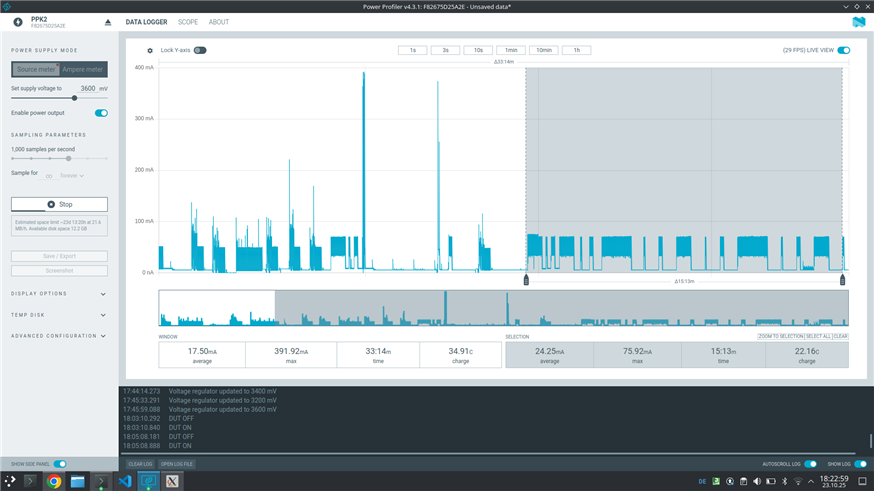
"Also, as seen in the power profiler pattern the lte is trying to connect but the events are not triggered most of the time. For example, during the first attempt I see the LTE_LC_NW_REG_UNKNOWN and LTE_LC_NW_REG_SEARCHING events, but for the next 15 minutes, as shown in the screenshot, I only see one LTE_LC_NW_REG_NOT_REGISTERED event."
The issue here is that I dont want the modem to try a connection every few seconds when I know that the device is not going to get the connection for several hours, so to handle this I need a consistant behaviour and events from the modem so I can decide to turn off the modem and do not waste power as it is an IoT device. In the screenshot you can see that there is a pattern of modem trying to get the connection every few seconds/minutes but I can't find any documentation about it. So, can you please mention how can I set a custom pattern to try a connection may be every hour or a documentation about the events being generated during a connection loss so I can implement the logic according to it as the events I mentioned above are inconsistant.
Hi Benjamin,
I have gone through the Cellular IoT course and also looked into the UDP sample. These are just basic LTE handling, I am talking about the exception where LTE is either very weak or is not available for several hours. I mentioned this already that LTE is trying to reconnect as you said, it is doing it automatically, I did not saved the logs for it but the behaviour was as I mentioned
"Also, as seen in the power profiler pattern the lte is trying to connect but the events are not triggered most of the time. For example, during the first attempt I see the LTE_LC_NW_REG_UNKNOWN and LTE_LC_NW_REG_SEARCHING events, but for the next 15 minutes, as shown in the screenshot, I only see one LTE_LC_NW_REG_NOT_REGISTERED event."
The issue here is that I dont want the modem to try a connection every few seconds when I know that the device is not going to get the connection for several hours, so to handle this I need a consistant behaviour and events from the modem so I can decide to turn off the modem and do not waste power as it is an IoT device. In the screenshot you can see that there is a pattern of modem trying to get the connection every few seconds/minutes but I can't find any documentation about it. So, can you please mention how can I set a custom pattern to try a connection may be every hour or a documentation about the events being generated during a connection loss so I can implement the logic according to it as the events I mentioned above are inconsistant.
I guess, the names of the registration events are mixing more up. If you check the docu of the at commands, some may be clearer.
+CEREG notifications:
0 – Not registered. UE is not currently searching for an operator to register to.
1 – Registered, home network
2 – Not registered, but UE is currently trying to attach or searching an operator to
register to
3 – Registration denied
4 – Unknown (for example, out of E-UTRAN coverage)
5 – Registered, roaming
90 – Not registered due to UICC failure
e.g. LTE_LC_NW_REG_SEARCHING is used, when them modem "UE is currently trying to attach or searching an operator to register to". Together with "sticky rejection" the modem may report that only on the first search-runs, but maybe not in the follow up ones, when a network rejected the registration (see my old ticket ).
All in all, if you want to have a feedback about "each search run", I use the modem sleep events when the modem is not registered. You may need to enable them in your prj.conf
CONFIG_LTE_LC_MODEM_SLEEP_NOTIFICATIONS=y
CONFIG_LTE_LC_MODEM_SLEEP_NOTIFICATIONS_THRESHOLD_MS=30000
(all in all: the network search is one of the very frustrating functions of the nRF91. Years ago it was draining the battery searching for 9xxyy networks (HPPLMN), never ever finding one. Takes me months and tickets over tickets. I'm not sure, if the modem still stays idle without network because of the "rescue calls" as mentioned in the old ticket above. My main strategy: cfun=0 after 30 min and then activate it again, when you want to schedule a new network search for periods about 15 min. Inconsistent events and sticky rejection blocks any more advanced mechanism.)