VS Code New Workflow - Guidance Requested

I've just come back to software development on Nordic after focusing on other projects, and since I last did any software development work, nRF Connect has been integrated as extensions n VS Code. I was hoping that there would be some online webinars explaining the new workflow but haven't found any. Can I suggest please that this would be very helpful?

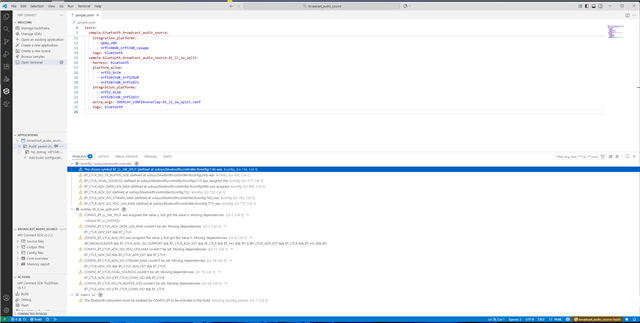
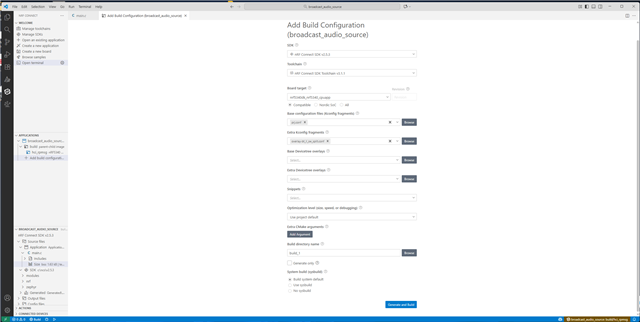
I tried building the Broadcast Audio Source project targeting the nRF5340 DK, but found numerous problems. I have attached screen captures of both the build configuration and the problems reported.

Once I've been able to build and run the application on the target hardware, is there any information on how to interface to it please, including a suitable audio source?

Kind regards,

Al
Parents
  • Hi Al, 

    I was hoping that there would be some online webinars explaining the new workflow but haven't found any. Can I suggest please that this would be very helpful?

    We do have a course covering the main features of the nRF Connect for VS Code extension on YouTube: https://www.youtube.com/playlist?list=PLx_tBuQ_KSqEt7NK-H7Lu78lT2OijwIMl. There have been updates made to the extension since the release and the creation of this course, but the general flow is the same. 

    In addition we have some written guides in the extension documentation: https://docs.nordicsemi.com/bundle/nrf-connect-vscode/page/guides/overview.html 

    I tried building the Broadcast Audio Source project targeting the nRF5340 DK, but found numerous problems. I have attached screen captures of both the build configuration and the problems reported.

    The first potential source for errors is that your SDK version and toolchain version are different and quite far apart in version numbers. It is recommended to use the same or similar toolchain and SDK versions to ensure compatibility. 

    Once I've been able to build and run the application on the target hardware, is there any information on how to interface to it please, including a suitable audio source?

    The Broadcast Audio sample, or the v3.1.1 equivalent Basic Audio Profile (BAP) Broadcast Audio Source, broadcasts dummy audio data out of the box, so to broadcast actual audio you would need to add that functionality. 

    If you want to use a sample which already supports actual audio, please use the nRF5340 Audio application and build the Broadcast source version of the application by following the instructions in the application documentation. The nRF5340 DK is supported as a target from nRF Connect SDK v3.1.0. Note that using command line or the provided buildprog.py script to build is recommended for the nRF5340 Audio application, but using the VS Code extension is possible. Refer to the Building and programming using command line documentation to see the necessary configuration files. 

    I hope this can get you started. Please let me know if there is more information missing to get you up and running. 

    Best regards,

    Maria

Reply
  • Hi Al, 

    I was hoping that there would be some online webinars explaining the new workflow but haven't found any. Can I suggest please that this would be very helpful?

    We do have a course covering the main features of the nRF Connect for VS Code extension on YouTube: https://www.youtube.com/playlist?list=PLx_tBuQ_KSqEt7NK-H7Lu78lT2OijwIMl. There have been updates made to the extension since the release and the creation of this course, but the general flow is the same. 

    In addition we have some written guides in the extension documentation: https://docs.nordicsemi.com/bundle/nrf-connect-vscode/page/guides/overview.html 

    I tried building the Broadcast Audio Source project targeting the nRF5340 DK, but found numerous problems. I have attached screen captures of both the build configuration and the problems reported.

    The first potential source for errors is that your SDK version and toolchain version are different and quite far apart in version numbers. It is recommended to use the same or similar toolchain and SDK versions to ensure compatibility. 

    Once I've been able to build and run the application on the target hardware, is there any information on how to interface to it please, including a suitable audio source?

    The Broadcast Audio sample, or the v3.1.1 equivalent Basic Audio Profile (BAP) Broadcast Audio Source, broadcasts dummy audio data out of the box, so to broadcast actual audio you would need to add that functionality. 

    If you want to use a sample which already supports actual audio, please use the nRF5340 Audio application and build the Broadcast source version of the application by following the instructions in the application documentation. The nRF5340 DK is supported as a target from nRF Connect SDK v3.1.0. Note that using command line or the provided buildprog.py script to build is recommended for the nRF5340 Audio application, but using the VS Code extension is possible. Refer to the Building and programming using command line documentation to see the necessary configuration files. 

    I hope this can get you started. Please let me know if there is more information missing to get you up and running. 

    Best regards,

    Maria

Children
Related