

Hi
I noticed nordic provides Wi-Fi: Throughput to evaluate the throughput when device is working in STA mode.
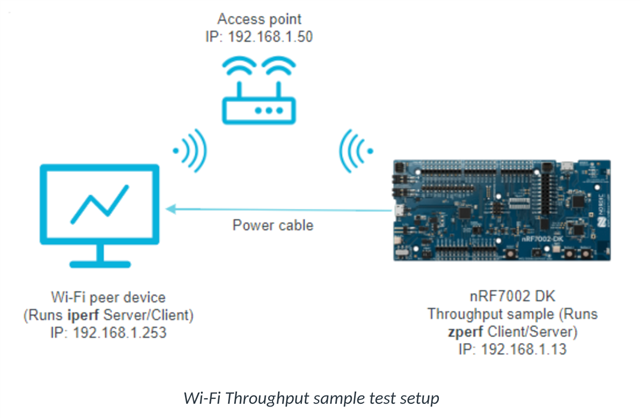
If I want to evaluate the device in AP mode, is there any samples?
Thanks!
Hi
I noticed nordic provides Wi-Fi: Throughput to evaluate the throughput when device is working in STA mode.
If I want to evaluate the device in AP mode, is there any samples?
Thanks!

Can this sample evaluate the throuhhput? I didn't see the

Ah sorry I guess I overlooked the throughput part of your question. No, I guess this sample doesn't have an easy way to allow for that.
You could try to modify the sample and add features from the throughput sample. Though I'll ask the relevant R&D team if they have any other suggestions. I'll get back to you once I hear from them - presumably next week.
Regards and have a good week-end,
Elfving
Ah sorry I guess I overlooked the throughput part of your question. No, I guess this sample doesn't have an easy way to allow for that.
You could try to modify the sample and add features from the throughput sample. Though I'll ask the relevant R&D team if they have any other suggestions. I'll get back to you once I hear from them - presumably next week.
Regards and have a good week-end,
Elfving
Thank you!
Hi again,
So you can use the throughput sample for measuring the AP mode throughputs as well - just use the DK in SoftAP mode and use zperf shell command in the place of iperf (used with the COTS AP + connected PC).
Regards,
Elfving
Hi
Could you give me more details? How could we use the DK in AP mode? Does it simply turn on CONFIG_NRF70_AP_MODE = y in the project config?
#
# Copyright (c) 2023 Nordic Semiconductor ASA
#
# SPDX-License-Identifier: LicenseRef-Nordic-5-Clause
#
CONFIG_WIFI=y
CONFIG_WIFI_NRF70=y

# WPA supplicant
CONFIG_WIFI_NM_WPA_SUPPLICANT=y
CONFIG_NET_L2_WIFI_SHELL=y

CONFIG_NET_ZPERF=y
CONFIG_NET_ZPERF_SERVER=y

# Networking
CONFIG_NETWORKING=y
CONFIG_NET_SOCKETS=y
CONFIG_NET_LOG=y
CONFIG_NET_IPV6=y
CONFIG_NET_IPV4=y
CONFIG_NET_UDP=y
CONFIG_NET_TCP=y
CONFIG_NET_DHCPV4=y
CONFIG_DNS_RESOLVER=y

CONFIG_NET_STATISTICS=y
CONFIG_NET_STATISTICS_WIFI=y
CONFIG_NET_STATISTICS_USER_API=y

CONFIG_NET_PKT_RX_COUNT=8
CONFIG_NET_PKT_TX_COUNT=8

# Below section is the primary contributor to SRAM and is currently
# tuned for performance, but this will be revisited in the future.
CONFIG_NET_BUF_RX_COUNT=16
CONFIG_NET_BUF_TX_COUNT=16
CONFIG_NRF70_RX_NUM_BUFS=16
CONFIG_NRF70_MAX_TX_AGGREGATION=4
CONFIG_NET_TC_TX_COUNT=1

CONFIG_NET_IF_UNICAST_IPV6_ADDR_COUNT=4
CONFIG_NET_IF_MCAST_IPV6_ADDR_COUNT=5
CONFIG_NET_MAX_CONTEXTS=5
CONFIG_NET_CONTEXT_SYNC_RECV=y

CONFIG_INIT_STACKS=y

CONFIG_NET_L2_ETHERNET=y
CONFIG_NET_SHELL=y
CONFIG_NET_SOCKETS_POLL_MAX=12

# Memories
CONFIG_MAIN_STACK_SIZE=5200
CONFIG_SHELL_STACK_SIZE=5200
CONFIG_NET_TX_STACK_SIZE=4096
CONFIG_NET_RX_STACK_SIZE=4096

# Debugging
CONFIG_STACK_SENTINEL=y
CONFIG_DEBUG_COREDUMP=y
CONFIG_DEBUG_COREDUMP_BACKEND_LOGGING=y
CONFIG_DEBUG_COREDUMP_MEMORY_DUMP_MIN=y
CONFIG_SHELL_CMDS_RESIZE=n
#CONFIG_DEBUG=y
CONFIG_WIFI_NM_WPA_SUPPLICANT_LOG_LEVEL_INF=y

# Kernel options
CONFIG_ENTROPY_GENERATOR=y

# Logging
CONFIG_LOG=y
CONFIG_PRINTK=y
CONFIG_SHELL=y
CONFIG_SHELL_GETOPT=y
CONFIG_DEVICE_SHELL=y
CONFIG_POSIX_TIMERS=y
CONFIG_DATE_SHELL=y
CONFIG_NET_CONFIG_AUTO_INIT=n

CONFIG_WIFI_CREDENTIALS=y
CONFIG_FLASH=y
CONFIG_FLASH_PAGE_LAYOUT=y
CONFIG_FLASH_MAP=y
CONFIG_NVS=y
CONFIG_SETTINGS=y
CONFIG_SETTINGS_NVS=y

# printing of scan results puts pressure on queues in new locking
# design in net_mgmt. So, use a higher timeout for a crowded
# environment.
CONFIG_NET_MGMT_EVENT_QUEUE_TIMEOUT=5000
Here are some configs that have been used for this in the past:
Sta compilation command - nrf/samples/wifi/shell
west build -p -b nrf7002dk/nrf5340/cpuapp -- -DEXTRA_CONF_FILE=overlay-zperf.conf -DCONFIG_NET_PKT_BUF_TX_DATA_POOL_SIZE=20000 -DCONFIG_NET_PKT_BUF_RX_DATA_POOL_SIZE=90000 -DCONFIG_NRF70_RX_NUM_BUFS=64
cat overlay-zperf.conf
CONFIG_NET_ZPERF=y
CONFIG_NET_ZPERF_SERVER=y
CONFIG_ZVFS_OPEN_MAX=20
# Zperf TCP=6, UDP=2, Others=1
CONFIG_NET_SOCKETS_POLL_MAX=20
# Sockets: select + poll take up more stack
CONFIG_MAIN_STACK_SIZE=5200
CONFIG_SHELL_STACK_SIZE=5200
CONFIG_NET_MGMT_EVENT_STACK_SIZE=4600

# Optimized networking settings for performance
CONFIG_NET_PKT_RX_COUNT=64
CONFIG_NET_PKT_TX_COUNT=8
CONFIG_NET_BUF_RX_COUNT=64
CONFIG_NET_BUF_TX_COUNT=16
CONFIG_HEAP_MEM_POOL_SIZE=40144
CONFIG_NRF_WIFI_CTRL_HEAP_SIZE=20000
CONFIG_NRF_WIFI_DATA_HEAP_SIZE=180000
CONFIG_NRF70_QSPI_LOW_POWER=n
# To enable optimization configuration options
CONFIG_PICOLIBC_USE_MODULE=y
CONFIG_SPEED_OPTIMIZATIONS=y

# Necessary for zperf_tcp_receiver.c
CONFIG_NET_CONFIG_SETTINGS=y
CONFIG_NET_CONFIG_INIT_TIMEOUT=0

# Zephyr NET Connection Manager Connectivity layer.
CONFIG_NET_CONNECTION_MANAGER=n

# Consumes more memory
CONFIG_WIFI_CREDENTIALS=n
CONFIG_FLASH=n
CONFIG_NVS=n
CONFIG_SETTINGS=n
CONFIG_NRF70_UTIL=y

# Disable rate limiting to avoid log flooding (default is drop)
CONFIG_LOG_RATELIMIT=n
SAP compilation command nrf/samples/wifi/shell
west build -p -b nrf7002dk/nrf5340/cpuapp -- -DCONFIG_NET_DHCPV4_SERVER=y -DCONFIG_NET_ZPERF_SERVER=y -DCONFIG_NET_PKT_BUF_TX_DATA_POOL_SIZE=90000 -DCONFIG_NET_PKT_BUF_RX_DATA_POOL_SIZE=13000 -DOVERLAY_CONFIG=overlay-sap.conf -DCONFIG_NRF70_RX_NUM_BUFS=16cat overlay-sap.conf
CONFIG_NRF70_AP_MODE=y
CONFIG_WIFI_NM_WPA_SUPPLICANT_AP=y

CONFIG_NET_ZPERF=y
CONFIG_NET_ZPERF_SERVER=y
CONFIG_ZVFS_OPEN_MAX=16
# Optimized networking settings for performance
CONFIG_NET_PKT_RX_COUNT=8
CONFIG_NET_PKT_TX_COUNT=64
CONFIG_NET_BUF_RX_COUNT=8
CONFIG_NET_BUF_TX_COUNT=128
CONFIG_HEAP_MEM_POOL_SIZE=43000
CONFIG_NRF_WIFI_CTRL_HEAP_SIZE=20000
CONFIG_NRF_WIFI_DATA_HEAP_SIZE=180000
CONFIG_NRF70_QSPI_LOW_POWER=n
CONFIG_NET_ZPERF_MAX_PACKET_SIZE=1500

# Necessary for zperf_tcp_receiver.c
CONFIG_NET_CONFIG_SETTINGS=y
CONFIG_NET_CONFIG_INIT_TIMEOUT=0

# Zephyr NET Connection Manager Connectivity layer.
CONFIG_NET_CONNECTION_MANAGER=n

# Consumes more memory
CONFIG_WIFI_CREDENTIALS=n
CONFIG_FLASH=n
CONFIG_NVS=n
CONFIG_SETTINGS=n

# IP is mandatory for successful STA connection
CONFIG_NET_CONFIG_MY_IPV4_ADDR="192.168.1.1"
CONFIG_NET_CONFIG_MY_IPV4_NETMASK="255.255.255.0"
CONFIG_NET_CONFIG_MY_IPV4_GW="192.168.1.1"

# Disable DHCPv4 client
CONFIG_NET_DHCPV4=n
# Enable DHCPv4 server
CONFIG_NET_DHCPV4_SERVER=y

# Temporarily enable FS support so that linking succeeds.
CONFIG_FILE_SYSTEM=y

CONFIG_MBEDTLS_HEAP_SIZE=1024
Zperf commands
STA- UDP-RX- zperf udp download 8001
SAP- UDP-TX - zperf udp upload 192.168.1.2 8001 10 1472 20M
Regards,
Elfving