VSCode debug failure

Environment:

- Board: nRF54L15-DK (v0.9.2)
- SDK & Toolchain: nRF Connect SDK v3.1.0
- VS Code: v1.105.1
- nRF Connect for VS Code Extension: v2025.9.798
- Host PC: Windows 10

I built the "Hello World" sample from Zephyr using the build configuration with optimization level set to Optimize for debugging (-Og), and flashed it onto the nRF54L15-DK.
When I started debugging in VS Code, the following error message popped up:

> Unable to start debugging. GDB exited unexpectedly with exit code -3 (0xFFFFFFFD). Could not connect to target. No target voltage detected or connection failed.

This issue occurred on two different DK boards. After the failure, the USB driver on my Windows PC seemed to change unexpectedly, and the PC no longer recognized the USB ports on the DKs.
I used J-Link Configurator (J-Link config.exe) to check the driver, and found that the USB driver had switched from SEGGER to WinUSB. After restoring it back to SEGGER, USB communication was recovered.


Question:
How can I debug properly with this setup? Is there any recommended configuration or workaround to avoid this issue?

Parents Reply
  • Yes. I have been able to program the nRF54L15DK before.

    Recently, I updated the SDK and toolchain from v3.0.2 to v3.1.0, and to verify the issue,

    I switched back to v3.0.2.

    Using the same "Hello world" sample, I built, flashed and debugged it.

    And it worked correctly.

    Note that while using SDK v3.1.0, I could build and flashed to the DK correctly. The issue is that the error causes when I try to debug it.

Children
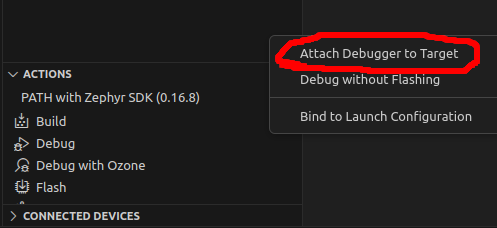
  • Can you try to flash the DK as normal, and then debug using "Attach Debugger to Target".

    I suggest this as step to test to see what is wrong, and possible workaround. But not as a permanent fix.

  • This could possible be due to JLink version.
    Can you check your JLink version, and update it if it is old.

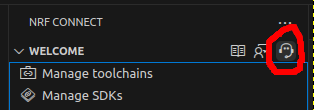
    If that does not work, use "Generate Support Information" and upload the (possibly edited) generated file.

  • I just updated SEGGER JLink to the latest (v8.84), and after that, the dbugger worked successfully.

    This matches the information in the link below.

    https://devzone.nordicsemi.com/f/nordic-q-a/124514/could-not-connect-to-target-when-use-gdb-debug-in-vscode?ReplyFilter=Answers&ReplySortBy=Answers&ReplySortOrder=Descending

    However, I encountered an issue: I could not easily update J-Link in C://Program Files/SEGGER due to security restrictions.

    I would prefer to install it in the user-space, such as C://Users/XXXX...

    Is there any option or possibility to change the auto-search directory from C://Program Files/SEGGER to a user-space loaciton?

    {
      "tools": {
        "C:\\Program Files\\SEGGER\\JLink_V884\\JLink.exe": "8.84",
        "D:\\ncs\\toolchains\\b8b84efebd\\nrfutil": "8.1.0",
        "D:\\ncs\\toolchains\\b8b84efebd\\cmake": "3.21.0",
        "D:\\ncs\\toolchains\\b8b84efebd\\opt\\bin\\Scripts\\west.exe": "1.4.0",
        "D:\\ncs\\toolchains\\b8b84efebd\\opt\\bin\\python.exe": "3.12.4",
        "D:\\ncs\\toolchains\\b8b84efebd\\opt\\bin\\ninja.exe": "1.10.2",
        "D:\\ncs\\toolchains\\b8b84efebd\\opt\\bin\\gperf.exe": "3.1",
        "D:\\ncs\\toolchains\\b8b84efebd\\opt\\bin\\dtc.exe": "1.4.7",
        "D:\\ncs\\toolchains\\b8b84efebd\\opt\\bin\\gn.exe": "2223",
        "D:\\ncs\\toolchains\\b8b84efebd\\mingw64\\bin\\git.exe": "git version 2.37.3.",
        "debugger (arm)": "d:\\ncs\\toolchains\\b8b84efebd\\opt\\zephyr-sdk\\arm-zephyr-eabi\\bin\\arm-zephyr-eabi-gdb.exe",
        "debugger (riscv)": "d:\\ncs\\toolchains\\b8b84efebd\\opt\\zephyr-sdk\\riscv64-zephyr-elf\\bin\\riscv64-zephyr-elf-gdb.exe"
      },
      "nrfutil": {
        "nrfutil-device": {
          "version": "2.13.1",
          "binPath": "c:\\Users\\XXXXXX\\.vscode\\extensions\\nordic-semiconductor.nrf-connect-2025.9.798-win32-x64\\platform\\nrfutil\\bin\\nrfutil-device",
          "jlinkInfo": {
            "description": "This version of SEGGER J-Link is different from the J-Link version that was used to test nrfutil device commands",
            "expectedVersion": {
              "version": "JLink_V8.60",
              "versionFormat": "string"
            },
            "name": "JlinkARM",
            "version": "JLink_V8.84",
            "versionFormat": "string"
          }
        },
        "nrfutil-sdk-manager": {
          "version": "1.6.2",
          "binPath": "c:\\Users\\XXXXXX\\.vscode\\extensions\\nordic-semiconductor.nrf-connect-2025.9.798-win32-x64\\platform\\nrfutil\\bin\\nrfutil-sdk-manager"
        }
      },

    In the generated support information above, JLink.exe ver8.84 is auto-searched after the installation.

  • I think that nrfutil will find JLink as long as JLink is in the PATH. 
    If you try to move JLink to your user-space, and then update windows Environement Variables to point to its install location, that might work.
    Could you try this and let me know how it goes?

Related