Power supply Config. 6 and software define

Hi,
I used in my hw design Config. 6 for nRF52840 QIAA aQFN73

https://docs.nordicsemi.com/bundle/ps_nrf52840/page/ref_circuitry.html#ariaid-title7 

The question is how to activate this configuration in the Zephyr software?

As I understand I should disable HV and DCDC. I tried to flash a few configurations, but NR52 stuck on start.
And the only way to reflash again is to apply to DEC4 1.3V.  

Parents
  • Hi,

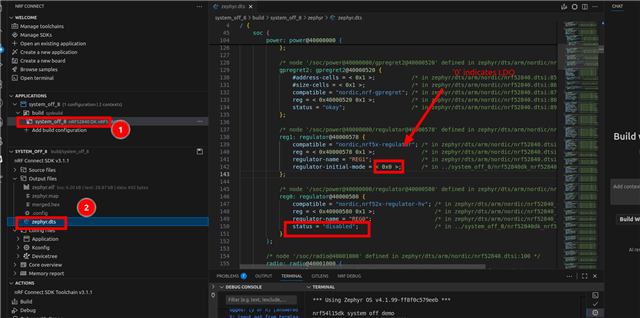
    If you're building for the nRF52840DK/nrf52840 target you can create a file named nrf52840dk_nrf52840 in your project root directory with the following content which overrides the default regulator configuration for this board to match your HW:

    &reg0 {
        status = "disabled";
    };
    
    &reg1 {
        regulator-initial-mode = <NRF5X_REG_MODE_LDO>;
    };

    Then do a pristine/clean build which is needed to allow the build system to detect that the new devictree overlay file has been added. You can also check the zephyr.dts output after completing the build to verify that the changes took effect:

    If you don't have the optional 32KHz crystal, you will also need to change the default clock source from LFXO to LFRC by adding CONFIG_CLOCK_CONTROL_NRF_K32SRC_RC=y to your project configuration (prj.conf) file.

    Best regards,

    Vidar

  • Thanks
    Works great for Zephyr SDK 3.1.1

    Could you please advise how to enable LDO in SDK 2.5.3? It's old, and there is no &reg0 and &reg1

Reply Children
Related