nrf_crypto_ecdsa_verify fails when verifying signature in custom bootloader

Hi,

I am implementing a custom bootloader on an nRF52840. The firmware update is downloaded while the main application is running. The flow is as follows:

  1. The application receives update information over MQTT (version, firmware size, hash, signature, and URL).

  2. The application downloads the new firmware from the given URL into external flash.

  3. The metadata (hash + signature + version info) is stored in the bootloader settings area.

  4. The device is reset.

  5. On startup, the bootloader checks if new firmware exists in the external flash region.

  6. The bootloader calculates the hash of the firmware and compares it with the stored hash.

  7. If the hash matches, the bootloader attempts to verify the signature using nrf_crypto_ecdsa_verify().

Issue:

The call to nrf_crypto_ecdsa_verify() always fails. I am using curve SECP256R1.
I have tried:

  • Swapping public key and signature endianness (both LE and BE).

  • Splitting the signature and key into two 32-byte components and swapping individually.

  • Confirming the hash is correct. (Comparing the saved and calculated hash succeeds)

To validate the correctness of hash, signature, and public key, I wrote a Python script using cryptography.hazmat.primitives.asymmetric.ec with SECP256R1, and there the verification succeeds. So the signature and data are correct.

Questions:

  1. Does nrf_crypto_ecdsa_verify expect the hash, signature, and key in raw big-endian or little-endian format?

  2. For the public key, should it be passed as a concatenated buffer [X || Y] or in some other internal representation?

  3. For the signature, should it be provided as raw 64 bytes (r || s), or DER encoded?

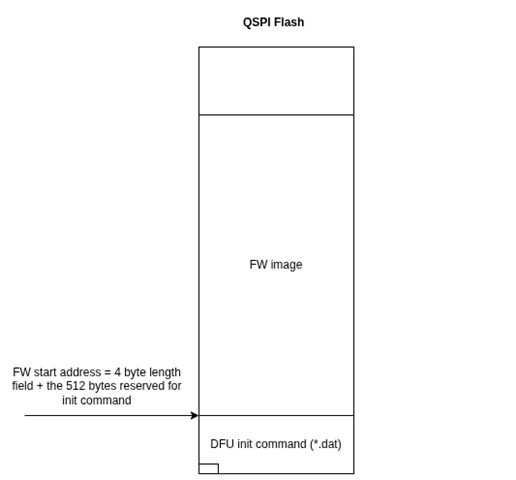
  • Thanks for the update. Yes, the original nRF5 SDK bootloader doesn’t include support for external memory, but it’s easier for me at least to help troubleshoot if you’re using this project as a starting point. I’m not sure if you’ve tried modifying the original version to validate the init command instead of the firmware image. nrfutil is signing the content of the *.dat file contained in the zip.

  • Thanks for the help! I believe I understand the theory and have some insight into what might be causing the issue with confirming the signature using the public key.

    Practically, however, I’m still a bit stuck and unsure about how to implement it correctly. After discussing with my tech lead, we’ve decided to take a step back and start from the secure bootloader example provided by Nordic. From there, we hope to collaborate with an expert to plan the best path forward for achieving the functionality we need in our custom bootloader.

    Thanks again for your guidance so far.

  • It sounds like you’ve already made good progress. Since you are using our bootloader now I created a small test demo based on it where I use the onboard QSPI flash on the nRF52840 DK to stage the firmware update, and then have the bootloader validate and activate it.

    nrf5_sdk_ext_flash_dfu.zip

  • Hi!

    Thanks again for the help. The ZIP file you provided was very useful. I’ve now successfully completed the following:

    1. Placed the combined HEX in the external flash

    2. Started the bootloader

    3. Bootloader verifies the init package

    4. Bootloader copies the firmware from external flash into Bank 0

    5. Bootloader jumps to the application

    6. The application runs correctly

    I did run into a small issue in the postvalidate_ext_flash function.
    I had to change:

    uint32_t ext_addr = INIT_COMMAND_MAX_SIZE + 4;

    to:

    uint32_t ext_addr = init_cmd_length + 4;

    so that the firmware is copied from the correct address.


    Now we’re looking into what options we have for always keeping a factory firmware stored and ready to boot into if a newly updated firmware crashes repeatedly.

    Our first thought was to use Bank 0 and Bank 1 alternately—e.g., if Bank 0 was last active and a new firmware update arrives, place it into Bank 1 and run it from there. However, I ran into the issue that the firmware build requires a linker script configured for the exact address where the firmware will be placed. Some things that depend on the linker script include:

    • Code/text section (absolute jumps like BL, B, LDR PC)

    • Static/global variables (.data/.bss) – RAM placement

    • Literal pools / constant tables

    Because of that, we’re now considering a slightly different approach:

    • Keep a known-good factory firmware permanently stored in either Bank 0 or Bank 1

    • Use the other bank as the active “updatable” firmware

    • If the new firmware fails (e.g., repeated crashes), the bootloader can fall back to the factory firmware automatically

    This would give us a “bulletproof” recovery option, since our bootloader differs from the original design where new firmware is downloaded directly by the bootloader.

    What do you think of this approach?
    Is there a recommended pattern for maintaining a permanent factory firmware alongside an updatable application when the bootloader does not handle the download process itself?

    Thanks again for your assistance!

  • Hi! 

    It's great to hear that you are able to validate the update now using the DFU init command. 

    Jonas S Andersen said:
    I did run into a small issue in the postvalidate_ext_flash function.

    Yes, this was specific to the memory layout I ended up using. I should have made that more clear. 

    Is bank 1 in external or internal flash? Either way, as you noted, the code is not position independent. For this reason, updates have to be copied to bank 0 as a part of the FW activation process. To have a possible fallback option you could "swap" the images to let the old application remains available in external flash in case you need to recover. This approach is used by MCUBoot, an open source bootloader we use in our nRF connect SDK: https://docs.nordicsemi.com/bundle/ncs-latest/page/mcuboot/design.html#swap_using_offset_without_using_scratch. Having a "golden image" also sounds like a good solution. It’s hard to tell which one is better.  The nRF5 SDK bootloader does not rely on either of these approaches as shown in the documentation linked below, but it has also been proven to work well.

    https://docs.nordicsemi.com/bundle/sdk_nrf5_v17.1.0/page/lib_bootloader_dfu_banks.html 

Related