Broadcast Audio Source application not recognised by Samsung Galaxy Tab S11 and Buds3 Pro

I have programmed an nRF5340 DK with the Auracast Broadcast Audio Source application. I have a pair of Samsung Galaxy Buds3 Pro paired with a Samsung Galaxy Tab S11 running Android 16 and One UI version 8.0.

When I select Listen to Auracast Broadcasts on the S11, it says 'No broadcasts found'.

What else needs to be done please?

Parents Reply Children
  • Hi Dejan,

    Just to be sure, I created a new sample application using the v3.1.1 SDK and toolchain.

    The sample application is bap_broadcast_source

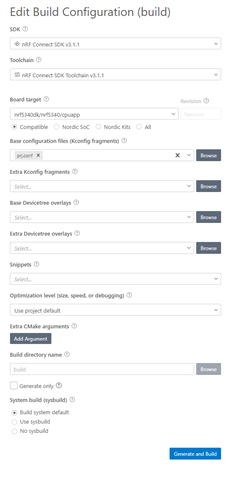
    This is the build configuration:

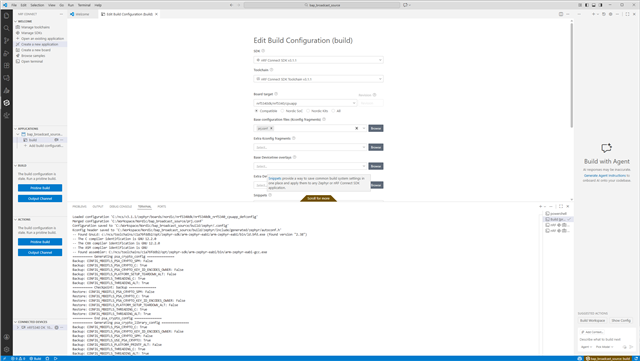
    The build completes successfully:

     *  Executing task: nRF Connect: Build [pristine]: bap_broadcast_source/build (active) 
    
    Building bap_broadcast_source
    west build --build-dir c:/workspace/Nordic/bap_broadcast_source/build c:/workspace/Nordic/bap_broadcast_source --pristine --board nrf5340dk/nrf5340/cpuapp --no-sysbuild -- -DCONF_FILE="prj.conf"
    
    -- west build: generating a build system
    Loading Zephyr default modules (Zephyr base).
    -- Application: C:/Workspace/Nordic/bap_broadcast_source
    -- CMake version: 3.21.0
    -- Found Python3: C:/ncs/toolchains/c1a76fddb2/opt/bin/python.exe (found suitable version "3.12.4", minimum required is "3.10") found components: Interpreter
    -- Cache files will be written to: C:/ncs/v3.1.1/zephyr/.cache
    -- Zephyr version: 4.1.99 (C:/ncs/v3.1.1/zephyr)
    -- Found west (found suitable version "1.4.0", minimum required is "0.14.0")
    -- Board: nrf5340dk, qualifiers: nrf5340/cpuapp
    -- Found host-tools: zephyr 0.17.0 (C:/ncs/toolchains/c1a76fddb2/opt/zephyr-sdk)
    -- Found toolchain: zephyr 0.17.0 (C:/ncs/toolchains/c1a76fddb2/opt/zephyr-sdk)
    -- Found Dtc: C:/ncs/toolchains/c1a76fddb2/opt/bin/dtc.exe (found suitable version "1.4.7", minimum required is "1.4.6")
    -- Found BOARD.dts: C:/ncs/v3.1.1/zephyr/boards/nordic/nrf5340dk/nrf5340dk_nrf5340_cpuapp.dts
    -- Found devicetree overlay: C:/Workspace/Nordic/bap_broadcast_source/boards/nrf5340dk_nrf5340_cpuapp.overlay
    -- Generated zephyr.dts: C:/Workspace/Nordic/bap_broadcast_source/build/zephyr/zephyr.dts
    -- Generated pickled edt: C:/Workspace/Nordic/bap_broadcast_source/build/zephyr/edt.pickle
    -- Generated devicetree_generated.h: C:/Workspace/Nordic/bap_broadcast_source/build/zephyr/include/generated/zephyr/devicetree_generated.h
    Parsing C:/Workspace/Nordic/bap_broadcast_source/Kconfig
    Loaded configuration 'C:/ncs/v3.1.1/zephyr/boards/nordic/nrf5340dk/nrf5340dk_nrf5340_cpuapp_defconfig'
    Merged configuration 'C:/Workspace/Nordic/bap_broadcast_source/prj.conf'
    Configuration saved to 'C:/Workspace/Nordic/bap_broadcast_source/build/zephyr/.config'
    Kconfig header saved to 'C:/Workspace/Nordic/bap_broadcast_source/build/zephyr/include/generated/zephyr/autoconf.h'
    -- Found GnuLd: c:/ncs/toolchains/c1a76fddb2/opt/zephyr-sdk/arm-zephyr-eabi/arm-zephyr-eabi/bin/ld.bfd.exe (found version "2.38")
    -- The C compiler identification is GNU 12.2.0
    -- The CXX compiler identification is GNU 12.2.0
    -- The ASM compiler identification is GNU
    -- Found assembler: C:/ncs/toolchains/c1a76fddb2/opt/zephyr-sdk/arm-zephyr-eabi/bin/arm-zephyr-eabi-gcc.exe
    =========== Generating psa_crypto_config ===============
    Backup: CONFIG_MBEDTLS_PSA_CRYPTO_SPM: False
    Backup: CONFIG_MBEDTLS_PSA_CRYPTO_C: True
    Backup: CONFIG_MBEDTLS_PSA_CRYPTO_KEY_ID_ENCODES_OWNER: False
    Backup: CONFIG_MBEDTLS_PLATFORM_SETUP_TEARDOWN_ALT: False
    Backup: CONFIG_MBEDTLS_THREADING_C: True
    Backup: CONFIG_MBEDTLS_THREADING_ALT: True
    =========== Checkpoint: backup ===============
    Restore: CONFIG_MBEDTLS_PSA_CRYPTO_SPM: False
    Restore: CONFIG_MBEDTLS_PSA_CRYPTO_C: True
    Restore: CONFIG_MBEDTLS_PSA_CRYPTO_KEY_ID_ENCODES_OWNER: False
    Restore: CONFIG_MBEDTLS_PLATFORM_SETUP_TEARDOWN_ALT: False
    Restore: CONFIG_MBEDTLS_THREADING_C: True
    Restore: CONFIG_MBEDTLS_THREADING_ALT: True
    =========== End psa_crypto_config ===============
    =========== Generating psa_crypto_library_config ===============
    Backup: CONFIG_MBEDTLS_PSA_CRYPTO_C: True
    Backup: CONFIG_MBEDTLS_PSA_CRYPTO_KEY_ID_ENCODES_OWNER: False
    Backup: CONFIG_MBEDTLS_PSA_CRYPTO_SPM: False
    Backup: CONFIG_MBEDTLS_USE_PSA_CRYPTO: True
    Backup: CONFIG_MBEDTLS_PLATFORM_PRINTF_ALT: False
    Backup: CONFIG_MBEDTLS_THREADING_C: True
    Backup: CONFIG_MBEDTLS_THREADING_ALT: True
    =========== Checkpoint: backup ===============
    Restore: CONFIG_MBEDTLS_PSA_CRYPTO_C: True
    Restore: CONFIG_MBEDTLS_PSA_CRYPTO_KEY_ID_ENCODES_OWNER: False
    Restore: CONFIG_MBEDTLS_PSA_CRYPTO_SPM: False
    Restore: CONFIG_MBEDTLS_USE_PSA_CRYPTO: True
    Restore: CONFIG_MBEDTLS_PLATFORM_PRINTF_ALT: False
    Restore: CONFIG_MBEDTLS_THREADING_C: True
    Restore: CONFIG_MBEDTLS_THREADING_ALT: True
    =========== End psa_crypto_library_config ===============
    -- libmetal version: 1.7.0 (C:/Workspace/Nordic/bap_broadcast_source)
    -- Build type:
    -- Host:    Windows/AMD64
    -- Target:  Generic/arm
    -- Machine: arm
    -- Vendor: none
    -- Looking for include file stdatomic.h
    -- Looking for include file stdatomic.h - found
    -- open-amp version: 1.7.0 (C:/ncs/v3.1.1/modules/lib/open-amp/open-amp)
    -- Host:    Windows/AMD64
    -- Target:  Generic/arm
    -- Machine: arm
    -- C_FLAGS :  -Wall -Wextra
    -- Looking for include file fcntl.h
    -- Looking for include file fcntl.h - found
    -- Found gen_kobject_list: C:/ncs/v3.1.1/zephyr/scripts/build/gen_kobject_list.py
    -- Configuring done
    -- Generating done
    -- Build files have been written to: C:/Workspace/Nordic/bap_broadcast_source/build
    ←[92m-- west build: building application
    [4/298] Generating include/generated/zephyr/version.h
    -- Zephyr version: 4.1.99 (C:/ncs/v3.1.1/zephyr), build: ncs-v3.1.1
    [298/298] Linking C executable zephyr\zephyr.elf
    Memory region         Used Size  Region Size  %age Used
               FLASH:      188352 B         1 MB     17.96%
                 RAM:       53980 B       448 KB     11.77%
            IDT_LIST:          0 GB        32 KB      0.00%
    Generating files from C:/Workspace/Nordic/bap_broadcast_source/build/zephyr/zephyr.elf for board: nrf5340dk
     *  Terminal will be reused by tasks, press any key to close it. 

    But I am not then presented with a Flash option for the connected nRF5340 DK board:

    What am I missing please?

    Kind regards,

    Al

  • Hi,

    I have programmed an nRF5340 DK with the Auracast Broadcast Audio Source application.
    alwalker said:
    But I am not then presented with a Flash option for the connected nRF5340 DK board

    It is not clear to me if you managed to flash the sample or not? Can you clarify this?

    You can try to open Terminal window and flash from the terminal.

    Best regards,
    Dejan

  • Hi Dejan,

    I did not flash the board as no option to do so under either the Actions of Connected Board section is presented, this is the point I am querying. Once I have successfully built a project, I would normally expect to see Flash as one of the available options. Why don’t I see it please?

    Kind regards,

    Al

  • Hi Al,

    alwalker said:
    Once I have successfully built a project, I would normally expect to see Flash as one of the available options. Why don’t I see it please?

    Is this missing Flash option something that has happened recently? 
    Have you done anything of the following recently: updated VS Code, updated VS Code extension, or installed new VS Code extension (other than nRF Connect for VS Code)?
    Which versions of VS Code and nRF Connect for VS Code extension do you use?

    dejans said:
    You can try to open Terminal window and flash from the terminal.

    Have you tried flashing from the terminal? What is the result?

    Best regards,
    Dejan

  • I am running VS Code as follows:

    Version: 1.106.0 (user setup)
    Commit: ac4cbdf48759c7d8c3eb91ffe6bb04316e263c57
    Date: 2025-11-11T16:02:25.943Z
    Electron: 37.7.0
    ElectronBuildId: 12597478
    Chromium: 138.0.7204.251
    Node.js: 22.20.0
    V8: 13.8.258.32-electron.0
    OS: Windows_NT x64 10.0.26100

    nRF Connect for VS Code

    Version 2025.8.654

    The missing Flsh option happened with this project only.

    What is the syntax of the flash command that I should use from the terminal please?

Related