Dev Academy - WiFi Fundamentals - BLE Provisioning not working from iPhone.

Hi,

I've just completed Lesson 2 Exercise 3 and found that BLE Provisioning does not work from the iPhone version of the app.  The problem seems to be related to Version 2 of the firmware.  The Quick start version in the nRF Connect for Desktop 5.2.0 works fine and reports Version 1.

The problem also exists in Exercise 1 of Lesson1.

In general, the WiFi Fundamentals contains quite a few errors and would benefit from someone taking a look at it.  The errors are mostly obvious and easy to correct but cost a bit of time (and I'm only at lesson 2;-)).

SDK is v. 3.1.0.
   

Any help greatly appreciated as always.

Andy

Parents
  • Hello,

    Thank you for the feedback! It is very welcome!

    The problem seems to be related to Version 2 of the firmware

    Can you please clarify what you mean here? Version 2 of what? 

    The problem also exists in Exercise 1 of Lesson1.

    Can you please be more precise, so that we can look into this issue as well?

    the WiFi Fundamentals contains quite a few errors and would benefit from someone taking a look at it.

    Feel free to specify these as well. We strive to keep these courses up to date, so we will gladly take input.

    Best regards,

    Edvin

  • Hi Edvin,

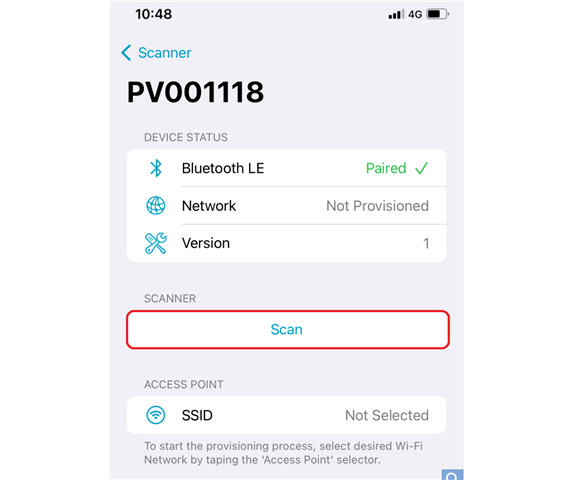
    When provisioning from the phone, a version number is shown as below.  

    In sdk 3.1.0 this has been updated to 2.  This is NOT the version of the app on the phone, rather it seems to be the API version in the sdk. 

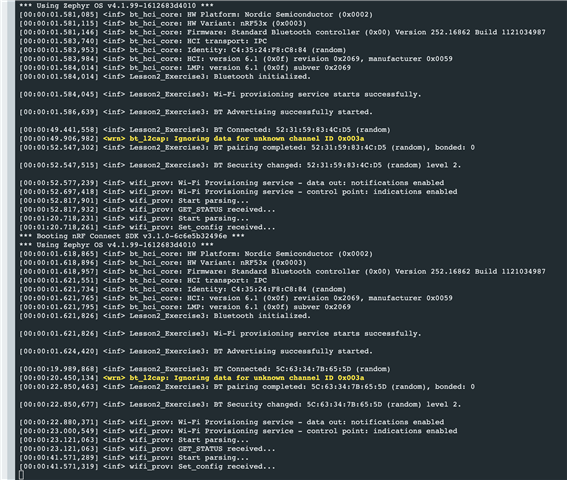
    The screen shot that I included shows that the version supplied with the Quick Start samples was compiled with sdk v.2.9.0 and works, whilst with the version in sdk 3.1.0, the DK fails to connect to the AP once provisioned.

    Exercise 1 simply requires the BLE provisioning sample to be compiled and flashed to the board.  Here the 3.1.0 sample shows Version 2 in the phone app and fails to connect. Loading the quick start version shows Version 1 and connects correctly.

    Here are some of the errors that I have found so far:

    a.  Lesson 2, Exercise 1, section 3.  WiFi shell has been updated and wifi connect has changed. The key-mgt parameters listed in the text are no longer valid.

    b.  Lesson 2, Exercise 2, section 8.2, the security type has to match the user's AP. A hint to check this would be useful.

    c.  Lesson 2, Exercise 3, section 1, the configs don't match the solution.  The solution is correct.

    None of these are huge problems and I appreciate how difficult it is to keep everything up to date, but the provisioning is a big irritation at the moment as I would like to understand this and move forward with the course.

    All the best,

    Andy    

  • I forgot to mention that my ios app version is 2.1.1 build 23.

Reply Children
Related