This discussion has been locked.
You can no longer post new replies to this discussion. If you have a question you can start a new discussion

UART config rejected with error -134

Hi, I have an Adafruit Feather nRF52840 which I'm programming using SDK 3.1.1. I want the following UART config but it is being rejected with error -134 which I believe means "Unsupported value" (defined in Zephyr's errno.h header):

#define ENOTSUP 134         /**< Unsupported value */

Here's my config:

const struct uart_config uart_cfg = {
		.baudrate = 31250,
		.parity = UART_CFG_PARITY_NONE,
		.stop_bits = UART_CFG_STOP_BITS_1,
		.data_bits = UART_CFG_DATA_BITS_8,
		.flow_ctrl = UART_CFG_FLOW_CTRL_NONE
	};
	
	
// then later....

	err = uart_configure(uart, &uart_cfg);

	if (err) {
		printk("UART config failed with error %d\n",err);
		return err;
	}
	
// and in the console I see:
//
// 00> UART config failed with error -134

What is it about my requested configuration that is unsupported? It seems pretty standard to me. FYI this is the configuration for MIDI 1.0.

Thanks as always for your support

p.s. before switching to using Zephyr I was programming the board with Circuit Python and had no problem sending data over the UART in this way.

Parents
  • Hi!

    Do you have this set?

    CONFIG_UART_USE_RUNTIME_CONFIGURE=y
  • Hi, thanks for looking into this.

    To answer your question, no I do not because according to the DevAcademy chapter on the UART driver, it is enabled by default. See https://academy.nordicsemi.com/courses/nrf-connect-sdk-fundamentals/lessons/lesson-4-serial-communication-uart/topic/uart-driver/ 

    But, I just set it, ran a pristine build and then erased and flashed and I get both the -134 result code and a BUS FAULT. Without this kconfig option, I get the -134 result but do not get the BUS FAULT.

    Here's what happens:

    00> *** Using Zephyr OS v4.1.99-ff8f0c579eeb ***
    00> Starting MIDI_TX_TEST V0.0.5
    00> UART config failed with error -134
    00> [00:00:00.557,067] <err> os: ***** BUS FAULT *****
    00> [00:00:00.557,067] <err> os:   Precise data bus error
    00> [00:00:00.557,067] <err> os:   BFAR Address: 0xffffff8e
    00> [00:00:00.557,098] <err> os: r0/a1:  0x00008660  r1/a2:  0x0000202b  r2/a3:  0x20002088
    00> [00:00:00.557,098] <err> os: r3/a4:  0x00000005 r12/ip:  0x00000000 r14/lr:  0x000021e1
    00> [00:00:00.557,128] <err> os:  xpsr:  0x00000000
    00> [00:00:00.557,128] <err> os: Faulting instruction address (r15/pc): 0x00005154
    00> [00:00:00.557,159] <err> os: >>> ZEPHYR FATAL ERROR 25: Unknown error on CPU 0
    00> [00:00:00.557,189] <err> os: Current thread: 0x20000c78 (unknown)
    00> [00:00:01.610,351] <err> os: Halting system
    00> [00:00:00.248,809] <err> os: ***** BUS FAULT *****
    00> [00:00:00.248,809] <err> os:   Precise data bus error
    00> [00:00:00.248,809] <err> os:   BFAR Address: 0xffffff8e
    00> [00:00:00.248,840] <err> os: r0/a1:  0x00008660  r1/a2:  0x0000202b  r2/a3:  0x20002088
    00> [00:00:00.248,840] <err> os: r3/a4:  0x00000005 r12/ip:  0x00000000 r14/lr:  0x000021e1
    00> [00:00:00.248,840] <err> os:  xpsr:  0x00000000
    00> [00:00:00.248,870] <err> os: Faulting instruction address (r15/pc): 0x00005154
    00> [00:00:00.248,901] <err> os: >>> ZEPHYR FATAL ERROR 25: Unknown error on CPU 0
    00> [00:00:00.248,931] <err> os: Current thread: 0x20000c78 (unknown)
    00> [00:00:00.559,356] <err> os: Halting system

  • Hi!

    bluetoothmdw said:
    To answer your question, no I do not because according to the DevAcademy chapter on the UART driver, it is enabled by default.

    Looks like it's default disabled now, ref this: https://github.com/nrfconnect/sdk-zephyr/blob/v4.0.99-ncs1/soc/nordic/Kconfig.defconfig#L40-L42 (from the git commit: Since it takes 400 bytes of code and it is rarely used disable by default this feature.)

    I tried reproducing the issue using the code below here, but it works fine for me.

    main.c 

    /*
     * Copyright (c) 2016 Intel Corporation
     *
     * SPDX-License-Identifier: Apache-2.0
     */
    
    #include <stdio.h>
    #include <zephyr/kernel.h>
    #include <zephyr/drivers/gpio.h>
    #include <zephyr/drivers/uart.h>
    
    /* 1000 msec = 1 sec */
    #define SLEEP_TIME_MS   1000
    
    /* The devicetree node identifier for the "led0" alias. */
    #define LED0_NODE DT_ALIAS(led0)
    
    /*
     * A build error on this line means your board is unsupported.
     * See the sample documentation for information on how to fix this.
     */
    static const struct gpio_dt_spec led = GPIO_DT_SPEC_GET(LED0_NODE, gpios);
    
    /* Get UART1 device */
    static const struct device *uart = DEVICE_DT_GET(DT_NODELABEL(uart1));
    
    int main(void)
    {
    	int ret;
    	int err;
    	bool led_state = true;
    
    	/* UART configuration */
    	const struct uart_config uart_cfg = {
    		.baudrate = 31250,
    		.parity = UART_CFG_PARITY_NONE,
    		.stop_bits = UART_CFG_STOP_BITS_1,
    		.data_bits = UART_CFG_DATA_BITS_8,
    		.flow_ctrl = UART_CFG_FLOW_CTRL_NONE
    	};
    
    	if (!gpio_is_ready_dt(&led)) {
    		return 0;
    	}
    
    	ret = gpio_pin_configure_dt(&led, GPIO_OUTPUT_ACTIVE);
    	if (ret < 0) {
    		return 0;
    	}
    
    	/* Check if UART device is ready */
    	if (!device_is_ready(uart)) {
    		printk("UART device not ready\n");
    		return 0;
    	}
    
    	/* Configure UART at runtime */
    	err = uart_configure(uart, &uart_cfg);
    	if (err) {
    		printk("UART config failed with error %d\n", err);
    		return err;
    	}
    
    	printk("UART configured successfully\n");
    
    	while (1) {
    		ret = gpio_pin_toggle_dt(&led);
    		if (ret < 0) {
    			return 0;
    		}
    
    		led_state = !led_state;
    		printf("LED state: %s\n", led_state ? "ON" : "OFF");
    
    		/* Transmit data over UART */
    		const char *msg = led_state ? "LED ON\r\n" : "LED OFF\r\n";
    		for (int i = 0; msg[i] != '\0'; i++) {
    			uart_poll_out(uart, msg[i]);
    		}
    
    		k_msleep(SLEEP_TIME_MS);
    	}
    	return 0;
    }
    

    prj.conf

    CONFIG_GPIO=y
    CONFIG_SERIAL=y
    
    CONFIG_UART_USE_RUNTIME_CONFIGURE=y
    

    nrf52840dk_nrf52840.overlay

    /*
     * Copyright (c) 2025
     * SPDX-License-Identifier: Apache-2.0
     */
    
    &uart1 {
    	compatible = "nordic,nrf-uarte";
    	status = "okay";
    	current-speed = <31250>;
    	pinctrl-0 = <&uart1_default>;
    	pinctrl-1 = <&uart1_sleep>;
    	pinctrl-names = "default", "sleep";
    };
    
    &pinctrl {
    	uart1_default: uart1_default {
    		group1 {
    			psels = <NRF_PSEL(UART_TX, 1, 1)>;  /* P1.01 = Arduino D7 */
    		};
    		group2 {
    			psels = <NRF_PSEL(UART_RX, 1, 2)>;  /* P1.02 = Arduino D6 */
    			bias-pull-up;
    		};
    	};
    
    	uart1_sleep: uart1_sleep {
    		group1 {
    			psels = <NRF_PSEL(UART_TX, 1, 1)>,
    				<NRF_PSEL(UART_RX, 1, 2)>;
    			low-power-enable;
    		};
    	};
    };
    

  • Hi Sigurd

    Thanks again for looking at this. Yes, it looks like the default value of CONFIG_UART_USE_RUNTIME_CONFIGURE has changed. Knowing that is a step forward!

    I also see you used uart1 whereas my original code was using uart0 (I should have shared all of my code). I now understand that uart0 is associated with USB whereas I want to use serial communication via the header pins of my board to which I have a daughter board connected (a "Wing" in Adafruit speak).

    What led me to use uart0 though was seeing this dtsi file for the Adafruit Feather nRF52840:

    /*
     * Copyright (c) 2020 Richard Osterloh <[email protected]>
     *
     * SPDX-License-Identifier: Apache-2.0
     */
    
    / {
    	feather_header: connector {
    		compatible = "adafruit-feather-header";
    		#gpio-cells = <2>;
    		gpio-map-mask = <0xffffffff 0xffffffc0>;
    		gpio-map-pass-thru = <0 0x3f>;
    		gpio-map = <0 0 &gpio0 4 0>,	/* A0 */
    			   <1 0 &gpio0 5 0>,	/* A1 */
    			   <2 0 &gpio0 30 0>,	/* A2 */
    			   <3 0 &gpio0 28 0>,	/* A3 */
    			   <4 0 &gpio0 2 0>,	/* A4 */
    			   <5 0 &gpio0 3 0>,	/* A5 */
    			   <6 0 &gpio0 14 0>,	/* SCK */
    			   <7 0 &gpio0 13 0>,	/* MOSI */
    			   <8 0 &gpio0 15 0>,	/* MISO */
    			   <9 0 &gpio0 24 0>,	/* RXD */
    			   <10 0 &gpio0 25 0>,	/* TXD */
    			   <11 0 &gpio0 10 0>,	/* D2 (NFC2) */
    			   <12 0 &gpio0 12 0>,	/* SDA */
    			   <13 0 &gpio0 11 0>,	/* SCL */
    			   <14 0 &gpio1 8 0>,	/* D5 */
    			   <15 0 &gpio0 7 0>,	/* D6 */
    			   <16 0 &gpio0 26 0>,	/* D9 */
    			   <17 0 &gpio0 27 0>,	/* D10 */
    			   <18 0 &gpio0 6 0>,	/* D11 */
    			   <19 0 &gpio0 8 0>,	/* D12 */
    			   <20 0 &gpio1 9 0>;	/* D13 */
    	};
    };
    
    feather_serial: &uart0 {};
    feather_i2c: &i2c0 {};
    feather_spi: &spi1 {};
    

    Since I want to communicate via the pins in the header, I thought this was the way to go and I'm somewhat confused by this DTS definition now since it seems to associated uart0 with the header pins.

    Your code doesn't produce the error I was experiencing. But I don't see any sign of communication taking place via my daughter board. It has an LED that is supposed to indicate activity. I've modified your overlay so that afaik the appropriate pins for TX/RX are selected:

    /*
     * Copyright (c) 2025
     * SPDX-License-Identifier: Apache-2.0
     */
    
    &uart1 {
    	compatible = "nordic,nrf-uarte";
    	status = "okay";
    	current-speed = <31250>;
    	pinctrl-0 = <&uart1_default>;
    	pinctrl-1 = <&uart1_sleep>;
    	pinctrl-names = "default", "sleep";
    };
    
    &pinctrl {
    	uart1_default: uart1_default {
    		group1 {
    			psels = <NRF_PSEL(UART_TX, 1, 10)>;
    		};
    		group2 {
    			psels = <NRF_PSEL(UART_RX, 1, 9)>; 
    			bias-pull-up;
    		};
    	};
    
    	uart1_sleep: uart1_sleep {
    		group1 {
    			psels = <NRF_PSEL(UART_TX, 1, 10)>,
    				<NRF_PSEL(UART_RX, 1, 9)>;
    			low-power-enable;
    		};
    	};
    };

    I used this information to determine that pins 24 and 25 should be used.

    https://learn.adafruit.com/introducing-the-adafruit-nrf52840-feather/pinouts 

    I've checked my physical connections and see no problem at that level. Tbh I'm a bit lost now :-(

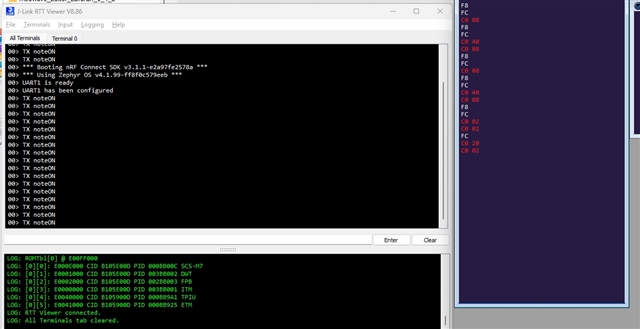
  • I started again. The following code is successfully transmitting data to my PC via a cable connected to the daughter board. No errors are returned during device configuration. But the data values reported at the PC end are not the same as those transmitted from my code.

    // main.c
    #include <zephyr/kernel.h>
    #include <zephyr/drivers/uart.h>
    
    /* Get UART1 device */
    static const struct device *uart = DEVICE_DT_GET(DT_NODELABEL(uart1));
    
    static uint8_t noteON [3] = {144, 48, 100};
    static uint8_t noteOFF [3] = {128, 48, 100};
    
    int main(void)
    {
            if (!device_is_ready(uart)) {
                    printk("ERROR: uart1 is not ready\n");
                    return -1;
            }
            printk("UART1 is ready\n");
    	/* UART configuration */
    	const struct uart_config uart_cfg = {
    		.baudrate = 31250,
    		.parity = UART_CFG_PARITY_NONE,
    		.stop_bits = UART_CFG_STOP_BITS_1,
    		.data_bits = UART_CFG_DATA_BITS_8,
    		.flow_ctrl = UART_CFG_FLOW_CTRL_NONE
    	};
    
            int ret = uart_configure(uart, &uart_cfg);
            if (ret < 0) {
                    printk("ERROR configuring UART: %d",ret);
                    return ret;
            }
    
            printk("UART1 has been configured\n");
            while (1) {
                    uart_poll_out(uart, noteON[0]);
                    uart_poll_out(uart, noteON[1]);
                    uart_poll_out(uart, noteON[2]);
                    printk("TX noteON\n");
                    k_msleep(1000);
     
                    uart_poll_out(uart, noteOFF[0]);
                    uart_poll_out(uart, noteOFF[1]);
                    uart_poll_out(uart, noteOFF[2]);
                    printk("TX noteON\n");
                    k_msleep(1000);
            }
    
            return 0;
    }
    
    // overlay
    
    /*
     * Copyright (c) 2025
     * SPDX-License-Identifier: Apache-2.0
     */
    
    &uart1 {
    	compatible = "nordic,nrf-uarte";
    	status = "okay";
    	current-speed = <31250>;
    	pinctrl-0 = <&uart1_default>;
    	pinctrl-1 = <&uart1_sleep>;
    	pinctrl-names = "default", "sleep";
    };
    
    &pinctrl {
    	uart1_default: uart1_default {
    		group1 {
    			psels = <NRF_PSEL(UART_TX, 1, 10)>;
    		};
    		group2 {
    			psels = <NRF_PSEL(UART_RX, 1, 9)>; 
    			bias-pull-up;
    		};
    	};
    
    	uart1_sleep: uart1_sleep {
    		group1 {
    			psels = <NRF_PSEL(UART_TX, 1, 10)>,
    				<NRF_PSEL(UART_RX, 1, 9)>;
    			low-power-enable;
    		};
    	};
    };
    
    // prj.conf
    
    CONFIG_GPIO=y
    CONFIG_SERIAL=y
    
    CONFIG_UART_USE_RUNTIME_CONFIGURE=y
    
    CONFIG_LOG=y
    CONFIG_USE_SEGGER_RTT=y
    CONFIG_SEGGER_RTT_PRINTF_BUFFER_SIZE=512


    The fact that there is evidence of transmission of data and it being received suggests I've created a UART1 device OK and the pin selected for TX is correct (I've not looked into RX yet). 

    I can only think that the mismatch between values sent and received suggests that the serial config of the two endpoints are not the same. Are there any other possibilities? The cable I'm using is a 5-pin DIN MIDI to MIDI over USB converter and it is identified by Windows 11 as expected as a MIDI device. I've used it many times with MIDI equipment so have confidence in the cable and it being correctly registered as a device and configured by Windows. Unfortunately, Windows doesn't seem to let me get at the serial port device that sits under the MIDI device so I can't actually see the configuration. But given I know this usually works, I am not too concerned about this.

    That leaves the Zephyr end of things. Any ideas? It feels like I'm close now!

    Btw the MIDI specification says

    "The hardware MIDI interface operates at 31.25 (+/- 1%) Kbaud, asynchronous, with a start bit, 8 data bits (D0 to D7), and a stop bit. This makes a total of 10 bits for a period of 320 microseconds per serial byte. The start bit is a logical 0 (current on) and the stop bit is a logical 1 (current off). Bytes are sent LSB first".

    The only thing not explicitly defined by my code is the start bit but I'm not sure it's possible to configure this.

  • More information on this:

    My Adafruit Feather nRF52840 has a MIDI daughter board with 5-pin DIN sockets. I have its MIDI OUT connected to my PC using a special adapter cable. The USB end has active electronics which cause Windows to register it as a MIDI device. This has prevented me from engaging directly with the serial communications using (say) a terminal. Instead I use a MIDI monitor application to see the data being received.

    I've now got the Adafruit Feather connected to the serial interface of a Raspberry Pi rather than a Windows PC and have a simple script reading directly from the serial port and printing the bytes received from the Adafruit Feather. I've tried various baud rates but none result in the expected values being received and printed.

    The Adafruit Feather sends 

    static uint8_t noteON [3] = {144, 48, 100};

    and then 

    static uint8_t noteOFF [3] = {128, 48, 100};

    in an infinite loop.

    The script on the Raspberry Pi is this:

    import serial
    
    baudrates=[4800, 9600, 19200, 38400, 115200]
    num_br = len(baudrates)
    i=0
    
    while (i < num_br):
    
      br = baudrates[i]
      print("BAUDRATE: "+str(br))
      ser = serial.Serial('/dev/ttyAMA0', baudrate=br)
    
      data = ser.read(3)
      print("Decimal: "+str(data[0])+" "+str(data[1])+" "+str(data[2])+"\t\tBinary: "+format(data[0],'008b')+" "+format(data[1],'008b')+" "+format(data[2],'008b'))
    
      data = ser.read(3)
      print("Decimal: "+str(data[0])+" "+str(data[1])+" "+str(data[2])+"\t\tBinary: "+format(data[0],'008b')+" "+format(data[1],'008b')+" "+format(data[2],'008b'))
    
      data = ser.read(3)
      print("Decimal: "+str(data[0])+" "+str(data[1])+" "+str(data[2])+"\t\tBinary: "+format(data[0],'008b')+" "+format(data[1],'008b')+" "+format(data[2],'008b'))
    
      data = ser.read(3)
      print("Decimal: "+str(data[0])+" "+str(data[1])+" "+str(data[2])+"\t\tBinary: "+format(data[0],'008b')+" "+format(data[1],'008b')+" "+format(data[2],'008b'))
    
      i = i + 1
    
    print("FINISHED")

    The Serial object has the following parameters and defaults:

    classserial.Serial
    __init__(port=None, baudrate=9600, bytesize=EIGHTBITS, parity=PARITY_NONE, stopbits=STOPBITS_ONE, timeout=None, xonxoff=False, rtscts=False, write_timeout=None, dsrdtr=False, inter_byte_timeout=None, exclusive=None)

    The script overrides the default baud rate with a series of different values.

    This is the output:

    pi@raspberrypi:~/MIDI $ python ./autobaud_uart_test.py 
    BAUDRATE: 4800
    Decimal: 253 253 253		Binary: 11111101 11111101 11111101
    Decimal: 255 253 253		Binary: 11111111 11111101 11111101
    Decimal: 255 253 253		Binary: 11111111 11111101 11111101
    Decimal: 253 253 255		Binary: 11111101 11111101 11111111
    BAUDRATE: 9600
    Decimal: 239 231 231		Binary: 11101111 11100111 11100111
    Decimal: 239 255 255		Binary: 11101111 11111111 11111111
    Decimal: 231 255 239		Binary: 11100111 11111111 11101111
    Decimal: 255 231 255		Binary: 11111111 11100111 11111111
    BAUDRATE: 19200
    Decimal: 158 159 255		Binary: 10011110 10011111 11111111
    Decimal: 183 254 190		Binary: 10110111 11111110 10111110
    Decimal: 151 254 159		Binary: 10010111 11111110 10011111
    Decimal: 255 190 158		Binary: 11111111 10111110 10011110
    BAUDRATE: 38400
    Decimal: 255 163 111		Binary: 11111111 10100011 01101111
    Decimal: 250 255 235		Binary: 11111010 11111111 11101011
    Decimal: 175 250 254		Binary: 10101111 11111010 11111110
    Decimal: 235 111 250		Binary: 11101011 01101111 11111010
    BAUDRATE: 115200
    Decimal: 218 92 148		Binary: 11011010 01011100 10010100
    Decimal: 117 121 83		Binary: 01110101 01111001 01010011
    Decimal: 117 27 197		Binary: 01110101 00011011 11000101
    Decimal: 218 92 148		Binary: 11011010 01011100 10010100
    FINISHED

    None of the sets of data from the different baud rates matches the values being transmitted. There are other possible baud rates and the issue may have nothing to do with baud rates as such. But it does seem the config at the receiver is not the same as that of the transmitter i.e. the Adafruit Feather.

    FYI I've received and processed MIDI information using this same technique from Python and the same Raspberry Pi hardware many times so I'm confident this end of things is OK.

    Could there be a bug in the Zephyr UART driver that is resulting in mismatched configs? I know this is considerably less likely than the issue being with my code but it's at least theoretically possible.

    Hope someone can help with this. I think I'm now at a dead end.

    Thanks in anticipation

Reply
  • More information on this:

    My Adafruit Feather nRF52840 has a MIDI daughter board with 5-pin DIN sockets. I have its MIDI OUT connected to my PC using a special adapter cable. The USB end has active electronics which cause Windows to register it as a MIDI device. This has prevented me from engaging directly with the serial communications using (say) a terminal. Instead I use a MIDI monitor application to see the data being received.

    I've now got the Adafruit Feather connected to the serial interface of a Raspberry Pi rather than a Windows PC and have a simple script reading directly from the serial port and printing the bytes received from the Adafruit Feather. I've tried various baud rates but none result in the expected values being received and printed.

    The Adafruit Feather sends 

    static uint8_t noteON [3] = {144, 48, 100};

    and then 

    static uint8_t noteOFF [3] = {128, 48, 100};

    in an infinite loop.

    The script on the Raspberry Pi is this:

    import serial
    
    baudrates=[4800, 9600, 19200, 38400, 115200]
    num_br = len(baudrates)
    i=0
    
    while (i < num_br):
    
      br = baudrates[i]
      print("BAUDRATE: "+str(br))
      ser = serial.Serial('/dev/ttyAMA0', baudrate=br)
    
      data = ser.read(3)
      print("Decimal: "+str(data[0])+" "+str(data[1])+" "+str(data[2])+"\t\tBinary: "+format(data[0],'008b')+" "+format(data[1],'008b')+" "+format(data[2],'008b'))
    
      data = ser.read(3)
      print("Decimal: "+str(data[0])+" "+str(data[1])+" "+str(data[2])+"\t\tBinary: "+format(data[0],'008b')+" "+format(data[1],'008b')+" "+format(data[2],'008b'))
    
      data = ser.read(3)
      print("Decimal: "+str(data[0])+" "+str(data[1])+" "+str(data[2])+"\t\tBinary: "+format(data[0],'008b')+" "+format(data[1],'008b')+" "+format(data[2],'008b'))
    
      data = ser.read(3)
      print("Decimal: "+str(data[0])+" "+str(data[1])+" "+str(data[2])+"\t\tBinary: "+format(data[0],'008b')+" "+format(data[1],'008b')+" "+format(data[2],'008b'))
    
      i = i + 1
    
    print("FINISHED")

    The Serial object has the following parameters and defaults:

    classserial.Serial
    __init__(port=None, baudrate=9600, bytesize=EIGHTBITS, parity=PARITY_NONE, stopbits=STOPBITS_ONE, timeout=None, xonxoff=False, rtscts=False, write_timeout=None, dsrdtr=False, inter_byte_timeout=None, exclusive=None)

    The script overrides the default baud rate with a series of different values.

    This is the output:

    pi@raspberrypi:~/MIDI $ python ./autobaud_uart_test.py 
    BAUDRATE: 4800
    Decimal: 253 253 253		Binary: 11111101 11111101 11111101
    Decimal: 255 253 253		Binary: 11111111 11111101 11111101
    Decimal: 255 253 253		Binary: 11111111 11111101 11111101
    Decimal: 253 253 255		Binary: 11111101 11111101 11111111
    BAUDRATE: 9600
    Decimal: 239 231 231		Binary: 11101111 11100111 11100111
    Decimal: 239 255 255		Binary: 11101111 11111111 11111111
    Decimal: 231 255 239		Binary: 11100111 11111111 11101111
    Decimal: 255 231 255		Binary: 11111111 11100111 11111111
    BAUDRATE: 19200
    Decimal: 158 159 255		Binary: 10011110 10011111 11111111
    Decimal: 183 254 190		Binary: 10110111 11111110 10111110
    Decimal: 151 254 159		Binary: 10010111 11111110 10011111
    Decimal: 255 190 158		Binary: 11111111 10111110 10011110
    BAUDRATE: 38400
    Decimal: 255 163 111		Binary: 11111111 10100011 01101111
    Decimal: 250 255 235		Binary: 11111010 11111111 11101011
    Decimal: 175 250 254		Binary: 10101111 11111010 11111110
    Decimal: 235 111 250		Binary: 11101011 01101111 11111010
    BAUDRATE: 115200
    Decimal: 218 92 148		Binary: 11011010 01011100 10010100
    Decimal: 117 121 83		Binary: 01110101 01111001 01010011
    Decimal: 117 27 197		Binary: 01110101 00011011 11000101
    Decimal: 218 92 148		Binary: 11011010 01011100 10010100
    FINISHED

    None of the sets of data from the different baud rates matches the values being transmitted. There are other possible baud rates and the issue may have nothing to do with baud rates as such. But it does seem the config at the receiver is not the same as that of the transmitter i.e. the Adafruit Feather.

    FYI I've received and processed MIDI information using this same technique from Python and the same Raspberry Pi hardware many times so I'm confident this end of things is OK.

    Could there be a bug in the Zephyr UART driver that is resulting in mismatched configs? I know this is considerably less likely than the issue being with my code but it's at least theoretically possible.

    Hope someone can help with this. I think I'm now at a dead end.

    Thanks in anticipation

Children
Related