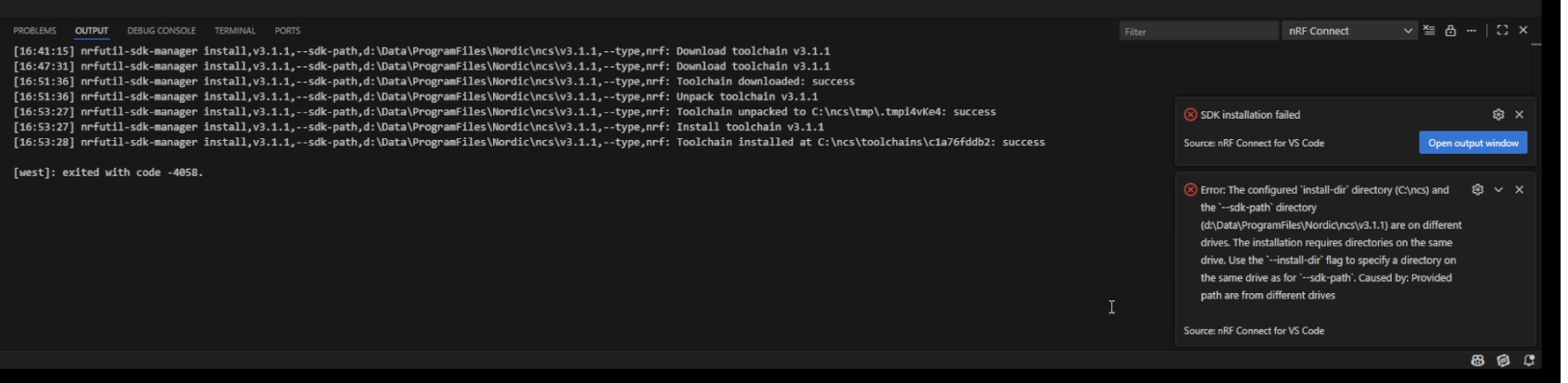
Context: Windows 10 Pro x64 up to date; VSCode 1.106.2 (installed fresh 2025-11-20); nRF Connect SDK: nrfconnect-setup-5.2.0-x64.exe (downloaded 2025-11-20)
Install VSCode; download and run nrfconnect-setup-5.2.0-x64.exe, follow the prompts to install rRF Connect for Visual Studio Code. Choose directory for install (shown in output below).
Output clearly shows that installer does not respect the chosen install path (installs to c:\ncs), and then a later stage treats the different locations as an error. Note that istalling on C drive is not an option.
Question: How to install SDK/toolset etc. for VSCode to a directory on a different drive? Keep in mind that after install, future updates from within VSCode need to apply properly also, without breaking the install.