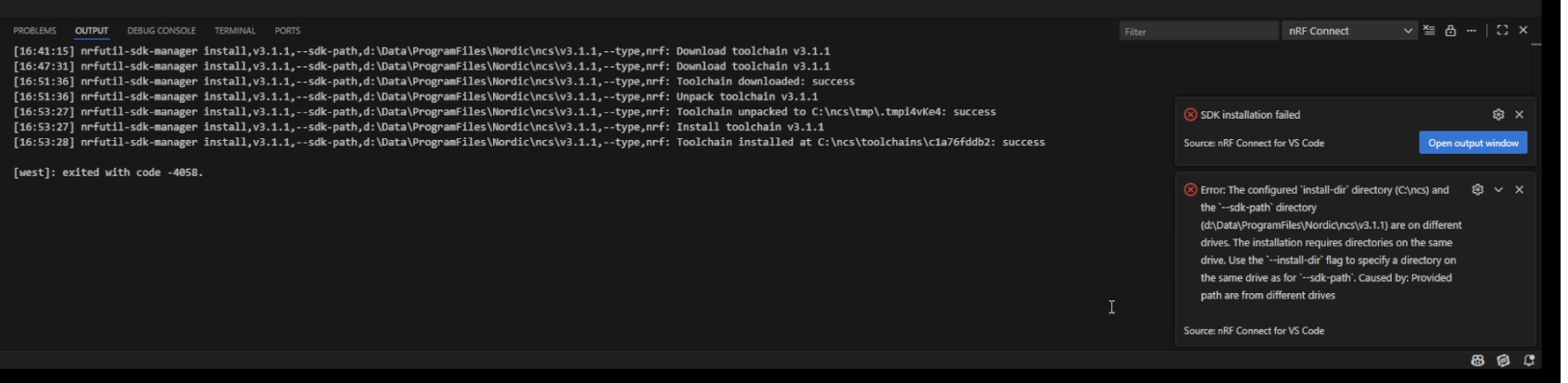
nrF Connect SDK VSCode install fails: "[west]: exited with code -4058"

Context: Windows 10 Pro x64 up to date; VSCode 1.106.2 (installed fresh 2025-11-20); nRF Connect SDK: nrfconnect-setup-5.2.0-x64.exe (downloaded 2025-11-20)

Install VSCode; download and run nrfconnect-setup-5.2.0-x64.exe, follow the prompts to install rRF Connect for Visual Studio Code. Choose directory for install (shown in output below).

Output clearly shows that installer does not respect the chosen install path (installs to c:\ncs), and then a later stage treats the different locations as an error. Note that istalling on C drive is not an option.

Question: How to install SDK/toolset etc. for VSCode to a directory on a different drive? Keep in mind that after install, future updates from within VSCode need to apply properly also, without breaking the install.
Parents Reply Children
  • Hello Benjamin,

    Sorry, I started out by replying to a different ticket (Case ID: 345961), so you wouldn't have seen what I've already tried. Following Ovynd's suggestion there, I started this ticket.

    From my posts in ticket 345961:

    Despite my doubts (see comment below), I did try this. (nrfutil sdk-manager install .....) but with current version (v3.1.1) and my path (d:\data\programfiles\nordic\ncs.

    It appeared to download and unpack successfully - the resulting ncs directory is 10GB! But how does haveing done this relate to or effect the extension for nRF development in VSCode? VSCode still shows no extensions installed. I'm guessing if I go to install the extension from within VSCode it will go through the process exactly as before, and assume the install-dir is c:\ncs.

    If  the sdk and toolchain is installed via the command line, how to sync this with VSCode?

    -----

    This looks to me like a bug in the installation / integration of nrf Connect with VS Code. The install directory is hard-coded to c:\ncs, and cannot be overridden when following the official install instructions. This same problem occurs when following the instructions to install using nRF Connect SDK download, and when following the instructions to install from within VS Code.

    Is this a bug? Can you reproduce on your end? That is: following the Nordic published instructions, do a fresh install to any drive other than c:.

  • Hi,
    No worries!

    Al. said:
    still shows no extensions installed

    Right, the VS Code extension needs to be installed separately from the SDK. You can install this easily inside VS Code in the Extensions tab.

    Al. said:
    If  the sdk and toolchain is installed via the command line, how to sync this with VSCode?

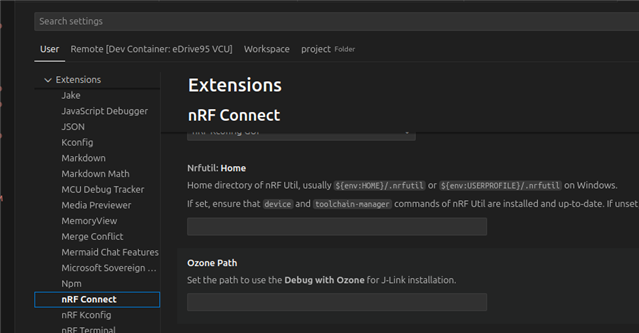
    If you install NCS to a custom path, you will need to point the extension to nrfutil as path information is stored in the nrfutil configuration. You will find this in the settings for the extensions (see attached image).


    Regards,

    Benjamin

Related