Hello,
I’m working with the nRF9151-DK hardware to test Power Saving Mode (PSM) functionality, but I’ve encountered an issue:
The TAU timer (T3412) cannot be activated, even though it is explicitly defined in the KConfig file.
The setup details are the following:
- Development environment: nRF Connect for VS Code (v3.1.1)
- Toolchain version: v3.1.1
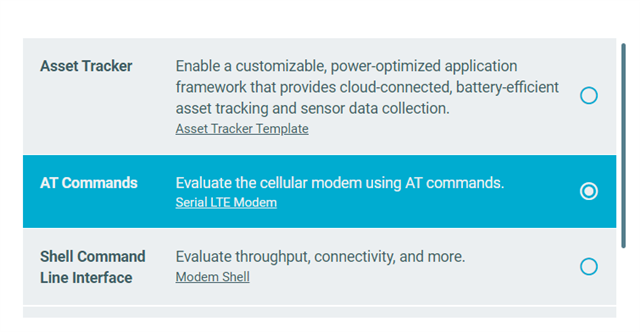
- Firmware base: Example project Serial LTE Modem, modified to enable all necessary PSM features.
- The KConfig file is almost identical to the example, except for a few additional lines (I’ll attach the full file)
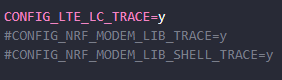
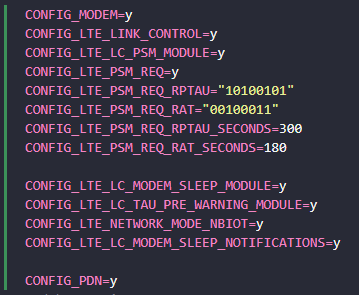
The following image shows the lines added to the base kconfig file:
In every test I always execute the following AT commands:
- AT+CFUN=0
- AT%XCBAND=2,28
- AT+CEMODE=0
- AT%XSYSTEMMODE=0,1,0,0
- AT+CGDCONT=0,"IP","<APN>"
- AT+CGEREP=1
- AT+CPSMS=1,"","","10100101","00100011"
- AT+CEDRXS=0
- AT+CEREG=4
- AT%SMSDISABLE=1
- AT%XEPCO=0
- AT+CFUN=1
After the device connects, the modem accepts the Active Time, but the TAU timer shows as “Deactivated.”
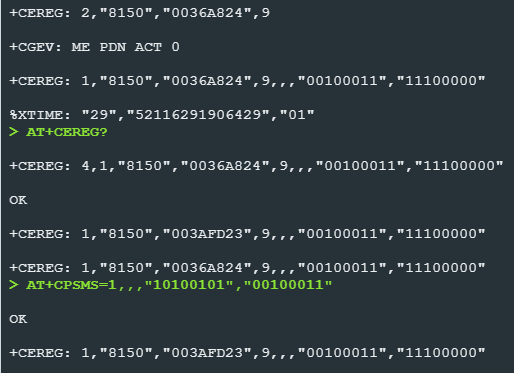
This happens in the cereg and XMONITOR AT commands

In the nRF Kconfig GUI, I noticed another “Enable PSM” option under the Sierra Wireless HL7800 modem driver. My project does not use that modem, but I tried enabling it anyway. As expected, the build fails if I activate any options related to that driver, so this option is ruled out.
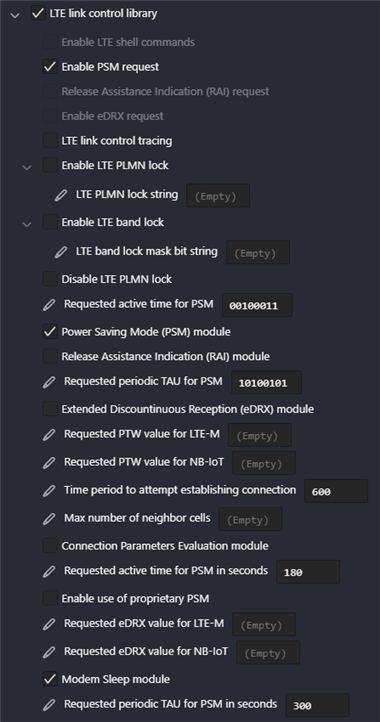
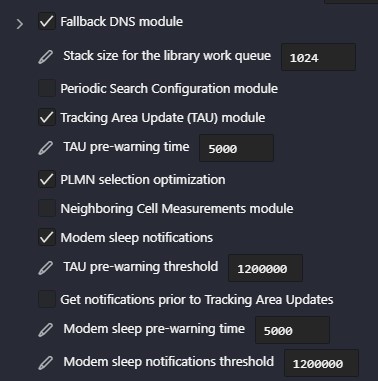
I’ve attached a screenshot of the "LTE Link Control Library" options in nRF Kconfig GUI for reference.
#
# Copyright (c) 2020 Nordic Semiconductor ASA
#
# SPDX-License-Identifier: LicenseRef-Nordic-5-Clause
#
# General config
CONFIG_LOG=y
CONFIG_ASSERT=y
CONFIG_ASSERT_VERBOSE=n
CONFIG_LOG_DEFAULT_LEVEL=3
CONFIG_STACK_SENTINEL=y
CONFIG_PICOLIBC_IO_FLOAT=y
CONFIG_RING_BUFFER=y
CONFIG_REBOOT=y
CONFIG_EVENTFD=y

# Segger RTT
CONFIG_USE_SEGGER_RTT=y
# Where console messages (printk) are output.
# By itself, SLM does not output any.
CONFIG_RTT_CONSOLE=y
CONFIG_UART_CONSOLE=n
# Where SLM logs are output.
CONFIG_LOG_BACKEND_RTT=y
CONFIG_LOG_BACKEND_UART=n
# Increase the buffer so that all SLM boot logs fit into the buffer.
# Because J-Link RTT Viewer has to be connected after the bootup,
# only logs that fit into the buffer are shown. This is especially useful in showing
# errors if SLM does not start properly.
CONFIG_SEGGER_RTT_BUFFER_SIZE_UP=2048

# Network
CONFIG_NETWORKING=y
CONFIG_NET_SOCKETS=y
CONFIG_NET_NATIVE=n
CONFIG_NET_IPV4=y
CONFIG_NET_IPV6=y

# Modem library
CONFIG_NRF_MODEM_LIB=y
CONFIG_AT_CMD_CUSTOM=y
# Align the max FD entry to NRF_MODEM_MAX_SOCKET_COUNT(8)
CONFIG_ZVFS_OPEN_MAX=8

# Handle modem fault
CONFIG_NRF_MODEM_LIB_ON_FAULT_APPLICATION_SPECIFIC=y

# Use GPIO
CONFIG_GPIO=y
CONFIG_GPIO_NRFX=y

# UART interface
CONFIG_SERIAL=y
CONFIG_UART_USE_RUNTIME_CONFIGURE=y
CONFIG_UART_ASYNC_API=y
CONFIG_NRFX_TIMER2=y

# Stacks and heaps
CONFIG_MAIN_STACK_SIZE=4096
CONFIG_HEAP_MEM_POOL_SIZE=16384
CONFIG_SYSTEM_WORKQUEUE_STACK_SIZE=4096
CONFIG_AT_MONITOR_HEAP_SIZE=4096

# Device power management
CONFIG_PM_DEVICE=y

# FOTA
CONFIG_HTTP_PARSER_URL=y
CONFIG_FOTA_DOWNLOAD=y
CONFIG_FOTA_DOWNLOAD_PROGRESS_EVT=y
CONFIG_DFU_TARGET=y
CONFIG_DOWNLOADER=y
CONFIG_DOWNLOADER_STACK_SIZE=4096
CONFIG_DOWNLOADER_MAX_FILENAME_SIZE=2048
CONFIG_BOOTLOADER_MCUBOOT=y
CONFIG_IMG_MANAGER=y

# FLASH
CONFIG_FLASH=y
CONFIG_FLASH_PAGE_LAYOUT=y
CONFIG_FLASH_MAP=y
CONFIG_STREAM_FLASH=y
CONFIG_MPU_ALLOW_FLASH_WRITE=y
CONFIG_IMG_ERASE_PROGRESSIVELY=y

# Settings
CONFIG_SETTINGS=y
CONFIG_SETTINGS_NVS=y
CONFIG_NVS=y

# nRF Cloud
CONFIG_NRF_CLOUD=y
CONFIG_NRF_CLOUD_MQTT=y
CONFIG_NRF_CLOUD_FOTA=n
CONFIG_NRF_CLOUD_AGNSS=y
CONFIG_NRF_CLOUD_AGNSS_FILTERED=n
CONFIG_NRF_CLOUD_PGPS=n
CONFIG_NRF_CLOUD_LOCATION=y
CONFIG_NRF_CLOUD_LOG_LEVEL_INF=y
CONFIG_NRF_CLOUD_GPS_LOG_LEVEL_INF=y
CONFIG_NRF_CLOUD_CLIENT_ID_SRC_INTERNAL_UUID=y
CONFIG_NRF_CLOUD_WIFI_LOCATION_ENCODE_OPT_MAC_RSSI=y
CONFIG_DATE_TIME=y
CONFIG_MODEM_INFO=y
CONFIG_MODEM_INFO_ADD_DATE_TIME=n

# UUID and JWT
CONFIG_MODEM_JWT=y

# MQTT client
#CONFIG_MQTT_KEEPALIVE=60
CONFIG_MQTT_CLEAN_SESSION=y

# AT command helper libraries
CONFIG_AT_PARSER=y
CONFIG_AT_MONITOR=y

# Eventfd's to use with AT-commands.
CONFIG_ZVFS_EVENTFD_MAX=2

# Disable TF-M logging.
# TF-M log sending will block until remote end is ready, when HWFC is used on UART1.
CONFIG_TFM_LOG_LEVEL_SILENCE=y

#
# SLM-specific configurations
#
CONFIG_SLM_CUSTOMER_VERSION=""
CONFIG_SLM_EXTERNAL_XTAL=n

CONFIG_MODEM=y
CONFIG_LTE_LINK_CONTROL=y
CONFIG_LTE_LC_PSM_MODULE=y
CONFIG_LTE_PSM_REQ=y
CONFIG_LTE_PSM_REQ_RPTAU="10100101"
CONFIG_LTE_PSM_REQ_RAT="00100011"
CONFIG_LTE_PSM_REQ_RPTAU_SECONDS=300
CONFIG_LTE_PSM_REQ_RAT_SECONDS=180

CONFIG_LTE_LC_MODEM_SLEEP_MODULE=y
CONFIG_LTE_LC_TAU_PRE_WARNING_MODULE=y
CONFIG_LTE_NETWORK_MODE_NBIOT=y
CONFIG_LTE_LC_MODEM_SLEEP_NOTIFICATIONS=y

CONFIG_PDN=y
# debug options
#CONFIG_LOG_BUFFER_SIZE=16384
#CONFIG_SLM_LOG_LEVEL_DBG=y
#CONFIG_LOG_PRINTK=n
#CONFIG_LOG_MODE_IMMEDIATE=y

# For using external GNSS antenna
#CONFIG_MODEM_ANTENNA=y
#CONFIG_MODEM_ANTENNA_GNSS_EXTERNAL=y
Any guidance or suggestions on how to properly enable TAU in this setup would be greatly appreciated.
Thank you in advance!