IPC breaks when enabling bluetooth mesh on nrf54l15

Hello,

We are developing a product based on the nRF54L15, using BT Mesh. We also use the FLPR. For communication between the cores, we use ICMSG.

Separately, ICMSG and BT Mesh work well, but for some reason, when we include BT Mesh, cpuapp cannot set up ICMSG properly, even if the ICMSG setup is done before `bt_enable()`. The callback `ipc_ept_cfg.cb.bound` is never called. We are getting serial logging from the FLPR, so we know that is running and its `ipc_ept_cfg.cb.bound` is called.

This question (The IPC and bt_enable are turned on at the same time, and the chip is not working) about the nRF53 is similar, but there is no IPC Radio Firmware on the nRF54 as far as I can tell.

Here is the relevant part of our prj.conf for cpuapp:

CONFIG_SYSTEM_WORKQUEUE_STACK_SIZE=8192
CONFIG_MAIN_STACK_SIZE=8192
CONFIG_LOG_BUFFER_SIZE=8192
CONFIG_BT_RX_STACK_SIZE=5120

CONFIG_LOG=y
CONFIG_REQUIRES_FLOAT_PRINTF=y

CONFIG_BT_SETTINGS=y
CONFIG_FLASH=y
CONFIG_FLASH_MAP=y
CONFIG_SETTINGS=y
CONFIG_SOC_FLASH_NRF_PARTIAL_ERASE=n
CONFIG_SPI_NOR=n
CONFIG_NVS=n
CONFIG_NVS_LOOKUP_CACHE=n
CONFIG_SETTINGS_NVS_NAME_CACHE=n
CONFIG_ZMS=y
CONFIG_SETTINGS_ZMS_CUSTOM_SECTOR_COUNT=y
CONFIG_SETTINGS_ZMS_SECTOR_COUNT=8
CONFIG_ZMS_LOOKUP_CACHE=y
CONFIG_ZMS_LOOKUP_CACHE_SIZE=512
CONFIG_ZMS_LOOKUP_CACHE_FOR_SETTINGS=y

CONFIG_HWINFO=y
CONFIG_GPIO=y

CONFIG_BT=y
CONFIG_BT_L2CAP_TX_BUF_COUNT=5
CONFIG_BT_PERIPHERAL=y
CONFIG_BT_OBSERVER=y
CONFIG_BT_BROADCASTER=y

CONFIG_BT_CTLR_DUP_FILTER_LEN=0
CONFIG_BT_CTLR_LE_ENC=n
CONFIG_BT_CTLR_LE_PING=n
CONFIG_BT_DATA_LEN_UPDATE=n
CONFIG_BT_PHY_UPDATE=n
CONFIG_BT_CTLR_MIN_USED_CHAN=n
CONFIG_BT_CTLR_PRIVACY=n
CONFIG_BT_CTLR_CHAN_SEL_2=n

CONFIG_BT_MESH=y
CONFIG_BT_MESH_MODEL_EXTENSIONS=y
CONFIG_BT_MESH_RELAY=y
CONFIG_BT_MESH_FRIEND=y
CONFIG_BT_MESH_PB_GATT=y
CONFIG_BT_MESH_PB_ADV=y
CONFIG_BT_MESH_GATT_PROXY=y

CONFIG_BT_MESH_SUBNET_COUNT=2
CONFIG_BT_MESH_APP_KEY_COUNT=2
CONFIG_BT_MESH_MODEL_GROUP_COUNT=2
CONFIG_BT_MESH_LABEL_COUNT=3

CONFIG_BT_MESH_ADV_BUF_COUNT=10
CONFIG_BT_MESH_TX_SEG_MSG_COUNT=3

CONFIG_BT_MESH_RX_SEG_MAX=32
CONFIG_BT_MESH_TX_SEG_MAX=32

CONFIG_MBOX=y
CONFIG_IPC_SERVICE=y
CONFIG_IPC_SERVICE_BACKEND_ICMSG=y
CONFIG_IPC_SERVICE_LOG_LEVEL_DBG=y

Any help is appreciated

- Fridtjof

Parents
  • Hi Fridtjof,


    nRF53 architecture has a strict split between the cores, in terms of which peripheral and resources each core can access. This limitation is alot more configurable in nRF54L-series.

    It sounds like the cpuapp image is not booting, or is overwriting the cpuflpr image.


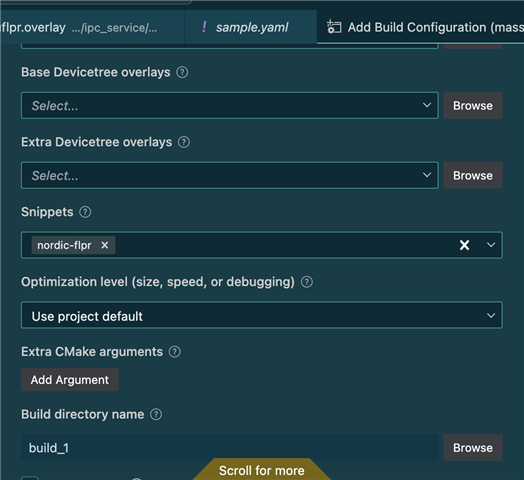
    Q1: Are you building with the "SNIPPET=nordic-flpr" in place?

    ie. west build -b nrf54l15dk/nrf54l15/cpuapp -- -DSNIPPET=nordic-flpr


    or in vscode:


    Q2: Have you checked out the IPC sample, specifically with how the "remote" example is pulled in?

    https://github.com/nrfconnect/sdk-nrf/blob/main/samples/ipc/ipc_service/sysbuild.cmake#L12-L17


    If you still see issues, could you share the whole build output?


    Kind regards,

    Håkon

  • Hi Håkon,

    We know that both cpuapp and cpuflpr are running, since we have RTT logging from cpuapp and serial logging from cpuflpr. In fact, we know the exact spot where cpuapp halts, which is on the line in our program corresponding to  ` k_sem_take(&bound_sem, K_FOREVER);` in `zephyr/samples/subsys/ipc/ipc_service/icmsg/src/main.c`. It halts here because the callback `ipc_ept_cfg.cb.bound` is never called by the IPC library.

    To answer your questions:

    A1: We do not directly use the nordic-flpr snippet. What we have done is copy the contents of the snippet and changed some of the values, since we have allocated more SRAM to FLPR than the default. This all works fine until we have both bluetooth mesh and ipc enabled in the config. This means we are using sysbuild and have added the relevant overlay code.

    A2: We based our IPC on the icmsg sample in zephyr (not sdk-nrf) because it had overlay and config files for nRF54L15. Looking at a diff between the two samples, I can't see any relevant differences which could impact our program. We already use the following in our project, which works fine:

    ExternalZephyrProject_Add(
    APPLICATION flpr
    SOURCE_DIR ${APP_DIR}/flpr
    BOARD nrf54l15dk/nrf54l15/cpuflpr
    )

    I will work on creating a minimal sample so I can show the complete build log.

    -Fridtjof

  • When I created a minimal sample, the issue seems to disappear. This makes me think the issue comes from incorrectly partitioning the RAM. In the minimal sample, cpuapp and cpuflpr use 61% and 25% of their allocated RAM respectively, while in the full sample we used 71% and 92%.

    Full code:

    cpuapp:
    Memory region         Used Size  Region Size  %age Used
               FLASH:      424016 B      1404 KB     29.49%
                 RAM:       98606 B       136 KB     70.81%
            IDT_LIST:          0 GB        32 KB      0.00%
    
    cpuflpr:
    Memory region         Used Size  Region Size  %age Used
                 RAM:      112452 B       120 KB     91.51%
            IDT_LIST:          0 GB         2 KB      0.00%

    Minimal sample:

    cpuapp:
    Memory region         Used Size  Region Size  %age Used
               FLASH:      352984 B      1404 KB     24.55%
                 RAM:       85198 B       136 KB     61.18%
            IDT_LIST:          0 GB        32 KB      0.00%
    
    cpuflpr:
    Memory region         Used Size  Region Size  %age Used
                 RAM:       30336 B       120 KB     24.69%
            IDT_LIST:          0 GB         2 KB      0.00%

    Although it does seem strange. In another build, we have the full code on flpr, and no bluetooth on cpuapp (which means cpuapp has low RAM usage), and that works fine. So it is the increase in RAM usage on cpuapp which causes a failure in cpuapp. If partitioning was incorrect I would expect high memory usage on cpuapp to break cpuflpr by overwriting some of its memory.

  • Hi,


    Your memory map is similar, in terms of the RAM layout atleast, between both of those builds.

    When using FLPR it is important that one does not overwrite or use the topmost 0x200 bytes of RAM:

    https://docs.nordicsemi.com/bundle/ps_nrf54L15/page/chapters/memory.html


    Other than that, there should not be a problem to scale the RAM in any of the regions.


    mbox/ipc will use the vevif channels, as per the overlay that you set, default 20/21 for RX/TX between the cores.

    Softdevice controller will use these resources:

    https://docs.nordicsemi.com/bundle/ncs-3.1.0/page/nrfxlib/softdevice_controller/doc/softdevice_controller.html


    Does both your tests use the SoftDevice Controller?


    Kind regards,

    Håkon

  • Hello again, Håkon.

    I apologize, but I now believe I messed up the test which made me conclude that the Bluetooth was breaking the IPC. After removing different modules from my project, it seems like it is GNSS which is breaking IPC. IPC works fine with all the other modules, including bluetooth.

    IPC breaks even with the minimal GNSS config shown below. Even if I remove all code which uses gnss.

    CONFIG_GNSS=y
    CONFIG_UART_ASYNC_API=y
    CONFIG_GNSS_QUECTEL_LCX6G=y

    Do the GNSS and IPC systems interact somehow?

  • Good afternoon Fridtjof!


    I am unable to get this behavior on my end, and I also cannot see how those configurations should break the ipc communication in general.

    Where do you add the gnss dt node? I suspect this is to one of the uart instances?


    If yes, which one? And does this happen if you disable uart in the remote (ie. flpr) project?


    Kind regards,

    Håkon

  • Good afternoon,

    I am still trying to produce a minimal sample, but it is taking longer than expected because I ran into some other strange issues. I will come back to you when I have more of a clue what I'm dealing with.

    Thanks,
    -Fridtjof

Reply Children
  • Hi Fridtjof,


    No worries, feel free to update when you have the time.


    Kind regards,

    Håkon

  • Hi again Håkon,

    I think I found a fix for the issue. In our code, cpuflpr's task is to just wait for commands from cpuapp. This means that unless it gets a command from cpuapp, it doesn't ever send any IPC messages to cpuapp. The only exception to this is the handshake message at IPC setup.

    It is my understanding that on IPC setup, cpuflpr places a magic number in its send buffer, triggers an interrupt on cpuapp which then reads the buffer, and if the number is read correctly, cpuapp will call its setup callback.

    It seems like GNSS is somehow hindering the handshake. I believe it is by stopping the interrupt which triggers cpuapp to read the buffer. I think this because IPC will work if flpr waits one second after IPC setup, then sends a message to cpuapp, which triggers it to read the IPC buffer, seeing the magic number, and completing setup.

    I have attached a sample which shows this behavior, and has three comments with the text "FIX" where I have found ways to get around the problem:

    1. Send an extra message from cpuflpr to trigger cpuapp to read the IPC buffer
    2. Disable GNSS (we cannot use this since we need GNSS)
    3. Enable multithreading on cpuflpr (we cannot use this since we need all the RAM we can get on cpuflpr

    gnss_ipc.zip

    Could you answer whether my understanding of IPC handshaking and explanation of the problem is correct?

    Best regards,
    Fridtjof

  • Hi Fridtjof,


    I used the dt bindings found the boards/proto3*.overlay, and built for the nrf54l15dk/nrf54l15/cpuapp.

    I am unable to fully test this, as I do not have the gnss/modem that you are using physically connected, so it will fail during runtime, as shown in the log below.

    This is printed over RTT:

    00> [00:00:00.015,404] <inf> quectel_lcx6g: Resuming
    00> [00:00:00.015,411] <inf> quectel_lcx6g: Waiting until PM ready
    00> [00:00:10.515,242] <wrn> modem_chat: resume_script: timed out
    00> [00:00:10.515,296] <err> quectel_lcx6g: Failed to initialize GNSS
    00> *** Booting nRF Connect SDK v3.1.1-e2a97fe2578a ***
    00> *** Using Zephyr OS v4.1.99-ff8f0c579eeb ***
    00> [00:00:10.515,916] <inf> main: Initializing...
    00> 
    00> [00:00:10.515,925] <dbg> main: ipc_init: initializing IPC...
    00> [00:00:10.515,947] <dbg> ipc_service: ipc_service_register_endpoint: Register endpoint ipc_ept_0
    00> [00:00:10.517,563] <dbg> main: ipc_bound_cb: IPC ep bound
    00> 
    00> [00:00:10.517,595] <inf> main: IPC initialized.
    00> 
    00> [00:00:10.517,628] <dbg> main: send_message: ipc send: 5 = appcpu says hi
    00> [00:00:10.522,777] <dbg> main: ipc_recv_cb: ipc received: 3 = reaction
    00> [00:00:11.517,721] <dbg> main: send_message: ipc send: 5 = appcpu says hi
    00> [00:00:11.525,116] <dbg> main: ipc_recv_cb: ipc received: 3 = reaction
     

    IPC comms are running as they should in this scenario.  

    It seems like GNSS is somehow hindering the handshake.

    Can you share a log output of a working and a non-working scenario?

    Could you answer whether my understanding of IPC handshaking and explanation of the problem is correct?

    It is set up to ping/pong data at this time, and the scenarios that are most likely occurring is either a fault, or another blocking scenario that makes the firmware hang.

    Try setting "CONFIG_GNSS_LOG_LEVEL_DBG=y" for a bit more verbose output.


    Kind regards,

    Håkon

  • Here is appcpu log when not working. "Initializing IPC..." is the last thing that appcpu prints outside GNSS. I have replaced location data with "<<<REDACTED>>>".

    *** Booting nRF Connect SDK v3.0.1-9eb5615da66b ***
    *** Using Zephyr OS v4.0.99-77f865b8f8d0 ***
    [00:00:18.464,672] <inf> main: Initializing...
    
    [00:00:18.464,681] <dbg> main: ipc_init: initializing IPC...
    [00:00:18.464,702] <dbg> ipc_service: ipc_service_register_endpoint: Register endpoint ipc_ept_0
    [00:00:18.481,633] <dbg> modem_chat: modem_chat_log_received_command: $GNGGA, <<<REDACTED>>>
    [00:00:18.496,337] <dbg> modem_chat: modem_chat_log_received_command: $GNRMC, <<<REDACTED>>>
    Got a fix! <<<REDACTED>>>
    quectel_lc86g: gnss_info: {satellites_cnt: 16, hdop: 0.650, fix_status: DGNSS_FIX, fix_quality: DGNSS}
    
    quectel_lc86g: navigation_data: <<<REDACTED>>>
    
    quectel_lc86g: gnss_time: {hour: 13, minute: 52, millisecond 14000, month_day 15, month: 12, century_year: 25}
    
    [00:00:18.496,865] <dbg> modem_chat: modem_chat_on_unknown_command_received: $PQTMANTENNASTATUS,3,1,2,1*52
    [00:00:19.471,673] <dbg> modem_chat: modem_chat_log_received_command: $GNGGA, <<<REDACTED>>>
    [00:00:19.486,332] <dbg> modem_chat: modem_chat_log_received_command: $GNRMC, <<<REDACTED>>>
    Got a fix! <<<REDACTED>>>
    quectel_lc86g: gnss_info: {satellites_cnt: 16, hdop: 0.650, fix_status: DGNSS_FIX, fix_quality: DGNSS}
    
    quectel_lc86g: navigation_data: <<<REDACTED>>>
    
    quectel_lc86g: gnss_time: {hour: 13, minute: 52, millisecond 15000, month_day 15, month: 12, century_year: 25}
    
    [00:00:19.486,793] <dbg> modem_chat: modem_chat_on_unknown_command_received: $PQTMANTENNASTATUS,3,1,2,1*52
    [00:00:20.473,464] <dbg> modem_chat: modem_chat_log_received_command: $GNGGA, <<<REDACTED>>>
    [00:00:20.488,144] <dbg> modem_chat: modem_chat_log_received_command: $GNRMC, <<<REDACTED>>>
    Got a fix! <<<REDACTED>>>
    quectel_lc86g: gnss_info: {satellites_cnt: 16, hdop: 0.650, fix_status: DGNSS_FIX, fix_quality: DGNSS}
    
    quectel_lc86g: navigation_data: <<<REDACTED>>>
    
    quectel_lc86g: gnss_time: {hour: 13, minute: 52, millisecond 16000, month_day 15, month: 12, century_year: 25}
    
    [00:00:20.488,606] <dbg> modem_chat: modem_chat_on_unknown_command_received: $PQTMANTENNASTATUS,3,1,2,1*52
    [00:00:21.460,812] <dbg> modem_chat: modem_chat_log_received_command: $GNGGA, <<<REDACTED>>>
    [00:00:21.466,369] <dbg> modem_chat: modem_chat_log_received_command: $GPGSV, <<<REDACTED>>>
    [00:00:21.471,923] <dbg> modem_chat: modem_chat_log_received_command: $GPGSV, <<<REDACTED>>>
    [00:00:21.477,468] <dbg> modem_chat: modem_chat_log_received_command: $GPGSV, <<<REDACTED>>>
    [00:00:21.477,561] <dbg> modem_chat: modem_chat_log_received_command: $GLGSV, <<<REDACTED>>>
    [00:00:21.483,072] <dbg> modem_chat: modem_chat_log_received_command: $GAGSV, <<<REDACTED>>>
    10 satellites reported (of which 9 tracked)!
    [00:00:21.488,631] <dbg> modem_chat: modem_chat_log_received_command: $GAGSV, <<<REDACTED>>>
    [00:00:21.494,153] <dbg> modem_chat: modem_chat_log_received_command: $GAGSV, <<<REDACTED>>>
    quectel_lc86g: gnss_satellite: <<<REDACTED>>>
    
    quectel_lc86g: gnss_satellite: <<<REDACTED>>>
    
    quectel_lc86g: gnss_satellite: <<<REDACTED>>>
    
    quectel_lc86g: gnss_satellite: <<<REDACTED>>>
    
    quectel_lc86g: gnss_satellite: <<<REDACTED>>>
    
    quectel_lc86g: gnss_satellite: <<<REDACTED>>>
    
    quectel_lc86g: gnss_satellite: <<<REDACTED>>>
    
    quectel_lc86g: gnss_satellite: <<<REDACTED>>>
    
    quectel_lc86g: gnss_satellite: <<<REDACTED>>>
    
    quectel_lc86g: gnss_satellite: <<<REDACTED>>>
     

    Here is the cpuflpr log:

    *** Booting nRF Connect SDK v3.0.1-9eb5615da66b ***
    *** Using Zephyr OS v4.0.99-77f865b8f8d0 ***
    I: Initializing...
    
    D: initializing IPC...
    D: IPC ep bound
    
    I: IPC initialized.

  • Hi,


    So, you are stuck on the bound semaphore.

    One theory is that the timing is the reason why.

    I can add a 10+ second delay in my test, and that should also fail.

    So I added a quick test by appending k_msleep(10*1000):

    00> [00:00:10.507,290] <wrn> modem_chat: resume_script: timed out
    00> [00:00:10.507,339] <err> quectel_lcx6g: Failed to initialize GNSS
    00> *** Booting nRF Connect SDK v3.1.99-ef4b0afc4605 ***
    00> *** Using Zephyr OS v4.2.99-dcb90afc70fb ***
    00> [00:00:10.507,400] <inf> main: Initializing...
    00> 
    00> [00:00:10.507,404] <inf> main: Lets delay for 10
    00> [00:00:10.507,409] <inf> main: 0
    00> [00:00:11.507,476] <inf> main: 1
    00> [00:00:12.507,551] <inf> main: 2
    00> [00:00:13.507,618] <inf> main: 3
    00> [00:00:14.507,703] <inf> main: 4
    00> [00:00:15.507,772] <inf> main: 5
    00> [00:00:16.507,862] <inf> main: 6
    00> [00:00:17.507,933] <inf> main: 7
    00> [00:00:18.508,022] <inf> main: 8
    00> [00:00:19.508,093] <inf> main: 9
    00> [00:00:20.508,182] <dbg> main: ipc_init: initializing IPC...
    00> [00:00:20.508,211] <dbg> ipc_service: ipc_service_register_endpoint: Register endpoint ipc_ept_0
    00> [00:00:20.509,825] <dbg> main: ipc_bound_cb: IPC ep bound
    00> 
    00> [00:00:20.509,853] <inf> main: IPC initialized.
    00> 
    00> [00:00:20.509,885] <dbg> main: send_message: ipc send: 5 = appcpu says hi
    00> [00:00:20.515,032] <dbg> main: ipc_recv_cb: ipc received: 3 = reaction
    00> [00:00:21.509,975] <dbg> main: send_message: ipc send: 5 = appcpu says hi
    00> [00:00:21.517,373] <dbg> main: ipc_recv_cb: ipc received: 3 = reaction
    00> [00:00:22.510,074] <dbg> main: send_message: ipc send: 5 = appcpu says hi
    00> [00:00:22.519,644] <dbg> main: ipc_recv_cb: ipc received: 3 = reaction
    00> [00:00:23.510,189] <dbg> main: send_message: ipc send: 5 = appcpu says hi
    00> [00:00:23.521,908] <dbg> main: ipc_recv_cb: ipc received: 3 = reaction
    00> [00:00:24.510,269] <dbg> main: send_message: ipc send: 5 = appcpu says hi
    00> [00:00:24.524,177] <dbg> main: ipc_recv_cb: ipc received: 3 = reaction
    00> [00:00:25.510,376] <dbg> main: send_message: ipc send: 5 = appcpu says hi
    00> [00:00:25.526,436] <dbg> main: ipc_recv_cb: ipc received: 3 = reaction
    00> [00:00:26.510,454] <dbg> main: send_message: ipc send: 5 = appcpu says hi
    00> [00:00:26.528,699] <dbg> main: ipc_recv_cb: ipc received: 3 = reaction
    00> [00:00:27.510,532] <dbg> main: send_message: ipc send: 5 = appcpu says hi
    00> [00:00:27.530,962] <dbg> main: ipc_recv_cb: ipc received: 3 = reaction
    00> [00:00:28.510,643] <dbg> main: send_message: ipc send: 5 = appcpu says hi
    00> [00:00:28.533,228] <dbg> main: ipc_recv_cb: ipc received: 3 = reaction
    00> [00:00:29.510,748] <dbg> main: send_message: ipc send: 5 = appcpu says hi
    00> [00:00:29.535,492] <dbg> main: ipc_recv_cb: ipc received: 3 = reaction
    00> [00:00:30.510,853] <dbg> main: send_message: ipc send: 5 = appcpu says hi
    (Connection lost)

    And also k_busy_wait(10*1000*1000) to emulate a blocking task, and also added another 10 sec after calling ipc_service_register_endpoint().

    00> [00:00:10.507,290] <wrn> modem_chat: resume_script: timed out
    00> [00:00:10.507,339] <err> quectel_lcx6g: Failed to initialize GNSS
    00> *** Booting nRF Connect SDK v3.1.99-ef4b0afc4605 ***
    00> *** Using Zephyr OS v4.2.99-dcb90afc70fb ***
    00> [00:00:10.507,400] <inf> main: Initializing...
    00> 
    00> [00:00:10.507,404] <inf> main: Lets delay for 10
    00> [00:00:20.503,724] <dbg> main: ipc_init: initializing IPC...
    00> [00:00:20.503,753] <dbg> ipc_service: ipc_service_register_endpoint: Register endpoint ipc_ept_0
    00> [00:00:20.505,373] <dbg> main: ipc_bound_cb: IPC ep bound
    00> 
    00> [00:00:30.488,836] <inf> main: IPC initialized.
    00> 
    00> [00:00:30.488,869] <dbg> main: send_message: ipc send: 5 = appcpu says hi
    00> [00:00:30.507,385] <dbg> main: ipc_recv_cb: ipc received: 3 = reaction
    00> [00:00:31.488,978] <dbg> main: send_message: ipc send: 5 = appcpu says hi
    00> [00:00:31.509,648] <dbg> main: ipc_recv_cb: ipc received: 3 = reaction
    00> [00:00:32.489,057] <dbg> main: send_message: ipc send: 5 = appcpu says hi
    00> [00:00:32.511,915] <dbg> main: ipc_recv_cb: ipc received: 3 = reaction
    00> [00:00:33.489,160] <dbg> main: send_message: ipc send: 5 = appcpu says hi

    And here a 10 sec delay between each ipc-call:

    00> *** Booting nRF Connect SDK v3.1.99-ef4b0afc4605 ***
    00> *** Using Zephyr OS v4.2.99-dcb90afc70fb ***
    00> [00:00:10.507,344] <inf> main: Initializing...
    00> 
    00> [00:00:10.507,349] <inf> main: Lets delay for 10
    00> [00:00:20.506,733] <dbg> main: ipc_init: initializing IPC...
    00> [00:00:30.495,998] <dbg> ipc_service: ipc_service_register_endpoint: Register endpoint ipc_ept_0
    00> [00:00:30.497,621] <dbg> main: ipc_bound_cb: IPC ep bound
    00> 
    00> [00:00:40.483,683] <inf> main: IPC initialized.
    00> 
    00> [00:00:40.483,716] <dbg> main: send_message: ipc send: 5 = appcpu says hi
    00> [00:00:40.499,637] <dbg> main: ipc_recv_cb: ipc received: 3 = reaction
    00> [00:00:41.483,825] <dbg> main: send_message: ipc send: 5 = appcpu says hi
    00> [00:00:41.501,903] <dbg> main: ipc_recv_cb: ipc received: 3 = reaction
    00> [00:00:42.483,903] <dbg> main: send_message: ipc send: 5 = appcpu says hi
    00> [00:00:42.504,165] <dbg> main: ipc_recv_cb: ipc received: 3 = reaction
    00> [00:00:43.484,013] <dbg> main: send_message: ipc send: 5 = appcpu says hi
    00> [00:00:43.506,431] <dbg> main: ipc_recv_cb: ipc received: 3 = reaction
    00> [00:00:44.484,085] <dbg> main: send_message: ipc send: 5 = appcpu says hi


    I am unable to reproduce your scenario with the above emulation, which indicates that the gnss/modem subsys might be blocking the main thread, or that the issue is related to the image on the flpr side.


    I would recommend that you check with the zephyr community and/or the modem manufacturer if it is expected that the gnss/modem shall block in such a way.


    Kind regards,

    Håkon

Related