nRF5340 Custom Board Hangs at WFE (Idle) After Migration from NCS v2.4.0 - No External 32.768 kHz Crystal

Environment

  • NCS Version (Working): v2.4.0
  • NCS Version (Not Working): v3.1.1
  • Board: Custom board based on nRF5340 (Application Core + Network Core)
  • Build System: Sysbuild
  • Network Core Image: ipc_radio 
  • IDE: VS Code
  • Hardware: Custom PCB without external 32.768 kHz LFXO crystal

Problem Description

I have a custom nRF5340 board without an external 32.768 kHz crystal. The firmware was working correctly on this custom board with NCS v2.4.0, but after migrating to the newer NCS version, it hangs.

The firmware also works correctly on the nRF5340 DK (which has an external 32.768 kHz crystal).

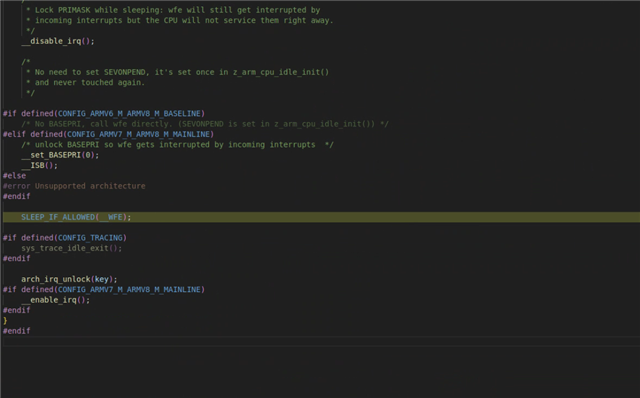
Using the debugger, I found that the code hangs at line 141 in zephyr/arch/arm/core/cortex_m/cpu_idle.c at the SLEEP_IF_ALLOWED(__WFE) instruction inside arch_cpu_atomic_idle().

It appears the system enters idle mode but never wakes up.
Application Core that we use - prj.conf:

# enable internal rc
CONFIG_CLOCK_CONTROL_NRF_K32SRC_SYNTH=y
CONFIG_CLOCK_CONTROL_NRF_K32SRC_XTAL=n
CONFIG_SOC_ENABLE_LFXO=n    


  • What changed in the clock control configuration between NCS v2.4.0 and the current version that could cause this issue?
  • Is there any additional configuration required for the nRF5340 to use the internal RC oscillator (LFRC) without an external 32.768 kHz crystal?
  • Are there any device tree overlay changes needed to disable the LFXO on a custom board in the newer NCS versions?

Parents
  • Check finished DTS in build/zephyr. There were DTS LFXO changes IIRC.

  • Thank you for your response.

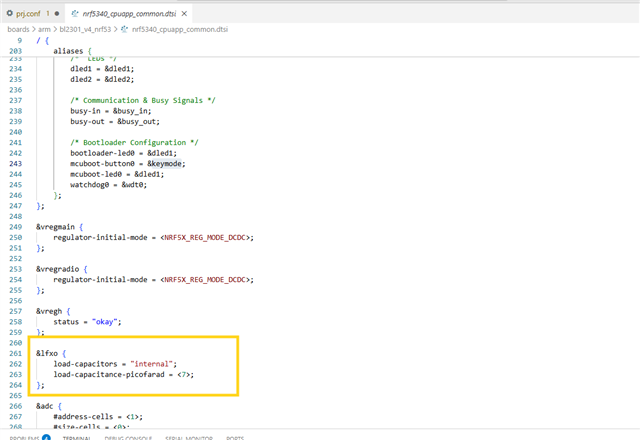
    I found the following LFXO configuration in my device tree file. Could this be causing the issue?


    Additionally, I checked the generated build/zephyr.dts and found this output for the clock controller...

    			/* node '/soc/peripheral@50000000/clock-controller@4000' defined in zephyr/dts/arm/nordic/nrf5340_cpuapp_peripherals.dtsi:15 */
    			oscillators: clock-controller@4000 {
    				compatible = "nordic,nrf53-oscillators"; /* in zephyr/dts/arm/nordic/nrf5340_cpuapp_peripherals.dtsi:16 */
    				reg = < 0x4000 0x1000 >;                 /* in zephyr/dts/arm/nordic/nrf5340_cpuapp_peripherals.dtsi:17 */
    
    				/* node '/soc/peripheral@50000000/clock-controller@4000/lfxo' defined in zephyr/dts/arm/nordic/nrf5340_cpuapp_peripherals.dtsi:19 */
    				lfxo: lfxo {
    					compatible = "nordic,nrf53-lfxo";     /* in zephyr/dts/arm/nordic/nrf5340_cpuapp_peripherals.dtsi:20 */
    					#clock-cells = < 0x0 >;               /* in zephyr/dts/arm/nordic/nrf5340_cpuapp_peripherals.dtsi:21 */
    					clock-frequency = < 0x8000 >;         /* in zephyr/dts/arm/nordic/nrf5340_cpuapp_peripherals.dtsi:22 */
    					load-capacitors = "internal";         /* in custom/boards/arm/custom_nrf53/nrf5340_cpuapp_common.dtsi:262 */
    					load-capacitance-picofarad = < 0x7 >; /* in custom/boards/arm/custom_nrf53/nrf5340_cpuapp_common.dtsi:263 */
    				};
    
    				/* node '/soc/peripheral@50000000/clock-controller@4000/hfxo' defined in zephyr/dts/arm/nordic/nrf5340_cpuapp_peripherals.dtsi:25 */
    				hfxo: hfxo {
    					compatible = "nordic,nrf53-hfxo"; /* in zephyr/dts/arm/nordic/nrf5340_cpuapp_peripherals.dtsi:26 */
    					#clock-cells = < 0x0 >;           /* in zephyr/dts/arm/nordic/nrf5340_cpuapp_peripherals.dtsi:27 */
    					clock-frequency = < 0x1e84800 >;  /* in zephyr/dts/arm/nordic/nrf5340_cpuapp_peripherals.dtsi:28 */
    					startup-time-us = < 0x578 >;      /* in zephyr/dts/arm/nordic/nrf5340_cpuapp_peripherals.dtsi:29 */
    				};
    			};


    Since my custom board does not have an external 32.768 kHz crystal, should I disable the LFXO node in my device tree overlay like this?

    &lfxo {
        status = "disabled";
    };


    Would this resolve the hang at SLEEP_IF_ALLOWED(__WFE) that I'm experiencing?

  • When you don't have an external LF crystal it is recommended to select the internal LF RC oscillator by enabling the CONFIG_CLOCK_CONTROL_NRF_K32SRC_RC setting. It is important that you not only apply this to your main application, but also any bootloader's and to your  ipc_radio build.

    You can check whether this setting is currently applied or not for ipc_radio by looking at the generated build/ipc_radio/zephyr/.config file. 

    Khldun said:
    Since my custom board does not have an external 32.768 kHz crystal, should I disable the LFXO node in my device tree overlay like this?

    Yes.

  • Thank you very much for your help!

    The issue is now resolved. I added the LFCLK configuration options to my custom board's defconfig file. This ensures that all images (Application Core, Network Core, MCUboot, etc.) built for this board automatically use the internal RC oscillator instead of the external LFXO

Reply Children
Related