Software Reset to imitate Pin Reset

Hello, 

We have a small number of returns for our product, where the modem has gotten into some sort of strange state, and almost seems like it is unresponsive, or blocked from connecting to any network. It's very difficult to debug as most of them have been out in the field for months, if not years, before it happens. I wouldn't be surprised if it was some sort of Cell tower upgrade that messed up a live connection or something. When researching, I thought it might be the Modem Reset Loop Restriction, but after forcing that issue, it does recover eventually, so I am not sure that is it. I will continue to look for the real issue behind what this state even is, but until I find that, I need a failsafe to getting it out of this state. A soft reboot using the function ;

NVIC_SystemReset();
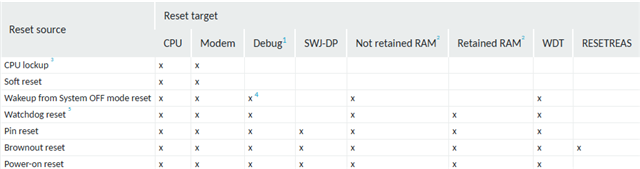
Does not fix it, but a Pin reset (nRESET line) does fix it. The problem is, we have no way to pull that line down, other than physically opening an IP68 rated enclosure, which we do not allow customers to do, so they have to send the units back for us to do a simple reset. A brown-out also fixes it, but again, customer would have to open the enclosure, remove the battery, AND we have a large supercapacitor which would take time to discharge, so that is not an option. 
Looking at the above table made me think it must be something to do with the retained RAM, so I thought I could try forcing a watchdog reset, and test to see if that fixes the issue, BUT we already use a watchdog set to 5 minute expiry. Whatever is going on when it is in this state still manages top feed the watchdog. I tried disabling the watchdog and resetting it up to 5 seconds, and block feeding, but when I try and set a different timeout, it fails. In the Zephyr Docs, in the disable function it states  -

"This function disables the watchdog instance and automatically uninstalls all timeouts. To set up a new watchdog, install timeouts and call wdt_setup() again. Not all watchdogs can be restarted after they are disabled."
So I am guessing this is not possible with the nrf9160. 
I could just block feeding the watchdog and wait the 5 minutes, which is fine for testing, but it is not ideal for a customer fixing it themselves. 

Is there any way I can perform a hard reset through code alone? (no physical PCB changes)

Thanks, 
Damien

P.S. In case you need to know, we have modem firmware 1.3.1 / 1.3.2 / 1.3.3 on most of our units, and currently developing our next firmware using SDK3.1.0, and modem FW 1.3.8 (latest)
Parents
  • Hi Damien,

    Are you trying to disable watchdog, reconfigure it to a shorter interval and then trigger the reset this way?

    If the device resets after 5 minutes, you might try to enable watchdog timer expiry after some shorter time, for example 5 seconds. Can you verify that when you block feeding the watchdog for 5 minutes device restarts?

    Best regards,
    Dejan

  • Hi Dejans, 

    Yes, the watchdog definitely works. I block it and it resets after 5 minutes. We already use this feature, specifically for the rare case where something goes wrong, the modem gets turned on, but never turned off. 

    What I thought I could try, is disabling it, setting it to a shorter period, then enabling it, but I unless I am doing something else wrong, I don't think reconfiguring the interval is allowed. 

    The main point though, is that I need a way to imitate doing a Pin Reset (holding nRESET line low), in software, I figured WDT reset is probably the closest, unless there is another way?

    Thanks, 
    Damien

  • Hi Damien,

    DamoL said:
    What I thought I could try, is disabling it, setting it to a shorter period, then enabling it, but I unless I am doing something else wrong, I don't think reconfiguring the interval is allowed. 

    It should be possible to reconfigure WDT. Please refer to nrf9160 WDT documentation.

    Best regards,
    Dejan

  • "The watchdog must be configured before it is started. After it is started, the watchdog’s configuration registers, which comprise registers CRV, RREN, and CONFIG, will be blocked for further configuration. ... When the device starts running again, after a reset, or waking up from OFF mode, the watchdog configuration registers will be available for configuration again."

    Doesn't look like you can reconfigure during runtime without reset. 

    Thanks, 

    Damien

Reply
  • "The watchdog must be configured before it is started. After it is started, the watchdog’s configuration registers, which comprise registers CRV, RREN, and CONFIG, will be blocked for further configuration. ... When the device starts running again, after a reset, or waking up from OFF mode, the watchdog configuration registers will be available for configuration again."

    Doesn't look like you can reconfigure during runtime without reset. 

    Thanks, 

    Damien

Children
  • Hi Damien,

    DamoL said:
    Doesn't look like you can reconfigure during runtime without reset. 

    Can you elaborate on this? You could try to configure WDT before it is started. Is this valid option for you?

    Best regards,
    Dejan

  • We already configure and start the watchdog at the start of the program. The point is you cannot reconfigure after that. Not necessarily a problem, we will just have to find another way of working with the watchdog. 
    I take it this means there is no other way of triggering a hard (pin) reset through software?

  • Some designs implement a software-triggered power-on reset by mistake, a feature usually discovered after a few thousand devices are in the field; note this feature is heavily dependent on the power source and current capability of the source. Tie two or more GPIO pins together on the board and first set both (all) outputs low then configure all to High-Drive outputs. When a reset is required at some future time or event set one (or more) pin high, either in software or hardware via PPI from an impossible Event such as timer overflow or (say) push-button input.

    Not a Nordic-supported solution, I should add :-)

    Edit: After re-reading the original post I see this is not an option, but maybe since ram is a suspect set all RAM[].POWER to power down all ram, then without using the stack wait for a large number of CPU cycles then again without using the stack issue a soft reset. Hopefully the ram will have decayed. Other option is to zero all ram without using the stack then issue the soft reset.

  • Hi,

    DamoL said:
    I take it this means there is no other way of triggering a hard (pin) reset through software?

    Commonly you would need to bind pin activation to something that would act as trigger. 
    Best regards,
    Dejan

Related