Temporarily bricked a couple of NRF52840s. Solved, but...

I managed to somehow semi-brick an nrf52840. 

I've all but got the system/project working and wrote some instructions on how to install VSC with the appropriate toolchain and SDK. 

So I followed my instructions on a secondary machine (laptop rather than desktop), got the code form svn, compiled and with a couple of hiccoughs got it compiling. 

However, when I hit debug it got to the end and flaked out. I could not connect or do anything on either laptop OR desktop. Eventually, I found this:

 nRFConnect Programmer Error: Timeout occured while handling debug power 

This was saying a common issue is enabling reset, which I clearly did as, if I followed the instructions there I connected RESET to 3V3 and it was fine. 

So, how could I have managed to enable reset when trying this on the laptop? AFAIK I used exactly the same code as on the desktop, checked in to svn on the desktop, checked out on the laptop, compiled and debug hit. Why would that have enabled reset? 

It also doesn't quite line up with that other post, as it's saying that you might have enabled the reset pin and it's pulled low, but it's pulled to 3V3 via a 10k resistor. It was only shorting out that 10k resistor and connecting reset directly to 3V3 that did the trick. Why would that be the case? 

Parents
  • Hello

    I don't think you broke the nRF52840 because you used a different computer. You most likely flashed a slightly different firmware from the laptop, i.e., even though the source code was the same, since the laptop’s had a clean setup, this build environment probably generated different config files or different Kconfig options, and this caused the difference. Those settings likely changed how the RESET or SWD pins behave. 

    The new environment might have enabled the pin-reset function, or disabled/reused the SWD debug pins, or even put the chip into a very low-power mode too early. This might have caused the “debug power timeout” error.

    I think that your board already had a 10k pull-up on RESET, but something in the firmware or hardware was pulling that pin down just enough to keep the chip in a somewhat half-reset unstable state. When you forced RESET directly to 3.3V, you gave it a much stronger signal, which stabilized the chip long enough for the debugger to connect and recover it.

    Kind Regards,

    Abhijith

  • Hi,

    Thanks for the reply. 

    I had realised that there was something in the environment somewhere that had done this, rather than the computer itself being at fault, but the question is, what exactly could do this? 

    I have, in the svn repository all the files in the root directory of the project, the prj.conf files etc; the overlay files are present and correct too. One thing it didn't have  was build configuration. so I suppose something could have gone wrong with me recreating. So if that is  possibility, what part of it could be doing this?

    And maybe a better question was why was the build config not in svn? Where is that held? I  did not put the build directory in svn as that would be huge and surely recreated on each build. Or is there *some* information in the build directory that needs to be carried across? 

    If the new environment might have enabled the pin reset function, the question is how? What can cause that to happen? Saying the build environment probably generated different config files seems extraordinary, like it's random  what happens when you build. 

    So, the questions are:

    1. What, exactly could cause the reset to be enabled? 

    2. If it works on machine 1, is there something in the build directory than needs committing to svn? Is the build directory more than just what is created after a build?  

    If there was a clean function I might be able to see what is left on machine 1 afterwards and that might be a pointer to extra files that need to go in svn. 

Reply
  • Hi,

    Thanks for the reply. 

    I had realised that there was something in the environment somewhere that had done this, rather than the computer itself being at fault, but the question is, what exactly could do this? 

    I have, in the svn repository all the files in the root directory of the project, the prj.conf files etc; the overlay files are present and correct too. One thing it didn't have  was build configuration. so I suppose something could have gone wrong with me recreating. So if that is  possibility, what part of it could be doing this?

    And maybe a better question was why was the build config not in svn? Where is that held? I  did not put the build directory in svn as that would be huge and surely recreated on each build. Or is there *some* information in the build directory that needs to be carried across? 

    If the new environment might have enabled the pin reset function, the question is how? What can cause that to happen? Saying the build environment probably generated different config files seems extraordinary, like it's random  what happens when you build. 

    So, the questions are:

    1. What, exactly could cause the reset to be enabled? 

    2. If it works on machine 1, is there something in the build directory than needs committing to svn? Is the build directory more than just what is created after a build?  

    If there was a clean function I might be able to see what is left on machine 1 afterwards and that might be a pointer to extra files that need to go in svn. 

Children
  • OK, I foud thw issue, but I'd like to know a better way of doing this. 

    I had to add build configuation, so I'm guessing that build config is in the build directory which wasn't in svn. When I added that I got one detail wrong in the board target. 

    I don't understand why that would bork the reset line, but the big question is, why does that even have to be recreated? Surely that should be part of the project. If that is set up and working you should not have to recreate when you transfer to a new machine. So what files from the build directory should ne put into version control? There are SO many of them and I don't want to store unnecessary guff. 

  • Hello,

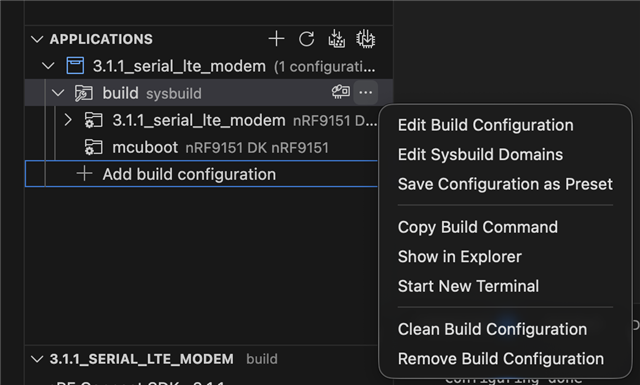
    You have for example those two options for exporting the build configuration:

    • Save Configuration as Preset (gives you a JSON output)
    • Copy Build Command

    Best regards,

    Michal

Related