Hi,
I am trying to communicate with Serial LTE Modem application running on nRF9151DK through SLM Shell sample running on nRF52840DK.
I am using nrf connect in vscode, and have followed the instructions in:
I have couple of issues on both sides:
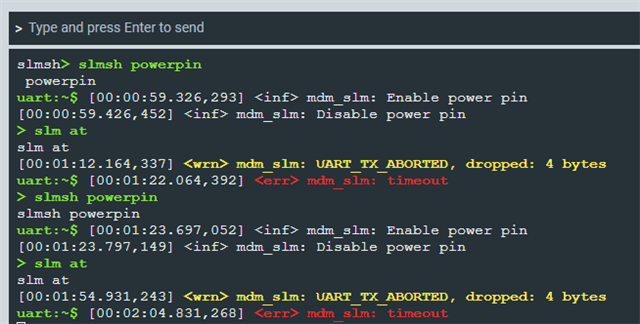
- On the slm-shell, when sending a simple "at" command, I receive TX Abort, I tried increasing the timeout, got same result:
*** Booting nRF Connect SDK v3.1.1-e2a97fe2578a ***
*** Using Zephyr OS v4.1.99-ff8f0c579eeb ***
[00:00:00.320,373] <inf> app: SLM Shell starts on nrf52840dk
[00:00:00.320,434] <inf> mdm_slm: UART baud: 115200 d/p/s-bits: 3/0/1 HWFC: 1
uart:~$ > slm at
slm at
[00:01:23.960,601] <wrn> mdm_slm: UART_TX_ABORTED, dropped: 4 bytes
uart:~$ [00:01:33.860,687] <err> mdm_slm: timeout
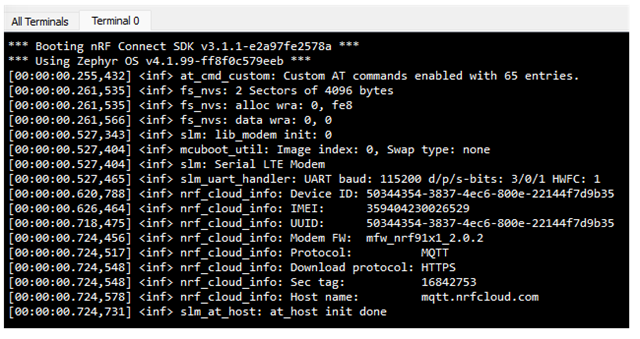
- On the modem side, I am using J-link RTT Viewer, but cannot capture any logs after the initial connection:
[00:00:00.252,655] <err> spi_nor: Device id 90 ca 33 does not match config c8 65 19
*** Booting nRF Connect SDK v3.1.1-e2a97fe2578a ***
*** Using Zephyr OS v4.1.99-ff8f0c579eeb ***
[00:00:00.253,662] <inf> at_cmd_custom: Custom AT commands enabled with 64 entries.
[00:00:00.254,119] <dbg> slm: main: RR: 0x00000001
[00:00:00.260,833] <inf> fs_nvs: 2 Sectors of 4096 bytes
[00:00:00.261,169] <inf> fs_nvs: alloc wra: 0, fe8
[00:00:00.261,505] <inf> fs_nvs: data wra: 0, 0
[00:00:00.528,778] <inf> slm: lib_modem init: 0
[00:00:00.529,144] <inf> mcuboot_util: Image index: 0, Swap type: none
[00:00:00.529,510] <inf> slm: Serial LTE Modem
[00:00:00.529,846] <inf> slm_uart_handler: UART baud: 115200 d/p/s-bits: 3/0/1 HWFC: 1
[00:00:00.623,565] <inf> nrf_cloud_info: Device ID: 50344354-3837-4ec6-800e-22144f7d9b35
[00:00:00.629,241] <inf> nrf_cloud_info: IMEI: 359404230026529
[00:00:00.721,588] <inf> nrf_cloud_info: UUID: 50344354-3837-4ec6-800e-22144f7d9b35
[00:00:00.727,569] <inf> nrf_cloud_info: Modem FW: mfw_nrf91x1_2.0.2
[00:00:00.727,966] <inf> nrf_cloud_info: Protocol: MQTT
[00:00:00.728,302] <inf> nrf_cloud_info: Download protocol: HTTPS
[00:00:00.728,668] <inf> nrf_cloud_info: Sec tag: 16842753
[00:00:00.729,034] <inf> nrf_cloud_info: Host name: mqtt.nrfcloud.com
[00:00:00.729,553] <dbg> slm_at_host: slm_at_send_indicate: TX
52 65 61 64 79 0d 0a |Ready..
[00:00:00.730,621] <inf> slm_at_host: at_host init done
Can you please advise how to resolve these issues?
Thanks