Failed to erase device (nRF9151-DK) when programming via nRF Connect for Desktop

I get the following error when trying to program the device:
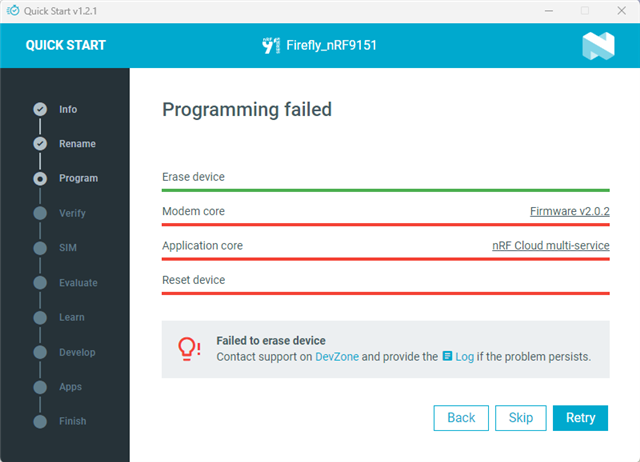
The log shows this:

2025-12-10T09:08:50.194Z INFO Initialising the bundled nrfutil device
2025-12-10T09:08:50.228Z DEBUG Started watching devices
2025-12-10T09:08:51.282Z INFO Using the bundled core version for nrfutil device: 8.1.1
2025-12-10T09:08:51.337Z INFO Using nrfutil-device version: 2.10.2
2025-12-10T09:08:51.338Z INFO Using nrf-device-lib version: 0.17.71
2025-12-10T09:08:51.340Z INFO Using nrf-probe version: 0.38.0
2025-12-10T09:08:51.340Z INFO Using JLink version: JLink_V8.76
2025-12-10T09:08:51.343Z INFO Your version of SEGGER J-Link (8.76) is newer than the one this app was tested with (8.18). The tested version is not required, and your J-Link version will most likely work fine. If you get issues related to J-Link with your devices, use the tested version.
2025-12-10T09:09:05.294Z DEBUG Selected device: nRF9151 DK
2025-12-10T09:09:05.856Z DEBUG Changed step: Info
2025-12-10T09:09:12.013Z DEBUG Changed step: Rename
2025-12-10T09:10:00.777Z DEBUG Changed step: Program

Is there a way to resolve this?

Initially I was already unable to find the device via Visual Studio (with the nrf extensions). It says no devices found in Connected Devices although it does find the device via nrfutil. I get a warning about the legacy USB drivers being missing. I did do the Segger J-Link installation with the legacy USB driver checkbox enabled but for some reason it is unable to find them.
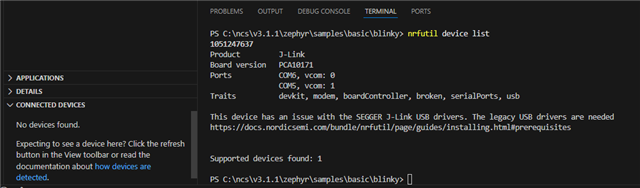
This is the reason I went to the nRF Connect for Desktop application to see if I could at least connect to and program the device from there.

Parents
  • Some additional information. When I try to manually set the driver for the board in windows Device Manager it refuses to accept the drivers in C:\Program Files\SEGGER\JLink_V876\USBDriver\x64. Are these the correct ones? If so, I wonder whether there is something wrong with the hardware ID. Based on what I have read, the hardware ID needs to match one of the ones listed in the .inf file. 

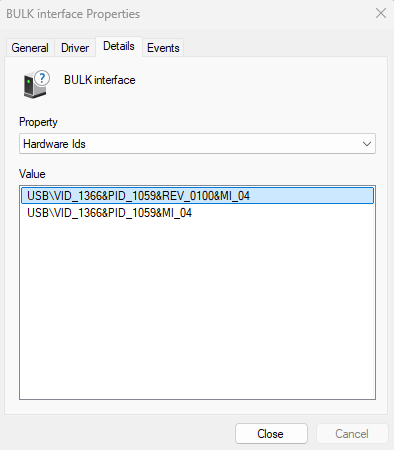
    Here are the hardware IDs of my board:

  • Hi,

    SamuelAustin said:
    When I try to manually set the driver for the board in windows Device Manager it refuses to accept the drivers in C:\Program Files\SEGGER\JLink_V876\USBDriver\x64. Are these the correct ones?

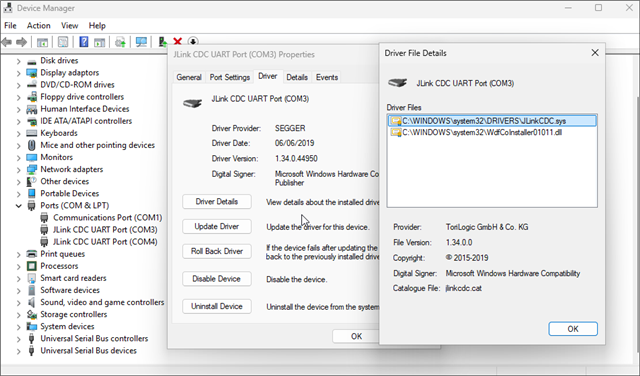
    When I check the drivers in use for my device, I get that.

    I also tried uninstalling J-Link and reinstalling it without the legacy USB drivers, but it still works. I can't reproduce the issue on my side.

    SamuelAustin said:
    If so, I wonder whether there is something wrong with the hardware ID. Based on what I have read, the hardware ID needs to match one of the ones listed in the .inf file. 

    Your hardware ID seems fine. I have almost the same, it is just the PID that is slightly different (1069) but it probably is that I am using a different version of the board or something like that.

    Another thing you can try, if you suspect the board of failing, is to recover the board by using nrfutil download it and install the device module with the command "nrfutil.exe install device" and then try to recover the DK with the command "nrfutil.exe device recover". 

    Best regards,

    Simon D-M

  • I tried on another machine and there everything works fine. The big difference, the machine where things are not working is Windows arm64 while the other machine is Windows x64.

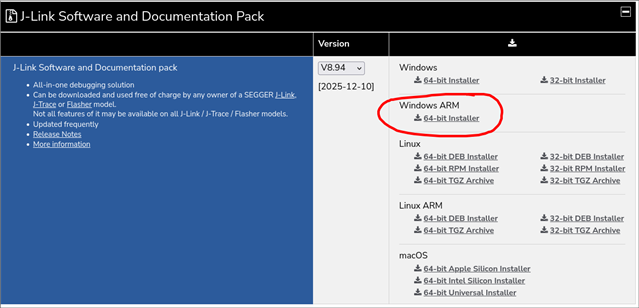
    I saw online that the Segger JLink Legacy USB drivers do not support arm64. Also nrfUtil apparently has no arm64 support.

    I suspect that the issue has to do with these two things. I saw that instead of using the Segger legacy USb drivers you need to use WinUSB instead. I tried this but still the board did not show up in VIsual Studio. It did start showing up in the nrf Connect for Desktop Programmer and it did also start showing up in the Universal Serial Bus devices in Device Manager though.

    I have asked my employer for an x64 machine for now to avoid all these issues. Smiley

    In the meantime, are there any tricks to get this to work on Windows arm64?

    The arm64 machine is able to install many x64 applications as it will emulate them, however, I am unsure which combination of x64 and arm64 installers I should run. For example, Segger JLink and VS Code have both available. I have tried loads of combinations but nothing seems to work.

Reply
  • I tried on another machine and there everything works fine. The big difference, the machine where things are not working is Windows arm64 while the other machine is Windows x64.

    I saw online that the Segger JLink Legacy USB drivers do not support arm64. Also nrfUtil apparently has no arm64 support.

    I suspect that the issue has to do with these two things. I saw that instead of using the Segger legacy USb drivers you need to use WinUSB instead. I tried this but still the board did not show up in VIsual Studio. It did start showing up in the nrf Connect for Desktop Programmer and it did also start showing up in the Universal Serial Bus devices in Device Manager though.

    I have asked my employer for an x64 machine for now to avoid all these issues. Smiley

    In the meantime, are there any tricks to get this to work on Windows arm64?

    The arm64 machine is able to install many x64 applications as it will emulate them, however, I am unsure which combination of x64 and arm64 installers I should run. For example, Segger JLink and VS Code have both available. I have tried loads of combinations but nothing seems to work.

Children
Related