

I'm trying to make the basic Button sample work but am having problems.
The physical button is a latching button. Press it and it moves in with a click and physically stays there. Press again and with a click, the latch releases and the button pops out.
This is the button:
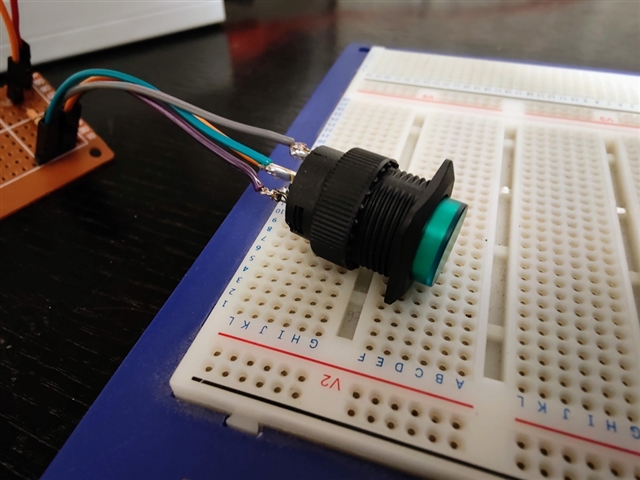
Out state
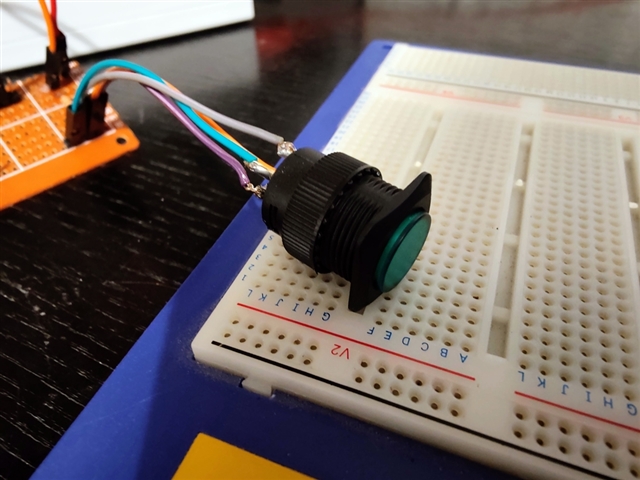
In state
In terms of code, what happens is this: When I press the button in, I don't think a callback is received. When it is released to its "out" position, the button's interrupt callback function is repeatedly called, over and over again, and its state is always 1. I never see a state of 0 which is why I assume there's no callback when the button is put into its "in" state.
Here's a video:
And here's the code:
/*
Shows how to control a push button with built-in LED like this one:
https://thepihut.com/products/16mm-illuminated-pushbutton-green-latching-on-off-switch?variant=27739372497
 */

#include <zephyr/kernel.h>
#include <zephyr/device.h>
#include <zephyr/drivers/gpio.h>
#include <zephyr/sys/util.h>
#include <zephyr/sys/printk.h>
#include <inttypes.h>

#define SLEEP_TIME_MS	1000

#define START_STOP_BTN_NODE	DT_ALIAS(btnpin)
/* Check if the node is valid before proceeding */
#if !DT_NODE_HAS_STATUS(START_STOP_BTN_NODE, okay)
#error "Start/Stop button pin devicetree node is disabled or not found"
#endif

#define START_STOP_LED_NODE	DT_ALIAS(btnled)
/* Check if the node is valid before proceeding */
#if !DT_NODE_HAS_STATUS(START_STOP_LED_NODE, okay)
#error "Start/Stop LED devicetree node is disabled or not found"
#endif

static const struct gpio_dt_spec button = GPIO_DT_SPEC_GET_OR(START_STOP_BTN_NODE, gpios,
							      {0});
static struct gpio_callback button_cb_data;

static const struct gpio_dt_spec led = GPIO_DT_SPEC_GET_OR(START_STOP_LED_NODE, gpios,
							      {0});

void set_led() {
    int state = 1 - gpio_pin_get_dt(&button);
    printk("Setting LED state to %d\n",state);
    gpio_pin_set_dt(&led, state);
}

void button_pressed(const struct device *dev, struct gpio_callback *cb,
		    uint32_t pins)
{
    printk("Button! State=%d\n",gpio_pin_get_dt(&button));
	printk("Button pressed at %" PRIu32 "\n", k_cycle_get_32());
    // set_led();
}

int main(void)
{
    printk("button test v20\n");

	int ret;

	if (!gpio_is_ready_dt(&button)) {
		printk("Error: button device %s is not ready\n",
		       button.port->name);
		return 0;
	}
    printk("Button is ready \n");

	ret = gpio_pin_configure_dt(&button, GPIO_INPUT);
	if (ret != 0) {
		printk("Error %d: failed to configure %s pin %d\n",
		       ret, button.port->name, button.pin);
		return 0;
	}
    printk("Button configured for input\n");

    if (!gpio_is_ready_dt(&led)) {
        printk("Error: LED device %s is not ready\n",
                led.port->name);
        return 0;
	}
    printk("LED is ready \n");

	ret = gpio_pin_configure_dt(&led, GPIO_OUTPUT);
	if (ret != 0) {
		printk("Error %d: failed to configure %s pin %d\n",
		       ret, led.port->name, led.pin);
		return 0;
	}
    printk("LED configured for output \n");

    // set_led();

	ret = gpio_pin_interrupt_configure_dt(&button,
					      GPIO_INT_EDGE_TO_ACTIVE);

	if (ret != 0) {
		printk("Error %d: failed to configure interrupt on %s pin %d\n",
			ret, button.port->name, button.pin);
		return 0;
	}
    printk("Button attached to interrupt\n");

	gpio_init_callback(&button_cb_data, button_pressed, BIT(button.pin));
	gpio_add_callback(button.port, &button_cb_data);
	printk("Set up button at %s pin %d\n", button.port->name, button.pin);

	printk("Press the button\n");
	return 0;
}
Overlay with DTS definitions for the button and its integral LED as follows:
/ {
    /* Define a new node within the root of the devicetree */
    custom_gpios {
        /* Use the generic 'gpio-leds' compatible binding */
        compatible = "gpio-leds";

        /* Define a button node with a unique label 'start_stop_btn' */
        start_stop_btn: start_stop_gpio_connector {
            /*
             * 'gpios' property is a phandle-array that takes:
             * 1. Phandle to the GPIO controller (&gpio0 refers to the node with label 'gpio0')
             * 2. The pin number (e.g., 13)
             * 3. The flags (e.g., GPIO_ACTIVE_LOW for an active-low LED)
             */
            gpios = <&gpio0 6 GPIO_ACTIVE_LOW>;
            label = "Start/stop button";
        };
        /* Define an LED node with a unique label 'btn_led' */
        start_stop_led: btn_led_gpio_connector {
            /*
             * 'gpios' property is a phandle-array that takes:
             * 1. Phandle to the GPIO controller (&gpio0 refers to the node with label 'gpio0')
             * 2. The pin number (e.g., 13)
             * 3. The flags (e.g., GPIO_ACTIVE_LOW for an active-low LED)
             */
            gpios = <&gpio0 8 GPIO_ACTIVE_LOW>;
            label = "Button LED";
        };
    };

    /* Add an alias for easy access in application code */
    aliases {
        btnpin = &start_stop_btn;
        btnled = &start_stop_led;
    };
};
I assume the issue is that this is a latching button rather than a simple momentary push button but I'm not sure how to handle this in code.
Advice and guidance appreciated as always :-)
Update
Tested with various GPIO interrupt flag combinations with the following results:
    // Button Out: repeated callbacks. Button In: no callback. State=1
	// ret = gpio_pin_interrupt_configure_dt(&button,
	// 				      GPIO_INT_EDGE_TO_ACTIVE);

    // Button Out: repeated callbacks. Button In: no callback. State=0
	// ret = gpio_pin_interrupt_configure_dt(&button,
	// 				      GPIO_INT_LEVEL_INACTIVE|GPIO_INT_LEVEL_ACTIVE);

    // Button Out: repeated callbacks. Button In: no callback. State=0
	// ret = gpio_pin_interrupt_configure_dt(&button,
	// 				      GPIO_INT_EDGE_RISING);

    // Button Out: repeated callbacks. Button In: no callback. State=1
	ret = gpio_pin_interrupt_configure_dt(&button,
					      GPIO_INT_EDGE_FALLING);

    // Button Out: repeated callbacks. Button In: no callback. State=1 and 0 alternating i.e. 2 callbacks each time button released to OUT state.
	// ret = gpio_pin_interrupt_configure_dt(&button,
	// 				      GPIO_INT_EDGE_BOTH);

    // Button Out: repeated callbacks with state=0. Button In: callback with state 1.
	ret = gpio_pin_interrupt_configure_dt(&button,
					      GPIO_INT_LEVEL_LOW|GPIO_INT_LEVEL_HIGH);


