nrfutil-device.exe fails if a USB-serial adapter is connected to computer

I observed that I can't flash my board in VS Code when a USB-serial adapter is connected to my computer. When the adapter is unplugged everything works.

-- runners.nrfutil: Flashing file: C:\Users\Grzegorz\Documents\src\nRF52\broadcaster\build\merged.hex

thread 'main' panicked at C:\Users\VssAdministrator\.cargo\git\checkouts\nrf-device-lib-cf1a63c495be42f5\936ac5a\serialport-lister\src\lib.rs:49:60:
called `Option::unwrap()` on a `None` value
note: run with `RUST_BACKTRACE=1` environment variable to display a backtrace
Error: Subprocess C:\ncs\toolchains\66cdf9b75e\nrfutil\home\bin\nrfutil-device.exe failed with unexpected exit code Some(101)
FATAL ERROR: command exited with status 1: nrfutil --json device x-execute-batch --batch-path 'C:\Users\Grzegorz\Documents\src\nRF52\broadcaster\build\broadcaster\zephyr\generated_nrfutil_batch.json'
--serial-number 1057721579

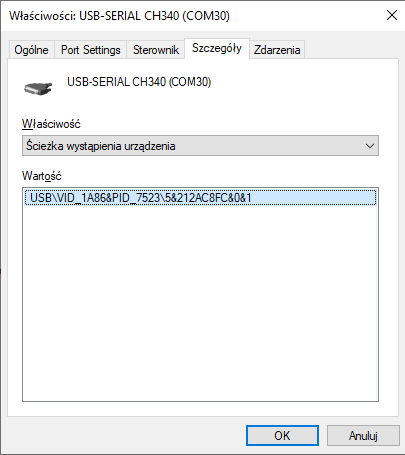
The interesing thing is that serial number is passed to nrfutil. Then why does it try to access serial port adapter instead of DK board? Another thing: in the same folder when nrfutil-device.exe is located there is also nrfutil.exe and this binary works without problems.

PS C:\Users\Grzegorz> & C:\ncs\toolchains\66cdf9b75e\nrfutil\home\bin\nrfutil-device.exe device-info

thread 'main' panicked at C:\Users\VssAdministrator\.cargo\git\checkouts\nrf-device-lib-cf1a63c495be42f5\936ac5a\serialport-lister\src\lib.rs:49:60:
called `Option::unwrap()` on a `None` value
note: run with `RUST_BACKTRACE=1` environment variable to display a backtrace
PS C:\Users\Grzegorz> & C:\ncs\toolchains\66cdf9b75e\nrfutil\home\bin\nrfutil.exe device device-info
serial_number: 001057721579
        boardVersion: PCA10156
        deviceFamily: NRF54L_FAMILY
        deviceName: nRF54L15
        deviceVersion: NRF54L15_xxAA_REV2
        jlinkObFirmwareVersion: J-Link OB-nRF5340-NordicSemi compiled Jul  8 2025 10:15:34

Simular issue can be oserved in Board Configurator:
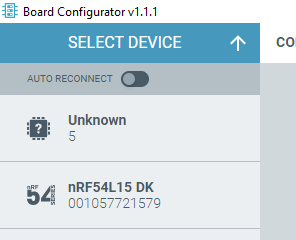
It detects USB-serial adapter as an unknown board.

Parents Reply Children
  • Grzegorz, and Ressa, I discovered another USB/UART device that also causes the problem when sitting on the bus: CP2102 from Silicon Labs. One of our custom boards uses a CP2102. I should have realized that although my CP2102 based board sits in a box, my colleague has most, or all of our products connected to his computer -- explaining why he had been seeing the problem. But the bell didn't ring until you mentioned that certain models of USB/UART adapters cause the issue, Grzegorz.

    Burt

  • I was playing around with this some more. Now, I can do the following or something very close:

    C:\> set NRFUTIL_HOME=\ncs\toolchains\66cdf9b75e\nrfutil\home
    C:\> cd \ncs\toolchains\66cdf9b75e\nrfutil\home
    C:\ncs\toolchains\66cdf9b75e\nrfutil\home> erase locked
    C:\ncs\toolchains\66cdf9b75e\nrfutil\home> cd ..\bin
    C:\ncs\toolchains\66cdf9b75e\nrfutil\bin> nrfutil uninstall nrfutil-device
    C:\ncs\toolchains\66cdf9b75e\nrfutil\bin> nrfutil install nrfutil-device
    C:\ncs\toolchains\66cdf9b75e\nrfutil\bin> cd ..\home
    C:\ncs\toolchains\66cdf9b75e\nrfutil\home> type NUL > locked
    to get from 2.15.2 to 2.15.7. And it's not that I have an issue with unlocking the toolchain and making a change that can only be helpful--my issue, Ressa, is that I am only one person out of like 77000 that use DevZone and who knows how many more developers are using NS products--so NS needs to have a system in place that gets everybody updated not just the tiny fraction who stumble upon the right DevZone ticket. (Also this has to be done for a number of toolchains, I believe.)
    Burt
  • Hi Burt,
    Thanks a lot !
    I am working with a custom board and my computer is connected to the board simutaneously via CP2102 and to a nrf5340DK to flash&debug, using VS Code. I had to disconnect the CP2102 each time to be able to flash, due to this problem with nrfutil, and this was really annoying. I applied the sequence to update nftutil-device as you suggested, and I confirm that it's now ok !
    jean-francois

  • You're welcome, jean-francois. Glad this helped. Happy New Year!

Related