nrfutil-device.exe fails if a USB-serial adapter is connected to computer

I observed that I can't flash my board in VS Code when a USB-serial adapter is connected to my computer. When the adapter is unplugged everything works.

-- runners.nrfutil: Flashing file: C:\Users\Grzegorz\Documents\src\nRF52\broadcaster\build\merged.hex

thread 'main' panicked at C:\Users\VssAdministrator\.cargo\git\checkouts\nrf-device-lib-cf1a63c495be42f5\936ac5a\serialport-lister\src\lib.rs:49:60:
called `Option::unwrap()` on a `None` value
note: run with `RUST_BACKTRACE=1` environment variable to display a backtrace
Error: Subprocess C:\ncs\toolchains\66cdf9b75e\nrfutil\home\bin\nrfutil-device.exe failed with unexpected exit code Some(101)
FATAL ERROR: command exited with status 1: nrfutil --json device x-execute-batch --batch-path 'C:\Users\Grzegorz\Documents\src\nRF52\broadcaster\build\broadcaster\zephyr\generated_nrfutil_batch.json'
--serial-number 1057721579

The interesing thing is that serial number is passed to nrfutil. Then why does it try to access serial port adapter instead of DK board? Another thing: in the same folder when nrfutil-device.exe is located there is also nrfutil.exe and this binary works without problems.

PS C:\Users\Grzegorz> & C:\ncs\toolchains\66cdf9b75e\nrfutil\home\bin\nrfutil-device.exe device-info

thread 'main' panicked at C:\Users\VssAdministrator\.cargo\git\checkouts\nrf-device-lib-cf1a63c495be42f5\936ac5a\serialport-lister\src\lib.rs:49:60:
called `Option::unwrap()` on a `None` value
note: run with `RUST_BACKTRACE=1` environment variable to display a backtrace
PS C:\Users\Grzegorz> & C:\ncs\toolchains\66cdf9b75e\nrfutil\home\bin\nrfutil.exe device device-info
serial_number: 001057721579
        boardVersion: PCA10156
        deviceFamily: NRF54L_FAMILY
        deviceName: nRF54L15
        deviceVersion: NRF54L15_xxAA_REV2
        jlinkObFirmwareVersion: J-Link OB-nRF5340-NordicSemi compiled Jul  8 2025 10:15:34

Simular issue can be oserved in Board Configurator:
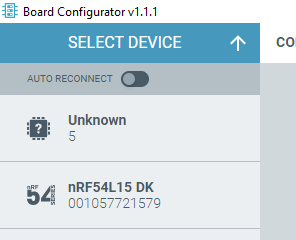
It detects USB-serial adapter as an unknown board.

Parents
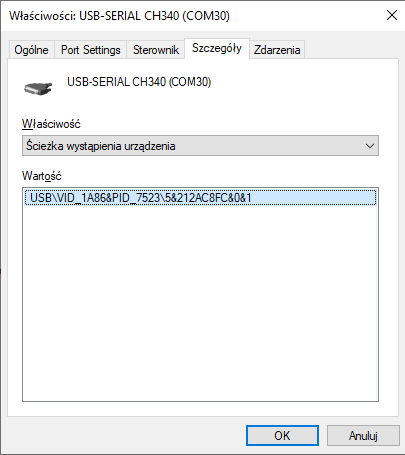
  • Hi Grzegorz, a colleague of mine is experiencing the same issue with flashing. Can you add some screenshots showing what Windows Device Manager shows for the Unkown 5 device? I don't know whether or not we have the same problem, but it might help us. Thanks.

    Burt

  • Holy Moly, Grzegorz, I have replicated the problem, using your information. Luckily, I have a CH340 in the house. I plugged it into a USB jack on my Windows 10 computer and got the error as soon as I tried to program my nRF9160DK board. Using v3.2.1 SDK and toolchain.

    My colleague tells me that he removed all devices other than the DK board he was trying to flash and that the problem persisted. I don't know if I want to figure that one out! Here, removing the CH340 from the USB bus fixes the issue.

    Burt

    ps, I will look at Device Manager and regedit as in nrfutil device list command fails - Nordic Q&A - Nordic DevZone - Nordic DevZone and see if I can make heads or tails out of the situation.

  • Grzegorz, and Ressa, I discovered another USB/UART device that also causes the problem when sitting on the bus: CP2102 from Silicon Labs. One of our custom boards uses a CP2102. I should have realized that although my CP2102 based board sits in a box, my colleague has most, or all of our products connected to his computer -- explaining why he had been seeing the problem. But the bell didn't ring until you mentioned that certain models of USB/UART adapters cause the issue, Grzegorz.

    Burt

  • I was playing around with this some more. Now, I can do the following or something very close:

    C:\> set NRFUTIL_HOME=\ncs\toolchains\66cdf9b75e\nrfutil\home
    C:\> cd \ncs\toolchains\66cdf9b75e\nrfutil\home
    C:\ncs\toolchains\66cdf9b75e\nrfutil\home> erase locked
    C:\ncs\toolchains\66cdf9b75e\nrfutil\home> cd ..\bin
    C:\ncs\toolchains\66cdf9b75e\nrfutil\bin> nrfutil uninstall nrfutil-device
    C:\ncs\toolchains\66cdf9b75e\nrfutil\bin> nrfutil install nrfutil-device
    C:\ncs\toolchains\66cdf9b75e\nrfutil\bin> cd ..\home
    C:\ncs\toolchains\66cdf9b75e\nrfutil\home> type NUL > locked
    to get from 2.15.2 to 2.15.7. And it's not that I have an issue with unlocking the toolchain and making a change that can only be helpful--my issue, Ressa, is that I am only one person out of like 77000 that use DevZone and who knows how many more developers are using NS products--so NS needs to have a system in place that gets everybody updated not just the tiny fraction who stumble upon the right DevZone ticket. (Also this has to be done for a number of toolchains, I believe.)
    Burt
Reply
  • I was playing around with this some more. Now, I can do the following or something very close:

    C:\> set NRFUTIL_HOME=\ncs\toolchains\66cdf9b75e\nrfutil\home
    C:\> cd \ncs\toolchains\66cdf9b75e\nrfutil\home
    C:\ncs\toolchains\66cdf9b75e\nrfutil\home> erase locked
    C:\ncs\toolchains\66cdf9b75e\nrfutil\home> cd ..\bin
    C:\ncs\toolchains\66cdf9b75e\nrfutil\bin> nrfutil uninstall nrfutil-device
    C:\ncs\toolchains\66cdf9b75e\nrfutil\bin> nrfutil install nrfutil-device
    C:\ncs\toolchains\66cdf9b75e\nrfutil\bin> cd ..\home
    C:\ncs\toolchains\66cdf9b75e\nrfutil\home> type NUL > locked
    to get from 2.15.2 to 2.15.7. And it's not that I have an issue with unlocking the toolchain and making a change that can only be helpful--my issue, Ressa, is that I am only one person out of like 77000 that use DevZone and who knows how many more developers are using NS products--so NS needs to have a system in place that gets everybody updated not just the tiny fraction who stumble upon the right DevZone ticket. (Also this has to be done for a number of toolchains, I believe.)
    Burt
Children
Related