nrfutil-device.exe fails if a USB-serial adapter is connected to computer

I observed that I can't flash my board in VS Code when a USB-serial adapter is connected to my computer. When the adapter is unplugged everything works.

-- runners.nrfutil: Flashing file: C:\Users\Grzegorz\Documents\src\nRF52\broadcaster\build\merged.hex

thread 'main' panicked at C:\Users\VssAdministrator\.cargo\git\checkouts\nrf-device-lib-cf1a63c495be42f5\936ac5a\serialport-lister\src\lib.rs:49:60:
called `Option::unwrap()` on a `None` value
note: run with `RUST_BACKTRACE=1` environment variable to display a backtrace
Error: Subprocess C:\ncs\toolchains\66cdf9b75e\nrfutil\home\bin\nrfutil-device.exe failed with unexpected exit code Some(101)
FATAL ERROR: command exited with status 1: nrfutil --json device x-execute-batch --batch-path 'C:\Users\Grzegorz\Documents\src\nRF52\broadcaster\build\broadcaster\zephyr\generated_nrfutil_batch.json'
--serial-number 1057721579

The interesing thing is that serial number is passed to nrfutil. Then why does it try to access serial port adapter instead of DK board? Another thing: in the same folder when nrfutil-device.exe is located there is also nrfutil.exe and this binary works without problems.

PS C:\Users\Grzegorz> & C:\ncs\toolchains\66cdf9b75e\nrfutil\home\bin\nrfutil-device.exe device-info

thread 'main' panicked at C:\Users\VssAdministrator\.cargo\git\checkouts\nrf-device-lib-cf1a63c495be42f5\936ac5a\serialport-lister\src\lib.rs:49:60:
called `Option::unwrap()` on a `None` value
note: run with `RUST_BACKTRACE=1` environment variable to display a backtrace
PS C:\Users\Grzegorz> & C:\ncs\toolchains\66cdf9b75e\nrfutil\home\bin\nrfutil.exe device device-info
serial_number: 001057721579
        boardVersion: PCA10156
        deviceFamily: NRF54L_FAMILY
        deviceName: nRF54L15
        deviceVersion: NRF54L15_xxAA_REV2
        jlinkObFirmwareVersion: J-Link OB-nRF5340-NordicSemi compiled Jul  8 2025 10:15:34

Simular issue can be oserved in Board Configurator:
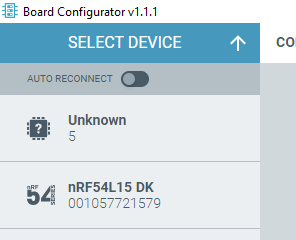
It detects USB-serial adapter as an unknown board.

Parents
  • Also seeing this problem as soon as toolchain updated to 3.2.1. Same fault occurs if any USB-Serial device is plugged in (in this case a multimeter with USB-Serial control cable connected).

    thread 'main' panicked at C:\Users\VssAdministrator\.cargo\git\checkouts\nrf-device-lib-cf1a63c495be42f5\936ac5a\serialport-lister\src\lib.rs:49:60:
    called `Option::unwrap()` on a `None` value
    note: run with `RUST_BACKTRACE=1` environment variable to display a backtrace
    Error: Subprocess C:\ncs\toolchains\66cdf9b75e\nrfutil\home\bin\nrfutil-device.exe failed with unexpected exit code Some(101)

    Existing project, updated (using nRF Connect within VS Code) from version 3.1 to 3.2.1 of SDK and toolchains. VS Code restarted after update, all extensions up to date.

  • Hello ajd. Definitely v3.2.1 has the problem. I don't believe that any USB-Serial device will cause the issue, but definitely it occurs with CH340 and CP2102 devices. Use Windows Device Manager to see if your device is one of those types. You can fix the problem with the technique I showed above. Otherwise wait until a new release.

    Burt

  • Those repair steps don't work for me - it fails with "Package is not installed" at the "nrfutil uninstall nrfutil-device" step - and yes I am in the correct folder. Paths and folders match your example, though note also that my version number for nrfutil also differs slightly from yours (8.1.0).

    I've taken the simpler step of unplugging the problematic USB-Serial device while programming as that's an option.

    Would be nice for this to be fixed properly in a toolchain update - it's clearly a code issue in respect of device enumeration.

  • Hello

    I think the repair steps work if you just change the package name to from "nrfutil-device" to "device"

    so change the steps:
    C:\ncs\toolchains\66cdf9b75e\nrfutil\bin> nrfutil uninstall nrfutil-device
    C:\ncs\toolchains\66cdf9b75e\nrfutil\bin> nrfutil install nrfutil-device
    to:
    C:\ncs\toolchains\66cdf9b75e\nrfutil\bin>nrfutil uninstall device
    C:\ncs\toolchains\66cdf9b75e\nrfutil\bin>nrfutil install device

    I found also that udating the "programmer" using NRF Desktop should solve the problem because this updates nrfutil.
    See release note of programmer 4.7.1 herafter:
    "4.7.1 - 2025-12-18
    Fixed
    Updated the bundled nrfutil device command to v2.15.7, which includes a fix to an issue with the device enumeration on Windows."

  • Yes - change of nrfutil package name worked. Thanks for the info.

  • Sorry, ajd, I must have been careless when typing the instructions. Thank you, Jean-Francois for the correction. I'm glad that it all worked out.

    Burt

Reply Children
No Data
Related