

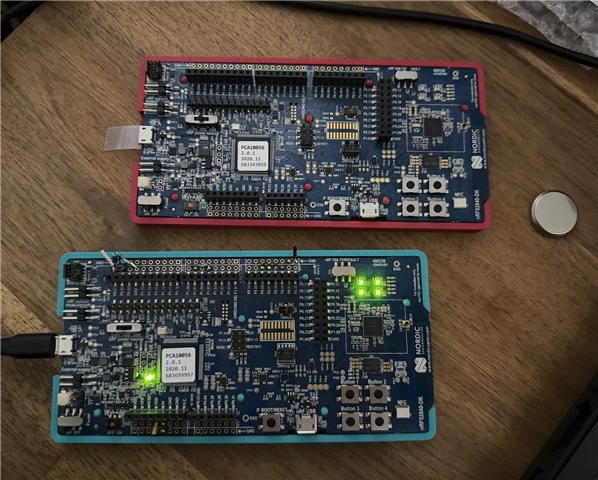
Hi, I took my old NRF52840 DK PCA10056 revision 2.0.1 and tried evaluating it today after few years. I am unable to connect to the target. I have 2 identical boards that were working few years ago on different machine.
I followed the academy guide (https://academy.nordicsemi.com/courses/nrf-connect-sdk-fundamentals/lessons/lesson-1-nrf-connect-sdk-introduction/topic/exercise-1-1/)
for installing nRF Connect SDK to VS Code. When I am trying to flash the sample project, I am having issues. I see the JLink fine, but don't see the target. I have JLink V8.76 and JLink V8.60 installed.
NRF52840 DK switches:
nRF power source: VDD
VEXT->NRF: OFF
TRACE: Def
SW6: DEFAULT
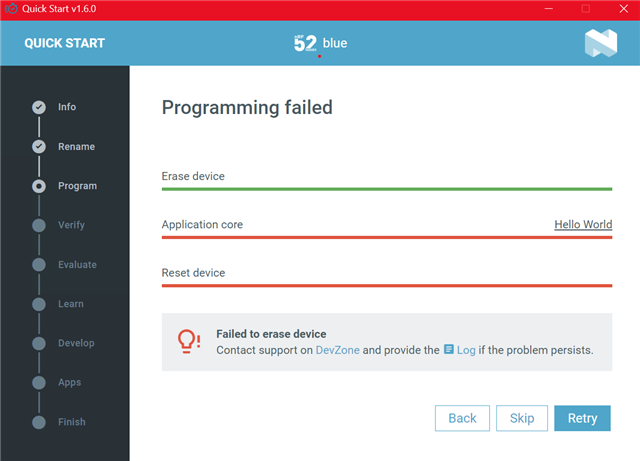
When I open nRF Connect for Desktop, the Quick Start detects my nRF52840 DK but fails when flashing. Here is the nRF Connnect for Desktop Quick Start log:
2025-12-31T11:51:58.877Z INFO Initialising the bundled nrfutil device
2025-12-31T11:51:58.885Z DEBUG Started watching devices
2025-12-31T11:51:59.022Z INFO Using the bundled core version for nrfutil device: 8.1.1
2025-12-31T11:51:59.059Z INFO Using nrfutil device version: 2.15.2
2025-12-31T11:51:59.059Z INFO Using nrf-device-lib version: 0.22.0
2025-12-31T11:51:59.059Z INFO Using nrf-probe version: 0.49.0
2025-12-31T11:51:59.059Z INFO Using SEGGER J-Link version: JLink_V8.76
2025-12-31T11:52:01.876Z DEBUG Selected device: nRF52840 DK
2025-12-31T11:52:01.892Z DEBUG Changed step: Info
2025-12-31T11:52:26.819Z DEBUG Changed step: Rename
2025-12-31T11:52:27.358Z DEBUG Changed step: Program
2025-12-31T11:52:29.643Z ERROR Failed to read the device information when setting up default external flash configuration. This is not critical, ignoring this error to allow the next operation to run, but we will probably hit it again on the next operation. The full error was: Device error: Setting the debug port SELECT register failed while powering up sys and debug regions (Unknown Error in J-Link DLL (error code =-1)).

This might indicate that the debug port is unavailable. Please double-check device power supply and SWD lines, and that SWD isn't disabled
And here is the VS Code Flashing log:
 *  Executing task: nRF Connect: Flash: blinky_sample/blinky_sample (active)

Flashing blinky_sample to blue
west flash -d c:\nrf52_projects\blinky_sample\build --domain blinky_sample --dev-id 683699997

-- west flash: rebuilding
[0/5] Performing build step for 'blinky_sample'
ninja: no work to do.
[4/5] cmd.exe /C "cd /D C:\nrf52_projects\blinky_sample\build\_sysbuild && C:\ncs\toolchains\66cdf9b75e\opt\bin\cmake.exe -E true"
-- west flash: using runner nrfutil
-- runners.nrfutil: reset after flashing requested
-- runners.nrfutil: Flashing file: C:\nrf52_projects\blinky_sample\build\merged.hex
-- runners.nrfutil: Connecting to probe
Error: One or more batch tasks failed:
 * 683699997: Device error: Setting the debug port SELECT register failed while powering up sys and debug regions (Unknown Error in J-Link DLL (error code =-1)).

   This might indicate that the debug port is unavailable. Please double-check device power supply and SWD lines, and that SWD isn't disabled (Generic)

FATAL ERROR: command exited with status 1: nrfutil --json device --x-ext-mem-config-file C:/ncs/v3.2.1/zephyr/boards/nordic/nrf52840dk/support/nrf52840dk_qspi_nrfutil_config.json x-execute-batch --bat
ch-path 'C:\nrf52_projects\blinky_sample\build\blinky_sample\zephyr\generated_nrfutil_batch.json' --serial-number 683699997
I have two boards board with the same revision and both act the same. They were both working few years back, with Segger embedded studio on different machine, under Windows 10.
Best regards,
Krystof
