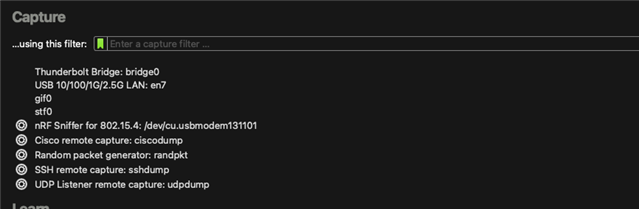
nrf52dk not visible in capture devise in Wireshark

Hi there,

I went through all the documentation and instructions in order to use my nRF52DK as a sniffer and I can not see it in the capture devices in wireshark.

am not too sure where to look next and I am very new to all this.

I flashed the board with what I think is the correct hex file 'nrf802154_sniffer_nrf5340dk.hex' (I can see a chip on the board saying n5340 so I assume that's the one).

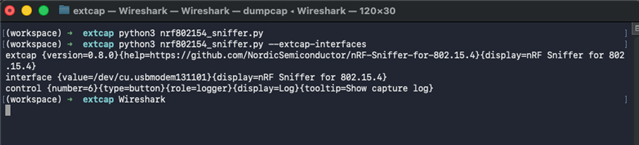
I also ran the nrf802154_sniffer.py file and get the following result which seems to indicate that it's working:

extcap {version=0.8.0}{help=https://github.com/NordicSemiconductor/nRF-Sniffer-for-802.15.4}{display=nRF Sniffer for 802.15.4}
control {number=6}{type=button}{role=logger}{display=Log}{tooltip=Show capture log}

My macOS is Sequoia 15.6.1

I am not sure what's the next step should be in order to see the nrf board visible in wireshark. Any help would be greatly appreciated.

I am happy to give more details or logs if that can help.

Thank you in advance

Parents
  • Hello,

    Unfortunately, the nRF52832 on the nRF52DK does not support the modulation required for sniffing 802.15.4 packets. See https://docs.nordicsemi.com/bundle/ug_sniffer_802154/page/UG/sniffer_802154/intro_802154.html for supported boards.

    I can see a chip on the board saying n5340 so I assume that's the one).

    This is the interface MCU on the DK used for programming the nRF52832.

    Best regards,

    Vidar

  • Hi, so I actually received the nrf52840 Dongle.

    I think I got too excited and try to flash it with the appropriate .hex file the following the documentation

    https://docs.nordicsemi.com/bundle/ug_sniffer_802154/page/UG/sniffer_802154/programming_firmware_802154.html

    However I get an error and it does not seem I can flash it again... I am very new to all this so I am probably doing something wrong or missing some steps.

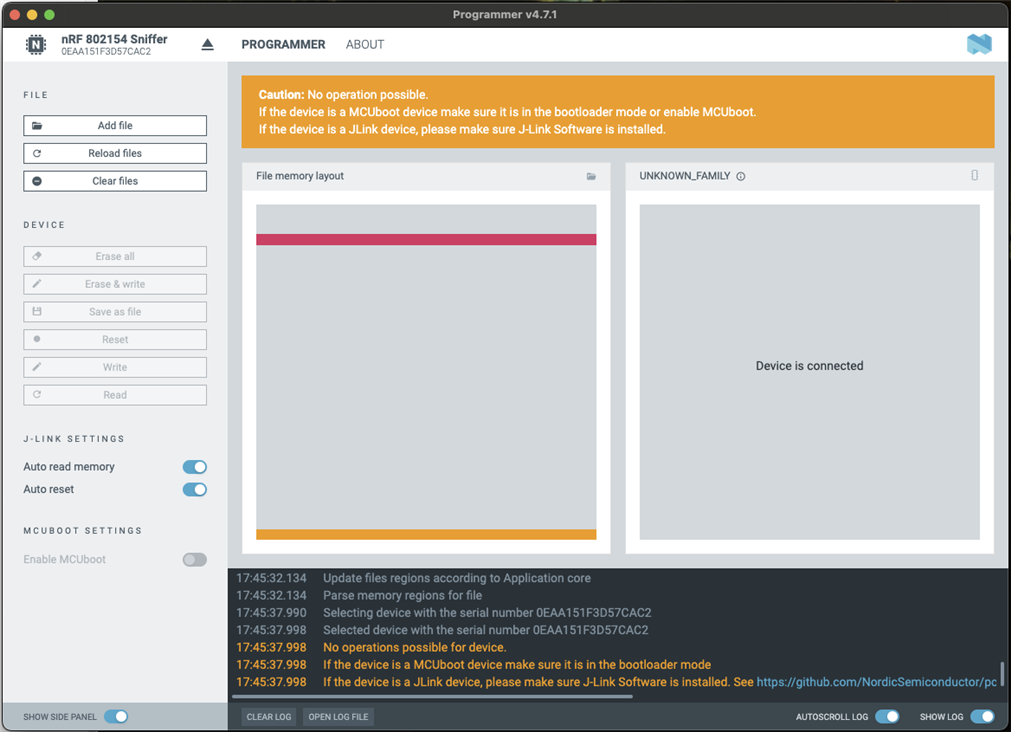
    Below a capture of the programmer

    2026-01-06T17:45:03.245Z INFO Initialising the bundled nrfutil device
    2026-01-06T17:45:03.253Z DEBUG Application data folder: /Users/ludo/Library/Application Support/nrfconnect/pc-nrfconnect-programmer
    2026-01-06T17:45:03.263Z DEBUG App pc-nrfconnect-programmer v4.7.1 (official)
    2026-01-06T17:45:03.263Z DEBUG App path: /Users/ludo/.nrfconnect-apps/node_modules/pc-nrfconnect-programmer
    2026-01-06T17:45:03.263Z DEBUG nRFConnect 5.2.1, required by the app is (>=5.2.0)
    2026-01-06T17:45:03.263Z DEBUG nRFConnect path: /Applications/nRF Connect for Desktop.app/Contents/Resources/app.asar
    2026-01-06T17:45:03.263Z DEBUG HomeDir: /Users/ludo
    2026-01-06T17:45:03.263Z DEBUG TmpDir: /var/folders/nt/sp661t_j64d1cjvpnv1g4dkw0000gn/T/
    2026-01-06T17:45:03.367Z INFO Using the bundled core version for nrfutil device: 8.1.1
    2026-01-06T17:45:03.392Z INFO Getting serial port options from the persistent store for 0EAA151F3D57CAC2.pc-nrfconnect-programmer
    2026-01-06T17:45:03.392Z INFO Device connected with the serial number 0EAA151F3D57CAC2
    2026-01-06T17:45:03.472Z INFO Using nrfutil device version: 2.15.7
    2026-01-06T17:45:03.473Z INFO Using nrf-device-lib version: 0.22.5
    2026-01-06T17:45:03.473Z INFO Using nrf-probe version: 0.51.0
    2026-01-06T17:45:03.473Z INFO Using SEGGER J-Link version: JLink_V8.96
    2026-01-06T17:45:03.473Z INFO Your version of SEGGER J-Link (8.96) is newer than the one this app was tested with (8.76). The tested version is not required, and your J-Link version will most likely work fine. If you get issues related to J-Link with your devices, use the tested version.
    2026-01-06T17:45:12.072Z INFO Selecting device with the serial number 0EAA151F3D57CAC2
    2026-01-06T17:45:12.081Z INFO Selected device with the serial number 0EAA151F3D57CAC2
    2026-01-06T17:45:12.081Z WARN No operations possible for device.
    2026-01-06T17:45:12.081Z WARN If the device is a MCUboot device make sure it is in the bootloader mode
    2026-01-06T17:45:12.081Z WARN If the device is a JLink device, please make sure J-Link Software is installed. See https://github.com/NordicSemiconductor/pc-nrfconnect-launcher/#macos-and-linux
    2026-01-06T17:45:17.482Z INFO Parsing HEX file:  /Users/ludo/Documents/NRF_sniffer/dongle_original_bootloader/graviton_bootloader_mbr_v1.0.1-[nRF5_SDK_15.0.1-1.alpha_f76d012].hex
    2026-01-06T17:45:17.486Z INFO File was last modified at  22/05/2018, 08:20:20
    2026-01-06T17:45:17.499Z INFO Update files regions according to Application core
    2026-01-06T17:45:17.499Z INFO Parse memory regions for file
    2026-01-06T17:45:32.127Z INFO Deselected device
    2026-01-06T17:45:32.134Z INFO Update files regions according to Application core
    2026-01-06T17:45:32.134Z INFO Parse memory regions for file
    2026-01-06T17:45:37.990Z INFO Selecting device with the serial number 0EAA151F3D57CAC2
    2026-01-06T17:45:37.998Z INFO Selected device with the serial number 0EAA151F3D57CAC2
    2026-01-06T17:45:37.998Z WARN No operations possible for device.
    2026-01-06T17:45:37.998Z WARN If the device is a MCUboot device make sure it is in the bootloader mode
    2026-01-06T17:45:37.998Z WARN If the device is a JLink device, please make sure J-Link Software is installed. See https://github.com/NordicSemiconductor/pc-nrfconnect-launcher/#macos-and-linux
    

    Any help would be greatly appreciated.

    Thank you

Reply
  • Hi, so I actually received the nrf52840 Dongle.

    I think I got too excited and try to flash it with the appropriate .hex file the following the documentation

    https://docs.nordicsemi.com/bundle/ug_sniffer_802154/page/UG/sniffer_802154/programming_firmware_802154.html

    However I get an error and it does not seem I can flash it again... I am very new to all this so I am probably doing something wrong or missing some steps.

    Below a capture of the programmer

    2026-01-06T17:45:03.245Z INFO Initialising the bundled nrfutil device
    2026-01-06T17:45:03.253Z DEBUG Application data folder: /Users/ludo/Library/Application Support/nrfconnect/pc-nrfconnect-programmer
    2026-01-06T17:45:03.263Z DEBUG App pc-nrfconnect-programmer v4.7.1 (official)
    2026-01-06T17:45:03.263Z DEBUG App path: /Users/ludo/.nrfconnect-apps/node_modules/pc-nrfconnect-programmer
    2026-01-06T17:45:03.263Z DEBUG nRFConnect 5.2.1, required by the app is (>=5.2.0)
    2026-01-06T17:45:03.263Z DEBUG nRFConnect path: /Applications/nRF Connect for Desktop.app/Contents/Resources/app.asar
    2026-01-06T17:45:03.263Z DEBUG HomeDir: /Users/ludo
    2026-01-06T17:45:03.263Z DEBUG TmpDir: /var/folders/nt/sp661t_j64d1cjvpnv1g4dkw0000gn/T/
    2026-01-06T17:45:03.367Z INFO Using the bundled core version for nrfutil device: 8.1.1
    2026-01-06T17:45:03.392Z INFO Getting serial port options from the persistent store for 0EAA151F3D57CAC2.pc-nrfconnect-programmer
    2026-01-06T17:45:03.392Z INFO Device connected with the serial number 0EAA151F3D57CAC2
    2026-01-06T17:45:03.472Z INFO Using nrfutil device version: 2.15.7
    2026-01-06T17:45:03.473Z INFO Using nrf-device-lib version: 0.22.5
    2026-01-06T17:45:03.473Z INFO Using nrf-probe version: 0.51.0
    2026-01-06T17:45:03.473Z INFO Using SEGGER J-Link version: JLink_V8.96
    2026-01-06T17:45:03.473Z INFO Your version of SEGGER J-Link (8.96) is newer than the one this app was tested with (8.76). The tested version is not required, and your J-Link version will most likely work fine. If you get issues related to J-Link with your devices, use the tested version.
    2026-01-06T17:45:12.072Z INFO Selecting device with the serial number 0EAA151F3D57CAC2
    2026-01-06T17:45:12.081Z INFO Selected device with the serial number 0EAA151F3D57CAC2
    2026-01-06T17:45:12.081Z WARN No operations possible for device.
    2026-01-06T17:45:12.081Z WARN If the device is a MCUboot device make sure it is in the bootloader mode
    2026-01-06T17:45:12.081Z WARN If the device is a JLink device, please make sure J-Link Software is installed. See https://github.com/NordicSemiconductor/pc-nrfconnect-launcher/#macos-and-linux
    2026-01-06T17:45:17.482Z INFO Parsing HEX file:  /Users/ludo/Documents/NRF_sniffer/dongle_original_bootloader/graviton_bootloader_mbr_v1.0.1-[nRF5_SDK_15.0.1-1.alpha_f76d012].hex
    2026-01-06T17:45:17.486Z INFO File was last modified at  22/05/2018, 08:20:20
    2026-01-06T17:45:17.499Z INFO Update files regions according to Application core
    2026-01-06T17:45:17.499Z INFO Parse memory regions for file
    2026-01-06T17:45:32.127Z INFO Deselected device
    2026-01-06T17:45:32.134Z INFO Update files regions according to Application core
    2026-01-06T17:45:32.134Z INFO Parse memory regions for file
    2026-01-06T17:45:37.990Z INFO Selecting device with the serial number 0EAA151F3D57CAC2
    2026-01-06T17:45:37.998Z INFO Selected device with the serial number 0EAA151F3D57CAC2
    2026-01-06T17:45:37.998Z WARN No operations possible for device.
    2026-01-06T17:45:37.998Z WARN If the device is a MCUboot device make sure it is in the bootloader mode
    2026-01-06T17:45:37.998Z WARN If the device is a JLink device, please make sure J-Link Software is installed. See https://github.com/NordicSemiconductor/pc-nrfconnect-launcher/#macos-and-linux
    

    Any help would be greatly appreciated.

    Thank you

Children
Related