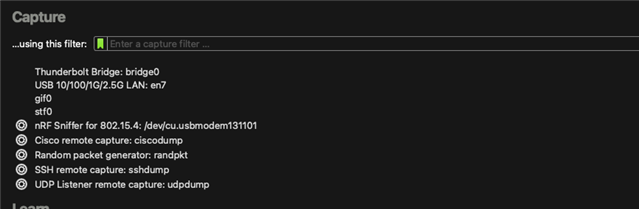
nrf52dk not visible in capture devise in Wireshark

Hi there,

I went through all the documentation and instructions in order to use my nRF52DK as a sniffer and I can not see it in the capture devices in wireshark.

am not too sure where to look next and I am very new to all this.

I flashed the board with what I think is the correct hex file 'nrf802154_sniffer_nrf5340dk.hex' (I can see a chip on the board saying n5340 so I assume that's the one).

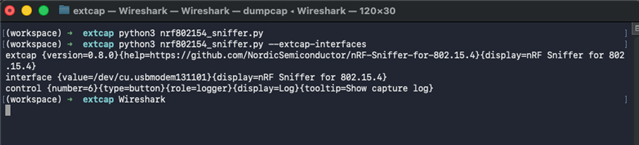
I also ran the nrf802154_sniffer.py file and get the following result which seems to indicate that it's working:

extcap {version=0.8.0}{help=https://github.com/NordicSemiconductor/nRF-Sniffer-for-802.15.4}{display=nRF Sniffer for 802.15.4}
control {number=6}{type=button}{role=logger}{display=Log}{tooltip=Show capture log}

My macOS is Sequoia 15.6.1

I am not sure what's the next step should be in order to see the nrf board visible in wireshark. Any help would be greatly appreciated.

I am happy to give more details or logs if that can help.

Thank you in advance

Parents
  • Hello,

    Unfortunately, the nRF52832 on the nRF52DK does not support the modulation required for sniffing 802.15.4 packets. See https://docs.nordicsemi.com/bundle/ug_sniffer_802154/page/UG/sniffer_802154/intro_802154.html for supported boards.

    I can see a chip on the board saying n5340 so I assume that's the one).

    This is the interface MCU on the DK used for programming the nRF52832.

    Best regards,

    Vidar

  • Hi, so I actually received the nrf52840 Dongle.

    I think I got too excited and try to flash it with the appropriate .hex file the following the documentation

    https://docs.nordicsemi.com/bundle/ug_sniffer_802154/page/UG/sniffer_802154/programming_firmware_802154.html

    However I get an error and it does not seem I can flash it again... I am very new to all this so I am probably doing something wrong or missing some steps.

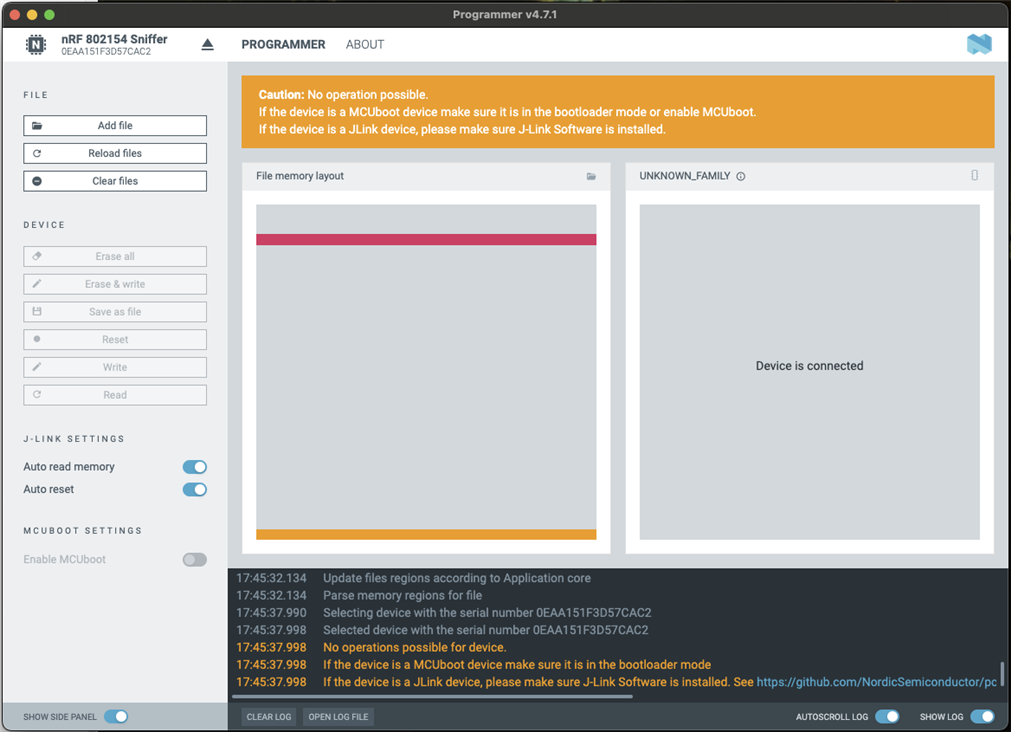
    Below a capture of the programmer

    2026-01-06T17:45:03.245Z INFO Initialising the bundled nrfutil device
    2026-01-06T17:45:03.253Z DEBUG Application data folder: /Users/ludo/Library/Application Support/nrfconnect/pc-nrfconnect-programmer
    2026-01-06T17:45:03.263Z DEBUG App pc-nrfconnect-programmer v4.7.1 (official)
    2026-01-06T17:45:03.263Z DEBUG App path: /Users/ludo/.nrfconnect-apps/node_modules/pc-nrfconnect-programmer
    2026-01-06T17:45:03.263Z DEBUG nRFConnect 5.2.1, required by the app is (>=5.2.0)
    2026-01-06T17:45:03.263Z DEBUG nRFConnect path: /Applications/nRF Connect for Desktop.app/Contents/Resources/app.asar
    2026-01-06T17:45:03.263Z DEBUG HomeDir: /Users/ludo
    2026-01-06T17:45:03.263Z DEBUG TmpDir: /var/folders/nt/sp661t_j64d1cjvpnv1g4dkw0000gn/T/
    2026-01-06T17:45:03.367Z INFO Using the bundled core version for nrfutil device: 8.1.1
    2026-01-06T17:45:03.392Z INFO Getting serial port options from the persistent store for 0EAA151F3D57CAC2.pc-nrfconnect-programmer
    2026-01-06T17:45:03.392Z INFO Device connected with the serial number 0EAA151F3D57CAC2
    2026-01-06T17:45:03.472Z INFO Using nrfutil device version: 2.15.7
    2026-01-06T17:45:03.473Z INFO Using nrf-device-lib version: 0.22.5
    2026-01-06T17:45:03.473Z INFO Using nrf-probe version: 0.51.0
    2026-01-06T17:45:03.473Z INFO Using SEGGER J-Link version: JLink_V8.96
    2026-01-06T17:45:03.473Z INFO Your version of SEGGER J-Link (8.96) is newer than the one this app was tested with (8.76). The tested version is not required, and your J-Link version will most likely work fine. If you get issues related to J-Link with your devices, use the tested version.
    2026-01-06T17:45:12.072Z INFO Selecting device with the serial number 0EAA151F3D57CAC2
    2026-01-06T17:45:12.081Z INFO Selected device with the serial number 0EAA151F3D57CAC2
    2026-01-06T17:45:12.081Z WARN No operations possible for device.
    2026-01-06T17:45:12.081Z WARN If the device is a MCUboot device make sure it is in the bootloader mode
    2026-01-06T17:45:12.081Z WARN If the device is a JLink device, please make sure J-Link Software is installed. See https://github.com/NordicSemiconductor/pc-nrfconnect-launcher/#macos-and-linux
    2026-01-06T17:45:17.482Z INFO Parsing HEX file:  /Users/ludo/Documents/NRF_sniffer/dongle_original_bootloader/graviton_bootloader_mbr_v1.0.1-[nRF5_SDK_15.0.1-1.alpha_f76d012].hex
    2026-01-06T17:45:17.486Z INFO File was last modified at  22/05/2018, 08:20:20
    2026-01-06T17:45:17.499Z INFO Update files regions according to Application core
    2026-01-06T17:45:17.499Z INFO Parse memory regions for file
    2026-01-06T17:45:32.127Z INFO Deselected device
    2026-01-06T17:45:32.134Z INFO Update files regions according to Application core
    2026-01-06T17:45:32.134Z INFO Parse memory regions for file
    2026-01-06T17:45:37.990Z INFO Selecting device with the serial number 0EAA151F3D57CAC2
    2026-01-06T17:45:37.998Z INFO Selected device with the serial number 0EAA151F3D57CAC2
    2026-01-06T17:45:37.998Z WARN No operations possible for device.
    2026-01-06T17:45:37.998Z WARN If the device is a MCUboot device make sure it is in the bootloader mode
    2026-01-06T17:45:37.998Z WARN If the device is a JLink device, please make sure J-Link Software is installed. See https://github.com/NordicSemiconductor/pc-nrfconnect-launcher/#macos-and-linux
    

    Any help would be greatly appreciated.

    Thank you

  • Please try to enter DFU mode first by pressing the RESET button on the dongle. DFU mode is indicated by slow blinking of the RED LED.

  • Thank you Vidar,

    I now have been able to flash the dongle successfully but still no luck with seeing it in the capture devices in Wireshark.

    I did repeat the configuration steps multiple times but no luck.

    Just to make sure, this is compatible for Mas users, right?

    It seems there are multiple hex files and ext cap plugins around. Maybe I am not using the right ones?

    I think I have all the right python and libraries installed but is there any troubleshooting you could suggest to make sure it's the case?

    Thank you very much for your help so far, I really appreciate it.

  • On macOS, GUI applications opened from "Finder" do not inherit the same environment as the Terminal. As a result, Wireshark may be invoking a different Python interpreter than the one used when you execute nrf802154_sniffer.py directly from the Terminal, and therefore may not have access to the required pyserial dependency.

    As a test, please try opening Wireshark from the terminal as I did here:

    nRF sniffer interace:

    I'm on macOS v26.2, but I don't think the OS version is relevant to the problem you are experiencing.

  • Thank you very much! That was it.

    I did flash the dongle again because I ended up trying another version of the hex file but I indeed need to open Wireshark via the terminal as you suggested, otherwise I can't see the dongle.

    Thank you for your help, I really appreciate it!

  • I'm glad to hear that it worked, thank you for the update! I will report these issues you encountered internally so we can hopefully simplify the installation process in a future release as we have done for our Bluetooth sniffer.

Reply Children
No Data
Related