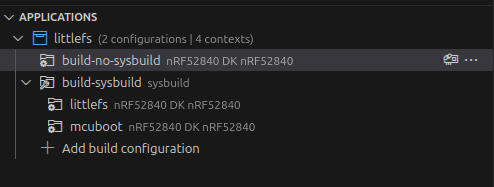
I'm having some issues creating multiple LittleFS file systems on a project. This is part of a larger project, so I used the Zephyr LittleFS test code to create a demonstration of the problem I'm encountering:
https://github.com/repoocaj/littlefs
My project is currently being built with NCS 2.6.1 but we are working on updating to NCS 3.2.1.
What I'm trying to do is to create two LittleFS file systems on an external flash. I want one smaller one that will be used for device data that that isn't updated very often, but must exist for the device to function correctly. The second file system will be for logs generated by the device. If logging fails at some point in the future, it is not a problem. I wanted to separate the file systems so that if flash used for the loggin wears out, the device can still function correctly.
In my device tree, I have two entries defined in my fstab:
	fstab {
		compatible = "zephyr,fstab";
		app_fs: app_fs {
			compatible = "zephyr,fstab,littlefs";
			mount-point = "/fs";
			partition = <&app_fs_part>;
			automount;
			read-size = <16>;
			prog-size = <16>;
			cache-size = <64>;
			lookahead-size = <32>;
			block-cycles = <512>;
		};

		log_fs: log_fs{
            compatible = "zephyr,fstab,littlefs";
            mount-point = "/log";
            partition = <&log_fs_part>;
            automount;
            read-size = <16>;
            prog-size = <16>;
            cache-size = <4096>;
            lookahead-size = <64>;
            block-cycles = <128>;
        };
	};
I also have two partitions defined for my external flash:
&mx25r64 {
	partitions {
		compatible = "fixed-partitions";
		#address-cells = <1>;
		#size-cells = <1>;

		app_fs_part: partition@0 {
			label = "storage";
			reg = <0x00000000 0x00010000>;
		};

		log_fs_part: partition@10000 {
			label = "logs";
			reg = <0x00010000 0x00050000>;
		};
	};
};
If I build this on my `master` branch with NCS 2.6.1 and flash it to a nRF58240DK, it works as expected. I see two file systems of the expected size created on the external flash:
D: fs register 1: 0
I: littlefs partition at /fs
I: LittleFS version 2.5, disk version 2.0
D: FS area 0 at 0x0 for 65536 bytes
I: FS at mx25r6435f@0:0x0 is 16 0x1000-byte blocks with 512 cycle
I: sizes: rd 16 ; pr 16 ; ca 64 ; la 32
D: fs mounted at /fs
I: Automount /fs succeeded
I: littlefs partition at /log
I: LittleFS version 2.5, disk version 2.0
D: FS area 1 at 0x10000 for 327680 bytes
I: FS at mx25r6435f@0:0x10000 is 80 0x1000-byte blocks with 512 cycle
I: sizes: rd 16 ; pr 16 ; ca 4096 ; la 64
D: fs mounted at /log
I: Automount /log succeeded
*** Booting nRF Connect SDK v3.5.99-ncs1-1-2-g0210b6b71faf ***
Sample program to r/w files on littlefs
Area 0 at 0x0 on mx25r6435f@0 for 65536 bytes
/fs was automounted
/fs: bsize = 16 ; frsize = 4096 ; blocks = 16 ; bfree = 14

Listing dir / ...
[DIR ] fs
[DIR ] log

Listing dir /fs ...
[FILE] boot_count (size = 1)

Listing dir /log ...

/fs/boot_count read count:2 (bytes: 1)
/fs/boot_count write new boot count 3: [wr:1]
I: /fs unmounted
D: fs unmounted from /fs
/fs unmount: 0
However, if I build the same project with NCS 2.8.0 and flash it to the same board, it doesn't work. It's now using the internal flash and both file systems are using the same area of flash and are of the same size:
D: fs register 1: 0
I: littlefs partition at /fs
I: LittleFS version 2.9, disk version 2.1
D: FS area 1 at 0xfa000 for 24576 bytes
I: FS at flash-controller@4001e000:0xfa000 is 6 0x1000-byte blocks with 512 cycle
I: sizes: rd 16 ; pr 16 ; ca 64 ; la 32
E: WEST_TOPDIR/modules/fs/littlefs/lfs.c:1374: Corrupted dir pair at {0x0, 0x1}
W: can't mount (LFS -84); formatting
I: /fs mounted
D: fs mounted at /fs
I: Automount /fs succeeded
I: littlefs partition at /log
I: LittleFS version 2.9, disk version 2.1
D: FS area 1 at 0xfa000 for 24576 bytes
I: FS at flash-controller@4001e000:0xfa000 is 6 0x1000-byte blocks with 512 cycle
I: sizes: rd 16 ; pr 16 ; ca 4096 ; la 64
D: fs mounted at /log
I: Automount /log succeeded
*** Booting nRF Connect SDK v2.8.0-a2386bfc8401 ***
*** Using Zephyr OS v3.7.99-0bc3393fb112 ***
Sample program to r/w files on littlefs
Area 1 at 0xfa000 on flash-controller@4001e000 for 24576 bytes
/fs was automounted
/fs: bsize = 16 ; frsize = 4096 ; blocks = 6 ; bfree = 4

Listing dir / ...
[DIR ] fs
[DIR ] log

Listing dir /fs ...


Listing dir /log ...

/fs/boot_count read count:0 (bytes: 0)
/fs/boot_count write new boot count 1: [wr:1]
I: /fs unmounted
D: fs unmounted from /fs
/fs unmount: 0
Although, it is using some of the information from the fstab device tree entry. For example, the `lookahead-size` for the first file system is defined as 32 and the second as 64. Those are correctly listed in the output above as `la 32` and `la 64`.
So my first question is why is this happening?
I also tried enabling MCUboot on this example as that is necessary on my larger project for DFU. I found that when I enabled MCUboot and built with NCS 2.6.1, I observe output similar to that seen when building with 2.8.0:
*** Booting nRF Connect SDK v3.5.99-ncs1-1-2-g0210b6b71faf ***
I: Starting bootloader
I: Primary image: magic=unset, swap_type=0x1, copy_done=0x3, image_ok=0x3
I: Secondary image: magic=unset, swap_type=0x1, copy_done=0x3, image_ok=0x3
I: Boot source: none
I: Image index: 0, Swap type: none
I: boot_image_check_hook: 1
I: boot_image_check()
I: bootutil_img_validate()
I: bootutil_tlv_iter_next: 0
I:   type: 16
I: EXPECTED_HASH_TLV
I: bootutil_tlv_iter_next: 0
I:   type: 1
I: IMAGE_TLV_KEYHASH
I: bootutil_tlv_iter_next: 0
I:   type: 34
I: EXPECTED_SIG_TLV
I: bootutil_verify_sig: 0
I: bootutil_tlv_iter_next: 1
I: valid_signature: 0
I: boot_image_check: 0
I: Valid header
I: Bootloader chainload address offset: 0xc000
D: fs register 1: 0irst image slot
I: littlefs partition at /fs
I: LittleFS version 2.5, disk version 2.0
D: FS area 6 at 0xfa000 for 24576 bytes
I: FS at flash-controller@4001e000:0xfa000 is 6 0x1000-byte blocks with 512 cycle
I: sizes: rd 16 ; pr 16 ; ca 64 ; la 32
E: WEST_TOPDIR/modules/fs/littlefs/lfs.c:1234: Corrupted dir pair at {0x0, 0x1}
W: can't mount (LFS -84); formatting
I: /fs mounted
D: fs mounted at /fs
I: Automount /fs succeeded
I: littlefs partition at /log
I: LittleFS version 2.5, disk version 2.0
D: FS area 6 at 0xfa000 for 24576 bytes
I: FS at flash-controller@4001e000:0xfa000 is 6 0x1000-byte blocks with 512 cycle
I: sizes: rd 16 ; pr 16 ; ca 4096 ; la 64
D: fs mounted at /log
I: Automount /log succeeded
*** Booting nRF Connect SDK v3.5.99-ncs1-1-2-g0210b6b71faf ***
Sample program to r/w files on littlefs
Area 6 at 0xfa000 on flash-controller@4001e000 for 24576 bytes
/fs was automounted
/fs: bsize = 16 ; frsize = 4096 ; blocks = 6 ; bfree = 4

Listing dir / ...
[DIR ] fs
[DIR ] log

Listing dir /fs ...


Listing dir /log ...

/fs/boot_count read count:0 (bytes: 0)
/fs/boot_count write new boot count 1: [wr:1]
I: /fs unmounted
D: fs unmounted from /fs
/fs unmount: 0
That is, it's creating the partitions in internal flash instead of external and they're of the wrong size and both are mounting the same location.
I'm assuming that this is something to do with the partition manager was wondering if anyone else has encountered this and what they might have done to solve it.
I tried building this example with NCS 3.2.1 just to make sure I wasn't missing a fix that had been added to Zephy or NCS but that build also doesn't work correctly.
Thanks for any help and advice!
Jeff