Issues creating multiple LittleFS file systems in external flash

I'm having some issues creating multiple LittleFS file systems on a project.  This is part of a larger project, so I used the Zephyr LittleFS test code to create a demonstration of the problem I'm encountering:

https://github.com/repoocaj/littlefs

My project is currently being built with NCS 2.6.1 but we are working on updating to NCS 3.2.1.

What I'm trying to do is to create two LittleFS file systems on an external flash.  I want one smaller one that will be used for device data that that isn't updated very often, but must exist for the device to function correctly.  The second file system will be for logs generated by the device.  If logging fails at some point in the future, it is not a problem.  I wanted to separate the file systems so that if flash used for the loggin wears out, the device can still function correctly.

In my device tree, I have two entries defined in my fstab:

	fstab {
		compatible = "zephyr,fstab";
		app_fs: app_fs {
			compatible = "zephyr,fstab,littlefs";
			mount-point = "/fs";
			partition = <&app_fs_part>;
			automount;
			read-size = <16>;
			prog-size = <16>;
			cache-size = <64>;
			lookahead-size = <32>;
			block-cycles = <512>;
		};

		log_fs: log_fs{
            compatible = "zephyr,fstab,littlefs";
            mount-point = "/log";
            partition = <&log_fs_part>;
            automount;
            read-size = <16>;
            prog-size = <16>;
            cache-size = <4096>;
            lookahead-size = <64>;
            block-cycles = <128>;
        };
	};

I also have two partitions defined for my external flash:

&mx25r64 {
	partitions {
		compatible = "fixed-partitions";
		#address-cells = <1>;
		#size-cells = <1>;

		app_fs_part: partition@0 {
			label = "storage";
			reg = <0x00000000 0x00010000>;
		};

		log_fs_part: partition@10000 {
			label = "logs";
			reg = <0x00010000 0x00050000>;
		};
	};
};

If I build this on my `master` branch with NCS 2.6.1 and flash it to a nRF58240DK, it works as expected.  I see two file systems of the expected size created on the external flash:

D: fs register 1: 0
I: littlefs partition at /fs
I: LittleFS version 2.5, disk version 2.0
D: FS area 0 at 0x0 for 65536 bytes
I: FS at mx25r6435f@0:0x0 is 16 0x1000-byte blocks with 512 cycle
I: sizes: rd 16 ; pr 16 ; ca 64 ; la 32
D: fs mounted at /fs
I: Automount /fs succeeded
I: littlefs partition at /log
I: LittleFS version 2.5, disk version 2.0
D: FS area 1 at 0x10000 for 327680 bytes
I: FS at mx25r6435f@0:0x10000 is 80 0x1000-byte blocks with 512 cycle
I: sizes: rd 16 ; pr 16 ; ca 4096 ; la 64
D: fs mounted at /log
I: Automount /log succeeded
*** Booting nRF Connect SDK v3.5.99-ncs1-1-2-g0210b6b71faf ***
Sample program to r/w files on littlefs
Area 0 at 0x0 on mx25r6435f@0 for 65536 bytes
/fs was automounted
/fs: bsize = 16 ; frsize = 4096 ; blocks = 16 ; bfree = 14

Listing dir / ...
[DIR ] fs
[DIR ] log

Listing dir /fs ...
[FILE] boot_count (size = 1)

Listing dir /log ...

/fs/boot_count read count:2 (bytes: 1)
/fs/boot_count write new boot count 3: [wr:1]
I: /fs unmounted
D: fs unmounted from /fs
/fs unmount: 0

However, if I build the same project with NCS 2.8.0 and flash it to the same board, it doesn't work.  It's now using the internal flash and both file systems are using the same area of flash and are of the same size:

D: fs register 1: 0
I: littlefs partition at /fs
I: LittleFS version 2.9, disk version 2.1
D: FS area 1 at 0xfa000 for 24576 bytes
I: FS at flash-controller@4001e000:0xfa000 is 6 0x1000-byte blocks with 512 cycle
I: sizes: rd 16 ; pr 16 ; ca 64 ; la 32
E: WEST_TOPDIR/modules/fs/littlefs/lfs.c:1374: Corrupted dir pair at {0x0, 0x1}
W: can't mount (LFS -84); formatting
I: /fs mounted
D: fs mounted at /fs
I: Automount /fs succeeded
I: littlefs partition at /log
I: LittleFS version 2.9, disk version 2.1
D: FS area 1 at 0xfa000 for 24576 bytes
I: FS at flash-controller@4001e000:0xfa000 is 6 0x1000-byte blocks with 512 cycle
I: sizes: rd 16 ; pr 16 ; ca 4096 ; la 64
D: fs mounted at /log
I: Automount /log succeeded
*** Booting nRF Connect SDK v2.8.0-a2386bfc8401 ***
*** Using Zephyr OS v3.7.99-0bc3393fb112 ***
Sample program to r/w files on littlefs
Area 1 at 0xfa000 on flash-controller@4001e000 for 24576 bytes
/fs was automounted
/fs: bsize = 16 ; frsize = 4096 ; blocks = 6 ; bfree = 4

Listing dir / ...
[DIR ] fs
[DIR ] log

Listing dir /fs ...


Listing dir /log ...

/fs/boot_count read count:0 (bytes: 0)
/fs/boot_count write new boot count 1: [wr:1]
I: /fs unmounted
D: fs unmounted from /fs
/fs unmount: 0

Although, it is using some of the information from the fstab device tree entry.  For example, the `lookahead-size` for the first file system is defined as 32 and the second as 64.  Those are correctly listed in the output above as `la 32` and `la 64`.

So my first question is why is this happening?

I also tried enabling MCUboot on this example as that is necessary on my larger project for DFU.  I found that when I enabled MCUboot and built with NCS 2.6.1, I observe output similar to that seen when building with 2.8.0:

*** Booting nRF Connect SDK v3.5.99-ncs1-1-2-g0210b6b71faf ***
I: Starting bootloader
I: Primary image: magic=unset, swap_type=0x1, copy_done=0x3, image_ok=0x3
I: Secondary image: magic=unset, swap_type=0x1, copy_done=0x3, image_ok=0x3
I: Boot source: none
I: Image index: 0, Swap type: none
I: boot_image_check_hook: 1
I: boot_image_check()
I: bootutil_img_validate()
I: bootutil_tlv_iter_next: 0
I:   type: 16
I: EXPECTED_HASH_TLV
I: bootutil_tlv_iter_next: 0
I:   type: 1
I: IMAGE_TLV_KEYHASH
I: bootutil_tlv_iter_next: 0
I:   type: 34
I: EXPECTED_SIG_TLV
I: bootutil_verify_sig: 0
I: bootutil_tlv_iter_next: 1
I: valid_signature: 0
I: boot_image_check: 0
I: Valid header
I: Bootloader chainload address offset: 0xc000
D: fs register 1: 0irst image slot
I: littlefs partition at /fs
I: LittleFS version 2.5, disk version 2.0
D: FS area 6 at 0xfa000 for 24576 bytes
I: FS at flash-controller@4001e000:0xfa000 is 6 0x1000-byte blocks with 512 cycle
I: sizes: rd 16 ; pr 16 ; ca 64 ; la 32
E: WEST_TOPDIR/modules/fs/littlefs/lfs.c:1234: Corrupted dir pair at {0x0, 0x1}
W: can't mount (LFS -84); formatting
I: /fs mounted
D: fs mounted at /fs
I: Automount /fs succeeded
I: littlefs partition at /log
I: LittleFS version 2.5, disk version 2.0
D: FS area 6 at 0xfa000 for 24576 bytes
I: FS at flash-controller@4001e000:0xfa000 is 6 0x1000-byte blocks with 512 cycle
I: sizes: rd 16 ; pr 16 ; ca 4096 ; la 64
D: fs mounted at /log
I: Automount /log succeeded
*** Booting nRF Connect SDK v3.5.99-ncs1-1-2-g0210b6b71faf ***
Sample program to r/w files on littlefs
Area 6 at 0xfa000 on flash-controller@4001e000 for 24576 bytes
/fs was automounted
/fs: bsize = 16 ; frsize = 4096 ; blocks = 6 ; bfree = 4

Listing dir / ...
[DIR ] fs
[DIR ] log

Listing dir /fs ...


Listing dir /log ...

/fs/boot_count read count:0 (bytes: 0)
/fs/boot_count write new boot count 1: [wr:1]
I: /fs unmounted
D: fs unmounted from /fs
/fs unmount: 0

That is, it's creating the partitions in internal flash instead of external and they're of the wrong size and both are mounting the same location.

I'm assuming that this is something to do with the partition manager was wondering if anyone else has encountered this and what they might have done to solve it.

I tried building this example with NCS 3.2.1 just to make sure I wasn't missing a fix that had been added to Zephy or NCS but that build also doesn't work correctly.

Thanks for any help and advice!

Jeff

Parents
  • Hi Jeff,

    if I build the same project with NCS 2.8.0 and flash it to the same board, it doesn't work.  It's now using the internal flash and both file systems are using the same area of flash and are of the same size

    What happens if you use only one file system (instead of two) in NCS v2.8.0 (and NCS v3.2.1)?

    Have you built your project in NCS v2.8.0 and NCS v3.2.1 using sysbuild? 

    Best regards,
    Dejan

  • Dejan,

    I forgot to add that I tried changing more of the values in the fstab (read-size, prog-size, cache-size, lookahead-size and block-cycles).  Those are picked up and used when mounting the file system.

    It just seems to be ignoring what the partition value is set to or it's being overwritten somehow.

    The `partitions.yml` generated by the 3.2.1 build looks like:

    app:
      address: 0x0
      end_address: 0xfa000
      region: flash_primary
      size: 0xfa000
    littlefs_storage:
      address: 0xfa000
      end_address: 0x100000
      placement:
        before:
        - end
      region: flash_primary
      size: 0x6000
    sram_primary:
      address: 0x20000000
      end_address: 0x20040000
      region: sram_primary
      size: 0x40000
    

    So it's not doing anything with the external flash.

    Jeff

  • Hi,

    Jeff said:
    Do you know why using sysbuild would be causing this issue?

    Support for partition manager for an image was moved to sysbuild and partition manager is activated for all sysbuild builds. 

    Best regards,
    Dejan

  • Dejan,

    Can you provide any assistance in defining a partition layout that will be accepted by partition manager and sysbuild that would allow a pair of LittleFS file systems to exist in the external flash on a nRF52840DK?

    The link about the partition manager activation that you gave states that:

    When you build a multi-image application using the Partition Manager, the devicetree source flash partitions are ignored. 

    I'm taking that to mean that I don't define my external partitions with an entry in the device tree like:

    &mx25r64 {
    	partitions {
    		compatible = "fixed-partitions";
    		#address-cells = <1>;
    		#size-cells = <1>;
    
    		app_fs_part: partition@0 {
    			label = "storage";
    			reg = <0x00000000 0x00010000>;
    		};
    
    		log_fs_part: partition@10000 {
    			label = "logs";
    			reg = <0x00010000 0x00050000>;
    		};
    	};
    };

    However, my fstab entry in my device tree looks like:

    	fstab {
    		compatible = "zephyr,fstab";
    		app_fs: app_fs {
    			compatible = "zephyr,fstab,littlefs";
    			mount-point = "/fs";
    			partition = <&app_fs_part>;
    			automount;
    			read-size = <16>;
    			prog-size = <16>;
    			cache-size = <64>;
    			lookahead-size = <32>;
    			block-cycles = <512>;
    		};
    
    		log_fs: log_fs{
                compatible = "zephyr,fstab,littlefs";
                mount-point = "/log";
                partition = <&log_fs_part>;
                automount;
                read-size = <16>;
                prog-size = <16>;
                cache-size = <4096>;
                lookahead-size = <64>;
                block-cycles = <128>;
            };
    	};

    Where the partition entry (e.g. 'partition = <&app_fs_part>;') references the entries in the device tree partition table.

    How do I create references to partitions that are defined by the partition manager?

    thanks,

    Jeff

  • Hi Jeff,

    Do you have multi image builds in both cases, with and without sysbuild?

    Best regards,
    Dejan

  • Hi Jeff,

    For reference, you can look at Zephyr littlefs sample. 
    You need to ensure that you include CONFIG_PM_PARTITION_REGION_LITTLEFS_EXTERNAL=y in your prj.conf and the following app.overlay file:

    / {
    	chosen {
    		nordic,pm-ext-flash = &mx25r64;
    	};
    };


    Best regards,
    Dejan

  • I'm not sure how to build a multi image without sysbuild.

    I checked out my 'mcuboot-3.2.1' branch from my example repo and created two build configurations in VS Code, one with sysbuild and one without.

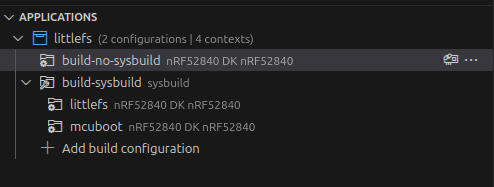
    That created an applications entry in VS Code that looks like:

    So it doesn't look like VS Code created multi images without using sysbuild.

    If I flash the 'build-no-sysbuild' image, it works in that it correctly mounts the LittleFS partitions on the external flash, but it didn't use MCUboot.

    If I flash the 'build-sysbuild' images, it uses MCUboot but doesn't mount the partitions from external flash.

    Jeff

Reply
  • I'm not sure how to build a multi image without sysbuild.

    I checked out my 'mcuboot-3.2.1' branch from my example repo and created two build configurations in VS Code, one with sysbuild and one without.

    That created an applications entry in VS Code that looks like:

    So it doesn't look like VS Code created multi images without using sysbuild.

    If I flash the 'build-no-sysbuild' image, it works in that it correctly mounts the LittleFS partitions on the external flash, but it didn't use MCUboot.

    If I flash the 'build-sysbuild' images, it uses MCUboot but doesn't mount the partitions from external flash.

    Jeff

Children
  • Hi Jeff,

    If you start from unmodified littlefs sample linked previously, does having only one littlefs file system on external flash work for you in NCS v3.2.1 (sysbuild enabled)?

    Best regards,
    Dejan

  • Hi Dejan,

    No, the littlefs sample does not work as expected.

    I started out with trying the example as-is building with sysbuild and NCS 3.2.1.  That built but when flashed to a nRF52840DK it created a 24 kiB LittleFS file system on the internal flash.

    I believe that was due to the name of the overlay file: boards/nrf52840dk_nrf52840_qspi.overlay.

    Next, I renamed that overlay file to boards/nrf52840dk_nrf52840.overlay which was found by the build.  When I flashed that version, it still created a 24 kiB LittleFS file system on the internal flash.

    I: littlefs partition at /lfs1
    I: LittleFS version 2.11, disk version 2.1
    I: FS at flash-controller@4001e000:0xfa000 is 6 0x1000-byte blocks with 512 cycle
    I: partition sizes: rd 16 ; pr 16 ; ca 64 ; la 32
    E: WEST_TOPDIR/modules/fs/littlefs/lfs.c:1386: Corrupted dir pair at {0x0, 0x1}
    W: can't mount (LFS -84); formatting
    I: /lfs1 mounted
    I: Automount /lfs1 succeeded
    *** Booting nRF Connect SDK v3.2.1-d8887f6f32df ***
    *** Using Zephyr OS v4.2.99-ec78104f1569 ***
    Sample program to r/w files on littlefs
    Area 1 at 0xfa000 on flash-controller@4001e000 for 24576 bytes
    /lfs1 automounted
    /lfs1: bsize = 16 ; frsize = 4096 ; blocks = 6 ; bfree = 4

    I believe that was due to me not having your suggested changes implemented:

    • Add CONFIG_PM_PARTITION_REGION_LITTLEFS_EXTERNAL=y to prj.conf
    • Add a chosen section to the device tree overlay.

    Next, I added those changes to their respective files and rebuilt and flashed.  That did create a LittleFS file system on the external flash but it was not the size defined in the devicetree.  It was still 24 kiB.  The partition defined in the device tree is 64 kiB.

    I: littlefs partition at /lfs1
    I: LittleFS version 2.11, disk version 2.1
    I: FS at mx25r6435f@0:0x0 is 6 0x1000-byte blocks with 512 cycle
    I: partition sizes: rd 16 ; pr 16 ; ca 64 ; la 32
    I: Automount /lfs1 succeeded
    *** Booting nRF Connect SDK v3.2.1-d8887f6f32df ***
    *** Using Zephyr OS v4.2.99-ec78104f1569 ***
    Sample program to r/w files on littlefs
    Area 1 at 0x0 on mx25r6435f@0 for 24576 bytes
    /lfs1 automounted
    /lfs1: bsize = 16 ; frsize = 4096 ; blocks = 6 ; bfree = 3

    This version does appear to use the file system values for read-size, prog-size, etc that are defined in the fstab in the device tree.  I can make changes to those values and see the change in the log output when the file system is mounted.

    It doesn't appear to use the partition size defined in the device tree.

    I've added a branch to my repo that has these latest changes in it:

    https://github.com/repoocaj/littlefs/tree/nodic_suggestions.3.2.1

    If you run that branch on a nRF52840DK do you get the same results?

    thanks,

    Jeff

  • Hi Jeff,

    I used your nordic_suggestions.3.2.1 branch for testing and got this result 

    I: littlefs partition at /fs
    I: LittleFS version 2.11, disk version 2.1
    D: FS area 1 at 0x0 for 24576 bytes
    I: FS at mx25r6435f@0:0x0 is 6 0x1000-byte blocks with 512 cycle
    I: partition sizes: rd 16 ; pr 16 ; ca 64 ; la 32
    E: WEST_TOPDIR/modules/fs/littlefs/lfs.c:1386: Corrupted dir pair at {0x0, 0x1}
    W: can't mount (LFS -84); formatting
    I: /fs mounted
    D: fs mounted at /fs
    I: Automount /fs succeeded
    I: littlefs partition at /log
    I: LittleFS version 2.11, disk version 2.1
    D: FS area 1 at 0x0 for 24576 bytes
    I: FS at mx25r6435f@0:0x0 is 6 0x1000-byte blocks with 128 cycle
    I: partition sizes: rd 16 ; pr 16 ; ca 4096 ; la 64
    D: fs mounted at /log
    I: Automount /log succeeded
    *** Booting nRF Connect SDK v3.2.1-d8887f6f32df ***
    *** Using Zephyr OS v4.2.99-ec78104f1569 ***
    Sample program to r/w files on littlefs
    Area 1 at 0x0 on mx25r6435f@0 for 24576 bytes
    /fs was automounted
    /fs: bsize = 16 ; frsize = 4096 ; blocks = 6 ; bfree = 4
    
    Listing dir / ...
    [DIR ] fs
    [DIR ] log
    
    Listing dir /fs ...
    
    Listing dir /log ...
    
    /fs/boot_count read count:0 (bytes: 0)
    /fs/boot_count write new boot count 1: [wr:1]
    I: /fs unmounted
    D: fs unmounted from /fs
    /fs unmount: 0


    Here is the output of "west build -t partition_manager_report":

     external_flash (0x800000 - 8192kB):
    +--------------------------------------------+
    | 0x0: littlefs_storage (0x6000 - 24kB)      |
    | 0x6000: external_flash (0x7fa000 - 8168kB) |
    +--------------------------------------------+
    
      flash_primary (0x100000 - 1024kB):
    +------------------------------+
    | 0x0: app (0x100000 - 1024kB) |
    +------------------------------+
    
      sram_primary (0x40000 - 256kB):
    +--------------------------------------------+
    | 0x20000000: sram_primary (0x40000 - 256kB) |
    +--------------------------------------------+
    

    Do you get the same result?

    Jeff said:

    This version does appear to use the file system values for read-size, prog-size, etc that are defined in the fstab in the device tree.  I can make changes to those values and see the change in the log output when the file system is mounted.

    It doesn't appear to use the partition size defined in the device tree.

    Can you point to relevant values that you tried to change and how?
    Can you elaborate on " I can make changes to those values and see the change in the log output when the file system is mounted."?

    Jeff said:
    It doesn't appear to use the partition size defined in the device tree.

    Which partition size do you refer to? What is your expectation regarding partition size?

    Best regards,
    Dejan

  • Hi Dejan,

    All of the images that I'm running below were built with sysbuild.

    The values I changed were in the fstab entry of the device tree.  I made a change to them to see if the image was using those values from the device tree or was getting them from somewhere else. 

    When I boot an image from the nordic_suggestions.3.2.1 branch built with NCS 2.7.0:

    I: LittleFS version 2.8, disk version 2.1
    I: FS at mx25r6435f@0:0x0 is 16 0x1000-byte blocks with 512 cycle
    I: sizes: rd 16 ; pr 16 ; ca 64 ; la 32
    I: Automount /lfs1 succeeded
    *** Booting nRF Connect SDK v2.7.0-5cb85570ca43 ***

    16 0x1000-byte: second value of reg entry for the partition (0x00010000)

    block-cycles: 512 cycle

    rd (read-size): 16

    pr (prog-size): 16

    ca (cache-size): 64

    la (lookahead-size): 32

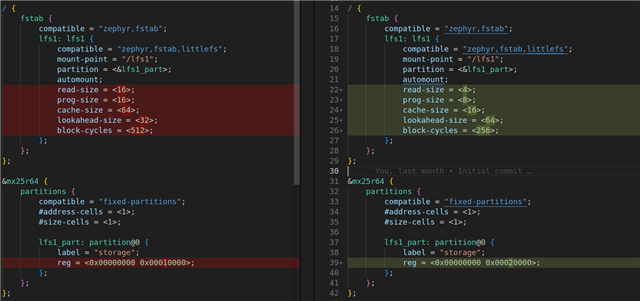
    If I modify those values as shown below and rebuild with NCS 2.7.0.:

    I get the following output:

    I: LittleFS version 2.8, disk version 2.1
    I: FS at mx25r6435f@0:0x0 is 32 0x1000-byte blocks with 512 cycle
    I: sizes: rd 4 ; pr 8 ; ca 16 ; la 64
    I: Automount /lfs1 succeeded
    *** Booting nRF Connect SDK v2.7.0-5cb85570ca43 ***

    So we can see that all of the values were updated in the output except for the block-cycles, that still stayed at 512 even though I tried to set it to 256.

    The size of the file system also changed from 16 0x1000 byte blocks to 32 blocks following the change of the value of the reg entry in the partition table for the 'lfs1_part' entry.

    Now, if I build with NCS 2.8.0:

    I: LittleFS version 2.9, disk version 2.1
    I: FS at mx25r6435f@0:0x0 is 6 0x1000-byte blocks with 512 cycle
    I: sizes: rd 4 ; pr 8 ; ca 16 ; la 64
    I: Automount /lfs1 succeeded
    *** Booting nRF Connect SDK v2.8.0-a2386bfc8401 ***

    The changed values in the fstab entry are still changed in this output (except for the block-cycles) however, the file system size is now 6 0x1000 byte blocks and not the 32 0x1000 byte blocks specified in the 'lfs1_part' entry of the device tree.

    If I build with NCS 3.2.1:

    I: LittleFS version 2.11, disk version 2.1
    I: FS at mx25r6435f@0:0x0 is 6 0x1000-byte blocks with 256 cycle
    I: partition sizes: rd 4 ; pr 8 ; ca 16 ; la 64
    I: Automount /lfs1 succeeded
    *** Booting nRF Connect SDK v3.2.1-d8887f6f32df ***

    Now everything (including block-cycles) has changed to match the device tree fstab values except for the size of the partition.  I assume that the block-cycle not changing was a bug that was fixed at some point.

    What I'm not understanding is how to configure the partitions and fstab entries when using a NCS that is 2.8.0 or newer.  

    If I remove the 'partition' entry in fstab, I get the following error when trying to build in NCS 3.2.1:

    -- Found devicetree overlay: /home/jeffc/projects/test/littlefs/boards/nrf52840dk_nrf52840.overlay
    devicetree error: 'partition' is marked as required in 'properties:' in /home/jeffc/ncs/v3.2.1/zephyr/dts/bindings/fs/zephyr,fstab,littlefs.yaml, but does not appear in <Node /fstab/lfs1 in /home/jeffc/projects/test/littlefs/boards/nrf52840dk_nrf52840.overlay:17>

    So, it appears that I need a partition entry in fstab to point at something in the devicetree, but the information in it isn't being used.

    If I need to create a 'pm_static.yml' to define my partitions for the partition manager, how does that relate to the device tree fstab entries?

    thanks,

    Jeff

  • Hi Jeff,

    Jeff said:
    Now everything (including block-cycles) has changed to match the device tree fstab values except for the size of the partition. 

    In NCS v3.2.1 all sizes should match fstab values. The partition sizes are expected to be taken from partition manager static configuration.

    You can try out configuration files shown below (2 lfs_part partitions of 64 KB and 1 MB are made in external flash as can be seen from partition manager report)
    pm_static.yml

    app:
      address: 0x0
      end_address: 0x100000
      region: flash_primary
      size: 0x100000
    external_flash:
      address: 0x6000
      end_address: 0x800000
      region: external_flash
      size: 0x7fa000
    littlefs_storage:
      address: 0x0
      device: DT_CHOSEN(nordic_pm_ext_flash)
      end_address: 0x6000
      placement:
        before:
        - tfm_storage
        - end
      region: external_flash
      size: 0x6000
    lfs_part_1:
      address: 0x6000
      device: DT_CHOSEN(nordic_pm_ext_flash)
      end_address: 0x16000
      placement:
        before:
        - tfm_storage
        - end
      region: external_flash
      size: 0x10000
    lfs_part_2:
      address: 0x16000
      device: DT_CHOSEN(nordic_pm_ext_flash)
      end_address: 0x116000
      placement:
        before:
        - tfm_storage
        - end
      region: external_flash
      size: 0x100000
    sram_primary:
      address: 0x20000000
      end_address: 0x20040000
      region: sram_primary
      size: 0x40000


    nrf52840dk_nrf52840.overlay
    /*
     * Copyright (c) 2019 Peter Bigot Consulting, LLC
     *
     * SPDX-License-Identifier: Apache-2.0
     */
    
    
     / {
    	chosen {
    		nordic,pm-ext-flash = &mx25r64;
    	};
    };
    
    
    /delete-node/ &storage_partition;
    
    / {
    	fstab {
    		compatible = "zephyr,fstab";
    		app_fs: app_fs {
    			compatible = "zephyr,fstab,littlefs";
    			mount-point = "/fs";
    			partition = <&app_fs_part>;
    			automount;
    			read-size = <16>;
    			prog-size = <16>;
    			cache-size = <64>;
    			lookahead-size = <32>;
    			block-cycles = <512>;
    		};
    
    		log_fs: log_fs{
                compatible = "zephyr,fstab,littlefs";
                mount-point = "/log";
                partition = <&log_fs_part>;
                automount;
                read-size = <16>;
                prog-size = <16>;
                cache-size = <4096>;
                lookahead-size = <64>;
                block-cycles = <128>;
            };
    
    		log_fs_2: log_fs_2{
                compatible = "zephyr,fstab,littlefs";
                mount-point = "/log_2";
                partition = <&log_fs_part_2>;
                automount;
                read-size = <16>;
                prog-size = <16>;
                cache-size = <4096>;
                lookahead-size = <64>;
                block-cycles = <128>;
            };
    	};
    };
    
    &mx25r64 {
    	partitions {
    		compatible = "fixed-partitions";
    		#address-cells = <1>;
    		#size-cells = <1>;
    
    		app_fs_part: partition@0 {
    			label = "storage";
    			reg = <0x00000000 0x00010000>;
    		};
    
    		log_fs_part: partition@10000 {
    			label = "logs";
    			reg = <0x00010000 0x00050000>;
    		};
    
    		log_fs_part_2: partition@50000 {
    			label = "logs_2";
    			reg = <0x00050000 0x00090000>;
    		};
    
    	};
    };


    Partition manager report (west build -t partition_manger_report)
    external_flash (0x800000 - 8192kB): 
    +--------------------------------------------+
    | 0x0: littlefs_storage (0x6000 - 24kB)      |
    | 0x6000: external_flash (0x7fa000 - 8168kB) |
    | 0x6000: lfs_part_1 (0x10000 - 64kB)        |
    | 0x16000: lfs_part_2 (0x100000 - 1024kB)    |
    +--------------------------------------------+
    
      flash_primary (0x100000 - 1024kB): 
    +------------------------------+
    | 0x0: app (0x100000 - 1024kB) |
    +------------------------------+
    
      sram_primary (0x40000 - 256kB): 
    +--------------------------------------------+
    | 0x20000000: sram_primary (0x40000 - 256kB) |
    +--------------------------------------------+


    Jeff said:
    If I need to create a 'pm_static.yml' to define my partitions for the partition manager, how does that relate to the device tree fstab entries?

    When partition manager is used, entries in the devicetree are not used. 

    For having multiple littlefs partitions when using partition manager, following SDK changes are also needed:

    diff --git a/subsys/fs/littlefs_fs.c b/subsys/fs/littlefs_fs.c
    index 5abbf95f949..0e155437fc5 100644
    --- a/subsys/fs/littlefs_fs.c
    +++ b/subsys/fs/littlefs_fs.c
    @@ -1105,8 +1105,8 @@ struct fs_mount_t FS_FSTAB_ENTRY(DT_DRV_INST(inst)) = { \
            .fs_data = &fs_data_##inst, \
            .storage_dev = (void *) \
                    COND_CODE_1(USE_PARTITION_MANAGER, \
    -                           (COND_CODE_1(FIXED_PARTITION_EXISTS(littlefs_storage), \
    -                                        (FIXED_PARTITION_ID(littlefs_storage)), \
    +                           (COND_CODE_1(FIXED_PARTITION_EXISTS(lfs_part##inst), \
    +                                        (FIXED_PARTITION_ID(lfs_part##inst)), \
                                             (FIXED_PARTITION_ID(storage)))), \
                                (DT_FIXED_PARTITION_ID(FS_PARTITION(inst)))), \
            .flags = FSTAB_ENTRY_DT_MOUNT_FLAGS(DT_DRV_INST(inst)), \


    Best regards,
    Dejan

Related