
I mean like when ever i click pristine build in the vs code i am getting this below error
"Unable to build: SDK not found. Ensure that a valid SDK is used for the build configuration."
but the build is getting done when it is done in the terminal 

I mean like when ever i click pristine build in the vs code i am getting this below error
"Unable to build: SDK not found. Ensure that a valid SDK is used for the build configuration."
but the build is getting done when it is done in the terminal
Hello,
Can you please generate and upload the support information in nRF Connect for VS Code? It is generated by clicking this button:

Does that list v3.1.1 under "sdks", like this:
  "sdks": [
    {
      "version": "v3.2.1",
      "path": "c:\\ncs\\v3.2.1"
    },
    {
      "version": "v3.2.0",
      "path": "c:\\ncs\\v3.2.0"
    },
    {
      "version": "v3.1.1",
      "path": "c:\\ncs\\v3.1.1"
    },
    {
      "version": "v3.1.0",
      "path": "c:\\ncs\\v3.1.0"
If not, can you please try to run the following command? (does require a standalone installation of nrfutil):
nrfutil sdk-manager toolchain launch --terminal --ncs-version v3.1.1 (this will open a new window, use this one for the rest of the commands)
cd into the root folder of ncs v3.1.1, e.g. c:\ncs\v3.1.1
run "west update" and wait for it to finish. Does it indicate any errors? When this is done, close VS Code and relaunch it. Does it work now? If not, can you generate the support information once more, and upload this as well?
Best regards,
Edvin

// IMPORTANT: The following data can contain sensitive or confidential information about your environment.
// If you do not want others to see this information, make sure to remove it before sharing the data.
// For help and support, visit Nordic Semiconductor's DevZone at devzone.nordicsemi.com/.
{
"platform": {
"os": "win32",
"osVersion": "Windows 11 Pro",
"osKernel": "10.0.26200",
"vscode": "1.104.0",
"electron": "37.3.1",
"node": "v22.18.0",
"appName": "Antigravity",
"appHost": "desktop"
},
"system": {
"date": "2026-01-13T03:59:34.538Z",
"vscodeRoot": "c:\\Users\\vishv\\AppData\\Local\\Programs\\Antigravity\\resources\\app",
"nrfConnectForDesktopInstalled": true,
"vscodeUptime": "00:18:34",
"osUptime": "00:25:05",
"cpu": "Intel(R) Core(TM) i7-9750H CPU @ 2.60GHz"
},
"workspace": {
"name": "ECG_NRF52DK",
"workspaceFile": null,
"folders": [
"c:\\NRF_PROJECTS\\ECG_NRF52DK"
]
},
"sdks": [
{
"version": "v3.1.1",
"path": "c:\\ncs\\v3.1.1"
}
],
"activeBuild": "/NRF_PROJECTS/ECG_NRF52DK/build",
"apps": [
{
"workspace": "c:\\NRF_PROJECTS\\ECG_NRF52DK",
"uri": "c:\\NRF_PROJECTS\\ECG_NRF52DK",
"buildConfigurations": [
{
"id": "/NRF_PROJECTS/ECG_NRF52DK/build",
"name": "build",
"type": "Sysbuild",
"isChild": false,
"isStale": true,
"taskBindings": {
"build": [],
"pristineBuild": [],
"flash": [],
"eraseAndFlash": []
},
"toolchain": "nRF Connect SDK Toolchain v3.1.1"
},
{
"id": "/NRF_PROJECTS/ECG_NRF52DK/build/ECG_NRF52DK",
"name": "build/ECG_NRF52DK",
"type": "Zephyr",
"isChild": true,
"isStale": true,
"taskBindings": {
"build": [],
"pristineBuild": [],
"flash": [],
"eraseAndFlash": []
},
"toolchain": "nRF Connect SDK Toolchain v3.1.1"
}
]
}
],
"toolchains": [
{
"version": "3.1.1",
"path": "c:\\ncs\\toolchains\\c1a76fddb2",
"displayName": "nRF Connect SDK Toolchain v3.1.1",
"compilerTools": [
"Zephyr SDK (arm) 0.17.0",
"Zephyr SDK (riscv) 0.17.0"
]
}
],
"connectedDevices": [],
"tools": {
"C:\\ncs\\toolchains\\c1a76fddb2\\opt\\zephyr-sdk\\arm-zephyr-eabi\\bin\\arm-zephyr-eabi-gcc.exe": "0.17.0",
"C:\\Program Files\\SEGGER\\JLink_V876\\JLink.exe": "8.76",
"C:\\Program Files\\Nordic Semiconductor\\nrf-command-line-tools\\bin\\nrfjprog.exe": "10.24.2",
"C:\\ncs\\toolchains\\c1a76fddb2\\nrfutil": "8.1.1",
"C:\\ncs\\toolchains\\c1a76fddb2\\cmake": "3.21.0",
"C:\\ncs\\toolchains\\c1a76fddb2\\opt\\bin\\Scripts\\west.exe": "1.4.0",
"C:\\ncs\\toolchains\\c1a76fddb2\\opt\\bin\\python.exe": "3.12.4",
"C:\\ncs\\toolchains\\c1a76fddb2\\opt\\bin\\ninja.exe": "1.10.2",
"C:\\ncs\\toolchains\\c1a76fddb2\\opt\\bin\\gperf.exe": "3.1",
"C:\\ncs\\toolchains\\c1a76fddb2\\opt\\bin\\dtc.exe": "1.4.7",
"C:\\ncs\\toolchains\\c1a76fddb2\\opt\\bin\\gn.exe": "2223",
"C:\\ncs\\toolchains\\c1a76fddb2\\mingw64\\bin\\git.exe": "git version 2.37.3.",
"debugger (arm)": "c:\\ncs\\toolchains\\c1a76fddb2\\opt\\zephyr-sdk\\arm-zephyr-eabi\\bin\\arm-zephyr-eabi-gdb.exe",
"debugger (riscv)": "c:\\ncs\\toolchains\\c1a76fddb2\\opt\\zephyr-sdk\\riscv64-zephyr-elf\\bin\\riscv64-zephyr-elf-gdb.exe"
},
"nrfutil": {
"nrfutil-device": {
"version": "2.15.6",
"binPath": "c:\\Users\\vishv\\.antigravity\\extensions\\nordic-semiconductor.nrf-connect-2026.1.1242-win32-x64\\platform\\nrfutil\\bin\\nrfutil-device",
"jlinkInfo": {
"name": "JlinkARM",
"version": "JLink_V8.76",
"versionFormat": "string"
}
},
"nrfutil-sdk-manager": {
"version": "1.9.3",
"binPath": "c:\\Users\\vishv\\.antigravity\\extensions\\nordic-semiconductor.nrf-connect-2026.1.1242-win32-x64\\platform\\nrfutil\\bin\\nrfutil-sdk-manager"
}
},
"environment": {
"westEnv": {
"HOME": "C:\\Users\\vishv",
"HOMEDRIVE": "C:",
"HOMEPATH": "\\Users\\vishv",
"PATH": "C:\\ncs\\toolchains\\c1a76fddb2;C:\\ncs\\toolchains\\c1a76fddb2\\mingw64\\bin;C:\\ncs\\toolchains\\c1a76fddb2\\bin;C:\\ncs\\toolchains\\c1a76fddb2\\opt\\bin;C:\\ncs\\toolchains\\c1a76fddb2\\opt\\bin\\Scripts;c:/ncs/toolchains/c1a76fddb2\\opt/nanopb/generator-bin;C:\\ncs\\toolchains\\c1a76fddb2\\nrfutil\\bin;C:\\ncs\\toolchains\\c1a76fddb2\\opt\\zephyr-sdk\\arm-zephyr-eabi\\bin;C:\\ncs\\toolchains\\c1a76fddb2\\opt\\zephyr-sdk\\riscv64-zephyr-elf\\bin;c:\\Users\\vishv\\.antigravity\\extensions\\nordic-semiconductor.nrf-connect-2026.1.1242-win32-x64\\platform\\nrfutil\\lib\\nrfutil-sdk-manager;C:\\Program Files (x86)\\Intel\\Intel(R) Management Engine Components\\iCLS\\;C:\\Program Files\\Intel\\Intel(R) Management Engine Components\\iCLS\\;C:\\WINDOWS\\system32;C:\\WINDOWS;C:\\WINDOWS\\System32\\Wbem;C:\\WINDOWS\\System32\\WindowsPowerShell\\v1.0\\;C:\\Program Files (x86)\\Intel\\Intel(R) Management Engine Components\\DAL;C:\\Program Files\\Intel\\Intel(R) Management Engine Components\\DAL;C:\\Program Files\\Git\\cmd;C:\\Program Files\\mosquitto;C:\\Users\\vishv\\miniconda3;C:\\WINDOWS\\System32\\OpenSSH\\;C:\\Program Files\\Nordic Semiconductor\\nrf-command-line-tools\\bin\\;C:\\Users\\vishv\\AppData\\Local\\Programs\\Python\\Launcher\\;C:\\Users\\vishv\\AppData\\Local\\Microsoft\\WindowsApps;C:\\Users\\vishv\\AppData\\Local\\GitHubDesktop\\bin;C:\\Users\\vishv\\AppData\\Local\\Packages\\PythonSoftwareFoundation.Python.3.13_qbz5n2kfra8p0\\LocalCache\\local-packages\\Python313\\Scripts;C:\\nrf-tools;C:\\Users\\vishv\\AppData\\Local\\Programs\\Antigravity\\bin;C:\\Users\\vishv\\AppData\\Local\\Programs\\Microsoft VS Code\\bin",
"ZEPHYR_TOOLCHAIN_VARIANT": "zephyr",
"ZEPHYR_SDK_INSTALL_DIR": "c:\\ncs\\toolchains\\c1a76fddb2\\opt\\zephyr-sdk",
"PYTHONPATH": "C:\\ncs\\toolchains\\c1a76fddb2\\opt\\bin;C:\\ncs\\toolchains\\c1a76fddb2\\opt\\bin\\Lib;C:\\ncs\\toolchains\\c1a76fddb2\\opt\\bin\\Lib\\site-packages"
},
"inherited": {
"HOME": "C:\\Users\\vishv",
"HOMEDRIVE": "C:",
"HOMEPATH": "\\Users\\vishv",
"Path": "C:\\Program Files (x86)\\Intel\\Intel(R) Management Engine Components\\iCLS\\;C:\\Program Files\\Intel\\Intel(R) Management Engine Components\\iCLS\\;C:\\WINDOWS\\system32;C:\\WINDOWS;C:\\WINDOWS\\System32\\Wbem;C:\\WINDOWS\\System32\\WindowsPowerShell\\v1.0\\;C:\\Program Files (x86)\\Intel\\Intel(R) Management Engine Components\\DAL;C:\\Program Files\\Intel\\Intel(R) Management Engine Components\\DAL;C:\\Program Files\\Git\\cmd;C:\\Program Files\\mosquitto;C:\\Users\\vishv\\miniconda3;C:\\WINDOWS\\System32\\OpenSSH\\;C:\\Program Files\\Nordic Semiconductor\\nrf-command-line-tools\\bin\\;C:\\Users\\vishv\\AppData\\Local\\Programs\\Python\\Launcher\\;C:\\Users\\vishv\\AppData\\Local\\Microsoft\\WindowsApps;C:\\Users\\vishv\\AppData\\Local\\GitHubDesktop\\bin;C:\\Users\\vishv\\AppData\\Local\\Packages\\PythonSoftwareFoundation.Python.3.13_qbz5n2kfra8p0\\LocalCache\\local-packages\\Python313\\Scripts;C:\\nrf-tools;C:\\Users\\vishv\\AppData\\Local\\Programs\\Antigravity\\bin;C:\\Users\\vishv\\AppData\\Local\\Programs\\Microsoft VS Code\\bin",
"PATH": "C:\\Program Files (x86)\\Intel\\Intel(R) Management Engine Components\\iCLS\\;C:\\Program Files\\Intel\\Intel(R) Management Engine Components\\iCLS\\;C:\\WINDOWS\\system32;C:\\WINDOWS;C:\\WINDOWS\\System32\\Wbem;C:\\WINDOWS\\System32\\WindowsPowerShell\\v1.0\\;C:\\Program Files (x86)\\Intel\\Intel(R) Management Engine Components\\DAL;C:\\Program Files\\Intel\\Intel(R) Management Engine Components\\DAL;C:\\Program Files\\Git\\cmd;C:\\Program Files\\mosquitto;C:\\Users\\vishv\\miniconda3;C:\\WINDOWS\\System32\\OpenSSH\\;C:\\Program Files\\Nordic Semiconductor\\nrf-command-line-tools\\bin\\;C:\\Users\\vishv\\AppData\\Local\\Programs\\Python\\Launcher\\;C:\\Users\\vishv\\AppData\\Local\\Microsoft\\WindowsApps;C:\\Users\\vishv\\AppData\\Local\\GitHubDesktop\\bin;C:\\Users\\vishv\\AppData\\Local\\Packages\\PythonSoftwareFoundation.Python.3.13_qbz5n2kfra8p0\\LocalCache\\local-packages\\Python313\\Scripts;C:\\nrf-tools;C:\\Users\\vishv\\AppData\\Local\\Programs\\Antigravity\\bin;C:\\Users\\vishv\\AppData\\Local\\Programs\\Microsoft VS Code\\bin"
}
},
"terminal": {
"defaultProfile": null
},
"config": {
"nordic-semiconductor.nrf-connect": {
"ozonePath": "",
"applications": [],
"applicationOptions": {},
"west": {
"env": {
"$base": "terminal"
},
"verbose": ""
},
"boardRoots": [],
"taskBindings": {},
"debugging": {
"flash": true,
"bindings": {
"${workspaceFolder}/build": "Launch build",
"${workspaceFolder}/build/ECG_NRF52DK": "Launch build"
},
"justMyCode": false,
"focusOnNrfDebug": true
},
"activeAppFollowActiveEditor": true,
"flash": {
"softreset": false,
"erase": false,
"recover": false
},
"enableTelemetry": true,
"thirdpartyIntegration": {},
"toolchainManager": {
"indexURL": null,
"installDirectory": null
},
"sdkManager": {
"region": "default"
},
"nrfutil": {
"home": null
},
"defaultOpenAction": "ask",
"terminalProfile": {
"shell": {}
},
"topdir": "C:\\ncs\\v3.1.1",
"toolchain": {
"path": "C:\\ncs\\toolchains\\c1a76fddb2"
}
},
"nordic-semiconductor.nrf-terminal": {
"terminalMode": "character",
"localEcho": false
}
},
"extensions": {
"internal": {
"nordic-semiconductor.nrf-connect": {
"version": "2026.1.1242",
"path": "c:\\Users\\vishv\\.antigravity\\extensions\\nordic-semiconductor.nrf-connect-2026.1.1242-win32-x64",
"isActive": true
},
"nordic-semiconductor.nrf-terminal": {
"version": "2026.1.235",
"path": "c:\\Users\\vishv\\.antigravity\\extensions\\nordic-semiconductor.nrf-terminal-2026.1.235-universal",
"isActive": true
},
"nordic-semiconductor.nrf-devicetree": {
"version": "2026.1.448",
"path": "c:\\Users\\vishv\\.antigravity\\extensions\\nordic-semiconductor.nrf-devicetree-2026.1.448-universal",
"isActive": true
},
"nordic-semiconductor.nrf-kconfig": {
"version": "2026.1.230",
"path": "c:\\Users\\vishv\\.antigravity\\extensions\\nordic-semiconductor.nrf-kconfig-2026.1.230-universal",
"isActive": true
}
},
"external": {
"marus25.cortex-debug": null,
"ms-vscode.cpptools": null,
"google.antigravity": "0.2.0",
"google.antigravity-browser-launcher": "0.0.1",
"google.antigravity-code-executor": "0.0.1",
"Google LLC.antigravity-dev-containers": "0.0.1",
"google.antigravity-remote-openssh": "0.0.1",
"google.antigravity-remote-wsl": "0.0.1",
"ms-vscode.js-debug": "1.104.0",
"ms-vscode.js-debug-companion": "1.1.3",
"ms-vscode.vscode-js-profile-table": "1.0.10",
"miguelsolorio.symbols": "0.0.21",
"RobbOwen.synthwave-vscode": "0.1.17",
"enkia.tokyo-night": "1.0.9",
"mechatroner.rainbow-csv": "3.3.0",
"ms-python.debugpy": "2025.18.0",
"ms-python.python": "2026.0.0",
"ms-python.vscode-python-envs": "1.10.0",
"ms-vscode.cmake-tools": "1.21.36",
"ms-vscode.vscode-serial-monitor": "0.13.1",
"tomoki1207.pdf": "1.2.2"
}
}
}
this is the whole thing which i got, after that the west update dint work actually it is not returning any errors also

Can you try: in VS Code, press file -> open folder, and open the root folder of your SDK (the one named v3.1.1). Then press the "+" sign ("open an existing application"), navigate to your application folder, and select "Open". This adds the application to the workspace, without removing the SDK from the workspace. Then you can generate a new build configuration:
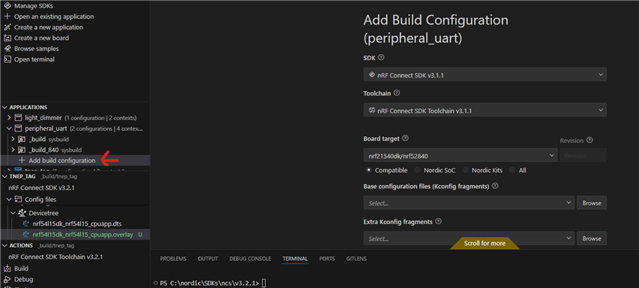
And you should see the SDK version and toolchain version in the two upper options.
Best regards,
Edvin
so basically i tried what you were saying, 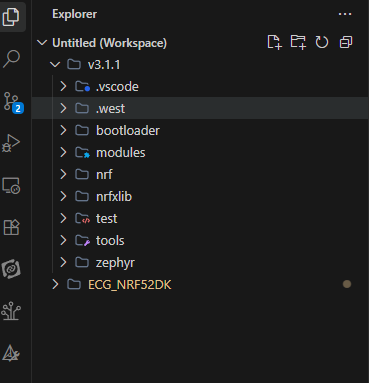
and even added the build configuration and it still looks like this 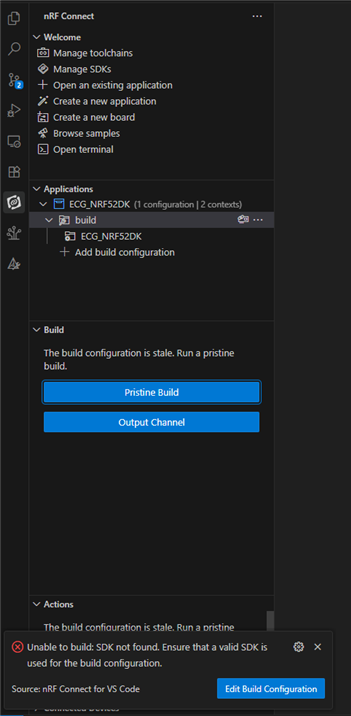
it dint change anything here
regards
vishva
When you create your build configuration, does v3.1.1 show up as an option? And how about the toolchain? Does it appear there?
Does it build the first time after you click "generate and build" in the "Add Build Configuration" tab, but then later doesn't find the SDK version? Or does it not build at all the first time around either?
Is this only an issue for v3.1.1? Or is it an issue for older NCS versions as well? Can you try with e.g. v3.0.1 and see if the issue is the same?
Best regards,
Edvin
Also, can you please share the content of your: v3.1.1\.west\config file?
BR,
Edvin
So basically my workflow will be like this, openning an existing application or creating one, when it is created i will go for the build configuration, so in the build configuration menu everything is fine and normal, i can see the tool chain i can see the sdk version and everything, so after that i can do the generate and build too, it will build when i am in that menu, after that when i go to the actions menu for the flash option it wont be there, it asks me to build again over there showing that two icons pristine build and output channel, so when i click the pristine build it shows that error " Unable to build: SDK not found. Ensure that a valid SDK is used for the build configuration."
i also tried with a different version of sdk the issue presists the same,
okay my contents in the config file is as below
[manifest]
path = nrf
file = west.yml
[zephyr]
base = C:\ncs\v3.1.1\zephyr
So basically my workflow will be like this, openning an existing application or creating one, when it is created i will go for the build configuration, so in the build configuration menu everything is fine and normal, i can see the tool chain i can see the sdk version and everything, so after that i can do the generate and build too, it will build when i am in that menu, after that when i go to the actions menu for the flash option it wont be there, it asks me to build again over there showing that two icons pristine build and output channel, so when i click the pristine build it shows that error " Unable to build: SDK not found. Ensure that a valid SDK is used for the build configuration."
i also tried with a different version of sdk the issue presists the same,
okay my contents in the config file is as below
[manifest]
path = nrf
file = west.yml
[zephyr]
base = C:\ncs\v3.1.1\zephyr
can you try changing that last line to:
base = zephyr
And then try to delete your current build configuration, restart VS Code and try to generate the build configuration again?
Best regards,
Edvin
It Worked! Thank you. i dont know how it got changed maybe i did something wrong over there maybe but yea nowit is working.
BR
Vishveshwaran