Nordic Academy Cellular IoT Fundamentals Lesson 4 Exercise 2 (l4_e2): MQTT Connect error -111 even in the solution build

We are running some internal training on cellular, and it seems that Lesson 4, Exercise 2 is missing something (in the tab for NCS v3.2.0); the instructions to provide the build system with the server certificate seem to be truncated (see image below):
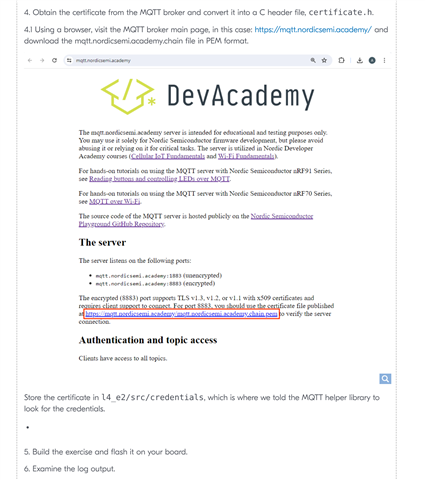
missing part in section 4?

Even leaving aside the course content itself, it seems the solution (in l4_e2_sol) gets a -111 (connection refused) when trying to connect to the nordic academy MQTT broker:

*** Booting nRF Connect SDK v3.2.0-5dcc6bd39b0f ***
*** Using Zephyr OS v4.2.99-a57ad913cf4e ***
[00:00:00.281,555] <inf> Lesson4_Exercise2: Initializing modem library
[00:00:00.654,052] <inf> Lesson4_Exercise2: Connecting to LTE network
[00:00:01.723,175] <inf> Lesson4_Exercise2: RRC mode: Connected
[00:00:05.888,549] <inf> Lesson4_Exercise2: Network registration status: Connected - roaming
[00:00:05.888,641] <inf> Lesson4_Exercise2: Connected to LTE network
[00:00:06.908,905] <err> mqtt_helper: mqtt_connect, error: -111
[00:00:06.908,935] <err> Lesson4_Exercise2: Failed to connect to MQTT, error code: -111
[00:00:18.166,107] <inf> Lesson4_Exercise2: RRC mode: Idle

This seems to be specific to v3.2.0: the repo at https://github.com/NordicDeveloperAcademy/cell-fund has 3 commits (4808121, b525c06 and c2c1ce0), all with the same commit message that fundamentally altered the lesson, removing the crt_to_header python script and moving the exercise to the MQTT Helper library.

The exercise text also mentions including modem_key_mgmt.h, which was a necessary step in the old mqtt_connection.c file for v3.1.0, but has been removed since.

In short, it seems that updating l4_e2 to NCS v3.2.0 somehow went wrong and the course is now out of sync with the code.

Parents
  • Hi Matteo,

    I just tested on a nRF9151 DK, and I can confirm that the solution is working with nRF Connect SDK v3.2.0.

    Logs:

    *** Booting nRF Connect SDK v3.2.0-5dcc6bd39b0f ***
    *** Using Zephyr OS v4.2.99-a57ad913cf4e ***
    [00:00:00.288,177] <inf> Lesson4_Exercise2: Initializing modem library
    [00:00:00.661,895] <inf> Lesson4_Exercise2: Connecting to LTE network
    [00:00:02.273,559] <inf> Lesson4_Exercise2: RRC mode: Connected
    [00:00:03.833,892] <inf> Lesson4_Exercise2: Network registration status: Connected - roaming
    [00:00:03.833,984] <inf> Lesson4_Exercise2: Connected to LTE network
    [00:00:06.278,808] <inf> Lesson4_Exercise2: Connected to MQTT broker
    [00:00:06.278,839] <inf> Lesson4_Exercise2: Hostname: mqtt.nordicsemi.academy
    [00:00:06.278,869] <inf> Lesson4_Exercise2: Client ID: nrf-359404230477532
    [00:00:06.278,900] <inf> Lesson4_Exercise2: Port: 8883
    [00:00:06.278,900] <inf> Lesson4_Exercise2: TLS: Yes
    [00:00:06.278,930] <inf> Lesson4_Exercise2: Subscribing to devacademy/subscribe/topic
    [00:00:06.362,823] <inf> Lesson4_Exercise2: Subscribed to devacademy/subscribe/topic with QoS 0
    [00:00:11.986,236] <inf> Lesson4_Exercise2: RRC mode: Idle

    I believe you have a problem with the certificate. Please try to download again the certificate on https://mqtt.nordicsemi.academy/mqtt.nordicsemi.academy.pem and to put it inside the "src/credentials". After that, do a pristine build.

    Also, can you check that you are using the latest version of the repository ?

    If that still doesn't work, can you share which board you are using ? And maybe also a zip file containing the project so that I can compare?

    Best regards,

    Simon D-M

  • Hi Simon,

    Thank you for your quick reply.

    We have re-downloaded the certificate and placed it in src/credentials. After a pristine build for the nRF9151DK, the problem is still there.

    For context:

    1. the course repo is indeed on the latest version (commit 68c5cd3).
    2. the board is the nRF9151DK, i.e. PCA10171 v0.7.0
    3. this happens on the l4_e2_sol project with no modification except adding the pem file
    4. the project directory, including the latest build, is attached.

    l4_e2_sol.zip

  • Hi Matteo,

    I tried to flash your program on my board directly from your provided build folder, and it worked fine on my end.

    Can you maybe try to upgrade the modem firmware ? To do it, download the latest modem firmware here. Open the "Programmer" application from nRF Connect for Desktop. Select your device on the menu top left. Add the whole mfw zip. Then press "write". It should say "Modem DFU" which indicate that the firmware has been recognized as a modem firmware.

    Once you have updated the modem firmware, try again and tell me if it still happens.

    Also, do you know if anyone used the DK you are using or is it a fresh DK ?

    Best regards,

    Simon D-M

  • I updated the modem to the v2.0.4 fw available at the link (my DK was on 2.0.3) and I got the same problem, after re-flashing the same binary as you have in the zip:

    Booting TF-M v2.1.1-ncs4                                                                                                                                                                                             
    [Sec Thread] Secure image initializing!                                                                                                                                                                              
    TF-M isolation level is: 0x00000001                                                                                                                                                                                  
    TF-M Float ABI: Hard                                                                                                                                                                                                 
    Lazy stacking enabled                                                                                                                                                                                                
    Ready                                                                                                                                                                                                                
    *** Booting nRF Connect SDK v3.2.0-5dcc6bd39b0f ***                                                                                                                                                                  
    *** Using Zephyr OS v4.2.99-a57ad913cf4e ***                                                                                                                                                                         
    [00:00:00.376,861] <inf> Lesson4_Exercise2: Initializing modem library                                                                                                                                               
    [00:00:00.748,870] <inf> Lesson4_Exercise2: Connecting to LTE network                                                                                                                                                
    [00:00:01.837,646] <inf> Lesson4_Exercise2: RRC mode: Connected                                                                                                                                                      
    [00:00:03.723,724] <inf> Lesson4_Exercise2: Network registration status: Connected - roaming                                                                                                                         
    [00:00:0,815] <inf> Lesson4_Exercise2: Connected to LTE network                                                                                                                                                      
    [00:00:04.584,320] <err> mqtt_helper: mqtt_connect, error: -111                                                                                                                                                      
    [00:00:04.584,350] <err> Lesson4_Exercise2: Failed to connect to MQTT, error code: -111                                                                                                                              
    [00:00:15.239,471] <inf> Lesson4_Exercise2: RRC mode: Idle 

    This specific board was a new nRF9151DK that I personally unpacked, but we have had the same with an Thingy:91X.

    I am surprised that we get different behaviours from the same *binary*, which would indicate there is state being stored somewhere (other than what gets written during a modem fw upgrade or an application flashing) or a different external cause 

Reply
  • I updated the modem to the v2.0.4 fw available at the link (my DK was on 2.0.3) and I got the same problem, after re-flashing the same binary as you have in the zip:

    Booting TF-M v2.1.1-ncs4                                                                                                                                                                                             
    [Sec Thread] Secure image initializing!                                                                                                                                                                              
    TF-M isolation level is: 0x00000001                                                                                                                                                                                  
    TF-M Float ABI: Hard                                                                                                                                                                                                 
    Lazy stacking enabled                                                                                                                                                                                                
    Ready                                                                                                                                                                                                                
    *** Booting nRF Connect SDK v3.2.0-5dcc6bd39b0f ***                                                                                                                                                                  
    *** Using Zephyr OS v4.2.99-a57ad913cf4e ***                                                                                                                                                                         
    [00:00:00.376,861] <inf> Lesson4_Exercise2: Initializing modem library                                                                                                                                               
    [00:00:00.748,870] <inf> Lesson4_Exercise2: Connecting to LTE network                                                                                                                                                
    [00:00:01.837,646] <inf> Lesson4_Exercise2: RRC mode: Connected                                                                                                                                                      
    [00:00:03.723,724] <inf> Lesson4_Exercise2: Network registration status: Connected - roaming                                                                                                                         
    [00:00:0,815] <inf> Lesson4_Exercise2: Connected to LTE network                                                                                                                                                      
    [00:00:04.584,320] <err> mqtt_helper: mqtt_connect, error: -111                                                                                                                                                      
    [00:00:04.584,350] <err> Lesson4_Exercise2: Failed to connect to MQTT, error code: -111                                                                                                                              
    [00:00:15.239,471] <inf> Lesson4_Exercise2: RRC mode: Idle 

    This specific board was a new nRF9151DK that I personally unpacked, but we have had the same with an Thingy:91X.

    I am surprised that we get different behaviours from the same *binary*, which would indicate there is state being stored somewhere (other than what gets written during a modem fw upgrade or an application flashing) or a different external cause 

Children
  • Hi Matteo,

    I was able to reproduce your error by wiping off all the certificates from my device. And in fact the firmware is not behaving as it should as it does not add the CA certificate from the MQTT broker. I had to do it manually.

    This problem is not a big deal for bigger projects, as this method of passing CA certificate is not secure and should not be used in real projects. However, it should still be fixed, and I'll report it to my colleagues so that they can fix it.

    For the moment, if you want to continue the course you can do it manually like I did and it should work. To do it manually, the easiest way is to do it through "nRF Connect for Desktop".

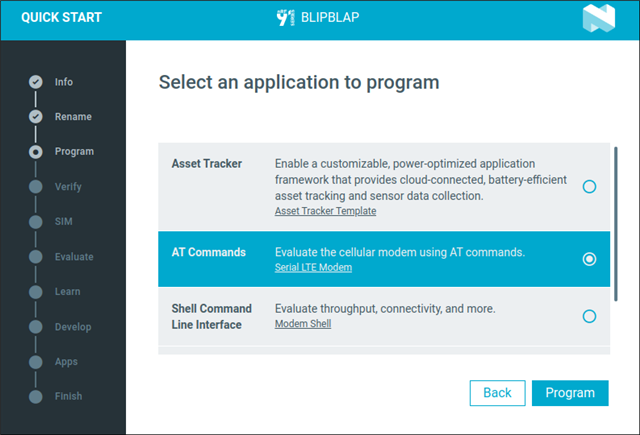
    • First, flash the device with the Serial LTE Modem. You can do it by running the "Quick start" application and selecting the "AT Commands" program when asking which program to flash.
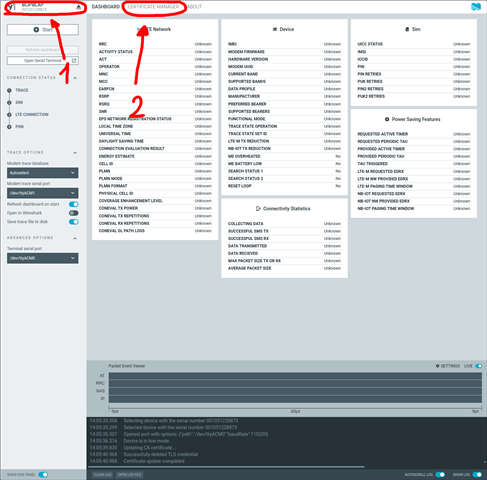
    • Once the Serial LTE Modem has been flashed, Open the "Cellular Monitor" application, connect to your device and go to "certificate manager"
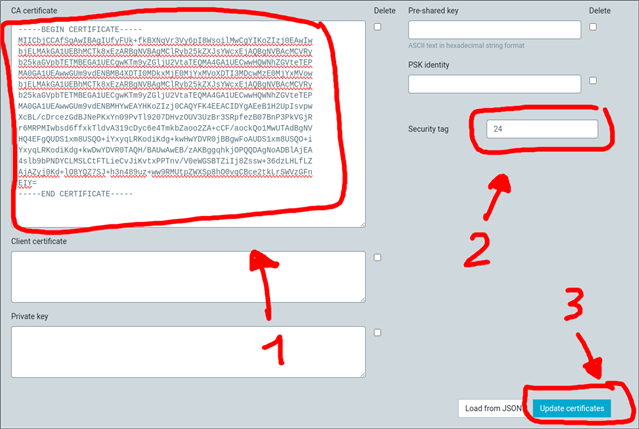
    • Then paste the certificate content to the "CA certificate" field, Write "24" in the "Security tag" field and press "Update certificates".

    After that, you should have pushed the certificate to your device. You can program the DK back with your firmware and it should work fine.

    Tell me if that did the trick !

    Best regards,

    Simon D-M

  • Hi Simon,

    Thank you for the answer, I have marked it "Verified".


    As you say, injecting keys from flash onto the modem key store is not something that a production application should do, so I think there is an opportunity to improve the course rather than just fixing it: instead of having the course show the developer how to do key injection "the quick and dirty way" (i.e. the way they should not use in the real world), why not change the course to include the instructions from your answer above? They are easy to follow, they yield a functional result, and that result is one that could actually be used as the starting point for prod.
    If going through Quick Start to flash the AT Commands binary and back is a bit awkward, maybe the user could be instructed to enable the AT host library so that they can inject the certificate with the same firmware?

    In either case, thank you again, it's good to see that we didn't have a problem on our side.

Related