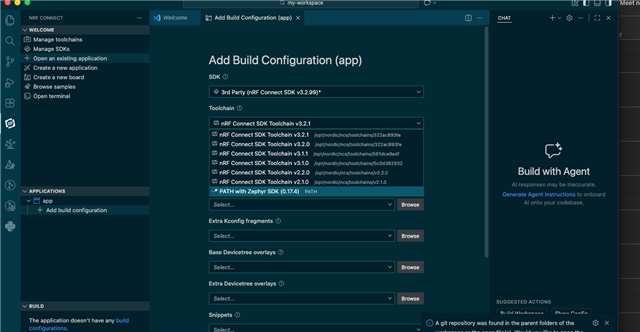
Development environment: MacOS Sequoia (15.4.1), Visual Studio Code v1.108 0, nrfConnect 2026.1.1242
I am trying to develop a "workspace" project with a nRF52840DK as my development target using the nrf-connect vs-code extension. I am unable to figure out how to install/select the stock zephyr toolchain. While I know the nordic toolchain will often work, I am experiencing a problem where the nordic toolchain gives posix errors that the stock toolchain does not. Thus I am revisiting how to install / select a third party tool chain. (It also is a bad practice to develop with the nordic toolchain, but then have build server use the stock toolchain. I don't need those gremlins.)
My development environment has stock zephyr base directory of "/opt/zephyr". There I have a "venv" to source for "west" development. I also have a "/opt/nordic/ncs" tree for nordic SDKs.
FWIW, I have the current zephyr toolchain installed at "/opt/zephyr/zephyr-sdk-0.17.4" as installed by "west sdk install".
To recreate the problem I performed the following steps:
1) using "Manage SDKs", I installed 3rd party SDK from the stock zephyr GitHub directory: "zephyrproject-rtos/zephyr" and chose v4.3.0. Destination "/opt/zephyr/sdk". Directory "v4.3.0" appeared in the destination directory with all the appropriate info cloned.
2) using "Create new application", I selected "copy from sample", I choose "Hello World" using the v4.3.0 SDK (just installed).
3) Then using "Manage SDKs", I selected "Manage west workspace" -> "Create west workspace" for the newly created application.
4) I then ran "Manage SDKs" -> "Manage west workspace" -> "Run west update".
5) After that I could run "add build configuration" & build, but I was not able to select the stock zephyr toolchain. The application built with the nordic toolchain selected. (Application frame shows Zephyr v4.3.0 as SDK. Action frame shows "nRF Connect SDK Toolchain v2.8.0)
6) Using a terminal, I was able to cd into the application root (ie the west directory) and after sourcing the zephyr venv environment (for me "source /opt/zephyr/venv/bin/activate", I was able to run "west sdk list" and see 0.17.4 listed as installed. I then change to application directory and run
```
(venv) $ west configure build.board nrf52840dk/nrf52840
(venv) $ west build -p
```
And I observe the application built with the stock toolchain, not the nordic one. I also observe the NRF CONNECT frames show "build configuration stale. Run pristine build". Selecting "Pristine Build" results in a "Unable to build: SDK not found." error.
Help in installing a third party toolchain would be appreciated. (Or really just selecting it: "west sdk install" works fine to get it, I just can't select it.)