

Hi,
Currently, I know that OTA updates for the nRF5340 can be performed using Device Manager and the nRF Connect mobile application. However, if using a PC, is it possible to achieve the same functionality via the command line?
Thanks!!
Mike
Hi,
Currently, I know that OTA updates for the nRF5340 can be performed using Device Manager and the nRF Connect mobile application. However, if using a PC, is it possible to achieve the same functionality via the command line?
Thanks!!
Mike


Hi Mike,
Is it a Windows PC? There has not been BLE support for this OS in the past, but it looks like that may have changed with the introduction of the smpmgr tool added here: https://github.com/zephyrproject-rtos/zephyr/issues/70871
- https://github.com/intercreate/smpmgr/releases
Best regards,
Vidar
Hi Vidar,
Yes, that’s correct. I am trying to run this on a Windows PC.
I have already installed the smpmgr tool (version 0.17.0) on my Windows PC and attempted to perform FOTA on my nRF5340 device.
However, I encountered the following issue. The error logs are shown below.
C:\Users\user>smpmgr --ble E8:B8:C3:0E:CC:23 image upload C:\Users\user\Desktop\Mike\p1_v1.1.2_32M_12pF_dfu_application.zip
[08:48:32] ERROR    Inspection of FW image failed - image_management:187                         image_management.py:187
                    ╭─────────────────── Traceback (most recent call last) ────────────────────╮
                    │ C:\Users\user\AppData\Local\Programs\Python\Python312\Lib\site-pack │
                    │ ages\smpmgr\image_management.py:184 in upload                            │
                    │                                                                          │
                    │   181 │   """Upload a FW image."""                                       │
                    │   182 │                                                                  │
                    │   183 │   try:                                                           │
                    │ ❱ 184 │   │   image_info = ImageInfo.load_file(str(file))                │
                    │   185 │   │   logger.info(str(image_info))                               │
                    │   186 │   except Exception:                                              │
                    │   187 │   │   logger.exception("Inspection of FW image failed")          │
                    │                                                                          │
                    │ C:\Users\user\AppData\Local\Programs\Python\Python312\Lib\site-pack │
                    │ ages\smpclient\mcuboot.py:326 in load_file                               │
                    │                                                                          │
                    │   323 │   │   │   │   raise MCUBootImageError(f"hex2bin() ret: {ret}")   │
                    │   324 │   │                                                              │
                    │   325 │   │   f.seek(0)  # move to the start of the image                │
                    │ ❱ 326 │   │   image_header = ImageHeader.load_from(f)                    │
                    │   327 │   │                                                              │
                    │   328 │   │   tlv_offset = image_header.hdr_size + image_header.img_size │
                    │   329                                                                    │
                    │                                                                          │
                    │ C:\Users\user\AppData\Local\Programs\Python\Python312\Lib\site-pack │
                    │ ages\smpclient\mcuboot.py:223 in load_from                               │
                    │                                                                          │
                    │   220 │   @staticmethod                                                  │
                    │   221 │   def load_from(file: BytesIO | BufferedReader) -> 'ImageHeader' │
                    │   222 │   │   """Load an `ImageHeader` from an open file."""             │
                    │ ❱ 223 │   │   return ImageHeader.loads(file.read(IMAGE_HEADER_STRUCT.siz │
                    │   224 │                                                                  │
                    │   225 │   @staticmethod                                                  │
                    │   226 │   def load_file(path: str) -> 'ImageHeader':                     │
                    │                                                                          │
                    │ C:\Users\user\AppData\Local\Programs\Python\Python312\Lib\site-pack │
                    │ ages\smpclient\mcuboot.py:205 in loads                                   │
                    │                                                                          │
                    │   202 │   │   │   flags,                                                 │
                    │   203 │   │   │   *ver,                                                  │
                    │   204 │   │   ) = IMAGE_HEADER_STRUCT.unpack(data)                       │
                    │ ❱ 205 │   │   return ImageHeader(                                        │
                    │   206 │   │   │   magic=magic,                                           │
                    │   207 │   │   │   load_addr=load_addr,                                   │
                    │   208 │   │   │   hdr_size=hdr_size,                                     │
                    │                                                                          │
                    │ C:\Users\user\AppData\Local\Programs\Python\Python312\Lib\site-pack │
                    │ ages\pydantic\_internal\_dataclasses.py:121 in __init__                  │
                    │                                                                          │
                    │   118 │   def __init__(__dataclass_self__: PydanticDataclass, *args: Any │
                    │       None:                                                              │
                    │   119 │   │   __tracebackhide__ = True                                   │
                    │   120 │   │   s = __dataclass_self__                                     │
                    │ ❱ 121 │   │   s.__pydantic_validator__.validate_python(ArgsKwargs(args,  │
                    │       self_instance=s)                                                   │
                    │   122 │                                                                  │
                    │   123 │   __init__.__qualname__ = f'{cls.__qualname__}.__init__'         │
                    │   124                                                                    │
                    │                                                                          │
                    │ C:\Users\user\AppData\Local\Programs\Python\Python312\Lib\site-pack │
                    │ ages\smpclient\mcuboot.py:218 in __post_init__                           │
                    │                                                                          │
                    │   215 │   def __post_init__(self) -> None:                               │
                    │   216 │   │   """Do initial validation of the header."""                 │
                    │   217 │   │   if self.magic != IMAGE_MAGIC:                              │
                    │ ❱ 218 │   │   │   raise MCUBootImageError(f"Magic is {hex(self.magic)},  │
                    │       {hex(IMAGE_MAGIC)}")                                               │
                    │   219 │                                                                  │
                    │   220 │   @staticmethod                                                  │
                    │   221 │   def load_from(file: BytesIO | BufferedReader) -> 'ImageHeader' │
                    ╰──────────────────────────────────────────────────────────────────────────╯
                    MCUBootImageError: Magic is 0x4034b50, expected 0x96f3b83d

C:\Users\user>
I am not sure whether I am using the smpmgr tool correctly.
Thanks!!
Mike
Hi Mike,
The packaging of the DFU FW image(s) in a .zip (dfu_application.zip) is a nRF connect specific feature that only works with our DFU tools (in our mobile apps). This scripts expect to receive the binary inside the zip.
Best regards,
Vidar
Hi Vidar,
Are you referring to directly using the zephyr.bin from the example project, or do we need to use additional tools to build the .bin file?
Thanks!!
Mike
Hi Mike,
Just extract the dfu_application.zip file and used the bin contained in the folder. Or you can look for zephyr.signed.bin (zephyr.bin is the unsigned application) in build/<app name>/zephyr
Hi Vidar,
Based on your suggestion, I extracted dfu_application.zip and used the .bin file inside to perform the update, but it seems that I am encountering a similar issue
C:\Users\user\Desktop\Mike\p1_v1.1.2_32M_12pF_dfu_application>smpmgr --ble E8:B8:C3:0E:CC:23 image upload application.signed.bin
[01:29:55] ERROR Inspection of FW image failed - image_management:187 image_management.py:187
╭───────────────────────────────────── Traceback (most recent call last) ──────────────────────────────────────╮
│ C:\Users\user\AppData\Local\Programs\Python\Python312\Lib\site-packages\smpmgr\image_management.py:184 │
│ in upload │
│ │
│ 181 │ """Upload a FW image.""" │
│ 182 │ │
│ 183 │ try: │
│ ❱ 184 │ │ image_info = ImageInfo.load_file(str(file)) │
│ 185 │ │ logger.info(str(image_info)) │
│ 186 │ except Exception: │
│ 187 │ │ logger.exception("Inspection of FW image failed") │
│ │
│ C:\Users\user\AppData\Local\Programs\Python\Python312\Lib\site-packages\smpclient\mcuboot.py:331 in │
│ load_file │
│ │
│ 328 │ │ tlv_offset = image_header.hdr_size + image_header.img_size │
│ 329 │ │ │
│ 330 │ │ f.seek(tlv_offset) # move to the start of the TLV area │
│ ❱ 331 │ │ tlv_info = ImageTLVInfo.load_from(f) │
│ 332 │ │ │
│ 333 │ │ tlvs: list[ImageTLVValue] = [] │
│ 334 │ │ while f.tell() < tlv_offset + tlv_info.tlv_tot: │
│ │
│ C:\Users\user\AppData\Local\Programs\Python\Python312\Lib\site-packages\smpclient\mcuboot.py:255 in │
│ load_from │
│ │
│ 252 │ @staticmethod │
│ 253 │ def load_from(file: BytesIO | BufferedReader) -> 'ImageTLVInfo': │
│ 254 │ │ """Load an `ImageTLVInfo` from a file.""" │
│ ❱ 255 │ │ return ImageTLVInfo.loads(file.read(IMAGE_TLV_INFO_STRUCT.size)) │
│ 256 │
│ 257 │
│ 258 @dataclass(frozen=True) │
│ │
│ C:\Users\user\AppData\Local\Programs\Python\Python312\Lib\site-packages\smpclient\mcuboot.py:250 in │
│ loads │
│ │
│ 247 │ @staticmethod │
│ 248 │ def loads(data: bytes) -> 'ImageTLVInfo': │
│ 249 │ │ """Load an `ImageTLVInfo` from bytes.""" │
│ ❱ 250 │ │ return ImageTLVInfo(*IMAGE_TLV_INFO_STRUCT.unpack(data)) │
│ 251 │ │
│ 252 │ @staticmethod │
│ 253 │ def load_from(file: BytesIO | BufferedReader) -> 'ImageTLVInfo': │
│ │
│ C:\Users\user\AppData\Local\Programs\Python\Python312\Lib\site-packages\pydantic\_internal\_dataclasses │
│ .py:121 in __init__ │
│ │
│ 118 │ def __init__(__dataclass_self__: PydanticDataclass, *args: Any, **kwargs: Any) -> │
│ None: │
│ 119 │ │ __tracebackhide__ = True │
│ 120 │ │ s = __dataclass_self__ │
│ ❱ 121 │ │ s.__pydantic_validator__.validate_python(ArgsKwargs(args, kwargs), │
│ self_instance=s) │
│ 122 │ │
│ 123 │ __init__.__qualname__ = f'{cls.__qualname__}.__init__' │
│ 124 │
│ │
│ C:\Users\user\AppData\Local\Programs\Python\Python312\Lib\site-packages\smpclient\mcuboot.py:243 in │
│ __post_init__ │
│ │
│ 240 │ def __post_init__(self) -> None: │
│ 241 │ │ """Do initial validation of the header.""" │
│ 242 │ │ if self.magic != IMAGE_TLV_INFO_MAGIC: │
│ ❱ 243 │ │ │ raise MCUBootImageError( │
│ 244 │ │ │ │ f"TLV info magic is {hex(self.magic)}, expected │
│ {hex(IMAGE_TLV_INFO_MAGIC)}" │
│ 245 │ │ │ ) │
│ 246 │
╰──────────────────────────────────────────────────────────────────────────────────────────────────────────────╯
MCUBootImageError: TLV info magic is 0x6908, expected 0x6907
C:\Users\user\Desktop\Mike\p1_v1.1.2_32M_12pF_dfu_application>
Thanks!!
Mike
Hi Mike,
Unfortunately, it looks like the script does not support handling of protected TLVs.

(https://docs.nordicsemi.com/bundle/ncs-latest/page/mcuboot/design.html)
Note: you can use the imgtool command "dumpinfo" to parse the TLVs in your application.signed.bin file: "imgtool dumpinfo application.signed.bin".
Is it an option to use AuTerm which is a GUI app (https://docs.nordicsemi.com/bundle/ncs-latest/page/zephyr/services/device_mgmt/mcumgr.html#toolslibraries)? Another option is to try this cli tool here https://github.com/thedjnK/qtmgmt
Best regards,
Vidar
Hi Mike,
Unfortunately, it looks like the script does not support handling of protected TLVs.
(https://docs.nordicsemi.com/bundle/ncs-latest/page/mcuboot/design.html)
Note: you can use the imgtool command "dumpinfo" to parse the TLVs in your application.signed.bin file: "imgtool dumpinfo application.signed.bin".
Is it an option to use AuTerm which is a GUI app (https://docs.nordicsemi.com/bundle/ncs-latest/page/zephyr/services/device_mgmt/mcumgr.html#toolslibraries)? Another option is to try this cli tool here https://github.com/thedjnK/qtmgmt
Best regards,
Vidar
Hi Vidar,
I’m not sure how to run AuTerm using the command line. From what I understand, if command-line usage is required, it seems that qtmgmt needs to be used instead.
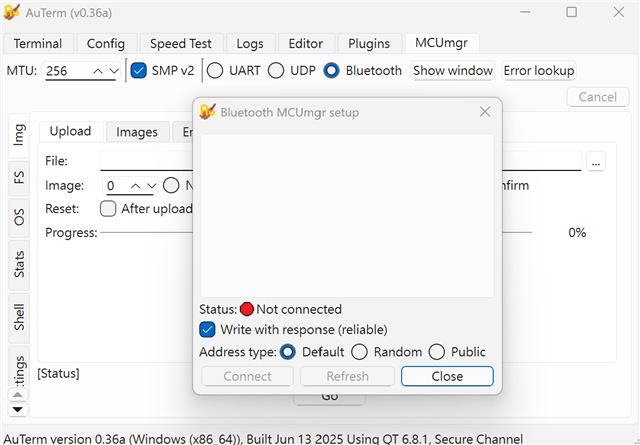
However, I’m unable to download a pre-built executable of qtmgmt.
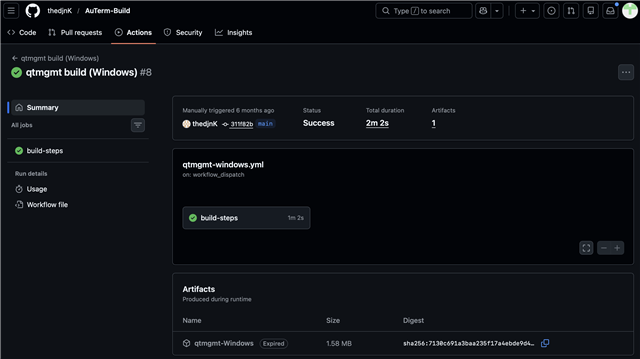
I would like to ask whether you could provide an example of commands that have been successfully executed using this tool, so that I can use them for testing purposes.
Thanks!!
Mike
Hi Mike,
AuTerm has a GUI only and cannot be used from the command line. That is why I mentioned qtmgmt, but this must be built from source it seems. I have not tried this tool myself. Internally for automated testing. we are using the mcumgr client script on linux
Best regards,
Vidar
Hi Vidar,
So on a Linux PC, your team has tested that using mcumgr to update the nRF5340 works reliably. However, mcumgr cannot be used on a Windows PC. Is my understanding correct?
Thanks!!
Mike
Hi Mike,
Yes, mcumgr BLE transport is not supported on Windows. On linux it works ok, but it does have some reliability issues and we are looking to replace it.
Hi Vidar,
For the Windows PC side, there is currently no command-line tool that you have tested and can recommend for use. Also, unlike the nRF52 series, Nordic does not provide a tool such as "nrfutil" for performing OTA updates, correct?
If we exclude command-line tools, does Nordic provide any tools that can be used to update the nRF5340?
Thanks!!
Mike