

Hi,
Currently, I know that OTA updates for the nRF5340 can be performed using Device Manager and the nRF Connect mobile application. However, if using a PC, is it possible to achieve the same functionality via the command line?
Thanks!!
Mike
Hi,
Currently, I know that OTA updates for the nRF5340 can be performed using Device Manager and the nRF Connect mobile application. However, if using a PC, is it possible to achieve the same functionality via the command line?
Thanks!!
Mike


Hi Vidar,
Based on your suggestion, I extracted dfu_application.zip and used the .bin file inside to perform the update, but it seems that I am encountering a similar issue
C:\Users\user\Desktop\Mike\p1_v1.1.2_32M_12pF_dfu_application>smpmgr --ble E8:B8:C3:0E:CC:23 image upload application.signed.bin
[01:29:55] ERROR Inspection of FW image failed - image_management:187 image_management.py:187
╭───────────────────────────────────── Traceback (most recent call last) ──────────────────────────────────────╮
│ C:\Users\user\AppData\Local\Programs\Python\Python312\Lib\site-packages\smpmgr\image_management.py:184 │
│ in upload │
│ │
│ 181 │ """Upload a FW image.""" │
│ 182 │ │
│ 183 │ try: │
│ ❱ 184 │ │ image_info = ImageInfo.load_file(str(file)) │
│ 185 │ │ logger.info(str(image_info)) │
│ 186 │ except Exception: │
│ 187 │ │ logger.exception("Inspection of FW image failed") │
│ │
│ C:\Users\user\AppData\Local\Programs\Python\Python312\Lib\site-packages\smpclient\mcuboot.py:331 in │
│ load_file │
│ │
│ 328 │ │ tlv_offset = image_header.hdr_size + image_header.img_size │
│ 329 │ │ │
│ 330 │ │ f.seek(tlv_offset) # move to the start of the TLV area │
│ ❱ 331 │ │ tlv_info = ImageTLVInfo.load_from(f) │
│ 332 │ │ │
│ 333 │ │ tlvs: list[ImageTLVValue] = [] │
│ 334 │ │ while f.tell() < tlv_offset + tlv_info.tlv_tot: │
│ │
│ C:\Users\user\AppData\Local\Programs\Python\Python312\Lib\site-packages\smpclient\mcuboot.py:255 in │
│ load_from │
│ │
│ 252 │ @staticmethod │
│ 253 │ def load_from(file: BytesIO | BufferedReader) -> 'ImageTLVInfo': │
│ 254 │ │ """Load an `ImageTLVInfo` from a file.""" │
│ ❱ 255 │ │ return ImageTLVInfo.loads(file.read(IMAGE_TLV_INFO_STRUCT.size)) │
│ 256 │
│ 257 │
│ 258 @dataclass(frozen=True) │
│ │
│ C:\Users\user\AppData\Local\Programs\Python\Python312\Lib\site-packages\smpclient\mcuboot.py:250 in │
│ loads │
│ │
│ 247 │ @staticmethod │
│ 248 │ def loads(data: bytes) -> 'ImageTLVInfo': │
│ 249 │ │ """Load an `ImageTLVInfo` from bytes.""" │
│ ❱ 250 │ │ return ImageTLVInfo(*IMAGE_TLV_INFO_STRUCT.unpack(data)) │
│ 251 │ │
│ 252 │ @staticmethod │
│ 253 │ def load_from(file: BytesIO | BufferedReader) -> 'ImageTLVInfo': │
│ │
│ C:\Users\user\AppData\Local\Programs\Python\Python312\Lib\site-packages\pydantic\_internal\_dataclasses │
│ .py:121 in __init__ │
│ │
│ 118 │ def __init__(__dataclass_self__: PydanticDataclass, *args: Any, **kwargs: Any) -> │
│ None: │
│ 119 │ │ __tracebackhide__ = True │
│ 120 │ │ s = __dataclass_self__ │
│ ❱ 121 │ │ s.__pydantic_validator__.validate_python(ArgsKwargs(args, kwargs), │
│ self_instance=s) │
│ 122 │ │
│ 123 │ __init__.__qualname__ = f'{cls.__qualname__}.__init__' │
│ 124 │
│ │
│ C:\Users\user\AppData\Local\Programs\Python\Python312\Lib\site-packages\smpclient\mcuboot.py:243 in │
│ __post_init__ │
│ │
│ 240 │ def __post_init__(self) -> None: │
│ 241 │ │ """Do initial validation of the header.""" │
│ 242 │ │ if self.magic != IMAGE_TLV_INFO_MAGIC: │
│ ❱ 243 │ │ │ raise MCUBootImageError( │
│ 244 │ │ │ │ f"TLV info magic is {hex(self.magic)}, expected │
│ {hex(IMAGE_TLV_INFO_MAGIC)}" │
│ 245 │ │ │ ) │
│ 246 │
╰──────────────────────────────────────────────────────────────────────────────────────────────────────────────╯
MCUBootImageError: TLV info magic is 0x6908, expected 0x6907
C:\Users\user\Desktop\Mike\p1_v1.1.2_32M_12pF_dfu_application>
Thanks!!
Mike
Hi Mike,
Unfortunately, it looks like the script does not support handling of protected TLVs.

(https://docs.nordicsemi.com/bundle/ncs-latest/page/mcuboot/design.html)
Note: you can use the imgtool command "dumpinfo" to parse the TLVs in your application.signed.bin file: "imgtool dumpinfo application.signed.bin".
Is it an option to use AuTerm which is a GUI app (https://docs.nordicsemi.com/bundle/ncs-latest/page/zephyr/services/device_mgmt/mcumgr.html#toolslibraries)? Another option is to try this cli tool here https://github.com/thedjnK/qtmgmt
Best regards,
Vidar
Hi Vidar,
I’m not sure how to run AuTerm using the command line. From what I understand, if command-line usage is required, it seems that qtmgmt needs to be used instead.
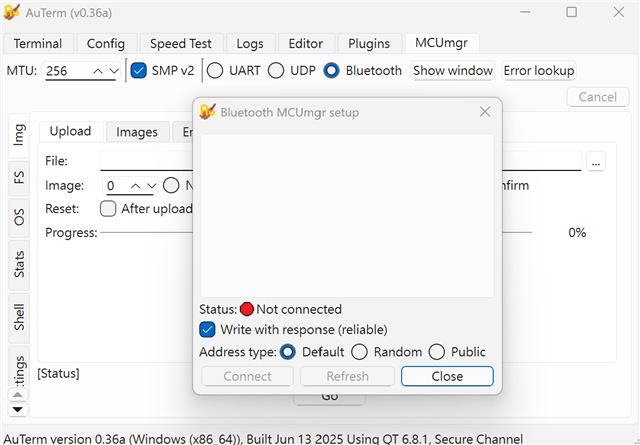
However, I’m unable to download a pre-built executable of qtmgmt.
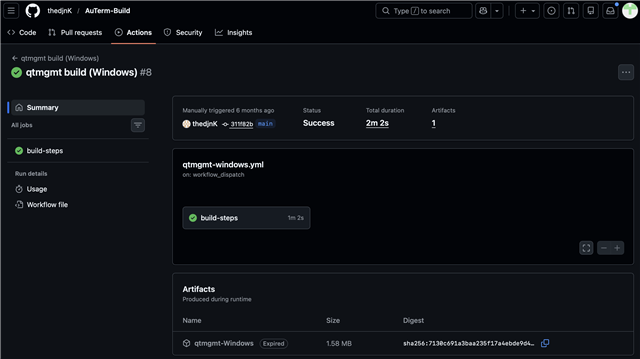
I would like to ask whether you could provide an example of commands that have been successfully executed using this tool, so that I can use them for testing purposes.
Thanks!!
Mike
Hi Mike,
AuTerm has a GUI only and cannot be used from the command line. That is why I mentioned qtmgmt, but this must be built from source it seems. I have not tried this tool myself. Internally for automated testing. we are using the mcumgr client script on linux
Best regards,
Vidar
Hi Vidar,
So on a Linux PC, your team has tested that using mcumgr to update the nRF5340 works reliably. However, mcumgr cannot be used on a Windows PC. Is my understanding correct?
Thanks!!
Mike