VS Code Extension + Bare Metal SDK = not much works correctly

Hello everyone, trying NRF for the first time and so far it's been only bunch of frustration and wasted time.

What I need to create is a subset of BM applications for NRF54L family utilizing both BLE and proprietary 2.4. Hence VSCode 1.108.1 + NCS-BM v1.0.0 + Toolchain v3.2.0 (bundled).

Here's how it went:

1. The SDK fails to install into the custom folder, gives "[west]: exited with code -4058" error. OK, installed into the default one.

- potentially resolved

2. Opening a sample project, there are ~20 BM demos vs 100+ zephyr / nrfx / modules ones (which I understand are not usable in BM ? why are they included at all ? more below). "Filter by board" works not as expected as the list actually refers to "platform" or "target" rather than a piece of hardware. Hence huge list that is impossible to review, and the search is useless unless you know exactly what to look for.

- potentially resolved

3. Opening any non-BM sample results in build script generation failure, even though the project is included with the SDK, and all default settings used (e.g. "radio_test" sample, "nrf54l15dk/nrf54l15/cpuapp" target):

-- Configuring incomplete, errors occurred!
CMake Error at cmake/modules/sysbuild_extensions.cmake:530 (message):
CMake configure failed for Zephyr project: radio_test

- resolved

4. Going strictly with BM projects (again, only ~20 available), even simplest peripheral demos (e.g. "pwm") require SoftDevice-based platform (why ?). I will not need it for the proprietary 2.4 portion as well. At least it seems that the linker removes SoftDevice library if it's not called ? And strange observation - some BM / SoftDevice projects offer S115 only, some - S115 and S145 while targeting exact same part (why ?).

5. The working projects are missing "Source" folder in project tree on NRF CONNECT panel, only "Output files" and "Config files". Sure the sources can be accessed through Explorer panel, but as far as I understand they should be listed in the project tree as well. Interestingly, the faulty projects from #3 do list "Source" folder, but inside there's only a "Missing compile_commands.json Click to regenerate" link (which still yields the same faulty result as above).

- resolved

6. No signs of source processing / language service support. Hence no code navigation / refactoring / etc. Any advice here ?

- partially resolved, now it can parse and navigate throughout a current file. But still cannot read headers and do cross-file navigation. Where to look ?

So here is where I am right now after hours of trial and error - only a handful of demos in very certain configuration do compile, not much clear about project configuration in general (why errors, cpuapp vs cpuflpr, secure / non secure, bootloader), many questions to the UI, source processing doesn't work. And I didn't even try flashing / debugging yet.

Wondering if anyone got the above working right. Any insight would be appreciated.

Parents Reply Children
  • Kenneth, appreciate the comments.

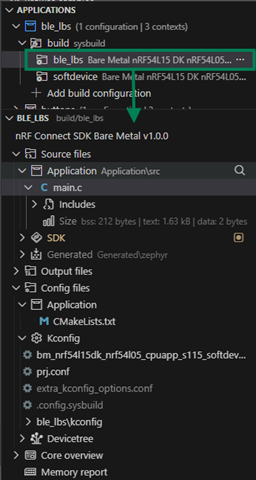
    Selecting the application build revealed the Sources folder Thumbsup So #5 resolved.

    "Active App Follows..." checkbox removed, good idea.

    S115 vs S145 - I know the difference, but quite confusing why not all demos support S145 if it's a superset, and never version. But that's minor. Main question was how I can create a BM application without SoftDevice at all, as it supposedly is not needed for proprietary protocol.

    Am I getting it right, that no other demos from the NCS-BM are supposed to work, except the 23 listed ? Well I would remove them altogether then, because when something doesn't work out of box, it looks like there's a fundamental problem on my side. Anyway, #3 resolved.

    Watched that intro video prior to diving in. Lot of great insight, but the hands-on shows nothing about project configuration at all. It's already configured and open, and the guy just clicks "Flash", and everything magically works. Not my case unfortunately. BTW, reviewing it very carefully again, now I see his build configuration has at least 4 components - "ble_lbs",  "firmware_loader", "installer", one barely visible ("mcuboot" ?), and most likely it should include the "softdevice" as well (5?). How did he get there !? Any advanced guide on compound projects ?

    And new items:

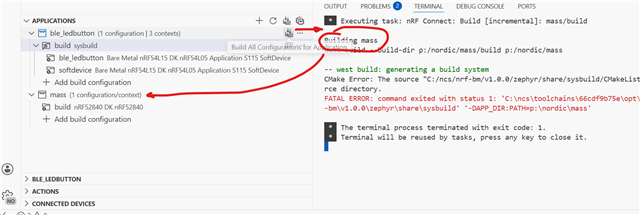
    7. Pressing "Build All Configurations" on the application plank runs build process for the different project:

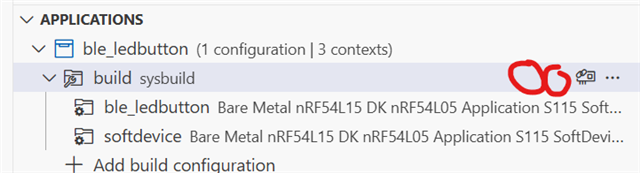
    8. Is it possible to add "Build" and "Clean and Build" buttons to the configuration plank ? This would also resolve the potential issue with an active project focus.

    Thanks again !

    Sergey

  • Hi Sergey,

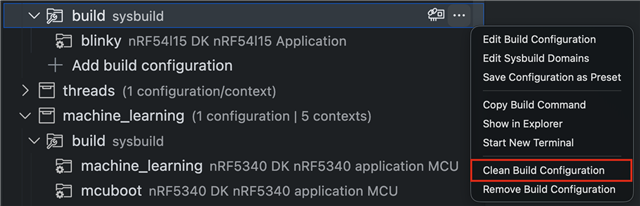
    I have forwarded the input to the VS code extension team, the feedback for now is that it can partly be done by:


    Edit1: Screenshot not from Bare Metal (BM) SDK, but same should be possible with BM SDK in VS code also.

    Edit2: I forgot to comment on why all projects need softdevice, this is something they are considering, but the main advantage of always having a softdevice is the possibility for DFU.

    Kenneth

  • Thanks Kenneth, got both points.

    Can you please check #6 once again - like stated in the update, it can navigate throughout a current file, but fails to parse the dependencies. Can I pull diag logs, or check some settings ?

  • Hi,

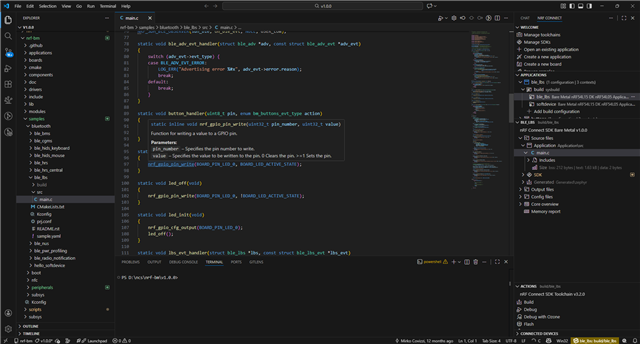
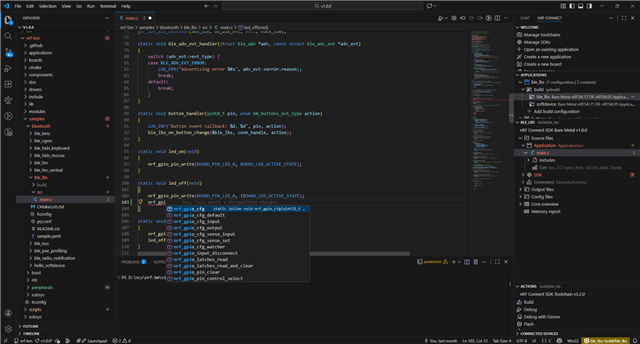
    I am not sure I understand, this is a screenshot of my setup, what are you missing?

    This is me hovering over a function:

    This is me trying to add an api call:

    Kenneth

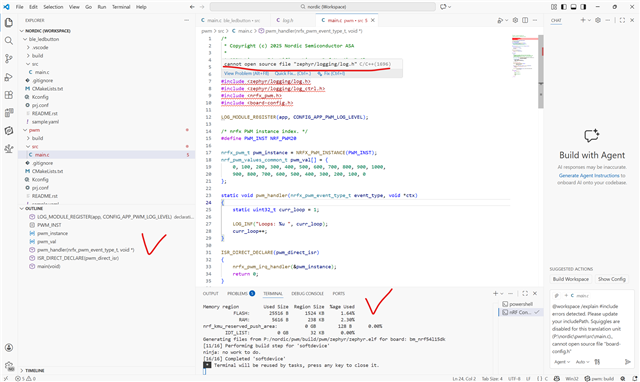
  • This is what's going on:

    PWM demo from BM package - builds correctly, local code navigation is OK, but cannot parse a single header and hence no cross-file navigation.

    Another similar project you can see on the same screenshot (ble_ledbutton which is a ble_lbs demo) has the cross-file navigation working just fine.

    Both utilize default build configuration, yet very different outcome. Any suggestion what to check ?

Related