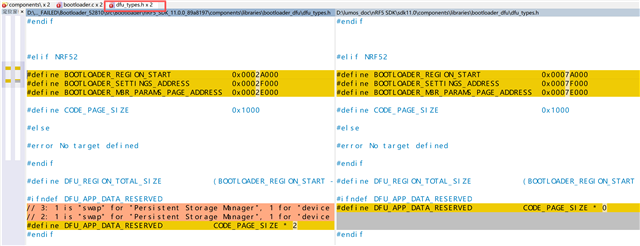
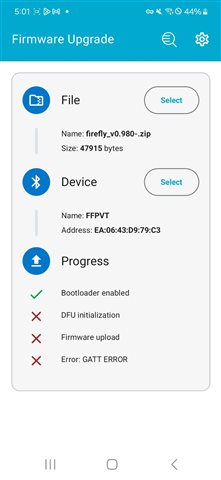
DFU failed during the work process.

SDK:nRF5_SDK_11.0.0_89a8197\examples\ble_peripheral\ble_app_hrs\pca10040\s132_with_dfu\arm4\ble_app_hrs_s132_with_dfu_pca10040

Our product encountered a problem with DFU: the device fails to perform DFU mode on an Android phone during working. Phone specifications: [Sumsung Galaxy s23]--[Android version 14]--[DFU App:v2.9.0].
However, I can perform DFU mode without issues using another Android phone[Redmi Note 8]--[Android 11RKQ1.201004.002]--[DFU APP:v2.9.0] and an iPhone[13Pro,18.1.1]--[DFU APP: v6.0.1]

Why is this?


best regard

Parents
  • Hi Zicongkuang, 
    Do you see any log with nrf log app on the phone ? 
    Do you see any log on the device ? 
    Could you try to test with a sample in the SDK and DFU a very simple application ? 

    You may want to remove any bonding information, turn off an on Bluetooth on the phone and try again. 


  • Hi hung bi
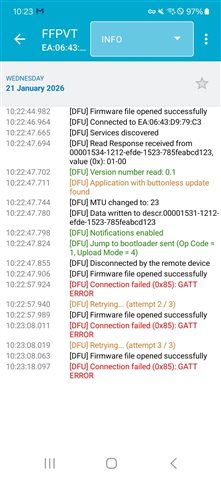
    this is the log from android 14 - sumsung galaxy s23.

    Could you try to test with a sample in the SDK and DFU a very simple application ? 

    yeah. i did it.
    this is the simple application code

    int main(void)
    {
        bool erase_bonds;
            
        // Initialize.
    //  app_trace_init();
        timers_init();
        buttons_leds_init(&erase_bonds);
        LL_Key_Init();
    
        ble_stack_init();
        device_manager_init(erase_bonds);
        gap_params_init();
        advertising_init();
        services_init();
    //  sensor_simulator_init();
        conn_params_init();
    
        // Start execution.
        application_timers_start();
         
        //LL_BLE_SetAdManu(LL_BLE_ADV_PAIRING_FLAG); battery_level_update(); 
    		ble_advertising_start(BLE_ADV_MODE_FAST);
        // Enter main loop.
        unsigned long ulTimerCntPwm = gulTimerCnt1ms;    
        for (;;)
        {
            LL_Key_Scan();
        }
        
    }


    You may want to remove any bonding information, turn off an on Bluetooth on the phone and try again.

    i try it. but it not work.

  • Hi Zicongkuang, 
    I would like to see a sniffer trace when you do DFU. 

    It seems that that phone has cached the attribute table of the device and doesn't want to update it. 

    Could you check after the issue occurs, use nRF Connect app on the phone to open and check the attribute table. 
    You should use also the other phone that can do DFU to use nRF Connect app and open and see the attribute table. 

    Please take a screen shot

    What I expect you to see is to see the bootloader attribute table, with the DFU service (not the application table with the DFU buttonless service). 


  • Hi Hung Bui
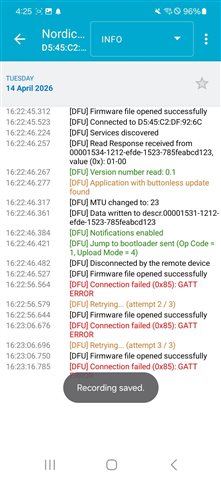
    I'm very sorry for replying to you so late. I will follow your instructions to record the issues over the next few days. Could you please tell me if you have encountered the issue where Android 14 cannot upgrade to SDK 11.0?

    Best regard!

  • Hello, Hung is currently OOO, so I will take over this for a bit.

    kenyon said:
    I'm very sorry for replying to you so late.

    No problem Slight smile

    kenyon said:
    I will follow your instructions to record the issues over the next few days.

    Sounds good! Let us know when you have something.

    kenyon said:
    Could you please tell me if you have encountered the issue where Android 14 cannot upgrade to SDK 11.0?

    Nothing comes to mind. I tried searching a bit around here, and I am not immediately finding anything either.

    Regards,

    Elfving

Reply
  • Hello, Hung is currently OOO, so I will take over this for a bit.

    kenyon said:
    I'm very sorry for replying to you so late.

    No problem Slight smile

    kenyon said:
    I will follow your instructions to record the issues over the next few days.

    Sounds good! Let us know when you have something.

    kenyon said:
    Could you please tell me if you have encountered the issue where Android 14 cannot upgrade to SDK 11.0?

    Nothing comes to mind. I tried searching a bit around here, and I am not immediately finding anything either.

    Regards,

    Elfving

Children
  • SDK11_DFU_FAILED.7z
    Hi  Elfving
    I'm very sorry for not replying to your message until so late. I've been extremely busy recently QAQ

    I created the smallest example to assist you in troubleshooting the issue.

    I conducted experiments on the pca10040 development board and found that it is indeed impossible to perform DFU (unless entering the bootloader, in which case DFU can be successfully accomplished)


    The error message should be consistent.

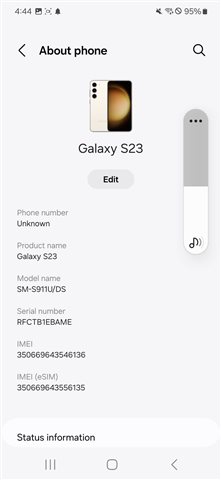
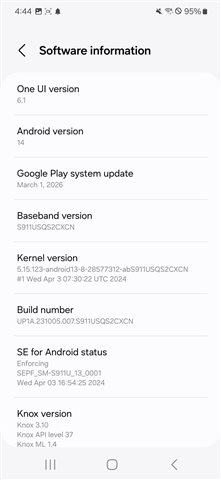
    The model of the faulty mobile phone:


    Best regard

  • Hi Zicongkuang, 

    Could you let me know: 

    - Have you done any modification to the bootloader ? 
    - Could you explain what exactly you did in this "I conducted experiments on the pca10040 development board and found that it is indeed impossible to perform DFU (unless entering the bootloader, in which case DFU can be successfully accomplished)" . How did you "unless entering the bootloader" ? 
    Was the bootloader advertising when you switch to the bootloader from the application ? Or what you meant here is that  you enter the bootloader by holding a button when booting  up ?
    - Did you try to delete bond, turn off and on Bluetooth on the phone ? 

    - Which app did you use on the phone ? Did you use nRF Device Firmware Update app ? SDK v11 is really old so there is a chance that it is not compatible with the buttonless DFU on SDK v11

    - Could you try to check the BLE  address of the bootloader after you switch from application to bootloader. You can use nRF Connect Device Manager to check . Usually it would be the same address as the application or a +1 address to the application's address. 

  • hi hungbui

    - Have you done any modification to the bootloader ? 


    Our significant changes in the bootloader:
    1. The address of the boot loader has been modified.(adapt to the nRF52810 (with 192 KB Flash)
    2. Modified the Bluetooth name and the method for booting the bootloader

    - Could you explain what exactly you did in this "I conducted experiments on the pca10040 development board and found that it is indeed impossible to perform DFU (unless entering the bootloader, in which case DFU can be successfully accomplished)" . How did you "unless entering the bootloader" ? 
    Was the bootloader advertising when you switch to the bootloader from the application ? Or what you meant here is that  you enter the bootloader by holding a button when booting  up ?
    - Did you try to delete bond, turn off and on Bluetooth on the phone ? 

    I am using Buttonless DFU. I connect to the application first and then trigger the DFU process via the Android  DFU app. This is what I meant by 'impossible to perform DFU unless entering the bootloader' — I found that the software trigger from the app often fails, but if I manually enter the bootloader (via buttons), it works.
    YES. I had reset bluetooth setting.

    - Which app did you use on the phone ? Did you use nRF Device Firmware Update app ? SDK v11 is really old so there is a chance that it is not compatible with the buttonless DFU on SDK v11

    I conducted the test using DFU. Version number: 2.11.0 (build 26021106)


    - Could you try to check the BLE  address of the bootloader after you switch from application to bootloader. You can use nRF Connect Device Manager to check . Usually it would be the same address as the application or a +1 address to the application's address. 

    • Manual Entry Test: I tested entering the bootloader manually (by holding the button during reset). In this case, the device advertises correctly, and I can see that the BLE address is indeed Application Address + 1.

    • Buttonless DFU Issue: When I trigger DFU from the application (Buttonless), the LED indicators on my board suggest that the device has successfully passed the application's validation and entered the bootloader stage.

     However, even though the LEDs show it is in the bootloader, I cannot find any ble advertisement (not even the +1 address) in the nRF Connect app.


    best regard


  • Hi Zicongkuang, 

    I'm sorry that I haven't got time to actually test your code yet. 

    My suggestion for you in the mean time is to try to check what happen when you try to switch from the application to the bootloader. 
    Please be noted that the bootloader can be debugged the same as a normal application. You just need to remove any code optimization when building to enable debugging. The size of the bootloader may be increased when you remove code optimization so you may need to move the bootloader down in the flash to give more space. You can also think of adding logging to the bootloader to make it easy to debug. 

    I noticed that you enabled 2 pages for DFU_APP_DATA_RESERVED . Please make sure you set the location of the app data correctly so that it doesn't overlap with the bootloader. 

    You can try to simplify the bootloader, to blink an LED for example, to see if you can jump from the application to the bootloader. So the bootloader only do 2 tasks, either boot the application or blink an LED (instead of advertising) so you can check if the application can jump to the bootloader. Then continue debugging from there. I suspect that the bootlaoder crashed at some point after you jump from the application to the bootloader. Some logging would really help here. 

Related