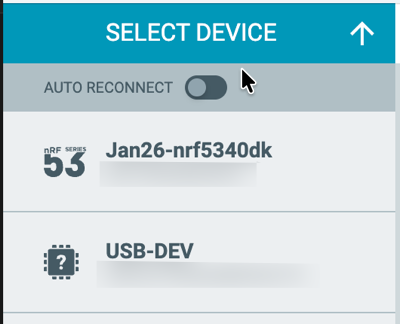
Cannot Flash Thing53 using the debugger on a nrf52840DK with nrfConnect for Visual Studio Code

I am trying to flash and use the debugger on a nrf52840 DK to flash a Thingy53, using the ribbon connector as outlined in this video. I tried to follow the steps in this post:

  1. Open nRF Connect for Desktop -> Programmer
  2. Connect Thingy:53 and nRF52840 DK as in the image you uploaded.
    Yurii_B said:
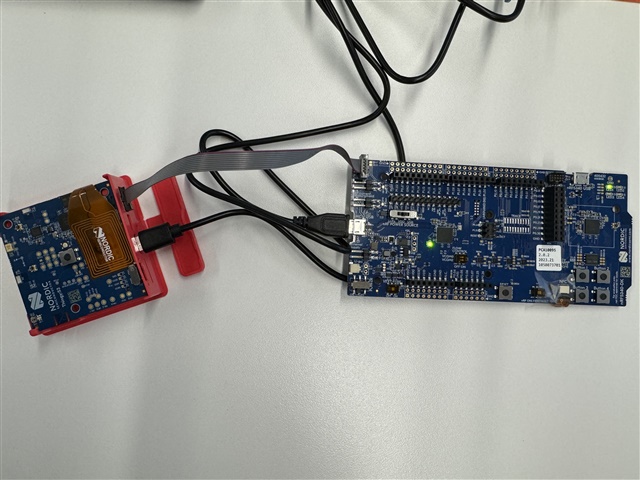
  3. Turn the thingy off. Turn on the DK.
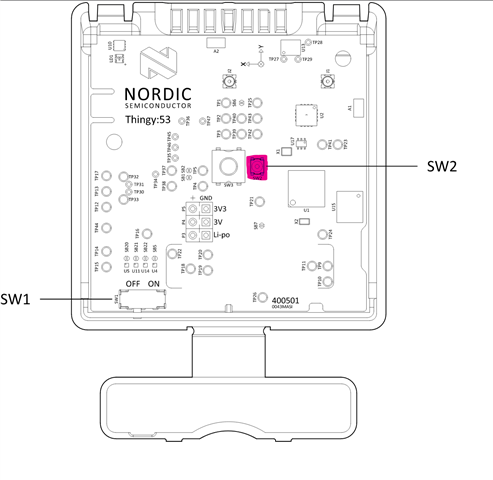
  4. Then press and hold SW2 (marked in pink, located next to SW3) while flipping SW1 to 'on''.
  5. Verify that "Bootloader Thingy:53" is visible in Programmer. This indicates a bootlader is present


But I don't see the nrf5340 in my nrfConnect for Visual Studio Code:
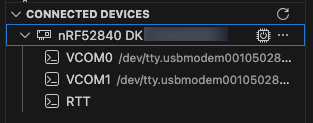

Like it's shown in the video:
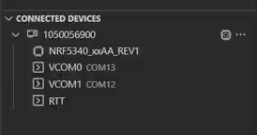
I get this error:

-- west flash: using runner nrfutil
-- runners.nrfutil: reset after flashing requested
-- runners.nrfutil: Flashing file: /Users/xxxxxxxxxx/Projects/xxxxxx/xxxxxx/xxxxxx/build_thingy53/merged_CPUNET.hex
Error: One or more batch tasks failed:
 * xxxxxxxxxx: Device error: Setting the debug port SELECT register failed while powering up sys and debug regions (Unknown Error in J-Link DLL (error code =-1)).
   
   This might indicate that the debug port is unavailable. Please double-check device power supply and SWD lines, and that SWD isn't disabled (Generic)

FATAL ERROR: command exited with status 1: nrfutil --json device x-execute-batch --batch-path /Users/xxxxxxxxxx/Projects/xxxxxx/xxxxxx/xxxxxx/build_thingy53/generated_nrfutil_batch.json --serial-number xxxxxxxxxx

When I use this command:


JLinkExe -device NRF5340_XXAA_APP -if SWD -speed 200

I get:

SEGGER J-Link Commander V8.90 (Compiled Nov 26 2025 17:27:22)
DLL version V8.90, compiled Nov 26 2025 17:26:30

Connecting to J-Link via USB...O.K.
Firmware: J-Link OB-nRF5340-NordicSemi compiled Jul  8 2025 10:15:34
Hardware version: V1.00
J-Link uptime (since boot): 0d 00h 38m 47s
S/N: XXX0XXXXXX
License(s): RDI, FlashBP, FlashDL, JFlash, GDB
USB speed mode: Full speed (12 MBit/s)
VTref=3.300V

When I type connect I get:

Device "NRF5340_XXAA_APP" selected.


Connecting to target via SWD
ConfigTargetSettings() start
ConfigTargetSettings() end - Took 8us
InitTarget() start
InitTarget() end - Took 139ms
ConfigTargetSettings() start
ConfigTargetSettings() end - Took 8us
InitTarget() start
InitTarget() end - Took 16.3ms
Error occurred: Could not connect to the target device.
For troubleshooting steps visit: https://kb.segger.com/J-Link_Troubleshooting



Parents
  • Hi Leo

    It seems to be a bit of a mix here. So let's clarify what the goal is

    1. Can you show me an image of your setup?

    2. Is the goal here to remove the bootloader on the thingy or maybe restore it?

    Regards

    Runar

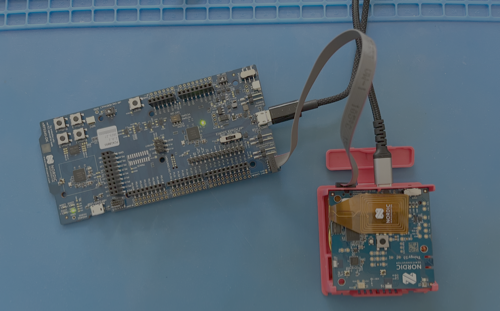
  • I have the new nrf5340DK and have been following this guide. Which shows this setup:


    My setup looks like this:


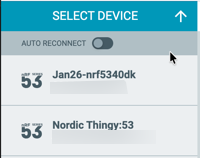
    Before attaching the ribbon I reboot the Thingy53 holding down SW2 and then releasing a few seconds after turning on I get this in the programmer:


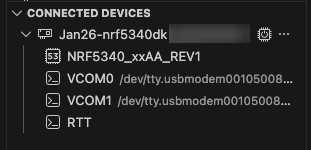
    So I know the Thingy is working. I see this in VS Code:


    The refresh button shows this in the output:

    [10:35:37] nrfutil-device device-info --serial-number XXXXXXXXXXXX --skip-overhead --json
    [10:35:37] Success.


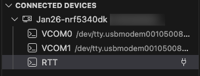
    I plug in the 10-pin JTAG cable and connect the dk to the thingy and hit refresh in VS code I see this:


    and the output console shows this:

    [10:37:49] nrfutil-device device-info --serial-number XXXXXXXXXXXX --skip-overhead --json
    [10:37:49] Error: One or more device info tasks failed:
     * XXXXXXXXXX: Device error: Setting the debug port SELECT register failed while powering up sys and debug regions (Unknown Error in J-Link DLL (error code =-1)).
       
       This might indicate that the debug port is unavailable. Please double-check device power supply and SWD lines, and that SWD isn't disabled (Generic)


    The programmer now shows this:


    When I try to flash it from VS Code I get this:
     *  Executing task: nRF Connect: Flash: hci_pwr_ctrl/build_53 (active) 
    
    Flashing build_53 to Jan26-nrf5340dk
    west flash -d /Users/XXXXXXX/XXXXXXX/hci_pwr_ctrl/build_53 --dev-id XXXXXXXXXX
    
    -- west flash: rebuilding
    [0/10] Performing build step for 'ipc_radio'
    ninja: no work to do.
    [1/10] Performing build step for 'hci_pwr_ctrl'
    ninja: no work to do.
    [8/9] cd /Users/XXXXXX/XXXXXX/hci_pwr_ctrl/build_53/_sysbuild && /opt/nordic/ncs/toolchains/5c0d382932/Cellar/cmake/3.21.0/bin/cmake -E true
    WARNING: Specifying runner options for multiple domains is experimental.
    If problems are experienced, please specify a single domain using '--domain <domain>'
    -- west flash: using runner nrfutil
    -- runners.nrfutil: reset after flashing requested
    -- runners.nrfutil: Flashing file: /Users/XXXXXXXX/XXXXXXXX/hci_pwr_ctrl/build_53/merged_CPUNET.hex
    Error: One or more batch tasks failed:
     * XXXXXXXXXX: Device error: Setting the debug port SELECT register failed while powering up sys and debug regions (Unknown Error in J-Link DLL (error code =-1)).
       
       This might indicate that the debug port is unavailable. Please double-check device power supply and SWD lines, and that SWD isn't disabled (Generic)
    
    FATAL ERROR: command exited with status 1: nrfutil --json device x-execute-batch --batch-path /Users/XXX/XXX/hci_pwr_ctrl/build_53/generated_nrfutil_batch.json --serial-number XXXXXXXXXX
    
     *  The terminal process terminated with exit code: 1. 
     *  Terminal will be reused by tasks, press any key to close it. 

Reply
  • I have the new nrf5340DK and have been following this guide. Which shows this setup:


    My setup looks like this:


    Before attaching the ribbon I reboot the Thingy53 holding down SW2 and then releasing a few seconds after turning on I get this in the programmer:


    So I know the Thingy is working. I see this in VS Code:


    The refresh button shows this in the output:

    [10:35:37] nrfutil-device device-info --serial-number XXXXXXXXXXXX --skip-overhead --json
    [10:35:37] Success.


    I plug in the 10-pin JTAG cable and connect the dk to the thingy and hit refresh in VS code I see this:


    and the output console shows this:

    [10:37:49] nrfutil-device device-info --serial-number XXXXXXXXXXXX --skip-overhead --json
    [10:37:49] Error: One or more device info tasks failed:
     * XXXXXXXXXX: Device error: Setting the debug port SELECT register failed while powering up sys and debug regions (Unknown Error in J-Link DLL (error code =-1)).
       
       This might indicate that the debug port is unavailable. Please double-check device power supply and SWD lines, and that SWD isn't disabled (Generic)


    The programmer now shows this:


    When I try to flash it from VS Code I get this:
     *  Executing task: nRF Connect: Flash: hci_pwr_ctrl/build_53 (active) 
    
    Flashing build_53 to Jan26-nrf5340dk
    west flash -d /Users/XXXXXXX/XXXXXXX/hci_pwr_ctrl/build_53 --dev-id XXXXXXXXXX
    
    -- west flash: rebuilding
    [0/10] Performing build step for 'ipc_radio'
    ninja: no work to do.
    [1/10] Performing build step for 'hci_pwr_ctrl'
    ninja: no work to do.
    [8/9] cd /Users/XXXXXX/XXXXXX/hci_pwr_ctrl/build_53/_sysbuild && /opt/nordic/ncs/toolchains/5c0d382932/Cellar/cmake/3.21.0/bin/cmake -E true
    WARNING: Specifying runner options for multiple domains is experimental.
    If problems are experienced, please specify a single domain using '--domain <domain>'
    -- west flash: using runner nrfutil
    -- runners.nrfutil: reset after flashing requested
    -- runners.nrfutil: Flashing file: /Users/XXXXXXXX/XXXXXXXX/hci_pwr_ctrl/build_53/merged_CPUNET.hex
    Error: One or more batch tasks failed:
     * XXXXXXXXXX: Device error: Setting the debug port SELECT register failed while powering up sys and debug regions (Unknown Error in J-Link DLL (error code =-1)).
       
       This might indicate that the debug port is unavailable. Please double-check device power supply and SWD lines, and that SWD isn't disabled (Generic)
    
    FATAL ERROR: command exited with status 1: nrfutil --json device x-execute-batch --batch-path /Users/XXX/XXX/hci_pwr_ctrl/build_53/generated_nrfutil_batch.json --serial-number XXXXXXXXXX
    
     *  The terminal process terminated with exit code: 1. 
     *  Terminal will be reused by tasks, press any key to close it. 

Children
No Data
Related