Why can't my application control the p1.00 and p1.01 pins of 5340?

I am developing a project using nRF5340 to drive some peripherals. During debugging, I found that no matter how I executed the pull-up/pull-down commands, the p1.00 and p1.01 pins remained uncontrollable and always stayed in a high-level state. Why is this? I have attached my config file and overlay file.

5050.prj.conf

7026.nrf5340dk_nrf5340_cpuapp_ns.overlay

Parents
  • Hello,

    Try adding this to your nrf5340dk_nrf5340_cpuapp_ns.overlay:

    /delete-node/ &gpio_fwd;

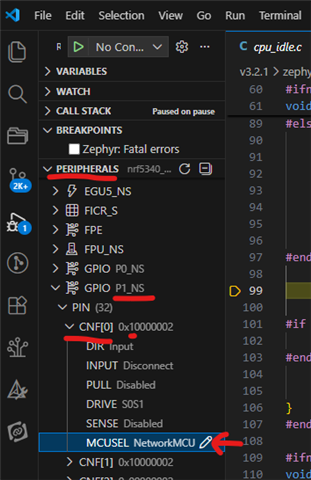
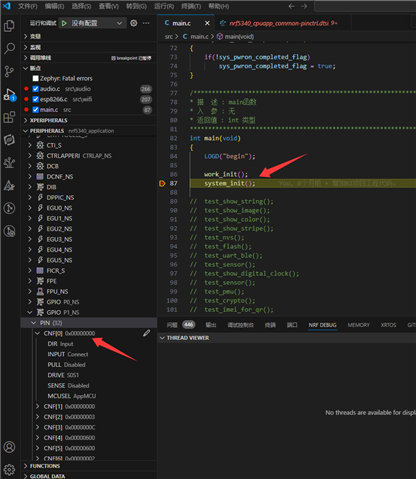
    I don't have your application to test, but after you do, if it doesn't work as intended, can you please try to run a debug session, and view the GPIO1 registers, particularly the PIN_CNF[0] and [1]. The first bit should be 0 (unlike it is in this screenshot) if the pins are controlled by the application core:

    The MCUSEL field should say "AppMCU" if the pin_fwd is successfully disabled.

    Best regards,

    Edvin

Reply
  • Hello,

    Try adding this to your nrf5340dk_nrf5340_cpuapp_ns.overlay:

    /delete-node/ &gpio_fwd;

    I don't have your application to test, but after you do, if it doesn't work as intended, can you please try to run a debug session, and view the GPIO1 registers, particularly the PIN_CNF[0] and [1]. The first bit should be 0 (unlike it is in this screenshot) if the pins are controlled by the application core:

    The MCUSEL field should say "AppMCU" if the pin_fwd is successfully disabled.

    Best regards,

    Edvin

Children
Related