nRF9151 Low Power Mode.

I am using the nRF9151 DK, using the Serial LTE Modem firmware from the nRF Connect quick start.

I am planning to use nRF9151 as a serial modem, and connect it to my Host MCU using UART.

I am using the Power Profile II to measure the current of VDD_nRF.

Questions:

  1. Is this the product code that I should be using for my final product?
  2. Power save mode:
    1. I set the modem LPM. The average current is about 500uA in LPM. Why is it still so high? What is nRF9151 drawing current for? Is it because nRF9151 UART is still enabled?
    2. I press button 1 on the DK, the average current went down to 3uA.
    3. I press button 1 again, it seems to wake the nRF9151 up, with average current about 500uA again, but I lost all network configurations.
    4. Questions:
      1. What does button 1 do exactly? Any documents that describe exactly what it does?
      2. What is the proper way to go into deep power save mode, assuming I am using this Serial LTE Modem firmware in my final product?
      3. Is there a even lower power mode that the button 1 method? i.e. average current < 1uA maybe?
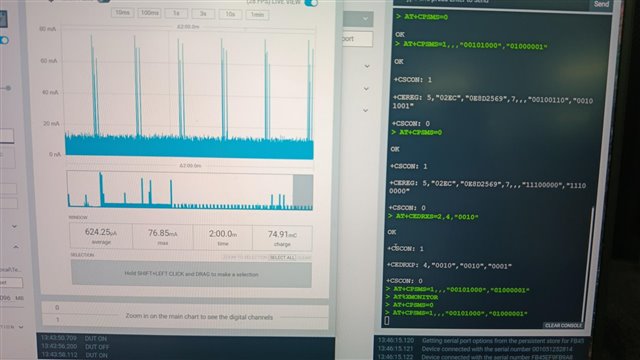
  3. There are some instances, when I leave the DK alone for maybe 10 mins, then I tried to send a AT command, the DK is not responsive in the sense it did not send back "OK" or network messages. However, my AT command was executed (based on the current profile of the Power Profiler II). Is this a know issue? Below image shows this error. In the image, bottom right, a few AT commands are sent but there were not response received.
  • Hi,

    Is this the product code that I should be using for my final product?

    I'm not sure to understand what you are asking here... If you are asking if the serial modem add-on (previously called "Serial LTE Modem (SLM)") is the right firmware to flash on the nRF9151 if you want to use as a modem-only solution; yes it is. However, if you want to use it with a host MCU, you probably want to use the devicetree overlay "overlay-external-mcu.overlay" file.

    What does button 1 do exactly? Any documents that describe exactly what it does?

    The button is connected to the UART DTR pin. All the documentation about the UART is here.

    What is the proper way to go into deep power save mode, assuming I am using this Serial LTE Modem firmware in my final product?

    All our normal power saving techniques (link) still applies for the Serial Modem add-on.

    I don't know how relevant it is but the nRF9151 is not only a modem, it has an application MCU. If the embedded MCU of the nRF9151 is enough for your needs you don't need a host MCU which can help you save power.

    Is there a even lower power mode that the button 1 method? i.e. average current < 1uA maybe?

    There are the "System OFF" and "System Disabled" mode, but it greatly depends on your application, as with "System OFF", the core system functionality is powered down and ongoing tasks terminated, and only the reset and the wake-up functions are available and responsive. And with "System Disabled" the chip is basically fully shut down. You can find the documentation about these modes here.

    There are some instances, when I leave the DK alone for maybe 10 mins, then I tried to send a AT command, the DK is not responsive in the sense it did not send back "OK" or network messages. However, my AT command was executed (based on the current profile of the Power Profiler II). Is this a know issue? Below image shows this error. In the image, bottom right, a few AT commands are sent but there were not response received.

    This is not an issue that I know of. I wasn't able to replicate it. Can you please document what you did a bit better so that I can try to replicate it?

    Best regards,

    Simon D-M

  • Hi Simon,

    Thanks for your reply.

    I have a external host MCU that will communicate with nRF9151 using AT commands. I want to use nRF9151 as a Serial LTE Modem. Meaning I do not want to modify any of the firmware (application and modem). I will just program whatever production-certified modem firmware and application firmware without any recompilation, which means I won't need to use overlay-external-mcu.overlay. Is this possible?

    I am able to get the modem to PSM but the current is not low enough as the application MCU is still operating. Based on my use case, I won't be able to modify any nRF9151 internal registers directly, unless it is accessible through AT commands. Are there AT commands that set nRF9151 to deep sleep? I understand I can wake it up from deep sleep using some GPIOs. Which GPIOs have the wake up function besides the DTR pin and Enable pin?

    Also I need your advise on the power saving. If my device only transmit once a day, will setting the nRF9151 to deep sleep be more power efficiency, or disabling it using the ENABLE pin be better? I am not sure what is the overhead and the extra current required to initialize nRF9151 when I toggle the ENABLE pin to wake it up.

    For the error, let me try to record the steps to reproduce it and post it here.

    Thanks,

    Alex.

  • Hi Alex,

    Medical Device said:
    I have a external host MCU that will communicate with nRF9151 using AT commands. I want to use nRF9151 as a Serial LTE Modem. Meaning I do not want to modify any of the firmware (application and modem). I will just program whatever production-certified modem firmware and application firmware without any recompilation, which means I won't need to use overlay-external-mcu.overlay. Is this possible?

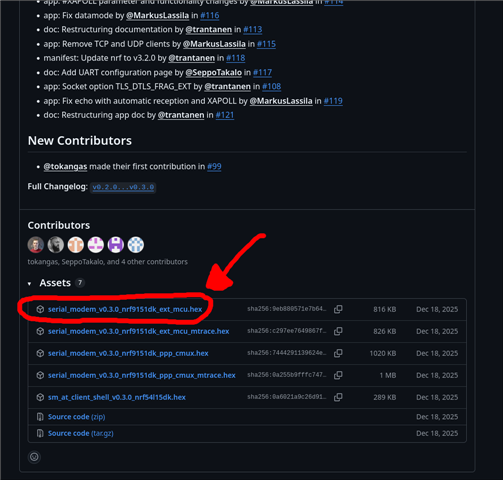
    Yes it is possible, we have a version already compiled with the "overlay-external-mcu.overlay" on the Github page of the application.

    Medical Device said:
    I am able to get the modem to PSM but the current is not low enough as the application MCU is still operating. Based on my use case, I won't be able to modify any nRF9151 internal registers directly, unless it is accessible through AT commands. Are there AT commands that set nRF9151 to deep sleep? I understand I can wake it up from deep sleep using some GPIOs. Which GPIOs have the wake up function besides the DTR pin and Enable pin?

    All the AT commands usable with the Serial modem add-on are split between the "normal AT commands" and the "custom AT commands".

    The command to get into different power modes are %XSLEEP and %XSHUTDOWN

    I believe that every GPIO pins can trigger the wake-up action. There is more information about this in the hardware design guidelines for the nRF9151.

    Medical Device said:
    Also I need your advise on the power saving. If my device only transmit once a day, will setting the nRF9151 to deep sleep be more power efficiency, or disabling it using the ENABLE pin be better? I am not sure what is the overhead and the extra current required to initialize nRF9151 when I toggle the ENABLE pin to wake it up.

    I believe that if your data sending frequency is only once a day, it might be better to disabling the chip using the ENABLE pin. However, it is very much a case to case scenario. You probably want to try and measure multiple solutions and compare them to see what is actually better.

    Best regards,

    Simon D-M

  • Hi Simon,

    Thanks for your reply.

    'Yes it is possible, we have a version already compiled with the "overlay-external-mcu.overlay" on the Github page of the application.'

    Great that there is an 'off the shelf' hex file that we can use immediately without any coding and compilation required.

    • Is this hex file the same one used in nRF Connect Desktop, Serial Modem? i.e. Is the one used in the quick start in nRF Connect Desktop, serial modem, compiled with "overlay-external-mcu.overlay"?
    • Is this hex file for the application MCU only? Or does it also includes the modem firmware/stack? Do I need a separate hex file, i.e. 1 for application MCU and another for modex?
    • Can I use this hex file in the DK? Will it have any hardware conflict?

    'I believe that every GPIO pins can trigger the wake-up action. There is more information about this in the hardware design guidelines for the nRF9151.'

    Thanks for the reference to the guidelines. I believe this requires a bit of customization to set a particular GPIO pin as the wakeup pin. With the context of just using the standard serial modem hex file, is there currently a pin that is already configured for this purposes? Is it DTR, P0.31 (active low, pull-up)?

    Additional questions:

    1. I am a bit confused on all the different AT commands. I believe each of the type of commands are for different use scenarios or hosts. Considering the use case of external MCU sending commands to the nRF9151 as Serial Modem, what is the exact commands that the external MCU needs to send? Will it be something like AT+CFUN? Or  AT%.... Or AT#.... Or just the command without AT, like ATE1?
    2. https://docs.nordicsemi.com/bundle/addon-serial_modem-latest/page/app/at_generic.html
      1. For the commands listed in the above link, is it application to my use case? (i.e. standard serial modem using AT commands from external MCU).
      2. I tried sending commands like ATE1, ATE0 to the DK from the PC serial terminal but it didn't wake. Does the debugger (U3 - nRF5340) interpret these commands?
      3. If I send these commands directly to nRF9151 instead of through the debugger, will it work? If not, how do I use these commands.
      4. Similar questions for AT commands starting with '#'. Does the debugger interpret these commands? Will it work if I send these command directly to nRF9151 instead of going through the debugger, will it work? And what are these '#' commands for and how are these command being used?
    3. https://docs.nordicsemi.com/bundle/addon-serial_modem-latest/page/uart_configuration.html. In this link, under 'Serial Modem application (nRF9151)', there are 'USB UART with PC host' and 'external MCU as host'.
      1. Are these applicable for the Serial Modem application of the DK? From the DK schematic 'PCA10171_Schematic_And_PCB', the pin assignment does not match those defined in the above link.
      2. If I want to use the pins allocated for USB UART with PC Host in my final design, can it be done?
    4. https://docs.nordicsemi.com/bundle/ug_nrf9151_dk/page/UG/nrf91_DK/hw_description/sip_enable.html.
      1. This link says: The nRF9151 System in Package (SiP) can be enabled by pulling pin 101 high or disabled by pulling pin 101 low. By default, the enable signal is pulled high by resistor R1. Where is pin 101? The schematic of the DK shows it is connected to pin 10 of nRF9151.
      2. Also, the DK seems to be going into sleep/active mode by pressing Switch 1, and based on the schematic, switch 1 is connected to the DK connector P10 pin 1, so I guess 101 = P10.1? Assuming switch 1 is connected to the ENABLE pin of nRF9151, the behavior is not as per the datasheet. The nRF9151 datasheet mentioned this pin is level triggered, but on the DK, it seems to be edge triggered. I need to press and release switch 1 in order to toggle between active and sleep mode. So should it be a edge or level trigger pin to switch between Enable and Disable mode?

    Thanks,

    Alex.

  • Hi Alex,

    Medical Device said:
    Is this hex file the same one used in nRF Connect Desktop, Serial Modem? i.e. Is the one used in the quick start in nRF Connect Desktop, serial modem, compiled with "overlay-external-mcu.overlay"?

    No, the one flashed by the "Quick Start" application from nRF Connect for Desktop is not compiled with the overlay. It may also be a few versions older than the one on the GitHub.

    Medical Device said:
    Is this hex file for the application MCU only? Or does it also includes the modem firmware/stack? Do I need a separate hex file, i.e. 1 for application MCU and another for modex?

    In our nRF91 chips, we have 2 cores: The Application core, which contains the Serial Modem add-on in your case. And a modem core which contains the modem firmware. They are both programmable independently.

    The .hex you download are only for the application core. If you want to update the modem core, you can follow this guide. You can also download the modem firmware on the nRF9151 product page, in the "Download" section. (if you download it from the product page, do not unzip the file before programming. You need to give the whole zip to the "programmer" app).

    Medical Device said:
    Can I use this hex file in the DK? Will it have any hardware conflict?

    This .hex file was compiled for the nRF9151 DK. Here is some more information about the UART configuration for the Serial modem add-on.

    Medical Device said:
    Thanks for the reference to the guidelines. I believe this requires a bit of customization to set a particular GPIO pin as the wakeup pin. With the context of just using the standard serial modem hex file, is there currently a pin that is already configured for this purposes? Is it DTR, P0.31 (active low, pull-up)?

    I don't think that by default, there are any wake-up pins configured. The DTR pin can wake the chip up when it is in low power mode, but cannot wake it up when it is in "System OFF" mode. For the DTR part, it is documented in here.

    Medical Device said:
    I am a bit confused on all the different AT commands. I believe each of the type of commands are for different use scenarios or hosts. Considering the use case of external MCU sending commands to the nRF9151 as Serial Modem, what is the exact commands that the external MCU needs to send? Will it be something like AT+CFUN? Or  AT%.... Or AT#.... Or just the command without AT, like ATE1?

    I would recommend you taking our "Cellular IoT Fundamentals" course on DevAcademy. It explains most of what you are asking here in the Lesson 2.

    Medical Device said:
    https://docs.nordicsemi.com/bundle/addon-serial_modem-latest/page/app/at_generic.html
    1. For the commands listed in the above link, is it application to my use case? (i.e. standard serial modem using AT commands from external MCU).
    2. I tried sending commands like ATE1, ATE0 to the DK from the PC serial terminal but it didn't wake. Does the debugger (U3 - nRF5340) interpret these commands?
    3. If I send these commands directly to nRF9151 instead of through the debugger, will it work? If not, how do I use these commands.
    4. Similar questions for AT commands starting with '#'. Does the debugger interpret these commands? Will it work if I send these command directly to nRF9151 instead of going through the debugger, will it work? And what are these '#' commands for and how are these command being used?

    When you connect to the Serial terminal, you can consider the debugger as a USB-UART converter. It does not look at what is being sent, it acts as a pass-through. So, when you'll connect directly to the nRF9151 UART it will be the exact same.

    Most of your question about AT commands are explained in the DevAcademy course I recommended you earlier. Try to take the course, you should get a better understanding of how to use AT commands. If you still have question after that, feel free to ask them. Also, you can ask our AI assistant (blue circle bottom left of your screen), It works very well for questions that we documented.

    Medical Device said:
    https://docs.nordicsemi.com/bundle/addon-serial_modem-latest/page/uart_configuration.html. In this link, under 'Serial Modem application (nRF9151)', there are 'USB UART with PC host' and 'external MCU as host'.
    1. Are these applicable for the Serial Modem application of the DK? From the DK schematic 'PCA10171_Schematic_And_PCB', the pin assignment does not match those defined in the above link.

    I'm not sure to follow you here, I believe they are matching...

    Medical Device said:
    If I want to use the pins allocated for USB UART with PC Host in my final design, can it be done?

    If you do your own board, yes, you can use these pins. But even if, from what I understood, you don't really want to do any programming, I would still recommend you to make some modification to the application at least to map the pins like you want. And to build your own version of the application.

    Medical Device said:
    This link says: The nRF9151 System in Package (SiP) can be enabled by pulling pin 101 high or disabled by pulling pin 101 low. By default, the enable signal is pulled high by resistor R1. Where is pin 101? The schematic of the DK shows it is connected to pin 10 of nRF9151.

    Oh, good catch! The documentation is wrong here, it has most likely been copied from the nRF9161 or the nRF9160, which both have the "ENABLE" pin on pin 101. For the nRF9151, It is indeed pin 10 on the chip that has to be used.

    Medical Device said:
    Also, the DK seems to be going into sleep/active mode by pressing Switch 1, and based on the schematic, switch 1 is connected to the DK connector P10 pin 1, so I guess 101 = P10.1? Assuming switch 1 is connected to the ENABLE pin of nRF9151, the behavior is not as per the datasheet. The nRF9151 datasheet mentioned this pin is level triggered, but on the DK, it seems to be edge triggered. I need to press and release switch 1 in order to toggle between active and sleep mode. So should it be a edge or level trigger pin to switch between Enable and Disable mode?

    No, this is not the ENABLE pin. The button is connected to a normal GPIO. All the power management done with this pin is done and configured in the application firmware.

    Best regards,

    Simon D-M

Related