nRF9151 Low Power Mode.

I am using the nRF9151 DK, using the Serial LTE Modem firmware from the nRF Connect quick start.

I am planning to use nRF9151 as a serial modem, and connect it to my Host MCU using UART.

I am using the Power Profile II to measure the current of VDD_nRF.

Questions:

  1. Is this the product code that I should be using for my final product?
  2. Power save mode:
    1. I set the modem LPM. The average current is about 500uA in LPM. Why is it still so high? What is nRF9151 drawing current for? Is it because nRF9151 UART is still enabled?
    2. I press button 1 on the DK, the average current went down to 3uA.
    3. I press button 1 again, it seems to wake the nRF9151 up, with average current about 500uA again, but I lost all network configurations.
    4. Questions:
      1. What does button 1 do exactly? Any documents that describe exactly what it does?
      2. What is the proper way to go into deep power save mode, assuming I am using this Serial LTE Modem firmware in my final product?
      3. Is there a even lower power mode that the button 1 method? i.e. average current < 1uA maybe?
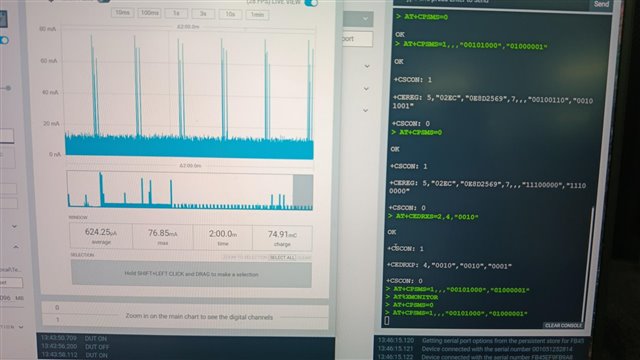
  3. There are some instances, when I leave the DK alone for maybe 10 mins, then I tried to send a AT command, the DK is not responsive in the sense it did not send back "OK" or network messages. However, my AT command was executed (based on the current profile of the Power Profiler II). Is this a know issue? Below image shows this error. In the image, bottom right, a few AT commands are sent but there were not response received.
Parents
  • average current is about 500uA


    This is usually caused by the UART receiver. To reduce it down to 3-6µA you need to suspend the UART and wake it up, when you need it again. That wake up is the frequently done/implemented by some GPIO. There are also some implementations, which using the RX for that, but it depends on your requirements.   

    I will just program whatever production-certified modem firmware and application firmware without any recompilation,

    The term "certified" may mean a lot of different things. Let me recommend, that you first clarify, what it should mean. Otherwise you will risk a very big disappointment in the end ;-).

  • Hi Achim,

    There are also some implementations, which using the RX for that, but it depends on your requirements.

    How can I proceed with that implementation on the nRF9151 SIP (using the Serial Modem application)? At the moment, I don’t have a Host GPIO mapped as DTR to wake up the UART and modem.

    Also, is it possible to disable UART power-down using 'overlay-disable-dtr.overlay'? I would like to configure something like:

    &dtr_uart2 {
    
        status = "disabled";
    
    }

  • Also, is it possible to disable UART power-down using 'overlay-disable-dtr.overlay'?

    As I wrote, in my experience, that 500µA is mainly caused by an active UART rx (UART requires to sample the rx pin). Therefore it's required to signal, when the rx should be active, and when not.

    In my case, I implemented that on/off signaling based on the level of the rx pin. This support mainly the logic, that if a device is not connected via USB or BLE, the UART is disable. Once it is connected, the UART is switched on. For that I enabled the "pull-down" on rx and if the level is low for longer, I disable the UART. If it get's high again (device plugged in via USB or BLE) I enable the UART.

    I guess in your case, that won't help too much, though the other device is more or less permanent connected. if you have a chance to control the tx of the other device, you may also go for the rx. But it's not too easy to implement. See my uart-manager to have an impression.

Reply
  • Also, is it possible to disable UART power-down using 'overlay-disable-dtr.overlay'?

    As I wrote, in my experience, that 500µA is mainly caused by an active UART rx (UART requires to sample the rx pin). Therefore it's required to signal, when the rx should be active, and when not.

    In my case, I implemented that on/off signaling based on the level of the rx pin. This support mainly the logic, that if a device is not connected via USB or BLE, the UART is disable. Once it is connected, the UART is switched on. For that I enabled the "pull-down" on rx and if the level is low for longer, I disable the UART. If it get's high again (device plugged in via USB or BLE) I enable the UART.

    I guess in your case, that won't help too much, though the other device is more or less permanent connected. if you have a chance to control the tx of the other device, you may also go for the rx. But it's not too easy to implement. See my uart-manager to have an impression.

Children
No Data
Related