How does one run zephyr/tests/drivers/spi/spi_controller_peripheral on two nRF54LM20-DKs?

Hi,

As the subject states.

I would like to run the tests at zephyr/tests/drivers/spi/spi_controller_peripheral as intended in testcase.yml. I can verify that I have the correct pins setup, as seen in the SPI traces below.

I've tried using the following:

$> ./scripts/twister --generate-hardware-map map.yml #Creates a map.yml with the two nRF54LM20-DKs currently connected
$> ./scripts/twister --device-testing --hardware-map map.yml -T tests/drivers/spi/spi_controller_peripheral/

But this doesn't run, or flash anything. It appears to skip all tests instead.

I can use the following on both boards to run one of the tests (using the 8MHz overlay), and I can see some good output on the SPI lines with a logic analyzer

$> west build -b nrf54lm20dk/nrf54lm20a/cpuapp . -T drivers.spi.spi_8MHz
$> west flash
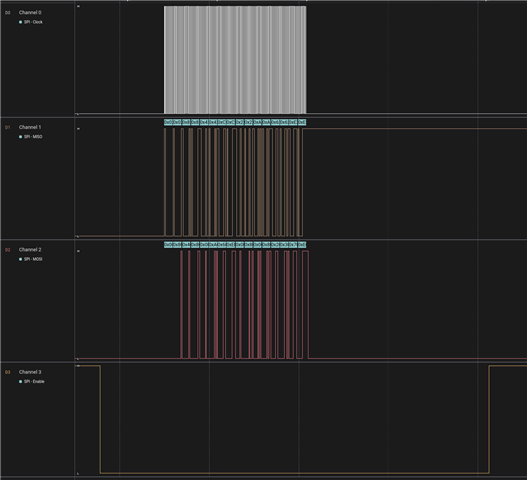
But I can't see any test results from ztest. Furthermore, it seems to only run test_basic(), which perhaps fails? Because it only does this once.

Is it possible to run all tests on these two boards? What's the command to do that?

Parents
  • Test requires fixture `gpio_spi_loopback`
    See https://github.com/nrfconnect/sdk-zephyr/blob/main/tests/drivers/spi/spi_controller_peripheral/testcase.yaml#L8

    Twister call should be f.e.:
    python3 ./zephyr/scripts/twister -T zephyr/tests/drivers/spi/spi_controller_peripheral/ --platform nrf54lm20dk/nrf54lm20a/cpuapp --ninja --device-testing --jobs 1 --device-serial /dev/serial/by-id/usb-SEGGER_J-Link_001051895427-if02 --fixture gpio_spi_loopback

    OR
    python3 ./zephyr/scripts/twister -T zephyr/tests/drivers/spi/spi_controller_peripheral/ --platform nrf54lm20dk/nrf54lm20a/cpuapp --ninja --device-testing --jobs 1 --hardware-map /home/segl/workspace/ncs/my_setup.map --fixture gpio_spi_loopback

    OR
    python3 ./zephyr/scripts/twister -T zephyr/tests/drivers/spi/spi_controller_peripheral/ --platform nrf54lm20dk/nrf54lm20a/cpuapp --ninja --device-testing --jobs 1 --hardware-map /home/segl/workspace/ncs/my_setup.map
    While HW map has list of fixtures available on the DK:

    - connected: true
      id: '001051895427'
      platform: nrf54lm20dk/nrf54lm20a/cpuapp
      product: J-Link
      runner: nrfutil
      serial: /dev/serial/by-id/usb-SEGGER_J-Link_001051895427-if02
      fixtures: ['gpio_spi_loopback']

  • Hi segl-nordic,

    Very cool, thank you very much. That looks extremely promising; I'll give this a shot and see how it goes.

Reply Children
No Data
Related