How does one run zephyr/tests/drivers/spi/spi_controller_peripheral on two nRF54LM20-DKs?

Hi,

As the subject states.

I would like to run the tests at zephyr/tests/drivers/spi/spi_controller_peripheral as intended in testcase.yml. I can verify that I have the correct pins setup, as seen in the SPI traces below.

I've tried using the following:

$> ./scripts/twister --generate-hardware-map map.yml #Creates a map.yml with the two nRF54LM20-DKs currently connected
$> ./scripts/twister --device-testing --hardware-map map.yml -T tests/drivers/spi/spi_controller_peripheral/

But this doesn't run, or flash anything. It appears to skip all tests instead.

I can use the following on both boards to run one of the tests (using the 8MHz overlay), and I can see some good output on the SPI lines with a logic analyzer

$> west build -b nrf54lm20dk/nrf54lm20a/cpuapp . -T drivers.spi.spi_8MHz
$> west flash
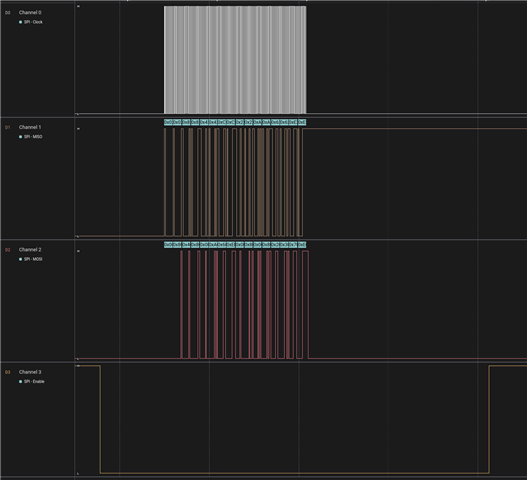
But I can't see any test results from ztest. Furthermore, it seems to only run test_basic(), which perhaps fails? Because it only does this once.

Is it possible to run all tests on these two boards? What's the command to do that?

Parents
  • Test requires fixture `gpio_spi_loopback`
    See https://github.com/nrfconnect/sdk-zephyr/blob/main/tests/drivers/spi/spi_controller_peripheral/testcase.yaml#L8

    Twister call should be f.e.:
    python3 ./zephyr/scripts/twister -T zephyr/tests/drivers/spi/spi_controller_peripheral/ --platform nrf54lm20dk/nrf54lm20a/cpuapp --ninja --device-testing --jobs 1 --device-serial /dev/serial/by-id/usb-SEGGER_J-Link_001051895427-if02 --fixture gpio_spi_loopback

    OR
    python3 ./zephyr/scripts/twister -T zephyr/tests/drivers/spi/spi_controller_peripheral/ --platform nrf54lm20dk/nrf54lm20a/cpuapp --ninja --device-testing --jobs 1 --hardware-map /home/segl/workspace/ncs/my_setup.map --fixture gpio_spi_loopback

    OR
    python3 ./zephyr/scripts/twister -T zephyr/tests/drivers/spi/spi_controller_peripheral/ --platform nrf54lm20dk/nrf54lm20a/cpuapp --ninja --device-testing --jobs 1 --hardware-map /home/segl/workspace/ncs/my_setup.map
    While HW map has list of fixtures available on the DK:

    - connected: true
      id: '001051895427'
      platform: nrf54lm20dk/nrf54lm20a/cpuapp
      product: J-Link
      runner: nrfutil
      serial: /dev/serial/by-id/usb-SEGGER_J-Link_001051895427-if02
      fixtures: ['gpio_spi_loopback']

Reply
  • Test requires fixture `gpio_spi_loopback`
    See https://github.com/nrfconnect/sdk-zephyr/blob/main/tests/drivers/spi/spi_controller_peripheral/testcase.yaml#L8

    Twister call should be f.e.:
    python3 ./zephyr/scripts/twister -T zephyr/tests/drivers/spi/spi_controller_peripheral/ --platform nrf54lm20dk/nrf54lm20a/cpuapp --ninja --device-testing --jobs 1 --device-serial /dev/serial/by-id/usb-SEGGER_J-Link_001051895427-if02 --fixture gpio_spi_loopback

    OR
    python3 ./zephyr/scripts/twister -T zephyr/tests/drivers/spi/spi_controller_peripheral/ --platform nrf54lm20dk/nrf54lm20a/cpuapp --ninja --device-testing --jobs 1 --hardware-map /home/segl/workspace/ncs/my_setup.map --fixture gpio_spi_loopback

    OR
    python3 ./zephyr/scripts/twister -T zephyr/tests/drivers/spi/spi_controller_peripheral/ --platform nrf54lm20dk/nrf54lm20a/cpuapp --ninja --device-testing --jobs 1 --hardware-map /home/segl/workspace/ncs/my_setup.map
    While HW map has list of fixtures available on the DK:

    - connected: true
      id: '001051895427'
      platform: nrf54lm20dk/nrf54lm20a/cpuapp
      product: J-Link
      runner: nrfutil
      serial: /dev/serial/by-id/usb-SEGGER_J-Link_001051895427-if02
      fixtures: ['gpio_spi_loopback']

Children
  • Hi segl-nordic,

    Very cool, thank you very much. That looks extremely promising; I'll give this a shot and see how it goes.

  • Hi segl-nordic,

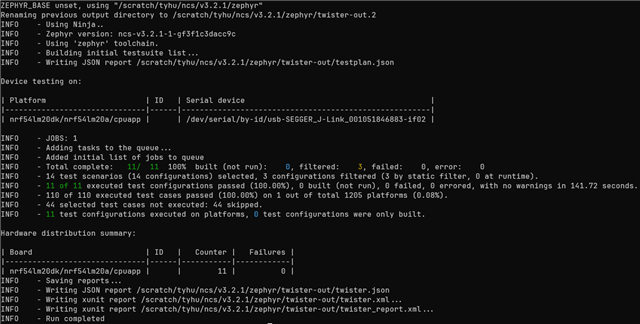
    Using the command above that you supplied me, I can indeed confirm that it works with or without zephyr,pm-device-runtime-auto;.

    This was the result when I ran with and without the device tree changes. (Note: I removed my changes to the prj.conf file so that Twister can communicate with the serial port).

    However, when I simply flash one of the tests, then it does not work without zephyr,pm-device-runtime-auto added.

    Using the Logic Analyzer, I can see that there's far less traffic on the SPI lines than if I run it manually as before, using:

    $> west build -p -b nrf54lm20dk/nrf54lm20a/cpuapp . -T drivers.spi.spi_8MHz

    $> west flash

    I haven't dived into the details, but I'm wondering if it's only running a subset of tests, rather than a full list of tests, when using Twister. 

    Does this make sense? What could the explanation for this be?

  • Unfortunately, I have no idea why

    $> west build -p -b nrf54lm20dk/nrf54lm20a/cpuapp . -T drivers.spi.spi_8MHz

    fails while Twister passes on that test.
    I'm unable to reproduce the issue locally. For me both Twister and west build/flash work.

    When You run Twister, it compiles and executes all test configurations found in testcase.yaml (that match target with platform_allow list, filters, etc.). In case of zephyr/tests/drivers/spi/spi_controller_peripheral on nrf54lm20dk that's 11 test configurations:
    drivers.spi.spi_mode0
    drivers.spi.spi_mode1
    drivers.spi.spi_mode2
    drivers.spi.spi_mode3
    ...

    You can see this after enabling Twister debug logs
    $> python3 ./zephyr/scripts/twister -T zephyr/tests/drivers/spi/spi_controller_peripheral/ --platform nrf54lm20dk/nrf54lm20a/cpuapp --ninja --device-testing --jobs 1 --hardware-map /home/segl/workspace/ncs/my_setup.map --log-level debug

    You can limit Twister test scope with (see output from python3 ./zephyr/scripts/twister --help):
    -T TESTSUITE_ROOT, --testsuite-root TESTSUITE_ROOT
    Base directory to recursively search for test cases. All testcase.yaml files under here will be processed. May be called multiple
    times. Defaults to the 'samples/' and 'tests/' directories at the base of the Zephyr tree.

    -s TEST, --test TEST, --scenario TEST
    Run only the specified test suite scenario. These are named by 'path/relative/to/Zephyr/base/section.subsection_in_testcase_yaml', or
    just 'section.subsection' identifier. With '--testsuite-root' option the scenario will be found faster.

    So, to limit Twister execution to drivers.spi.spi_8MHz try
    $> python3 ./zephyr/scripts/twister -T zephyr/tests/drivers/spi/spi_controller_peripheral/ --platform nrf54lm20dk/nrf54lm20a/cpuapp --ninja --device-testing --jobs 1 --hardware-map /home/segl/workspace/ncs/my_setup.map -s drivers.spi.spi_8MHz

  • Thank you very much! I appreciate the explanation. I'll use Twister for these tests, but in any case, it's working now with the changes made in the device tree in all cases.

    It's really cool to have a good example that I can use for doing this type of device testing.

Related